
自动化部署脚本之windows上执行批处理文件
windows .bat 批处理
脚本路径如下:
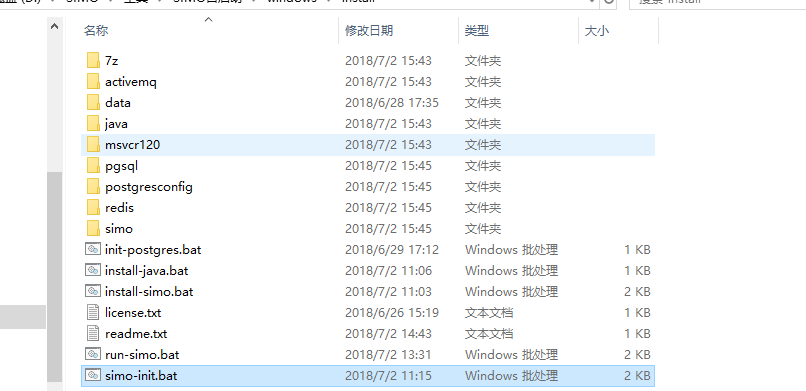
install-simo.bat文件内容:
@ECHO OFF
set scriptpath=%~dp0
set logfile=%scriptpath%install-log.txt
type license.txt | more
:license-check
echo Did you agree with this license(Y/N) :
set/p "cho=>"
if %cho%==Y goto start
if %cho%==y goto start
if %cho%==N call:notagree
if %cho%==n call:notagree
goto license-check
:notagree
echo "you do not agree with license install will exit now!"
pause
exit 1
goto:eof
:start
echo "Start to install SIMO........" >> %logfile%
echo %scriptpath%
call:install-redis
call:install-activemq
call:init-database
ping -n 120 127.0.0.1>nul
call:run-simo
echo simo install finish..................
pause
exit 0
:install-jdk
mkdir %scriptpath%java\jdk1.8
call %scriptpath%install-java.bat %scriptpath%
echo install-jdk finish
goto:eof
:install-redis
start cmd /k %scriptpath%redis\redis-server.exe %scriptpath%redis\redis.windows.conf
echo install-redis finish
goto:eof
:install-activemq
start cmd /k %scriptpath%activemq\bin\win64\activemq.bat
echo install-activemq finish
goto:eof
:install-database
echo install-database finish
rem 判断windows/system32下是否有对应的mscrv120.dll文件
goto:eof#运行完后 CMD 返回并等待下一条命令
:init-database
start cmd /k %scriptpath%init-postgres.bat %scriptpath%
echo init-database finish
goto:eof
:run-simo
start %scriptpath%simo-init.bat %scriptpath%
echo run-simo finish
goto:eof
simo-init.bat脚本如下:
@ECHO OFF
rem unzip simo.zip
call %17z\7z.exe x %1\simo\simo.zip -o%1simo\
xcopy /Y %1simo\application.properties %1simo\simo\scripts\
cd %1simo\simo\scripts\
rem enable\disable servicecenter
start /b %1simo\simo\scripts\runmodule.bat simo-servicecenter
ping -n 10 127.0.0.1>nul
rem enable\disable mc
start /b %1simo\simo\scripts\runmodule.bat simo-mc
ping -n 10 127.0.0.1>nul
rem enable\disable collector
start /b %1simo\simo\scripts\runmodule.bat simo-collector
ping -n 10 127.0.0.1>nul
rem enable\disable business
start /b %1simo\simo\scripts\runmodule.bat simo-business
ping -n 10 127.0.0.1>nul
rem enable\disable itsm
start /b %1simo\simo\scripts\runmodule.bat simo-itsm
ping -n 10 127.0.0.1>nul
rem enable\disable cmdb
start /b %1simo\simo\scripts\runmodule.bat simo-cmdb
ping -n 10 127.0.0.1>nul
rem enable\disable workflow
start /b %1simo\simo\scripts\runmodule.bat simo-workflow
ping -n 10 127.0.0.1>nul
rem enable\disable knowledgebase
start /b %1simo\simo\scripts\runmodule.bat simo-knowledgebase
run-simo.bat脚本如下:
@ECHO OFF
echo **********************************************
echo.
echo start to run simo
echo.
echo.
echo **********************************************
set scriptpath=%~dp0
ping -n 10 127.0.0.1>nul
call:start-redis
ping -n 10 127.0.0.1>nul
call:start-activemq
ping -n 10 127.0.0.1>nul
call:start-database
ping -n 10 127.0.0.1>nul
cd %scriptpath%simo\simo\scripts\
rem enable\disable servicecenter
start /b %scriptpath%simo\simo\scripts\runmodule.bat simo-servicecenter
ping -n 10 127.0.0.1>nul
rem enable\disable mc
start /b %scriptpath%simo\simo\scripts\runmodule.bat simo-mc
ping -n 10 127.0.0.1>nul
rem enable\disable collector
start /b %scriptpath%simo\simo\scripts\runmodule.bat simo-collector
ping -n 10 127.0.0.1>nul
rem enable\disable business
start /b %scriptpath%simo\simo\scripts\runmodule.bat simo-business
ping -n 10 127.0.0.1>nul
rem enable\disable itsm
start /b %scriptpath%simo\simo\scripts\runmodule.bat simo-itsm
ping -n 10 127.0.0.1>nul
rem enable\disable cmdb
start /b %scriptpath%simo\simo\scripts\runmodule.bat simo-cmdb
ping -n 10 127.0.0.1>nul
rem enable\disable workflow
start /b %scriptpath%simo\simo\scripts\runmodule.bat simo-workflow
ping -n 10 127.0.0.1>nul
rem enable\disable knowledgebase
start /b %scriptpath%simo\simo\scripts\runmodule.bat simo-knowledgebase
cd %scriptpath%
echo "DO NOT colse the window!"
cmd /k echo.
:start-redis
start cmd /k %scriptpath%redis\redis-server.exe %scriptpath%redis\redis.windows.conf
echo start-redis finish
goto:eof
:start-activemq
start cmd /k %scriptpath%activemq\bin\win64\activemq.bat
echo start-activemq finish
goto:eof
:start-database
start cmd /k %scriptpath%pgsql\bin\pg_ctl.exe -D "%scriptpath%data" -l logfile start
echo start-database finish
goto:eof
init-postgres.bat 脚本如下:
@ECHO OFF
echo "Start to install postgres........"
rem 检查系统依赖dll
if not exist C:\Windows\System32\msvcr120.dll xcopy /Y %1msvcr120\System32\msvcr120.dll C:\Windows\System32\
echo 检查系统依赖dll完成
rem 修改数据文件夹权限
echo Y|cacls %1data /c /p everyone:f
ping -n 5 127.0.0.1>nul
echo 修改数据文件夹权限
call %1pgsql\bin\initdb.exe -D %1data -E UTF-8 --locale=chs -U uxsino --pwfile=%1postgresconfig\password.txt
ping -n 10 127.0.0.1>nul
rem 修改配置文件
xcopy /EY %1postgresconfig\* %1data
ping -n 5 127.0.0.1>nul
echo config need comfirm
call "pgsql\bin\pg_ctl" -D "%1data" -l logfile start
ping -n 10 127.0.0.1>nul
call %1pgsql\bin\createdb.exe -U uxsino simo_dev
ping -n 10 127.0.0.1>nul
echo database init finish
cmd /k echo.
intall-java.bat 脚本如下:
@ECHO OFF
echo **********************************************
echo.
echo start to install jdk
echo.
echo.
echo **********************************************
set scriptpath=%~dp0
set logfile=%scriptpath%install-log.txt
echo.
echo installing.......jdk, do not close this windows
echo.
echo please wait about 3/4 mins until install finish
echo.
echo start to install jdk > %logfile%
start /WAIT %scriptpath%java\jdk-8u152-windows-x64.exe /qn INSTALLDIR=%scriptpath%java\jdk1.8
echo install finish start to config java
echo install finish start to config java >> %logfile%
echo.
set JAVA_HOME=%scriptpath%java\jdk1.8
setx Path "%Path%;%JAVA_HOME%\bin" /M
ping -n 30 127.0.0.1>nul
echo install finish and config finish.
echo you can close this window start to install simo
echo java install finish >> %logfile%
cmd /k echo.
run-simo.bat 脚本如下:
@ECHO OFF
echo **********************************************
echo.
echo start to run simo
echo.
echo.
echo **********************************************
set scriptpath=%~dp0
ping -n 10 127.0.0.1>nul
call:start-redis
ping -n 10 127.0.0.1>nul
call:start-activemq
ping -n 10 127.0.0.1>nul
call:start-database
ping -n 10 127.0.0.1>nul
cd %scriptpath%simo\simo\scripts\
rem enable\disable servicecenter
start /b %scriptpath%simo\simo\scripts\runmodule.bat simo-servicecenter
ping -n 10 127.0.0.1>nul
rem enable\disable mc
start /b %scriptpath%simo\simo\scripts\runmodule.bat simo-mc
ping -n 10 127.0.0.1>nul
rem enable\disable collector
start /b %scriptpath%simo\simo\scripts\runmodule.bat simo-collector
ping -n 10 127.0.0.1>nul
rem enable\disable business
start /b %scriptpath%simo\simo\scripts\runmodule.bat simo-business
ping -n 10 127.0.0.1>nul
rem enable\disable itsm
start /b %scriptpath%simo\simo\scripts\runmodule.bat simo-itsm
ping -n 10 127.0.0.1>nul
rem enable\disable cmdb
start /b %scriptpath%simo\simo\scripts\runmodule.bat simo-cmdb
ping -n 10 127.0.0.1>nul
rem enable\disable workflow
start /b %scriptpath%simo\simo\scripts\runmodule.bat simo-workflow
ping -n 10 127.0.0.1>nul
rem enable\disable knowledgebase
start /b %scriptpath%simo\simo\scripts\runmodule.bat simo-knowledgebase
cd %scriptpath%
echo "DO NOT colse the window!"
cmd /k echo.
:start-redis
start cmd /k %scriptpath%redis\redis-server.exe %scriptpath%redis\redis.windows.conf
echo start-redis finish
goto:eof
:start-activemq
start cmd /k %scriptpath%activemq\bin\win64\activemq.bat
echo start-activemq finish
goto:eof
:start-database
start cmd /k %scriptpath%pgsql\bin\pg_ctl.exe -D "%scriptpath%data" -l logfile start
echo start-database finish
goto:eof
自动化部署脚本之windows上执行批处理文件的更多相关文章
- 自动化部署脚本--linux执行sh脚本
自动化部署脚本文件目录: 运行主程序:./install.sh #!/bin/bash SCRIPTPATH=$(cd "$(dirname "$0")"; p ...
- Jenkins持续集成-自动化部署脚本的实现
要实现Jenkins端的持续集成,其实在CI服务配置端很容易,难点呢?就是如何实现自动化的部署.我的脚本设计就是为了解决以下难题: 难点一.如何使得自动化部署脚本更通用 我用的脚本,依赖依赖一个配置文 ...
- MySQL5.7多实例自动化部署脚本
一.安装说明 ------------------------------------------------------ mysql5.7.10_onekey_install.sh自动化部署脚本支持 ...
- 《转载》Jenkins持续集成-自动化部署脚本的实现《python》
本文转载自慕课网 读者须知:1.本手记本着记续接前面的两张手记内容整理2.本手记针对tomcat部署测试环境实现 最近工作比较繁忙,导致这章一直拖延,没有太抽出时间来总结.要实现Jenkins端的持续 ...
- 设置ssh免密码登录脚本(hadoop自动化部署脚本一)
设置ssh免密码登录脚本(hadoop自动化部署脚本一) 设置ssh免密码登录脚本(飞谷云大数据自动化部署脚本一) 1.#!/bin/sh2.#important note:this script i ...
- python+paramiko库+svn写的自动化部署脚本
第一篇博文 直接开门见山的说了. 这是件什么事?:每次部署都是复制本地的文件粘贴到服务器端,因为路径复杂,所以费时且手工容易出漏洞. 一直在想有什么办法可以解决这种,因为以前在微软的一个牛人同事做过一 ...
- Mysql安装及自动化部署脚本方案
一.简介 数据库(Database)是按照数据结构来组织.存储和管理数据的仓库, 每个数据库都有一个或多个不同的API用于创建,访问,管理,搜索和复制所保存的数据. 我们也可以将数据存储在文件中,但是 ...
- Web系统自动化部署脚本
Web开发的项目,除了在本地直接运行外,还可能经常需要在服务器上部署. 写了个自动化部署的脚本,仅供参考. 不少地方需要配置路径,个人建议使用绝对路径,不用依赖执行脚本时所在的路径. #!/bin/s ...
- 一个简单的Shell脚本(解决windows上文本在macos上乱码问题)
之所以有这一篇文章,是因为之前我写过的一篇文章:“解决Mac上打开txt文件乱码问题”:传送门: https://www.cnblogs.com/chester-cs/p/11784079.html ...
随机推荐
- (转载)sublime3安装markdown插件
原文链接 http://www.jianshu.com/p/335b7d1be39e?utm_source=tuicool&utm_medium=referral 最近升级到了 Sublime ...
- 【原创】大叔经验分享(55)spark连接kudu报错
spark-2.4.2kudu-1.7.0 开始尝试 1)自己手工将jar加到classpath spark-2.4.2-bin-hadoop2.6+kudu-spark2_2.11-1.7.0-cd ...
- bash脚本测试总结
bash脚本测试总结 跟踪脚本的执行 可以让bash打印出你脚本执行的过程中的所有语句.这很简单,只需要使用bash的-x选项就可以做到,下面让我们来看一下. 下面的这段脚本,先是输出一个问候 ...
- 爆路径写后门拿shell的一些姿势
[PhpMyAdmin后台拿Shell]CREATE TABLE `mysql`.`xiaoma` (`xiaoma1` TEXT NOT NULL );INSERT INTO `mysql`.`xi ...
- Zookeeper安装和运行
安装环境: CentOS 7 内存1GB JDK版本:1.8.0_112 为JDK配置如下环境变量: 编辑/etc/profile.d/jdk.sh JAVA_HOME=/usr/local/jd ...
- python 利用已有Ner模型进行数据清洗合并
# -*- coding: utf-8 -*- from kashgari.corpus import DataReader import re from tqdm import tqdm def c ...
- LVS Director端服务启动脚本
#!/bin/bash # 手动安装lpvs前端管理工具 # chkconfig: - # # lvs启动脚本:director # lvs模式类型:nat.dr.ipip # lvs代理协议:tcp ...
- 韦东山嵌入式Linux学习笔记08--中断体系结构
中断是什么? 举个栗子, 系统怎么知道你什么时候插入鼠标这个设备? 可以有两种处理方式: 1. 查询方式: 轮询去检测是否有设备插入; 2. 中断的方式 当鼠标插入这个事件发生时, 置位某个寄存器,告 ...
- RMQ最大值最小值
#include<iostream> #include<cstdio> #include<cstring> #include<cmath> using ...
- fastai 核心部件
1.ImageDataBunch 对数据封装的很好,包括预处理都在这里面完成了 2.models 现有模型及权重 2-1 create_body 可以用来获取现有模型的主体结构 2-2 create ...