
自动化部署脚本之windows上执行批处理文件
windows .bat 批处理
脚本路径如下:
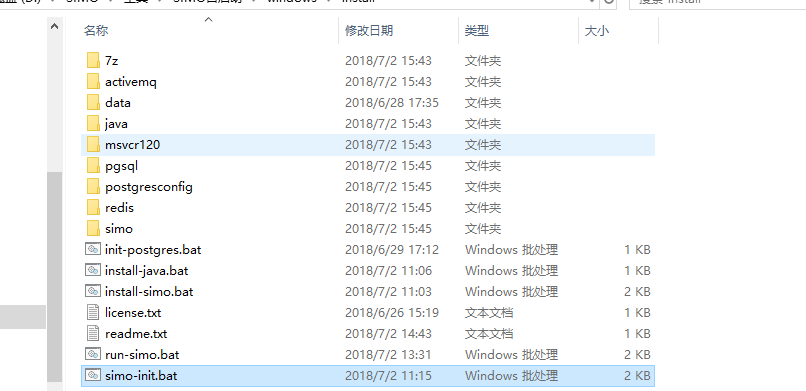
install-simo.bat文件内容:
@ECHO OFF
set scriptpath=%~dp0
set logfile=%scriptpath%install-log.txt
type license.txt | more
:license-check
echo Did you agree with this license(Y/N) :
set/p "cho=>"
if %cho%==Y goto start
if %cho%==y goto start
if %cho%==N call:notagree
if %cho%==n call:notagree
goto license-check
:notagree
echo "you do not agree with license install will exit now!"
pause
exit 1
goto:eof
:start
echo "Start to install SIMO........" >> %logfile%
echo %scriptpath%
call:install-redis
call:install-activemq
call:init-database
ping -n 120 127.0.0.1>nul
call:run-simo
echo simo install finish..................
pause
exit 0
:install-jdk
mkdir %scriptpath%java\jdk1.8
call %scriptpath%install-java.bat %scriptpath%
echo install-jdk finish
goto:eof
:install-redis
start cmd /k %scriptpath%redis\redis-server.exe %scriptpath%redis\redis.windows.conf
echo install-redis finish
goto:eof
:install-activemq
start cmd /k %scriptpath%activemq\bin\win64\activemq.bat
echo install-activemq finish
goto:eof
:install-database
echo install-database finish
rem 判断windows/system32下是否有对应的mscrv120.dll文件
goto:eof#运行完后 CMD 返回并等待下一条命令
:init-database
start cmd /k %scriptpath%init-postgres.bat %scriptpath%
echo init-database finish
goto:eof
:run-simo
start %scriptpath%simo-init.bat %scriptpath%
echo run-simo finish
goto:eof
simo-init.bat脚本如下:
@ECHO OFF
rem unzip simo.zip
call %17z\7z.exe x %1\simo\simo.zip -o%1simo\
xcopy /Y %1simo\application.properties %1simo\simo\scripts\
cd %1simo\simo\scripts\
rem enable\disable servicecenter
start /b %1simo\simo\scripts\runmodule.bat simo-servicecenter
ping -n 10 127.0.0.1>nul
rem enable\disable mc
start /b %1simo\simo\scripts\runmodule.bat simo-mc
ping -n 10 127.0.0.1>nul
rem enable\disable collector
start /b %1simo\simo\scripts\runmodule.bat simo-collector
ping -n 10 127.0.0.1>nul
rem enable\disable business
start /b %1simo\simo\scripts\runmodule.bat simo-business
ping -n 10 127.0.0.1>nul
rem enable\disable itsm
start /b %1simo\simo\scripts\runmodule.bat simo-itsm
ping -n 10 127.0.0.1>nul
rem enable\disable cmdb
start /b %1simo\simo\scripts\runmodule.bat simo-cmdb
ping -n 10 127.0.0.1>nul
rem enable\disable workflow
start /b %1simo\simo\scripts\runmodule.bat simo-workflow
ping -n 10 127.0.0.1>nul
rem enable\disable knowledgebase
start /b %1simo\simo\scripts\runmodule.bat simo-knowledgebase
run-simo.bat脚本如下:
@ECHO OFF
echo **********************************************
echo.
echo start to run simo
echo.
echo.
echo **********************************************
set scriptpath=%~dp0
ping -n 10 127.0.0.1>nul
call:start-redis
ping -n 10 127.0.0.1>nul
call:start-activemq
ping -n 10 127.0.0.1>nul
call:start-database
ping -n 10 127.0.0.1>nul
cd %scriptpath%simo\simo\scripts\
rem enable\disable servicecenter
start /b %scriptpath%simo\simo\scripts\runmodule.bat simo-servicecenter
ping -n 10 127.0.0.1>nul
rem enable\disable mc
start /b %scriptpath%simo\simo\scripts\runmodule.bat simo-mc
ping -n 10 127.0.0.1>nul
rem enable\disable collector
start /b %scriptpath%simo\simo\scripts\runmodule.bat simo-collector
ping -n 10 127.0.0.1>nul
rem enable\disable business
start /b %scriptpath%simo\simo\scripts\runmodule.bat simo-business
ping -n 10 127.0.0.1>nul
rem enable\disable itsm
start /b %scriptpath%simo\simo\scripts\runmodule.bat simo-itsm
ping -n 10 127.0.0.1>nul
rem enable\disable cmdb
start /b %scriptpath%simo\simo\scripts\runmodule.bat simo-cmdb
ping -n 10 127.0.0.1>nul
rem enable\disable workflow
start /b %scriptpath%simo\simo\scripts\runmodule.bat simo-workflow
ping -n 10 127.0.0.1>nul
rem enable\disable knowledgebase
start /b %scriptpath%simo\simo\scripts\runmodule.bat simo-knowledgebase
cd %scriptpath%
echo "DO NOT colse the window!"
cmd /k echo.
:start-redis
start cmd /k %scriptpath%redis\redis-server.exe %scriptpath%redis\redis.windows.conf
echo start-redis finish
goto:eof
:start-activemq
start cmd /k %scriptpath%activemq\bin\win64\activemq.bat
echo start-activemq finish
goto:eof
:start-database
start cmd /k %scriptpath%pgsql\bin\pg_ctl.exe -D "%scriptpath%data" -l logfile start
echo start-database finish
goto:eof
init-postgres.bat 脚本如下:
@ECHO OFF
echo "Start to install postgres........"
rem 检查系统依赖dll
if not exist C:\Windows\System32\msvcr120.dll xcopy /Y %1msvcr120\System32\msvcr120.dll C:\Windows\System32\
echo 检查系统依赖dll完成
rem 修改数据文件夹权限
echo Y|cacls %1data /c /p everyone:f
ping -n 5 127.0.0.1>nul
echo 修改数据文件夹权限
call %1pgsql\bin\initdb.exe -D %1data -E UTF-8 --locale=chs -U uxsino --pwfile=%1postgresconfig\password.txt
ping -n 10 127.0.0.1>nul
rem 修改配置文件
xcopy /EY %1postgresconfig\* %1data
ping -n 5 127.0.0.1>nul
echo config need comfirm
call "pgsql\bin\pg_ctl" -D "%1data" -l logfile start
ping -n 10 127.0.0.1>nul
call %1pgsql\bin\createdb.exe -U uxsino simo_dev
ping -n 10 127.0.0.1>nul
echo database init finish
cmd /k echo.
intall-java.bat 脚本如下:
@ECHO OFF
echo **********************************************
echo.
echo start to install jdk
echo.
echo.
echo **********************************************
set scriptpath=%~dp0
set logfile=%scriptpath%install-log.txt
echo.
echo installing.......jdk, do not close this windows
echo.
echo please wait about 3/4 mins until install finish
echo.
echo start to install jdk > %logfile%
start /WAIT %scriptpath%java\jdk-8u152-windows-x64.exe /qn INSTALLDIR=%scriptpath%java\jdk1.8
echo install finish start to config java
echo install finish start to config java >> %logfile%
echo.
set JAVA_HOME=%scriptpath%java\jdk1.8
setx Path "%Path%;%JAVA_HOME%\bin" /M
ping -n 30 127.0.0.1>nul
echo install finish and config finish.
echo you can close this window start to install simo
echo java install finish >> %logfile%
cmd /k echo.
run-simo.bat 脚本如下:
@ECHO OFF
echo **********************************************
echo.
echo start to run simo
echo.
echo.
echo **********************************************
set scriptpath=%~dp0
ping -n 10 127.0.0.1>nul
call:start-redis
ping -n 10 127.0.0.1>nul
call:start-activemq
ping -n 10 127.0.0.1>nul
call:start-database
ping -n 10 127.0.0.1>nul
cd %scriptpath%simo\simo\scripts\
rem enable\disable servicecenter
start /b %scriptpath%simo\simo\scripts\runmodule.bat simo-servicecenter
ping -n 10 127.0.0.1>nul
rem enable\disable mc
start /b %scriptpath%simo\simo\scripts\runmodule.bat simo-mc
ping -n 10 127.0.0.1>nul
rem enable\disable collector
start /b %scriptpath%simo\simo\scripts\runmodule.bat simo-collector
ping -n 10 127.0.0.1>nul
rem enable\disable business
start /b %scriptpath%simo\simo\scripts\runmodule.bat simo-business
ping -n 10 127.0.0.1>nul
rem enable\disable itsm
start /b %scriptpath%simo\simo\scripts\runmodule.bat simo-itsm
ping -n 10 127.0.0.1>nul
rem enable\disable cmdb
start /b %scriptpath%simo\simo\scripts\runmodule.bat simo-cmdb
ping -n 10 127.0.0.1>nul
rem enable\disable workflow
start /b %scriptpath%simo\simo\scripts\runmodule.bat simo-workflow
ping -n 10 127.0.0.1>nul
rem enable\disable knowledgebase
start /b %scriptpath%simo\simo\scripts\runmodule.bat simo-knowledgebase
cd %scriptpath%
echo "DO NOT colse the window!"
cmd /k echo.
:start-redis
start cmd /k %scriptpath%redis\redis-server.exe %scriptpath%redis\redis.windows.conf
echo start-redis finish
goto:eof
:start-activemq
start cmd /k %scriptpath%activemq\bin\win64\activemq.bat
echo start-activemq finish
goto:eof
:start-database
start cmd /k %scriptpath%pgsql\bin\pg_ctl.exe -D "%scriptpath%data" -l logfile start
echo start-database finish
goto:eof
自动化部署脚本之windows上执行批处理文件的更多相关文章
- 自动化部署脚本--linux执行sh脚本
自动化部署脚本文件目录: 运行主程序:./install.sh #!/bin/bash SCRIPTPATH=$(cd "$(dirname "$0")"; p ...
- Jenkins持续集成-自动化部署脚本的实现
要实现Jenkins端的持续集成,其实在CI服务配置端很容易,难点呢?就是如何实现自动化的部署.我的脚本设计就是为了解决以下难题: 难点一.如何使得自动化部署脚本更通用 我用的脚本,依赖依赖一个配置文 ...
- MySQL5.7多实例自动化部署脚本
一.安装说明 ------------------------------------------------------ mysql5.7.10_onekey_install.sh自动化部署脚本支持 ...
- 《转载》Jenkins持续集成-自动化部署脚本的实现《python》
本文转载自慕课网 读者须知:1.本手记本着记续接前面的两张手记内容整理2.本手记针对tomcat部署测试环境实现 最近工作比较繁忙,导致这章一直拖延,没有太抽出时间来总结.要实现Jenkins端的持续 ...
- 设置ssh免密码登录脚本(hadoop自动化部署脚本一)
设置ssh免密码登录脚本(hadoop自动化部署脚本一) 设置ssh免密码登录脚本(飞谷云大数据自动化部署脚本一) 1.#!/bin/sh2.#important note:this script i ...
- python+paramiko库+svn写的自动化部署脚本
第一篇博文 直接开门见山的说了. 这是件什么事?:每次部署都是复制本地的文件粘贴到服务器端,因为路径复杂,所以费时且手工容易出漏洞. 一直在想有什么办法可以解决这种,因为以前在微软的一个牛人同事做过一 ...
- Mysql安装及自动化部署脚本方案
一.简介 数据库(Database)是按照数据结构来组织.存储和管理数据的仓库, 每个数据库都有一个或多个不同的API用于创建,访问,管理,搜索和复制所保存的数据. 我们也可以将数据存储在文件中,但是 ...
- Web系统自动化部署脚本
Web开发的项目,除了在本地直接运行外,还可能经常需要在服务器上部署. 写了个自动化部署的脚本,仅供参考. 不少地方需要配置路径,个人建议使用绝对路径,不用依赖执行脚本时所在的路径. #!/bin/s ...
- 一个简单的Shell脚本(解决windows上文本在macos上乱码问题)
之所以有这一篇文章,是因为之前我写过的一篇文章:“解决Mac上打开txt文件乱码问题”:传送门: https://www.cnblogs.com/chester-cs/p/11784079.html ...
随机推荐
- volatile关键字和transient关键字
Java 语言包含两种内在的同步机制:同步块(或方法)和 volatile 变量 1.volatile 关键字-----针对变量的可变性 专业解释:volatile关键字是个类型修饰符用它声明的类型变 ...
- JSP和JSTL视图解析器
使用JSTL users.jsp <%@ page language="java" contentType="text/html; charset=UTF-8&qu ...
- 113、stack的优势 (Swarm20)
参考https://www.cnblogs.com/CloudMan6/p/8157391.html stack 将应用所包含的service,依赖的secret volume 等资源,以及他们之 ...
- MySQL之数据库优化
Mysql数据库的优化技术 对mysql优化是一个综合性的技术,主要包括 •表的设计合理化(符合3NF) •添加适当索引(index) [四种: 普通索引.主键索引.唯一索引unique.全文索引] ...
- symfony2学习笔记——控制器
//获取get过来的参数 $val = $request->query->get('aaa'); //获取post过来的参数 //$val = $request->request-& ...
- pat (B)_1002
1002 写出这个数 (20 分) 读入一个正整数 n,计算其各位数字之和,用汉语拼音写出和的每一位数字. 输入格式: 每个测试输入包含 1 个测试用例,即给出自然数 n 的值.这里保证 n 小于 1 ...
- Ubuntu环境变量设置注意点
设置环境变量时,有一点要注意: /etc/bash.bashrc与/etc/profile是有区别的 什么区别呢? 打开一个新的shell时,会读取/etc/bash.bashrc和~/.bashrc ...
- ArrayMatched
import os from jinja2 import Environment,FileSystemLoader def generateNewLackArray(ArrayList,count,T ...
- 关于LRU算法(转载)
原文地址: http://flychao88.iteye.com/blog/1977653 http://blog.csdn.net/cjfeii/article/details/47259519 ...
- tornado下pandas ndarray乱试
from tornado.web import RequestHandler from pymongo import MongoClient import pandas,xlrd from panda ...