
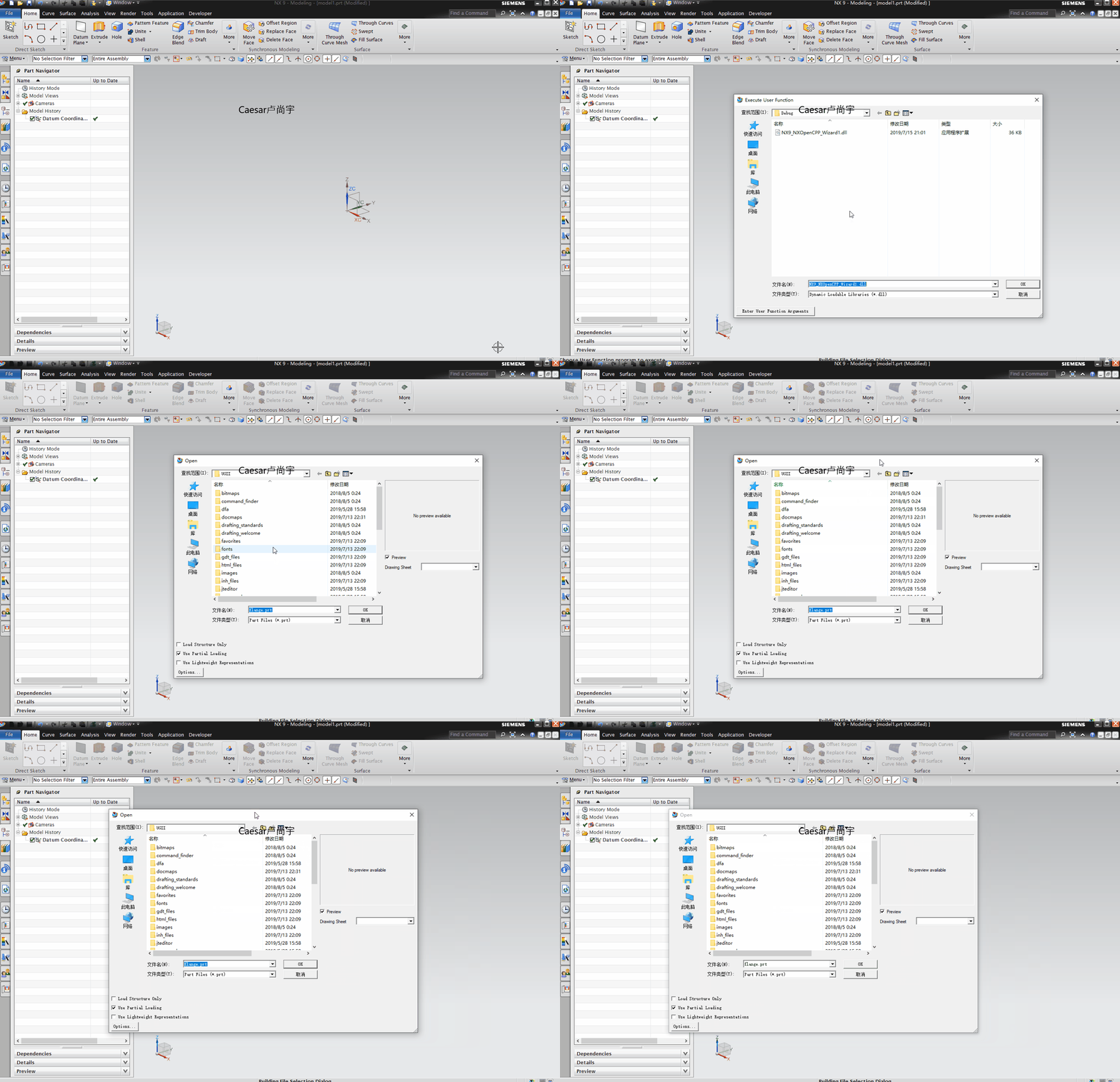
NX二次开发-打开part对话框UF_UI_open_part
这是UFUN帮助的官方例子
 /******************************************************************************

 Copyright (c) 1999 Unigraphics Solutions, Inc.

 Unpublished - All Rights Reserved

 *******************************************************************************/

 /* The following example demonstrates how to invoke

 UF_UI_open_part. */

 /* ***** Include Files ***** */

 #include <stdio.h>

 #include <string.h>

 #include <uf.h>

 #include <uf_part.h>

 #include <uf_ui.h>

 /* ***** Local Prototype ***** */

 static logical my_error_handler

 (

 UF_UI_err_data_p_t     error_fn_data,

 char                  *file_name,

 int                    error,

 UF_PART_load_status_t *error_status,

 logical               *skip_error_disp

 );

 /* ***** Entry Point ***** */

 /*ARGSUSED*/

 extern void ufusr(char *param, int *ret_code, int len)

 {

     /*

     *********************

     variable declarations

     *********************

     */

     int response;

     tag_t part_tag = NULL_TAG;

     char file_name[MAX_FSPEC_SIZE + ] = "flange.prt";

     const char *message = "part open error";

     logical use_display_file = FALSE;

     UF_PART_load_status_t part_status;

     UF_UI_err_t error_handler;

     /*

     ************************************************

     initialize the 'struct' as an open part 'struct'

     and assign the local function prototyped above

     as the callback

     ************************************************

     */

     error_handler.type = UF_UI_open_part_fun;

     error_handler.fun.open = my_error_handler;

     /*

     ************************************************

     assign the client data and its size

     Note:  this is an arbitrary usage of the client

     data.  A better use might be to pass the name of

     a UIStyler dialog which would then be invoked in

     the callback

     ************************************************

     */

     error_handler.fun_data.size = strlen(message) + ;

     error_handler.fun_data.data = message;

     /*

     *************************************************

     call the function, free any allocated memory

     *************************************************

     */

     UF_initialize();

     UF_UI_open_part(&error_handler, file_name,

         &use_display_file,

         &part_tag, &response, &part_status);

     if (part_status.statuses != NULL)

     {

         UF_free(part_status.statuses);

     }

     if (part_status.file_names != NULL)

     {

         UF_free_string_array(part_status.n_parts,

             part_status.file_names);

     }

     UF_terminate();

 }

 /* ***** local function to be invoked as a callback ***** */

 static logical my_error_handler

 (

 UF_UI_err_data_p_t     error_fn_data,

 char                  *file_name,

 int                    error,

 UF_PART_load_status_t *error_status,

 logical               *skip_error_disp

 )

 {

     /*

     ***************************************************

     this function trivially just prints the client data

     that it receives as well as the file name and the

     error

     As mentioned above, a better usage of the client

     data would be to pass through the name of a

     UIStyler dialog to display.  Such a use might

     resemble the following:

     UF_STYLER_create_dialog (

     ( char * ) error_fn_data->data ,

     callbacks ,

     n_callbacks ,

     NULL ,

     &response );

     ***************************************************

     */

     fprintf(stderr, "my_error_handler called with:\n"

         "    error_fn_data->size = %d\n"

         "    error_fn_data->data = %s\n"

         "    file_name           = %s\n"

         "    error               = %d\n",

         error_fn_data->size,

         (const char *)error_fn_data->data,

         file_name,

         error

         );

     /* **************************************************

     instruct NX to display its error dialog and to

     continue looping within the dialog until a part

     is opened

     **************************************************

     */

     *skip_error_disp = TRUE;

     return TRUE;

 }
NX二次开发-打开part对话框UF_UI_open_part的更多相关文章
- NX二次开发-打开文件夹,并同时选中指定文件
NX9+VS2012 #include <uf.h> #include <uf_ui.h> #include <uf_part.h> #include <at ...
- NX二次开发-UFUN特征选择对话框UF_UI_select_feature
#include <uf.h> #include <uf_ui.h> UF_initialize(); //特征选择对话框 char sMessage[] = "特征 ...
- NX二次开发-打开弹出当前part所在的文件夹
#include <uf.h> #include <uf_part.h> #include <atlstr.h> #include <iostream> ...
- NX二次开发-使用MFC对话框不能用UF_UI_select等函数解决方法
VC/MFC调用UG Dialog要进入加锁状态 加锁 UF_UI_lock_ug_access ( UF_UI_FROM_CUSTOM ); 此处为UF_UI_select的函数 解锁 UF_UI_ ...
- NX二次开发-uc1600字符串对话框
NX9+VS2012 #include <uf.h> #include <uf_ui.h> UF_initialize(); char* cue = "输入框&quo ...
- NX二次开发-基于MFC界面对话框与NX交互的开发
打开VS2013 点击新建,选择MFC DLL 点击确定 点下一步 什么都不改,直接点完成 进来之后先编译一下,看是否编译成功 打开项目属性,更改这几处 $(UGII_BASE_DIR)\ugopen ...
- NX二次开发-BlockUI对话框嵌套MFC对话框制作进度条
半年前在一些QQ群看到有大神NX二次开发做出了进度条,那个时候我还不会弄,也不知道怎么弄得,后来断断续续得研究了一下,直到今天我把它做出来了.内心还是很喜悦的!回想自己这两年当初从没公司肯给我做NX二 ...
- NX二次开发-基于MFC界面的NX对Excel读写操作(OLE方式(COM组件))
NX二次开发API里没有对EXCAL读写操作的相关函数,市面上有很多种方法去实现,比如UFUN调KF,ODBC,OLE(COM组件)等等.这里我是用的OLE(COM组件)方式去做的,这种在VC上创建的 ...
- NX二次开发-UDO用户自定义对象(UFUN)【持续完善】
每当提起UDO总是会让我想起大专毕业那会失业找工作,后来有个宝贵机会去了软件公司上班,拿到了我人生中的第一个NX二次开发项目,一个关于测量汽车前后左右摄像头的项目.当时那个项目就用到了UDO,对于只看 ...
随机推荐
- mysql的数据导出方法2
首先,使用mysqldump命令的前提是,在Cmd中进入mysql安装目录下的bin目录下,才可以使用该命令.我的mysql安装在E:盘,所以,首先进入bin目录下:E:/Program Files/ ...
- Thread.Join理解
Thread.Join:Blocks the calling thread until a thread terminates MainThread里面起了一个SubThread,从SubThread ...
- (转)OpenFire源码学习之八:MUC用户聊天室
转:http://blog.csdn.net/huwenfeng_2011/article/details/43413817 MUC 房间属性设置 以上属性存储在MUCPersistenceManag ...
- php中如何实现多进程
php中如何实现多进程 一.总结 一句话总结: php多进程需要pcntl,posix扩展支持 可以通过 php - m 查看,没安装的话需要重新编译php,加上参数--enable-pcntl,po ...
- 机器学习技法笔记:Homework #8 kNN&RBF&k-Means相关习题
原文地址:https://www.jianshu.com/p/1db700f866ee 问题描述 程序实现 # kNN_RBFN.py # coding:utf-8 import numpy as n ...
- 2019牛客多校第三场F-Planting Trees(单调队列)
Planting Trees 题目传送门 解题思路 枚举每一个下边界,再枚举其对应的所有上边界,求出其对应区间内的最大最小值,当下边界一样的时候,其最大最小值可以随着上边界减小逐步更新.然后将这些最大 ...
- Git 学习第三天(二)
默认情况下, Git合并是采用"fast forward"模式,但这种模式下,如果删除分支,会丢掉分支信息 禁用 fast forward 模式: git merge --no-f ...
- 【转载】Jmeter业务请求比例1
ps:文章转自订阅号“测试那点事儿”,链接:https://mp.weixin.qq.com/s/qVD4iNO0QqRIwAIq9_E_Kw 在进行综合场景压测时,由于不同的请求,要求所占比例不同, ...
- export 与 export default
export 和 import 都属于 ES6 的内容. node 的 module 遵循的是 CommonJS规范,requirejs遵循AMD,seajs遵循CMD,虽各有不同, 但总之还是希望保 ...
- 项目中UX设计1到2的设计提升总结