
Activiti学习笔记11 — 判断节点的使用
一、 创建流程
 <?xml version="1.0" encoding="UTF-8"?>

 <definitions xmlns="http://www.omg.org/spec/BPMN/20100524/MODEL" xmlns:xsi="http://www.w3.org/2001/XMLSchema-instance" xmlns:xsd="http://www.w3.org/2001/XMLSchema" xmlns:activiti="http://activiti.org/bpmn" xmlns:bpmndi="http://www.omg.org/spec/BPMN/20100524/DI" xmlns:omgdc="http://www.omg.org/spec/DD/20100524/DC" xmlns:omgdi="http://www.omg.org/spec/DD/20100524/DI" typeLanguage="http://www.w3.org/2001/XMLSchema" expressionLanguage="http://www.w3.org/1999/XPath" targetNamespace="http://www.activiti.org/test">

   <process id="确定旅游地点" name="确定旅游地点" isExecutable="true">

     <startEvent id="startevent1" name="Start"></startEvent>

     <receiveTask id="申请旅游经费" name="申请旅游经费"></receiveTask>

     <sequenceFlow id="flow1" sourceRef="startevent1" targetRef="申请旅游经费"></sequenceFlow>

     <exclusiveGateway id="exclusivegateway1" name="Exclusive Gateway" default="缺省值"></exclusiveGateway>

     <sequenceFlow id="flow2" sourceRef="申请旅游经费" targetRef="exclusivegateway1"></sequenceFlow>

     <receiveTask id="国外游" name="国外游"></receiveTask>

     <receiveTask id="国内游" name="国内游"></receiveTask>

     <receiveTask id="省内游" name="省内游"></receiveTask>

     <sequenceFlow id="经费大于等于10000" name="经费大于等于10000" sourceRef="exclusivegateway1" targetRef="国外游">

       <conditionExpression xsi:type="tFormalExpression"><![CDATA[${money >= }]]></conditionExpression>

     </sequenceFlow>

     <sequenceFlow id="经费大于1000小于10000" name="经费大于1000小于10000" sourceRef="exclusivegateway1" targetRef="国内游" skipExpression="经费大于1000小于10000">

       <conditionExpression xsi:type="tFormalExpression"><![CDATA[${money >  && money < }]]></conditionExpression>

     </sequenceFlow>

     <sequenceFlow id="缺省值" name="缺省值" sourceRef="exclusivegateway1" targetRef="省内游"></sequenceFlow>

     <endEvent id="endevent1" name="End"></endEvent>

     <sequenceFlow id="flow6" sourceRef="国外游" targetRef="endevent1"></sequenceFlow>

     <sequenceFlow id="flow7" sourceRef="国内游" targetRef="endevent1"></sequenceFlow>

     <sequenceFlow id="flow8" sourceRef="省内游" targetRef="endevent1"></sequenceFlow>

   </process>

   <bpmndi:BPMNDiagram id="BPMNDiagram_确定旅游地点">

     <bpmndi:BPMNPlane bpmnElement="确定旅游地点" id="BPMNPlane_确定旅游地点">

       <bpmndi:BPMNShape bpmnElement="startevent1" id="BPMNShape_startevent1">

         <omgdc:Bounds height="35.0" width="35.0" x="350.0" y="50.0"></omgdc:Bounds>

       </bpmndi:BPMNShape>

       <bpmndi:BPMNShape bpmnElement="申请旅游经费" id="BPMNShape_申请旅游经费">

         <omgdc:Bounds height="55.0" width="105.0" x="315.0" y="150.0"></omgdc:Bounds>

       </bpmndi:BPMNShape>

       <bpmndi:BPMNShape bpmnElement="exclusivegateway1" id="BPMNShape_exclusivegateway1">

         <omgdc:Bounds height="40.0" width="40.0" x="347.0" y="260.0"></omgdc:Bounds>

       </bpmndi:BPMNShape>

       <bpmndi:BPMNShape bpmnElement="国外游" id="BPMNShape_国外游">

         <omgdc:Bounds height="55.0" width="105.0" x="120.0" y="360.0"></omgdc:Bounds>

       </bpmndi:BPMNShape>

       <bpmndi:BPMNShape bpmnElement="国内游" id="BPMNShape_国内游">

         <omgdc:Bounds height="55.0" width="105.0" x="315.0" y="360.0"></omgdc:Bounds>

       </bpmndi:BPMNShape>

       <bpmndi:BPMNShape bpmnElement="省内游" id="BPMNShape_省内游">

         <omgdc:Bounds height="55.0" width="105.0" x="530.0" y="360.0"></omgdc:Bounds>

       </bpmndi:BPMNShape>

       <bpmndi:BPMNShape bpmnElement="endevent1" id="BPMNShape_endevent1">

         <omgdc:Bounds height="35.0" width="35.0" x="350.0" y="490.0"></omgdc:Bounds>

       </bpmndi:BPMNShape>

       <bpmndi:BPMNEdge bpmnElement="flow1" id="BPMNEdge_flow1">

         <omgdi:waypoint x="367.0" y="85.0"></omgdi:waypoint>

         <omgdi:waypoint x="367.0" y="150.0"></omgdi:waypoint>

       </bpmndi:BPMNEdge>

       <bpmndi:BPMNEdge bpmnElement="flow2" id="BPMNEdge_flow2">

         <omgdi:waypoint x="367.0" y="205.0"></omgdi:waypoint>

         <omgdi:waypoint x="367.0" y="260.0"></omgdi:waypoint>

       </bpmndi:BPMNEdge>

       <bpmndi:BPMNEdge bpmnElement="经费大于等于10000" id="BPMNEdge_经费大于等于10000">

         <omgdi:waypoint x="347.0" y="280.0"></omgdi:waypoint>

         <omgdi:waypoint x="173.0" y="280.0"></omgdi:waypoint>

         <omgdi:waypoint x="172.0" y="360.0"></omgdi:waypoint>

         <bpmndi:BPMNLabel>

           <omgdc:Bounds height="42.0" width="100.0" x="191.0" y="260.0"></omgdc:Bounds>

         </bpmndi:BPMNLabel>

       </bpmndi:BPMNEdge>

       <bpmndi:BPMNEdge bpmnElement="经费大于1000小于10000" id="BPMNEdge_经费大于1000小于10000">

         <omgdi:waypoint x="367.0" y="300.0"></omgdi:waypoint>

         <omgdi:waypoint x="367.0" y="360.0"></omgdi:waypoint>

         <bpmndi:BPMNLabel>

           <omgdc:Bounds height="42.0" width="100.0" x="380.0" y="309.0"></omgdc:Bounds>

         </bpmndi:BPMNLabel>

       </bpmndi:BPMNEdge>

       <bpmndi:BPMNEdge bpmnElement="缺省值" id="BPMNEdge_缺省值">

         <omgdi:waypoint x="387.0" y="280.0"></omgdi:waypoint>

         <omgdi:waypoint x="582.0" y="280.0"></omgdi:waypoint>

         <omgdi:waypoint x="582.0" y="360.0"></omgdi:waypoint>

         <bpmndi:BPMNLabel>

           <omgdc:Bounds height="14.0" width="36.0" x="519.0" y="260.0"></omgdc:Bounds>

         </bpmndi:BPMNLabel>

       </bpmndi:BPMNEdge>

       <bpmndi:BPMNEdge bpmnElement="flow6" id="BPMNEdge_flow6">

         <omgdi:waypoint x="172.0" y="415.0"></omgdi:waypoint>

         <omgdi:waypoint x="367.0" y="490.0"></omgdi:waypoint>

       </bpmndi:BPMNEdge>

       <bpmndi:BPMNEdge bpmnElement="flow7" id="BPMNEdge_flow7">

         <omgdi:waypoint x="367.0" y="415.0"></omgdi:waypoint>

         <omgdi:waypoint x="367.0" y="490.0"></omgdi:waypoint>

       </bpmndi:BPMNEdge>

       <bpmndi:BPMNEdge bpmnElement="flow8" id="BPMNEdge_flow8">

         <omgdi:waypoint x="582.0" y="415.0"></omgdi:waypoint>

         <omgdi:waypoint x="367.0" y="490.0"></omgdi:waypoint>

       </bpmndi:BPMNEdge>

     </bpmndi:BPMNPlane>

   </bpmndi:BPMNDiagram>

 </definitions>
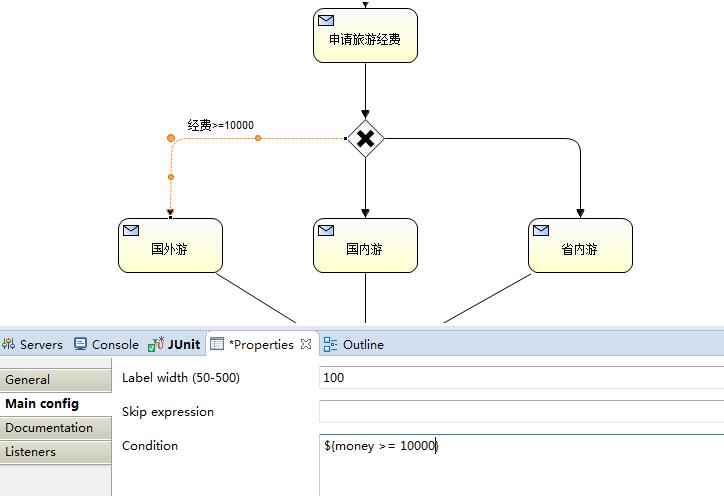
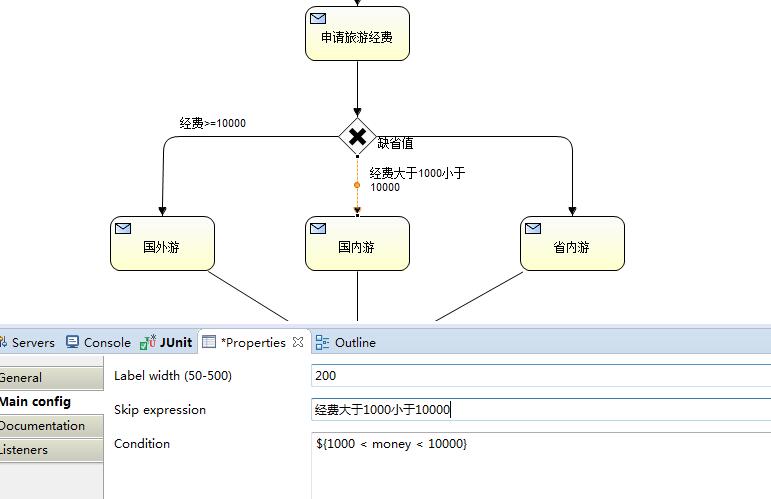


二、发布流程
 /**

      * 2、发布一个流程

      */

     @Test

     public void  testDeployProcess() {

         RepositoryService repositoryService = processEngine.getRepositoryService();

         DeploymentBuilder builder = repositoryService.createDeployment();

         // 加载发布资源

         builder.name("判断分支结点流程测试") // 设置流程显示别名

                 .addClasspathResource("travel.bpmn") // 设置流程规则文件

                 .addClasspathResource("travel.png"); // 设置流程规则的图片

         // 发布流程

         builder.deploy();

     }
三、运行、测试流程
     /**

      * 3、启动流程、执行任务,并查看状态

      */

     @Test

     public void testExcusiveGateway() {

         // 获取服务对象的实例

         RuntimeService runtimeService = processEngine.getRuntimeService();

         String processDefinitionKey = "确定旅游地点";

         // 自动执行与Key相对应的流程的最高版本

         ProcessInstance processInstance = runtimeService.startProcessInstanceByKey(processDefinitionKey);

         String processInstanceId = processInstance.getId();

         logger.info("processInstanceId:" + processInstance.getId());

         //获取当前流程下Execution对象

         Execution e1 = runtimeService

                                             .createExecutionQuery()

                                             .processInstanceId(processInstanceId) //每个流程的唯一标识

                                             .activityId("申请旅游经费")    //每个活动的唯一标识

                                             .singleResult();

         Assert.assertNotNull(e1);

         //执行逻辑,请领导批示旅游经费

         Double money =11500d;

         //把金额放入变量中

         runtimeService.setVariable(e1.getId(), "money", money);

         logger.info("领导批示的旅游经费是: " + money);

         //推动流程流转

         logger.info("executionId: " + e1.getId());

         runtimeService.signal(e1.getId());

         if (money >= 10000d) {

             Execution e2 = runtimeService

                                         .createExecutionQuery()

                                         .processInstanceId(processInstanceId) //每个流程的唯一标识

                                         .activityId("国外游")    //每个活动的唯一标识

                                         .singleResult();

             Assert.assertNotNull(e2);

             logger.info("由于领导指示的经费是:" + runtimeService.getVariable(e2.getId(), "money") + ",所以你可以国外游!" );

             //推动流程流转

             runtimeService.signal(e2.getId());

         } else if ( money > 1000d && money < 10000d ) {

             Execution e2 = runtimeService

                     .createExecutionQuery()

                     .processInstanceId(processInstanceId) //每个流程的唯一标识

                     .activityId("国内游")    //每个活动的唯一标识

                     .singleResult();

             Assert.assertNotNull(e2);

             logger.info("由于领导指示的经费是:" + runtimeService.getVariable(e2.getId(), "money") + ",所以你可以国内游!" );

             //推动流程流转

             runtimeService.signal(e2.getId());

         } else {

             Execution e2 = runtimeService

                     .createExecutionQuery()

                     .processInstanceId(processInstanceId) //每个流程的唯一标识

                     .activityId("省内游")    //每个活动的唯一标识

                     .singleResult();

             Assert.assertNotNull(e2);

             logger.info("由于领导指示的经费是:" + runtimeService.getVariable(e2.getId(), "money") + ",所以你可以省内游!" );

             //推动流程流转

             runtimeService.signal(e2.getId());

         }

         //检查结束状态

         ProcessInstance pInstance = runtimeService

                                                         .createProcessInstanceQuery()

                                                         .processInstanceId(processInstanceId)

                                                         .singleResult();

         Assert.assertNull(pInstance);

         logger.info("判断分支结点流程成功执行!");

     }
四、运行结果
[INFO][2015-12-02 14:39:58,335][com.mcs.activiti.test.TestExclusiveGateway]processInstanceId:170001
[INFO][2015-12-02 14:39:58,641][com.mcs.activiti.test.TestExclusiveGateway]领导批示的旅游经费是: 11500.0
[INFO][2015-12-02 14:39:58,642][com.mcs.activiti.test.TestExclusiveGateway]executionId: 170001
[INFO][2015-12-02 14:39:58,816][com.mcs.activiti.test.TestExclusiveGateway]由于领导指示的经费是:11500.0,所以你可以国外游!
[INFO][2015-12-02 14:39:58,914][com.mcs.activiti.test.TestExclusiveGateway]判断分支结点流程成功执行!
Activiti学习笔记11 — 判断节点的使用的更多相关文章
- Activiti学习笔记目录
1.Activiti学习笔记1 — 下载与开发环境的配置: 2.Activiti学习笔记2 — HelloWorld: 3.Activiti学习笔记3 — 流程定义: 4.Activiti学习笔记4 ...
- activiti学习笔记一
activiti学习笔记 在讲activiti之前我们必须先了解一下什么是工作流,什么是工作流引擎. 在我们的日常工作中,我们会碰到很多流程化的东西,什么是流程化呢,其实通俗来讲就是有一系列固定的步骤 ...
- 并发编程学习笔记(11)----FutureTask的使用及实现
1. Future的使用 Future模式解决的问题是.在实际的运用场景中,可能某一个任务执行起来非常耗时,如果我们线程一直等着该任务执行完成再去执行其他的代码,就会损耗很大的性能,而Future接口 ...
- Spring 源码学习笔记11——Spring事务
Spring 源码学习笔记11--Spring事务 Spring事务是基于Spring Aop的扩展 AOP的知识参见<Spring 源码学习笔记10--Spring AOP> 图片参考了 ...
- Activiti 学习笔记记录(2016-8-31)
上一篇:Activiti 学习笔记记录(二) 导读:上一篇学习了bpmn 画图的常用图形标记.那如何用它们组成一个可用文件呢? 我们知道 bpmn 其实是一个xml 文件
- Activiti 学习笔记记录(二)
上一篇:Activiti 学习笔记记录 导读:对于工作流引擎的使用,我们都知道,需要一个业务事件,比如请假,它会去走一个流程(提交申请->领导审批---(批,不批)---->结束),Act ...
- Ext.Net学习笔记11:Ext.Net GridPanel的用法
Ext.Net学习笔记11:Ext.Net GridPanel的用法 GridPanel是用来显示数据的表格,与ASP.NET中的GridView类似. GridPanel用法 直接看代码: < ...
- SQL反模式学习笔记11 限定列的有效值
目标:限定列的有效值,将一列的有效字段值约束在一个固定的集合中.类似于数据字典. 反模式:在列定义上指定可选值 1. 对某一列定义一个检查约束项,这个约束不允许往列中插入或者更新任何会导致约束失败的值 ...
- golang学习笔记11 golang要用jetbrain的golang这个IDE工具开发才好
golang学习笔记11 golang要用jetbrain的golang这个IDE工具开发才好 jetbrain家的全套ide都很好用,一定要dark背景风格才装B 从File-->s ...
随机推荐
- 2019河北省大学生程序设计竞赛(重现赛)B 题 -Icebound and Sequence ( 等比数列求和的快速幂取模)
题目链接:https://ac.nowcoder.com/acm/contest/903/B 题意: 给你 q,n,p,求 q1+q2+...+qn 的和 模 p. 思路:一开始不会做,后面查了下发现 ...
- PostgreSQL——启动脚本
<仅供参考,执行結果受环境影响> 如下: pgpath='/usr/local/pgsql/bin' pgdata='/usr/local/pgsql/data' #以 postgres ...
- 【Java多线程系列随笔二】BlockingQueue
前言: 在新增的Concurrent包中,BlockingQueue很好的解决了多线程中,如何高效安全“传输”数据的问题.通过这些高效并且线程安全的队列类,为我们快速搭建高质量的多线程程序带来极大的便 ...
- kafka相关业务必会操作命令整理
参考:https://kafka.apache.org 服务相关命令 1.启动/停止zk > bin/zookeeper-server-start.sh config/zookeeper.pro ...
- apach hadoop2.6 集群利用Phoenix 4.6-hbase 批量导入并自动创建索引
基础环境: 1.安装apach 版本hadoop2.6 2.部署hbase1.0.0 3.下载phoenix-4.6.0-HBase-1.0.下载地址(http://mirror.nus.edu.sg ...
- jmeter 查看结果树之查看响应的13种方法
查看结果树查看响应有哪几种方法,可通过左侧面板底部的下拉框选择 1 Text 查看结果树中请求的默认格式为Text,显示取样器结果.请求.响应数据3个部分内容. 取样器结果: 默认Raw展示,可以切换 ...
- Unity3D中画拉选框(绘制多选框)
问题分析: 需要根据鼠标事件,摁下鼠标开始绘制选择框,抬起鼠标结束绘制. 实现思路: 该需求是屏幕画线,Unity内置了GL类 封装了OpenGL,可以通过GL类来实现一些简单的画图操作,这里也是使 ...
- 读书笔记---《Docker 技术入门与实践》---为镜像添加SSH服务
之前说到可以通过attach和exec两个命令登陆容器,但是如果遇到需要远程通过ssh登陆容器的场景,就需要手动添加ssh服务. 下面介绍两种方法创建带有ssh服务的镜像,commit命令创建和通过D ...
- mongo 分片集群的搭建
MongoDB版本当前使用的MongoDB版本为4.2.0,下载地址.https://fastdl.mongodb.org/linux/mongodb-linux-x86_64-rhel70-4.2. ...
- AF_UNIX
3.SOCK_SEQPACKET SOCK_SEQPACKET提供一个顺序确定的,可靠的,双向基于连接的socket endpoint. 与SOCK_STREAM不同的是,它保留消息边界.(表明发送两 ...