
EventBus3.0源码解析
本文主要介绍EventBus3.0的源码
EventBus.getDefault().register(this);
2、响应事件方法
  @Subscribe(threadMode = ThreadMode.BACKGROUND, sticky = true, priority = 100)

     public void jiaoTest(String str) {

         System.out.println("响应方法:" + str);

     }
参数解析:
EventBus.getDefault().post("Test");
4、解除注册
EventBus.getDefault().unregister(this);
以上就是EventBus的使用过程,用起来非常简单方便,非常实用。
二、注册源码解析
对应以上的注册方式,我们就从EventBus.getDefault().register(this);入手,首先查看EventBus.getDefault()
看看EventBus是如何初始化的;
 /** Convenience singleton for apps using a process-wide EventBus instance. */

     public static EventBus getDefault() {

         if (defaultInstance == null) {

             synchronized (EventBus.class) {

                 if (defaultInstance == null) {

                     defaultInstance = new EventBus();

                 }

             }

         }

         return defaultInstance;

     }
可以看出来,EventBus是单例模式存在的,一个项目中只能有一个EventBus这样有利于管理订阅者和订阅方法,这会在下面的介绍中体现出来。
接下来看register(this)
 public void register(Object subscriber) {

         //订阅者

         Class<?> subscriberClass = subscriber.getClass();

         List<SubscriberMethod> subscriberMethods = subscriberMethodFinder.findSubscriberMethods(subscriberClass);

         synchronized (this) {

             for (SubscriberMethod subscriberMethod : subscriberMethods) {

                 subscribe(subscriber, subscriberMethod);

             }

         }

     }
可以看出首先获取订阅者的类对象Class<?> subscriberClass = subscriber.getClass();
在看这段代码之前,我们首先要了解SubscriberMethod和subscriberMethodFinder.findSubscriberMethods方法到底做了什么
首先来看SubscriberMethod
 public class SubscriberMethod {

     final Method method;//方法

     final ThreadMode threadMode;//执行线程

     final Class<?> eventType;//接收的事件类型

     final int priority;//优先级

     final boolean sticky;

     /** Used for efficient comparison */

     String methodString;

 ....

 }
可以看出SubscriberMethod其实就是一个订阅方法的实体类,里面保存了订阅方法信息
接着看subscriberMethodFinder.findSubscriberMethods
该方法的作用其实就是从订阅类中获取所有的订阅方法信息;
 List<SubscriberMethod> findSubscriberMethods(Class<?> subscriberClass) {

         //首先从缓存中读取

         List<SubscriberMethod> subscriberMethods = METHOD_CACHE.get(subscriberClass);

         if (subscriberMethods != null) {

             return subscriberMethods;

         }

         //是否忽略注解器生成的MyEventBusIndex类

         if (ignoreGeneratedIndex) {

             //利用反射来获取订阅类中的订阅方法信息

             subscriberMethods = findUsingReflection(subscriberClass);

         } else {

             //从注解器生成的MyEventBusIndex类中获得订阅类的订阅方法信息

             subscriberMethods = findUsingInfo(subscriberClass);

         }

         if (subscriberMethods.isEmpty()) {

             throw new EventBusException("Subscriber " + subscriberClass

                     + " and its super classes have no public methods with the @Subscribe annotation");

         } else {

             //保存进缓存

             METHOD_CACHE.put(subscriberClass, subscriberMethods);

             return subscriberMethods;

         }

     }
我们看到,该方法首先从缓存中获取订阅类的订阅方法信息,如果没有则通过两种方式来获取
1、通过EventBusAnnotationProcessor(注解处理器)生成的MyEventBusIndex中获取
2、利用反射来读取订阅类中订阅方法信息
EventBusAnnotationProcessor是什么东东?(此处参考:文/达达达达sky(简书作者)原文链接:http://www.jianshu.com/p/f057c460c77e)
在3.0版本中,EventBus提供了一个EventBusAnnotationProcessor注解处理器来在编译期通过读取@Subscribe()注解并解析,
处理其中所包含的信息,然后生成java类来保存所有订阅者关于订阅的信息,这样就比在运行时使用反射来获得这些订阅者的
信息速度要快.我们可以参考EventBus项目里的EventBusPerformance这个例子,编译后我们可以在build文件夹里找到这个类
,MyEventBusIndex 类,当然类名是可以自定义的.我们大致看一下生成的MyEventBusIndex类是什么样的:
 /**

  * This class is generated by EventBus, do not edit.

  */

 public class MyEventBusIndex implements SubscriberInfoIndex {

     private static final Map<Class<?>, SubscriberInfo> SUBSCRIBER_INDEX;

     static {

         SUBSCRIBER_INDEX = new HashMap<Class<?>, SubscriberInfo>();

         putIndex(new SimpleSubscriberInfo(org.greenrobot.eventbusperf.testsubject.PerfTestEventBus.SubscriberClassEventBusAsync.class,

                 true, new SubscriberMethodInfo[]{

                 new SubscriberMethodInfo("onEventAsync", TestEvent.class, ThreadMode.ASYNC),

         }));

         putIndex(new SimpleSubscriberInfo(TestRunnerActivity.class, true, new SubscriberMethodInfo[]{

                 new SubscriberMethodInfo("onEventMainThread", TestFinishedEvent.class, ThreadMode.MAIN),

         }));

     }

     private static void putIndex(SubscriberInfo info) {

         SUBSCRIBER_INDEX.put(info.getSubscriberClass(), info);

     }

     @Override

     public SubscriberInfo getSubscriberInfo(Class<?> subscriberClass) {

         SubscriberInfo info = SUBSCRIBER_INDEX.get(subscriberClass);

         if (info != null) {

             return info;

         } else {

             return null;

         }

     }

 }
可以看出是使用一个静态HashMap即:SUBSCRIBER_INDEX来保存订阅类的信息,其中包括了订阅类的class对象,
是否需要检查父类,以及订阅方法的信息SubscriberMethodInfo的数组,SubscriberMethodInfo中又保存了,订阅方法的方法名,
订阅的事件类型,触发线程,是否接收sticky事件以及优先级priority.这其中就保存了register()的所有需要的信息;
我们重点研究一下通过反射来获取订阅方法信息即:findUsingReflection(subscriberClass);
  private List<SubscriberMethod> findUsingReflection(Class<?> subscriberClass) {

         FindState findState = prepareFindState();

         findState.initForSubscriber(subscriberClass);

         while (findState.clazz != null) {

             findUsingReflectionInSingleClass(findState);

             findState.moveToSuperclass();

         }

         return getMethodsAndRelease(findState);

     }
FindState其实就是一个里面保存了订阅者和订阅方法信息的一个实体类,包括订阅类中所有订阅的事件类型和所有的订阅方法等。
我们看到会首先创建一个FindState对象并执行findUsingReflectionInSingleClass(findState);来获取订阅类的方法信息
 private void findUsingReflectionInSingleClass(FindState findState) {

         Method[] methods;

         try {

             // This is faster than getMethods, especially when subscribers are fat classes like Activities

             methods = findState.clazz.getDeclaredMethods();

         } catch (Throwable th) {

             // Workaround for java.lang.NoClassDefFoundError, see https://github.com/greenrobot/EventBus/issues/149

             //通过反射获取到订阅类中的所有方法

             methods = findState.clazz.getMethods();

             findState.skipSuperClasses = true;

         }

         //遍历所有方法,忽略private类型的,最后如果是公有,并且不是

         //java编译器 生成的方法名,那么就是我们要的了。

         for (Method method : methods) {

             int modifiers = method.getModifiers();

             if ((modifiers & Modifier.PUBLIC) != 0 && (modifiers & MODIFIERS_IGNORE) == 0) {

                 Class<?>[] parameterTypes = method.getParameterTypes();

                 //保证只有一个事件参数

                 if (parameterTypes.length == 1) {

                     //得到注解

                     Subscribe subscribeAnnotation = method.getAnnotation(Subscribe.class);

                     if (subscribeAnnotation != null) {

                         Class<?> eventType = parameterTypes[0];

                         //校验是否添加该方法

                         if (findState.checkAdd(method, eventType)) {

                             ThreadMode threadMode = subscribeAnnotation.threadMode();

                             //添加方法

                             findState.subscriberMethods.add(new SubscriberMethod(method, eventType, threadMode,

                                     subscribeAnnotation.priority(), subscribeAnnotation.sticky()));

                         }

                     }

                 } else if (strictMethodVerification && method.isAnnotationPresent(Subscribe.class)) {

                     String methodName = method.getDeclaringClass().getName() + "." + method.getName();

                     throw new EventBusException("@Subscribe method " + methodName +

                             "must have exactly 1 parameter but has " + parameterTypes.length);

                 }

             } else if (strictMethodVerification && method.isAnnotationPresent(Subscribe.class)) {

                 String methodName = method.getDeclaringClass().getName() + "." + method.getName();

                 throw new EventBusException(methodName +

                         " is a illegal @Subscribe method: must be public, non-static, and non-abstract");

             }

         }

     }
可以看到,首先会得到订阅类的class对象并通过反射获取订阅类中的所有方法信息,然后通过筛选获取到订阅方法集合。
程序执行到此我们就获取到了订阅类中的所有的订阅方法信息,接下来我们就要对订阅方法进行注册;
subscribe(subscriber, subscriberMethod);//参数:1订阅者2订阅方法集
  // Must be called in synchronized block

     private void subscribe(Object subscriber, SubscriberMethod subscriberMethod) {

         //获取订阅方法的参数类型

         Class<?> eventType = subscriberMethod.eventType;

         Subscription newSubscription = new Subscription(subscriber, subscriberMethod);

         //根据订阅的事件类型获取所有的订阅者

         CopyOnWriteArrayList<Subscription> subscriptions = subscriptionsByEventType.get(eventType);

         //将订阅者添加到subscriptionsByEventType集合中

         if (subscriptions == null) {

             subscriptions = new CopyOnWriteArrayList<>();

             subscriptionsByEventType.put(eventType, subscriptions);

         } else {

             if (subscriptions.contains(newSubscription)) {

                 throw new EventBusException("Subscriber " + subscriber.getClass() + " already registered to event "

                         + eventType);

             }

         }

         //根据优先级,将订阅者插入到指定的位置

         int size = subscriptions.size();

         for (int i = 0; i <= size; i++) {

             if (i == size || subscriberMethod.priority > subscriptions.get(i).subscriberMethod.priority) {

                 subscriptions.add(i, newSubscription);

                 break;

             }

         }

         //获取订阅者所有订阅的事件类型

         List<Class<?>> subscribedEvents = typesBySubscriber.get(subscriber);

         if (subscribedEvents == null) {

             subscribedEvents = new ArrayList<>();

             typesBySubscriber.put(subscriber, subscribedEvents);

         }

         //将该事件类型添加到typesBySubscriber中

         subscribedEvents.add(eventType);

         //如果接收sticky事件,立即分发sticky事件

         if (subscriberMethod.sticky) {

             if (eventInheritance) {

                 // Existing sticky events of all subclasses of eventType have to be considered.

                 // Note: Iterating over all events may be inefficient with lots of sticky events,

                 // thus data structure should be changed to allow a more efficient lookup

                 // (e.g. an additional map storing sub classes of super classes: Class -> List<Class>).

                 Set<Map.Entry<Class<?>, Object>> entries = stickyEvents.entrySet();

                 for (Map.Entry<Class<?>, Object> entry : entries) {

                     Class<?> candidateEventType = entry.getKey();

                     if (eventType.isAssignableFrom(candidateEventType)) {

                         Object stickyEvent = entry.getValue();

                         checkPostStickyEventToSubscription(newSubscription, stickyEvent);

                     }

                 }

             } else {

                 Object stickyEvent = stickyEvents.get(eventType);

                 checkPostStickyEventToSubscription(newSubscription, stickyEvent);

             }

         }

     }
上面这段代码涉及到几个对象我来介绍一下:
Subscription
//订阅者信息
final class Subscription {
final Object subscriber;//订阅者
final SubscriberMethod subscriberMethod;//订阅方法
}
subscriptionsByEventType
key订阅方法类型 values 所有订阅了该类型的订阅者集合
Map<Class<?>, CopyOnWriteArrayList<Subscription>> subscriptionsByEventType;
typesBySubscriber
key订阅者 values订阅事件集合
Map<Object, List<Class<?>>> typesBySubscriber;
了解了这几个对象,上面的代码就很容易看懂了,
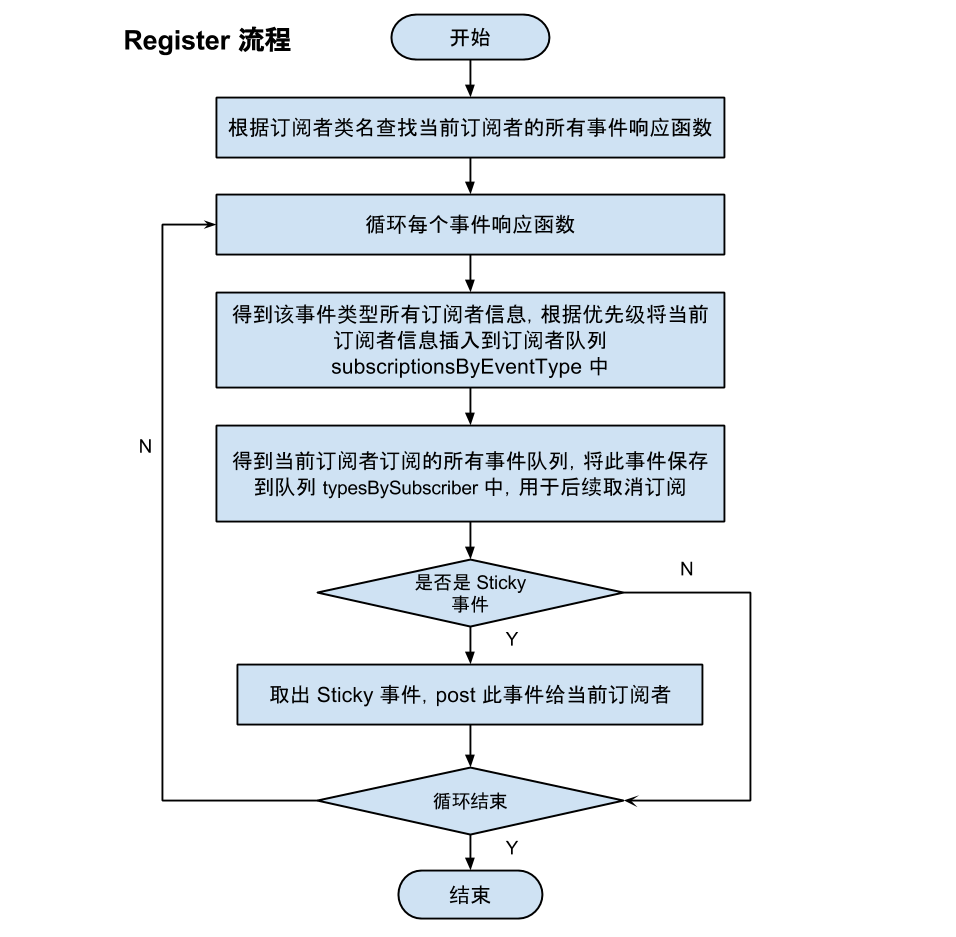
1、首先获取订阅方法的参数类型即订阅事件类型
2、根据订阅事件类型获取该事件类型的所有订阅者
3、将该订阅者添加到该事件类型的订阅者集合中即:subscriptionsByEventType
4、获取订阅者所有的订阅事件类型
5、将该事件类型添加到该订阅者的订阅事件类型集中即:typesBySubscriber
至此,就完成了订阅类中订阅方法的注册,我们来看一下整个流程
三、事件分发解析
接下来我们来分析EventBus的事件分发机制即:EventBus.getDefault().post("Test");
我们从post方法入手
 /** Posts the given event to the event bus. */

     public void post(Object event) {

         //获取当前线程的postingState

         PostingThreadState postingState = currentPostingThreadState.get();

         //取得当前线程的事件队列

         List<Object> eventQueue = postingState.eventQueue;

         //将该事件添加到当前的事件队列中等待分发

         eventQueue.add(event);

         if (!postingState.isPosting) {

             //判断是否是在主线程post

             postingState.isMainThread = Looper.getMainLooper() == Looper.myLooper();

             postingState.isPosting = true;

             if (postingState.canceled) {

                 throw new EventBusException("Internal error. Abort state was not reset");

             }

             try {

                 while (!eventQueue.isEmpty()) {

                     //分发事件

                     postSingleEvent(eventQueue.remove(0), postingState);

                 }

             } finally {

                 postingState.isPosting = false;

                 postingState.isMainThread = false;

             }

         }

     }
什么是PostingThreadState?
 final static class PostingThreadState {

         final List<Object> eventQueue = new ArrayList<Object>();//当前线程的事件队列

         boolean isPosting;//是否有事件正在分发

         boolean isMainThread;//post的线程是否是主线程

         Subscription subscription;//订阅者

         Object event;//订阅事件

         boolean canceled;//是否取消

     }
PostingThreadState中包含了当前线程的事件队列,就是当前线程所有分发的事件都保存在eventQueue事件队列中
以及订阅者订阅事件等信息,有了这些信息我们就可以从事件队列中取出事件分发给对应的订阅者。
PostingThreadState怎么获得?
 ThreadLocal 是一个线程内部的数据存储类,通过它可以在指定的线程中存储数据,而这段数据是不会与其他线程共享的。

      private final ThreadLocal<PostingThreadState> currentPostingThreadState = new ThreadLocal<PostingThreadState>() {

         @Override

         protected PostingThreadState initialValue() {

             return new PostingThreadState();

         }

     };
可以看出currentPostingThreadState的实现是一个包含了PostingThreadState的ThreadLocal对象,这样可以保证取到的都是
自己线程对应的数据。
我们有了PostingThreadState获取到了当前线程的事件队列,接下来就是事件分发,我们来看
postSingleEvent(eventQueue.remove(0), postingState);
 事件分发

      private void postSingleEvent(Object event, PostingThreadState postingState) throws Error {

         //得到事件类型

         Class<?> eventClass = event.getClass();

         boolean subscriptionFound = false;

         //是否触发订阅了该事件(eventClass)的父类,以及接口的类的响应方法.

         if (eventInheritance) {

             List<Class<?>> eventTypes = lookupAllEventTypes(eventClass);

             int countTypes = eventTypes.size();

             for (int h = 0; h < countTypes; h++) {

                 Class<?> clazz = eventTypes.get(h);

                 subscriptionFound |= postSingleEventForEventType(event, postingState, clazz);

             }

         } else {

             subscriptionFound = postSingleEventForEventType(event, postingState, eventClass);

         }

         if (!subscriptionFound) {

             if (logNoSubscriberMessages) {

                 Log.d(TAG, "No subscribers registered for event " + eventClass);

             }

             if (sendNoSubscriberEvent && eventClass != NoSubscriberEvent.class &&

                     eventClass != SubscriberExceptionEvent.class) {

                 post(new NoSubscriberEvent(this, event));

             }

         }

     }
通过以上代码我们可以发现,真正的事件分发是通过postSingleEventForEventType(event, postingState, eventClass);发出去的我们来看:
 private boolean postSingleEventForEventType(Object event, PostingThreadState postingState, Class<?> eventClass) {

         CopyOnWriteArrayList<Subscription> subscriptions;

         synchronized (this) {

             //根据事件类型获取所有的订阅者

             subscriptions = subscriptionsByEventType.get(eventClass);

         }

         //向每个订阅者分发事件

         if (subscriptions != null && !subscriptions.isEmpty()) {

             for (Subscription subscription : subscriptions) {

                 postingState.event = event;

                 postingState.subscription = subscription;

                 boolean aborted = false;

                 try {

                     postToSubscription(subscription, event, postingState.isMainThread);

                     aborted = postingState.canceled;

                 } finally {

                     postingState.event = null;

                     postingState.subscription = null;

                     postingState.canceled = false;

                 }

                 if (aborted) {

                     break;

                 }

             }

             return true;

         }

         return false;

     }
可以看到首先根据事件类型获取到所有的订阅者,然后循环向每个订阅者发送事件,通过
postToSubscription(subscription, event, postingState.isMainThread);发送出去
  private void postToSubscription(Subscription subscription, Object event, boolean isMainThread) {

         switch (subscription.subscriberMethod.threadMode) {

             case POSTING://默认的 ThreadMode,表示在执行 Post 操作的线程直接调用订阅者的事件响应方法,

             //不论该线程是否为主线程(UI 线程)。

                 invokeSubscriber(subscription, event);

                 break;

             case MAIN://在主线程中执行响应方法。

                 if (isMainThread) {

                     invokeSubscriber(subscription, event);

                 } else {

                     mainThreadPoster.enqueue(subscription, event);

                 }

                 break;

             case BACKGROUND://在后台线程中执行响应方法。

                 if (isMainThread) {

                     backgroundPoster.enqueue(subscription, event);

                 } else {

                     invokeSubscriber(subscription, event);

                 }

                 break;

             case ASYNC://不论发布线程是否为主线程,都使用一个空闲线程来处理。

                 asyncPoster.enqueue(subscription, event);

                 break;

             default:

                 throw new IllegalStateException("Unknown thread mode: " + subscription.subscriberMethod.threadMode);

         }

     }
以上的四种threadMode可以看代码注释简单了解一下,通过一下代码我们来看一下订阅方法最后是通过invokeSubscriber(subscription, event);来执行的
 //最终通过反射调用订阅者的订阅函数 并把event作为参数传入

      void invokeSubscriber(Subscription subscription, Object event) {

         try {

             subscription.subscriberMethod.method.invoke(subscription.subscriber, event);

         } catch (InvocationTargetException e) {

             handleSubscriberException(subscription, event, e.getCause());

         } catch (IllegalAccessException e) {

             throw new IllegalStateException("Unexpected exception", e);

         }

     }
真相大白;最后是通过反射的方式,调用了订阅类中的订阅方法。我们来总结一下整个事件分发的过程
1、首先获取当前线程的PostingThreadState对象从而获取到当前线程的事件队列
2、通过事件类型获取到所有订阅者集合
3、通过反射执行订阅者中的订阅方法
是不是很简单。
我们来看一下整个事件分发的流程图

四、取消注册解析
我们简单看一下取消注册的源码EventBus.getDefault().unregister(this);
  /** Unregisters the given subscriber from all event classes. */

     public synchronized void unregister(Object subscriber) {

         //获取订阅者的所有订阅的事件类型

         List<Class<?>> subscribedTypes = typesBySubscriber.get(subscriber);

         if (subscribedTypes != null) {

             for (Class<?> eventType : subscribedTypes) {

                 //从事件类型的订阅者集合中移除订阅者

                 unsubscribeByEventType(subscriber, eventType);

             }

             typesBySubscriber.remove(subscriber);

         } else {

             Log.w(TAG, "Subscriber to unregister was not registered before: " + subscriber.getClass());

         }

     }
再来看一下:unsubscribeByEventType(subscriber, eventType);
  /** Only updates subscriptionsByEventType, not typesBySubscriber! Caller must update typesBySubscriber. */

     private void unsubscribeByEventType(Object subscriber, Class<?> eventType) {

         //获取事件类型的所有订阅者

         List<Subscription> subscriptions = subscriptionsByEventType.get(eventType);

         //遍历订阅者集合,将解除的订阅者移除

         if (subscriptions != null) {

             int size = subscriptions.size();

             for (int i = 0; i < size; i++) {

                 Subscription subscription = subscriptions.get(i);

                 if (subscription.subscriber == subscriber) {

                     subscription.active = false;

                     subscriptions.remove(i);

                     i--;

                     size--;

                 }

             }

         }

     }
总结一下:
1、首先获取订阅者的所有订阅事件
2、遍历订阅事件
3、根据订阅事件获取所有的订阅了该事件的订阅者集合
4、将该订阅者移除
5、将步骤1中的集合中的订阅者移除
这样就完成了取消订阅的全过程;
最后我们从开发者的角度来总结一下EventBus的工作原理
订阅逻辑
1、首先用register()方法注册一个订阅者
2、获取该订阅者的所有订阅的方法
3、根据该订阅者的所有订阅的事件类型,将订阅者存入到每个以 事件类型为key 以所有订阅者为values的map集合中
4、然后将订阅事件添加到以订阅者为key 以订阅者所有订阅事件为values的map集合中
4.1、如果是订阅了粘滞事件的订阅者,从粘滞事件缓存区获取之前发送过的粘滞事件,响应这些粘滞事件。
事件发送逻辑
1、首先获取当前线程的事件队列
2、将要发送的事件添加到事件队列中
3、根据发送事件类型获取所有的订阅者
4、根据响应方法的执行模式,在相应线程通过反射执行订阅者的订阅方法
取消逻辑
1、首先通过unregister方法拿到要取消的订阅者
2、得到该订阅者的所有订阅事件类型
3、遍历事件类型,根据每个事件类型获取到所有的订阅者集合,并从集合中删除该订阅者
4、将订阅者从步骤2的集合中移除
EventBus3.0源码解析的更多相关文章
- Android事件总线(二)EventBus3.0源码解析
1.构造函数 当我们要调用EventBus的功能时,比如注册或者发送事件,总会调用EventBus.getDefault()来获取EventBus实例: public static EventBus ...
- solr&lucene3.6.0源码解析(四)
本文要描述的是solr的查询插件,该查询插件目的用于生成Lucene的查询Query,类似于查询条件表达式,与solr查询插件相关UML类图如下: 如果我们强行将上面的类图纳入某种设计模式语言的话,本 ...
- solr&lucene3.6.0源码解析(三)
solr索引操作(包括新增 更新 删除 提交 合并等)相关UML图如下 从上面的类图我们可以发现,其中体现了工厂方法模式及责任链模式的运用 UpdateRequestProcessor相当于责任链模式 ...
- Heritrix 3.1.0 源码解析(三十七)
今天有兴趣重新看了一下heritrix3.1.0系统里面的线程池源码,heritrix系统没有采用java的cocurrency包里面的并发框架,而是采用了线程组ThreadGroup类来实现线程池的 ...
- solr&lucene3.6.0源码解析(二)
上文描述了solr3.6.0怎么采用maven管理的方式在eclipse中搭建开发环境,在solr中,为了提高搜索性能,采用了缓存机制,这里描述的是LRU缓存,这里用到了 LinkedHashMap类 ...
- solr&lucene3.6.0源码解析(一)
本文作为系列的第一篇,主要描述的是solr3.6.0开发环境的搭建 首先我们需要从官方网站下载solr的相关文件,下载地址为http://archive.apache.org/dist/luc ...
- apache mina2.0源码解析(一)
apache mina是一个基于java nio的网络通信框架,为TCP UDP ARP等协议提供了一致的编程模型:其源码结构展示了优秀的设计案例,可以为我们的编程事业提供参考. 依照惯例,首先搭建a ...
- Retrofit2.0源码解析
欢迎访问我的个人博客 ,原文链接:http://wensibo.net/2017/09/05/retrofit/ ,未经允许不得转载! 今天是九月的第四天了,学校也正式开学,趁着大学最后一年的这大好时 ...
- 【原创】backbone1.1.0源码解析之View
作为MVC框架,M(odel) V(iew) C(ontroler)之间的联系是必不可少的,今天要说的就是View(视图) 通常我们在写逻辑代码也好或者是在ui组件也好,都需要跟dom打交道,我们 ...
随机推荐
- AngularJS之代码风格36条建议【一】(九)
前言 其实在新学一门知识时,我们应该注意下怎么书写代码更加规范,从开始就注意养成一个良好的习惯无论是对于bug的查找还是走人后别人熟悉代码都是非常好的,利人利己的事情何乐而不为呢,关于AngularJ ...
- Hawk: 无编程抓取淘女郎的所有高清照片
1.这是什么鬼? 哦?美女? 最近看了这一篇文章:http://cuiqingcai.com/1001.html 大概说的是用Python和Pyspider(这货好像是我的一位师兄写的,吓尿),抓取淘 ...
- 转:Android随笔之——使用Root权限实现后台模拟全局按键、触屏事件方法(类似按键精灵)
本文转载自CSDN的jzj1993,原文连接:http://blog.csdn.net/jzj1993/article/details/39158865 有时我们需要使用安卓实现在后台模拟系统按键,比 ...
- 如何将MySQL help contents的内容有层次的输出
经常会遇到这种情况,在一个不能上网的环境通过MySQL客户端登录数据库,想执行一个操作,却忘了操作的具体语法,各种不方便. 其实,MySQL数据库内置了帮助文档,通过help contents即可查看 ...
- JDBC常用API小结
建立数据库链接的三种方式: package com.victor_01; import java.sql.Connection; import java.sql.Driver; import java ...
- php文件扩展名判断
<!DOCTYPE> <html> <head> <meta http-equiv="Content-type" content=&quo ...
- DOMContentLoaded实现
IE系列直到IE9才支持DOMContentLoaded事件,对于IE8及其之前版本,如果html内没有框架,则可以采用document.documentELement.doScroll来判断 是否构 ...
- 1Z0-053 争议题目解析695
1Z0-053 争议题目解析695 考试科目:1Z0-053 题库版本:V13.02 题库中原题为: 695.Identify two options that Oracle recommends w ...
- PHP中curl_init函数用法
使用PHP的cURL库可以简单和有效地去抓网页.你只需要运行一个脚本,然后分析一下你所抓取的网 页,然后就可以以程序的方式得到你想要的数据了.无论是你想从从一个链接上取部分数据,或是取一个XML文件并 ...
- QT 中 关键字讲解(emit,signal,slot)
Qt中的类库有接近一半是从基类QObject上继承下来,信号与反应槽(signals/slot)机制就是用来在QObject类或其子类间通讯的方法.作为一种通用的处理机制,信号与反应槽非常灵活,可以携 ...