
本周PSP流程进度
一计划
(1)估计这个任务需要多少时间:8天
二开发
(1)需求分析:作为一名观众,我希望了解每一场的比赛成绩,以便加深对自己喜爱球队的了解,以及赛况。
(2)生成设计文档:
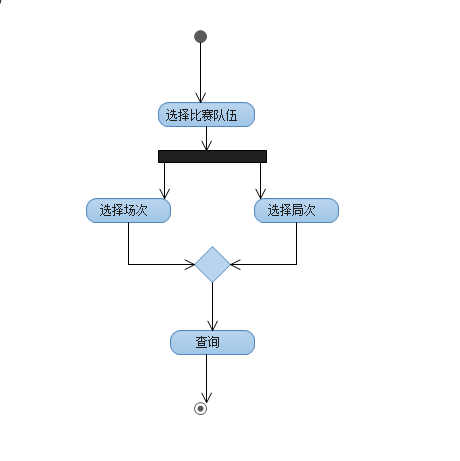
(3)设计复审(和同学交流讨论)
(4)代码规范:无
(5)具体设计:
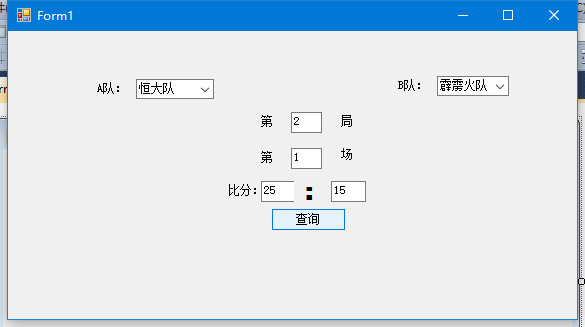
class SqlHelper
{
private static readonly string constr = ConfigurationManager.ConnectionStrings["connectionStr"].ConnectionSt
public static int ExecuteNonQuery(string sql, params SqlParameter[] pms)
{//使用using关键字定义一个范围,在范围结束时骸自动调用这个类实例的Dispose处理
using (SqlConnection con = new SqlConnection(constr))
{ //创建执行DSql命令对象
using (SqlCommand cmd = new SqlCommand(sql, con))
{
if (pms != null)
{
cmd.Parameters.AddRange(pms);
}
con.Open();
}
}
}
public static object ExecuteScalar(string sql, params SqlParameter[] pms)
{
using (SqlConnection con = new SqlConnection(constr))
{
using (SqlCommand cmd = new SqlCommand(sql, con))
{
if (pms != null)
{
cmd.Parameters.AddRange(pms);
}
con.Open();
return cmd.ExecuteScalar();
}
}
}
//执行返回SqlDataReader
public static SqlDataReader ExecuteReader(string sql, params SqlParameter[] pms)
{
SqlConnection con = new SqlConnection(constr);
using (SqlCommand cmd = new SqlCommand(sql, con))
{
if (pms != null)
{
cmd.Parameters.AddRange(pms);
}
try
{
con.Open();
return cmd.ExecuteReader(System.Data.CommandBehavior.CloseConnection);
}
catch (Exception)
{
con.Close();
con.Dispose();
throw;
}
}
}
//执行返回DataTable
public static DataTable ExecuteDataTable(string sql, params SqlParameter[] pms)
{
DataTable dt = new DataTable();
using (SqlDataAdapter adapter = new SqlDataAdapter(sql, constr))
{
if (pms != null)
{
adapter.SelectCommand.Parameters.AddRange(pms);
}
adapter.Fill(dt);
}
return dt;
}
}
class Info
{
public string Name { get; set; }
public int First { get; set; }
public int Second { get; set; }
public int Third { get; set; }
public int Fourth { get; set; }
public int Fifth { get; set; }
public int Score { get; set; }
}
private void Select1_Click_1(object sender, EventArgs e)
{
string sql = "select * from Bifen where Name=@Name";
SqlParameter[] paras = new SqlParameter[]
{
new SqlParameter("@Name",Name),
};
using (SqlDataReader reader = SqlHelper.ExecuteReader(sql, paras))
{
if (reader.Read())
{
Info bf = new Info();
bf.Name = (string)reader["Name"];
bf.Second = reader.GetInt32(1);
bf.Third = reader.GetInt32(2);
bf.Fourth = reader.GetInt32(3);
bf.Fifth = reader.GetInt32(4);
bf.Score = reader.GetInt32(5);
}
}
}
private void button1_Click(object sender, EventArgs e)
{
if(comboBox1.selectIndex==0)
{
txtbox1.Text = bf.first.ToString();
}
private void button1_Click(object sender, EventArgs e)
{
if (comboBox2.Text=="恒大:霹雳火"&&comboBox1.Text == "第一局") { textBox1.Text = "25:15"; }
if (comboBox2.Text == "恒大:霹雳火" && comboBox1.Text == "第二局") { textBox1.Text = "25:18"; }
if (comboBox2.Text == "恒大:霹雳火" && comboBox1.Text == "第三局") { textBox1.Text = "20:25"; }
if (comboBox2.Text == "恒大:霹雳火" && comboBox1.Text == "第四局") { textBox1.Text = "21:25"; }
if (comboBox2.Text == "恒大:霹雳火" && comboBox1.Text == "第五局") { textBox1.Text = "15:13"; }
}
private void button2_Click(object sender, EventArgs e)
{
if (comboBox2.Text == "恒大:霹雳火”) { textBox2.Text = "3:2"; }
if (comboBox2.Text == "恒大:霹雳火") { textBox2.Text = "3:1"; }
}
(6)代码复审:无
(7)测试:无
进行到此处,未完待续......
本周PSP流程进度的更多相关文章
- 本周psp
本周PSP 类别 内容 开始时间 中止时间 终止时间 总用时 产品计划会议 定义产品的用户需求,以及从这个产品中得到什么.解决啥问题 18:00 0 20:00 120分钟 撰写博客 会议记录与个 ...
- 14TH本周工作量及进度统计
14TH本周工作量及进度统计 本周psp: C(类别) C(内容) S(开始时间) ST(结束时间) I(中断时间) T(实际时间) 活动 本周会议 1 ...
- 本周psp(11月17-23)
本周psp进度 11月19号 内容 开始时间 结束时间 打断时间 净时间 发布读书笔记 11:05 11:25 0 20m 看构建之法书 9:50 10:48 5m 53m 11月20号 内容 开始时 ...
- 8th 本周工作量及进度统计
本周PSP: C(类别) C(内容) S(开始时间) ST(结束时间) I(中断时间) T(实际时间) 活动 本周站立会议 -- -- -- 340 撰写博客 构建之法有感 22:10 23:44 3 ...
- 本周PSP+历年作品评论
本周PSP 类别 内容 开始时间 结束时间 间断时间 净时间(min) 9月11号 看书 构建之法 19:00 21:00 14 106 9月12号 写程序 词频统计多需求版 8:00 14:23 3 ...
- 12th 本周工作量及进度统计
本周PSP: C(类别) C(内容) S(开始时间) ST(结束时间) I(中断时间) T(实际时间) 活动 1日—3日 用户调查 12月1日21:00 12月3日12:00 25小时 14小时 活动 ...
- 11th 本周工作量及进度统计
本周PSP: C(类别) C(内容) S(开始时间) ST(结束时间) I(中断时间) T(实际时间) 文档 11月30日 回顾5个问题 13:00 13:50 2 48 11月30日 如果重新来过 ...
- 10th 本周工作量及进度统计
本周PSP C(类别) C(内容) S(开始时间) ST(结束时间) I(中断时间) T(实际时间) 文档 11月22日 规格说明书练习 10:23 15:30 132 175 11月23日 知识点 ...
- 9th 本周工作量及进度统计
本周psp C(类别) C(内容) S(开始时间) ST(结束时间) I(中断时间) T(实际时间) 文档 11月10日 Beta发布的评论 20:30 21:18 0:05 43 活动 11月12日 ...
随机推荐
- 初次启动app校验的活动图和分析
初次启动活动图 version 1 version 2 version 3 根据上图的活动图分析,可能存在较严重的问题: 主线程中如果发现是sdcard的url,则可能进行重命名 FirstEnter ...
- From 202.97.60.193 icmp_seq=48 Time to live exceeded
从浙江某电信ip的服务器上 ping 大陆外某个外网地址不通,报如下信息: From 202.97.60.193 icmp_seq=48 Time to live exceeded google,百度 ...
- samba共享目录
samba 原理:在linux机器上共享一个目录出来,让windows通过网上邻居去访问 (i)共享一个不需要输入用户名和密码就能访问的目录(可读不可写) 一.打开配置文件: vim /etc/sam ...
- 游戏的套路你知道吗? H5 Canvas刮刮乐
玩游戏的人 很多时候都会遇到翻牌子 开宝箱. 总有人傻傻的在哪里还纠结很久到底点哪一个! 纠结 指不定翻哪一个会多一点,你明明看到那个卡片的奖项多 . 那我就告诉你好了 其实很多时候在你点开那个 ...
- QQ聊天界面模式切换
1.打开一个聊天窗口 2.按照图上步骤 3.模式 3-1气泡模式 3-2文本模式
- Linux下的DOS攻击
Linux下的DOS攻击 DOS是Denial of service的简称,即拒绝服务,造成Dos攻击行为被称为Dos攻击,其目的是使计算机或网络无法提供正常的服务.最常见的Dos攻击有计算机带宽攻击 ...
- Jquery-zTree的用法
[部分函数和属性介绍] 核心:zTree(setting, [zTreeNodes]) 这个函数接受一个JSON格式的数据对象setting和一个JSON格式的数据对象zTreeNodes,从而建立 ...
- Java 中使用javah编译头文件出现找不到类的情况
在工程的bin目录下,输入命令: javah -classpath . -jni 类路径.JNI类
- C#中的扩展方法
扩展方法使你能够向现有类型“添加”方法,而无需创建新的派生类型.重新编译或以其他方式修改原始类型. 扩展方法是一种特殊的静态方法,但可以像扩展类型上的实例方法一样进行调用. 以上是msdn官网对扩展方 ...
- Flashback Data Archive ( Oracle Total Recall ) introduced in 11g
Flashback Data Archive feature is part of Oracle Total Recall technology. Flashback Data Archive fea ...