
springboot2.0 集成elasticsearch,实现检索、分页、排序
springboot整合es的方式:
- transport方式(7.0弃用,8.0移除)
- spring-data(完全当做数据库来用,无法全部支持es,内部也是基于transport,包装后使用非常简单,和JPA基本类似)
- rest(low-level和high-level,low-level非常完善,支持所有版本,需要自己组装request和解析response,high-level是对low-level的包装,必须跟着大版本走)
- 根据官方的建议,我们一般采用high-level的方式来对ES操作,high-level方式无法实现的用low-level实现。
- 本文用low-level方式实现获取所有索引列表GET /_cat/indices?v,这个在high-level里没有封装,基本的检索、分页、排序用high-level实现。
一、依赖
        <dependency>

            <groupId>org.elasticsearch.client</groupId>

            <artifactId>elasticsearch-rest-high-level-client</artifactId>

            <version>6.5.1</version>

        </dependency>

        <!--如果不指定,springboot会自动引入5.x版本,所以需要强行引入高版本,

            elasticsearch-rest-client版本是同步,不需要强行指定,如果发现不同步也可以指定-->

        <dependency>

            <groupId>org.elasticsearch</groupId>

            <artifactId>elasticsearch</artifactId>

            <version>6.5.1</version>

        </dependency>
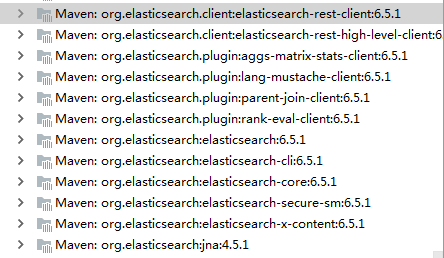
引入库情况:
二、application.yml
可以配置多个数据节点
elasticsearch:

  ip: 192.168.31.10:9200,192.168.1.101:9200
三、config
@Configuration

public class ESConfig {

    private Logger logger = LoggerFactory.getLogger(ESConfig.class);

    private static final int ADDRESS_LENGTH = 2;

    private static final String HTTP_SCHEME = "http";

    /**

     * 使用冒号隔开ip和端口

     */

    @Value("${elasticsearch.ip}")

    String[] ipAddress;

    @Bean

    public RestClientBuilder restClientBuilder() {

        HttpHost[] hosts = Arrays.stream(ipAddress)

                .map(this::makeHttpHost)

                .filter(Objects::nonNull)

                .toArray(HttpHost[]::new);

        logger.info("ES hosts:{}", Arrays.toString(hosts));

        return RestClient.builder(hosts);

    }


    //low-level

    @Bean

    public RestClient restClient(){

        return restClientBuilder().build();

    }

  //high-level

    @Bean(name = "highLevelClient")

    public RestHighLevelClient highLevelClient(@Autowired RestClientBuilder restClientBuilder) {

        restClientBuilder.setMaxRetryTimeoutMillis(60000);

        return new RestHighLevelClient(restClientBuilder);

    }

    private HttpHost makeHttpHost(String s) {

        String[] address = s.split(":");

        if (address.length == ADDRESS_LENGTH) {

            String ip = address[0];

            int port = Integer.parseInt(address[1]);

            return new HttpHost(ip, port, HTTP_SCHEME);

        } else {

            return null;

        }

    }

}
四、low-level实例
@Service

public class ESIndexServiceImpl implements ESIndexService {

    @Resource

    RestClient restClient;

    @Override

    public List<ESIndexObject> getAllESIndex() {

        return getESIndexByName("");

    }

    private <T> List<T> getDataByQuery(String method,String query)

    {

        Request request = new Request(method.toUpperCase(),query);

        try {

            Response response = restClient.performRequest(request);

            RequestLine requestLine = response.getRequestLine();

            HttpHost host = response.getHost();

            int statusCode = response.getStatusLine().getStatusCode();

            Header[] headers = response.getHeaders();

            System.out.println(requestLine);

            System.out.println(host);

            System.out.println(statusCode);

            System.out.println(headers);

            String responseBody = EntityUtils.toString(response.getEntity());

            ObjectMapper mapper = new ObjectMapper();

            List<T> list = mapper.readValue(responseBody,new TypeReference<List<T>>(){});

            return list;

        } catch (Exception e) {

            e.printStackTrace();

            return null;

        }

    }


    //获取指定或者所有索引
    //cat api不支持分页,所以数据返回后在client分页,做在前端,数据量也不大

    @Override

    public List<ESIndexObject> getESIndexByName(String index) {

        if(index==null) index = "";

        String strQuery = "/_cat/indices/*"+index+"*?v&h=uuid,health,status,index,docsCount,storeSize,cds&s=cds:desc&format=json";

        List<ESIndexObject> list =  getDataByQuery("GET",strQuery);

        return list;

    }

}
实体:
//实体和response返回字段一致,可以用反序列化直接生成对象

public class ESIndexObject implements Serializable {

    private String uuid;

    private String index;

    private String health;

    private String status;

    private int docsCount;

    private String storeSize;

    private String cds; //creation.date.string

    。。。省略getter,setter

}
五、high-level方式
数据:
PUT customer

{

  "settings": {

    "number_of_replicas": 0,

    "number_of_shards": 1,

    "index":{

      "analysis.analyzer.default.type":"ik_max_word",

      "analysis.search_analyzer.default.type":"ik_smart"

    }

  },

  "mappings": {

    "doc":{

      "properties":{

      }

    }

  }

}

类似这样,多弄几个数据

POST /customer/doc/510228192101063619

{

  "name":"燕子李三",

  "id":"510228192101063619",

  "addr":"天津市前卫营850号",

  "tel":"13700102347"

}
实体:
public class ESCustomer implements Serializable {

    private long id;

    private String name;

    private String addr;

    private String tel;

    ...省略getter,setter

}
实现检索,支持排序和分页:
@Service

public class ESCustomerServiceImpl implements ESCustomerService {

    @Resource

    RestClient restClient;

    @Resource(name = "highLevelClient")

    RestHighLevelClient restHighLevelClient;

    private ObjectMapper mapper = new ObjectMapper();

    private String indexName = "customer";

    //包装SearchResponse返回数据到List

    private <T> List<T> wrapperData(SearchResponse response) throws Exception {

        SearchHits hits = response.getHits();

        long totalHits = hits.getTotalHits();

        System.out.println("Customer search totalHits:" + totalHits);

        List<T> list = new ArrayList<>();

        SearchHit[] searchHits = hits.getHits();

        //SearchHits实现了Iterable接口,可以直接进行迭代

        //根据测试这里可以用hits变量替换searchHits变量

        for (SearchHit hit : searchHits) {

            String index = hit.getIndex(); //获取文档的index

            String type = hit.getType(); //获取文档的type

            String id = hit.getId(); //获取文档的id

            Map<String, Object> sourceMap = hit.getSourceAsMap(); //获取文档内容,封装为map

            System.out.println("index:" + index + ",type:" + type + ",id:" + id + ",\nsource:" + sourceMap);

            String sourceString = hit.getSourceAsString(); //获取文档内容,转换为json字符串。

            T object = mapper.readValue(sourceString, new TypeReference<T>() {

            });

            list.add(object);

        }

        return list;

    }

    //包装SearchSourceBuilder,用pageable完成分页和排序的设置

    //排序字段必须建立keyword字段

    private SearchSourceBuilder wrapperBuilder(SearchSourceBuilder builder, Pageable pageable) {

        builder.from(pageable.getPageNumber() * pageable.getPageSize());

        builder.size(pageable.getPageSize());

        Sort sort = pageable.getSort();

        Iterator iterator = sort.iterator();

        while (iterator.hasNext()) {

            Sort.Order order = (Sort.Order) iterator.next();

            //用keyword字段来排序,所以在建立索引的时候,就必须同步建立keyword字段

            builder.sort(order.getProperty() + ".keyword", order.getDirection() == Sort.Direction.ASC ? SortOrder.ASC : SortOrder.DESC);

        }

        return builder;

    }

    @Override

    public Page<ESCustomer> searchAllInPage(Pageable pageable) {

       return searchAllByAllField("",pageable);

    }

    //后期代码需重构,通过反射获取字段,然后构建数组来实现
  //query有值就按按值做全字段全文检索,对于类似身份证和电话等字段采用通配wildcard检索方式,query无值则返回所有数据
   //按Pageable分页和排序,暂时只能排序一个字段

    @Override

    public Page<ESCustomer> searchAllByAllField(String query, Pageable pageable) {

        SearchRequest searchRequest = new SearchRequest(this.indexName);

        SearchSourceBuilder builder = wrapperBuilder(new SearchSourceBuilder(),pageable);

        if(query==null||query=="")

        {

            builder.query(QueryBuilders.matchAllQuery());

        }else {

            BoolQueryBuilder boolQueryBuilder = QueryBuilders.boolQuery()

                    .should(QueryBuilders.matchQuery("name",query))

                    .should(QueryBuilders.matchQuery("addr",query))

                    .should(QueryBuilders.wildcardQuery("tel","*"+query+"*"))

                    .should(QueryBuilders.wildcardQuery("id","*"+query+"*"));

            builder.query(boolQueryBuilder);

        }

        searchRequest.source(builder);

        try {

            SearchResponse searchResponse = restHighLevelClient.search(searchRequest,RequestOptions.DEFAULT);

            List<ESCustomer> esCustomerList = wrapperData(searchResponse);

            Page<ESCustomer> esCustomerPage = new PageImpl<>(esCustomerList, pageable,

                    searchResponse.getHits().getTotalHits());

            return esCustomerPage;

        }catch (Exception e)

        {

            e.printStackTrace();

            return  null;

        }

    }

    @Override

    public List<ESCustomer> searchAll() {

        SearchRequest searchRequest = new SearchRequest(indexName);

        SearchSourceBuilder searchSourceBuilder = new SearchSourceBuilder();

        searchSourceBuilder.query(QueryBuilders.matchAllQuery());

        searchRequest.source(searchSourceBuilder);

        try {

            SearchResponse searchResponse = restHighLevelClient.search(searchRequest, RequestOptions.DEFAULT);

            List<ESCustomer> esCustomerList = wrapperData(searchResponse);

            return esCustomerList;

        } catch (Exception e) {

            e.printStackTrace();

            return null;

        }

    }

    // 使用low-level方式实现检索

    // 需要自己实现返回的json数据封装,演示,暂时未实现

    @Deprecated

    public List<ESCustomer> searchByNameByRaw(String name) {

        String query = "{\n" +

                "  \"query\": {\n" +

                "    \"match\": {\n" +

                "      \"name\": {\n" +

                "        \"query\": \"" + name + "\"\n" +

                "        , \"analyzer\": \"ik_smart\"\n" +

                "      }\n" +

                "    }\n" +

                "  },\n" +

                "  \"highlight\": {\n" +

                "    \"fields\": {\"name\": {}}\n" +

                "  }\n" +

                "}";

        Request request = new Request("GET", "/user*/_search");

        HttpEntity httpEntity = new NStringEntity(query, ContentType.APPLICATION_JSON);

        request.setEntity(httpEntity);

        try {

            Response response = restClient.performRequest(request);

            String responseBody = EntityUtils.toString(response.getEntity());

            System.out.println(response);

            System.out.println(responseBody);

            JSONObject jsonObject = JSON.parseObject(responseBody);

            Object hits = jsonObject.get("hits");

            System.out.println(hits);

            ObjectMapper mapper = new ObjectMapper();

            Map mapResponseBody = mapper.readValue(responseBody, Map.class);

            Object source = mapResponseBody.get("hits");

            System.out.println(source);

//            List<ESCustomer> list = mapper.readValue(responseBody,new TypeReference<List<ESCustomer>>(){});

//            return list;

            return null;

        } catch (Exception e) {

            e.printStackTrace();

            return null;

        }

    }

}
Controller:
@Controller

@RequestMapping("/esCustomer")

public class ESCustomerController {

    @Resource

    ESCustomerService esCustomerService;

    @RequestMapping("/list")

    public String list() {

        return "/ESCustomer/customerList";

    }

    @RequestMapping("/getList")

    @ResponseBody

    public Object getESCustomerList(HttpServletRequest request) {

        Pageable pageable = ControllerUtils.getPageInfo(request);

        String searchText = ControllerUtils.getSearchText(request);

        Page<ESCustomer> page = esCustomerService.searchAllByAllField(searchText,pageable);

        Map<String, Object> map = new HashMap<>();

        map.put("total", page.getTotalElements());

        map.put("rows", page.getContent());

        return map;

    }

}
springboot2.0 集成elasticsearch,实现检索、分页、排序的更多相关文章
- SpringBoot2.0集成FastDFS
SpringBoot2.0集成FastDFS 前两篇整体上介绍了通过 Nginx 和 FastDFS 的整合来实现文件服务器.但是,在实际开发中对图片或文件的操作都是通过应用程序来完成的,因此,本篇将 ...
- (补漏)Springboot2.0 集成shiro权限管理
原文Springboot2.0 集成shiro权限管理 一.关于停止使用外键. 原本集成shiro建立用户.角色.权限表的时候使用了外键,系统自动创建其中两个关联表,用@JoinTable.看起来省事 ...
- SpringBoot2.0集成Shiro
1.shiro的三个核心概念: 1)Subject:代表当前正在执行操作的用户,但Subject代表的可以是人,也可以是任何第三方系统帐号.当然每个subject实例都会被绑定到SercurityMa ...
- springboot2.0集成shiro出现ShiroDialect报错找不到AbstractTextChildModifierAttrPr
@Bean public ShiroDialect shiroDialect() { return new ShiroDialect(); } 报错出现找不到org/thymeleaf/process ...
- SpringBoot2.0 整合 ElasticSearch框架,实现高性能搜索引擎
本文源码:GitHub·点这里 || GitEE·点这里 一.安装和简介 ElasticSearch是一个基于Lucene的搜索服务器.它提供了一个分布式多用户能力的全文搜索引擎,基于RESTful ...
- springboot2.0 使用aop实现PageHelper分页
参考: https://blog.csdn.net/qq_24076135/article/details/85212081 https://www.jianshu.com/p/036d31ae77d ...
- Springboot2.0 集成shiro权限管理
在springboot中结合shiro教程搭建权限管理,其中几个小细节的地方对新手不友好,伸手党更是无法直接运行代码,搭建过程容易遇坑,记录一下.关键的地方也给注释了. 版本:springboot版本 ...
- SpringBoot2.0集成WebSocket,实现后台向前端推送信息
感谢作者,支持原创: https://blog.csdn.net/moshowgame/article/details/80275084 什么是WebSocket? WebSocket协议是基于TCP ...
- springboot2.0集成webSocket
WebSocket和http的区别? http协议是用在应用层的协议,他是基于tcp协议的,http协议建立链接也必须要有三次握手才能发送信息. http链接分为短链接,长链接,短链接是每次请求都要三 ...
随机推荐
- CC2640 LaunchPad入门试用-第一篇
1. 先安装固件ble_cc26xx_setupwin32_2_01_00_44423.exe. 2. 打开IAR先找到一个例程测试一下D:\ti\simplelink\ble_cc26xx_2_01 ...
- Hive支持行级update、delete时遇到的问题
Hive从0.14版本开始支持事务和行级更新,但缺省是不支持的,需要一些附加的配置.要想支持行级insert.update.delete,需要配置Hive支持事务.(行级的insert好像不配置也能运 ...
- mysql 开启远程连接
如图,修改mysql数据库中user表中的User字段为root的host为%,然后重新启动mysql服务即可让远程桌面连接本地.
- Linux命令应用大词典-第29章 SELinux管理
29.1 sestaus:显示SElinux的状态 29.2 getenforce:显示当前SELinux的应用模式 29.3 setenforce:修改SELinux的应用模式 29.4 getfa ...
- Linux命令应用大词典-第7章 字符串、文件和命令查找
7.1 grep:字符串.文件和命令的查找 7.2 egrep:在文件或标准输入中查找模式 7.3 fgrep:在每个文件或是标准输入中查找模式 7.4 find:列出文件系统内符合条件的文件 7.5 ...
- CF245H Queries for Number of Palindromes
题目描述 给你一个字符串s由小写字母组成,有q组询问,每组询问给你两个数,l和r,问在字符串区间l到r的字串中,包含多少回文串. 时空限制 5000ms,256MB 输入格式 第1行,给出s,s的长度 ...
- Vue 编程之路(二)——跳转页面传值
最近公司的一个项目中使用 Vue 2.0 + element UI 实现一个后台管理系统的前端部分,属于商城类型.其中我负责的部分有一项需要跳转页面,由于跳转前的页面是多个组件构成的,所以在跳转页面的 ...
- 简单构建基于RDF和SPARQL的KBQA(知识图谱问答系统)
本文主要通过python实例讲解基于RDF和SPARQL的KBQA系统的构建.该项目可在python2和python3上运行通过. 注:KBQA即是我们通常所说的基于知识图谱的问答系统.这里简单构建的 ...
- 七:Web Application Proxy
yarn自带了web接口,默认是和RM一起的(8088端口).但是为了减少从web接口受到的攻击,可以把Web接口单独放在别的机器上. 设置下web代理就行了 Configurations Confi ...
- CentOS6 安装VNCserver
1.下载vncserver yum install tigervnc tigervnc-server -y 2.配置 vncserver vi /etc/sysconfig/vncserver 在文件 ...