
安装第三方模块时遇到Python version 2.7 required, which was not found
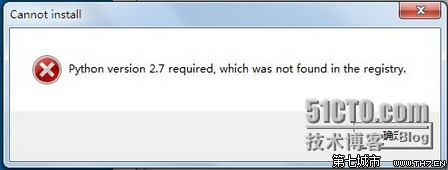
#
# script to register Python 2.0 or later for use with win32all
# and other extensions that require Python registry settings
#
# written by Joakim Loew for Secret Labs AB / PythonWare
#
# source:
# http://www.pythonware.com/products/works/articles/regpy20.htm
#
# modified by Valentine Gogichashvili as described in http://www.mail-archive.com/distutils-sig@python.org/msg10512.html
import sys
from _winreg import *
# tweak as necessary
version = sys.version[:3]
installpath = sys.prefix
regpath = "SOFTWARE\\Python\\Pythoncore\\%s\\" % (version)
installkey = "InstallPath"
pythonkey = "PythonPath"
pythonpath = "%s;%s\\Lib\\;%s\\DLLs\\" % (
installpath, installpath, installpath
)
def RegisterPy():
try:
reg = OpenKey(HKEY_CURRENT_USER, regpath)
except EnvironmentError as e:
try:
reg = CreateKey(HKEY_CURRENT_USER, regpath)
SetValue(reg, installkey, REG_SZ, installpath)
SetValue(reg, pythonkey, REG_SZ, pythonpath)
CloseKey(reg)
except:
print "*** Unable to register!"
return
print "--- Python", version, "is now registered!"
return
if (QueryValue(reg, installkey) == installpath and
QueryValue(reg, pythonkey) == pythonpath):
CloseKey(reg)
print "=== Python", version, "is already registered!"
return
CloseKey(reg)
print "*** Unable to register!"
print "*** You probably have another Python installation!"
if __name__ == "__main__":
RegisterPy()
来源:http://www.th7.cn/Program/Python/201608/921669.shtml
安装第三方模块时遇到Python version 2.7 required, which was not found的更多相关文章
- Python 安装第三方模块时 报Retrying(Retry(total=4, connect=None, read=None, redirect=None, status=None))...[WinError 10061]由于目标计算机积极拒绝,无法连接 错误
今日在安装ddt模块时(Windows系统),cmd报了一个以前从未见过的错误,如下图所示: 经百度,知是镜像源的问题,将安装命令改成如下命令: pip install ddt -i https:// ...
- Windows系统Python 安装第三方模块时,提示pip版本有问题
如果按照提示输入python -m pip install --upgrade pip 还不行, 那么执行easy_install --upgrade pip 即可 参考:https://stacko ...
- 【亲测】Python:解决方案:Python Version 2.7 required, which was not found in the registry
好久不更新随笔了,今天因为数据可视化作业,想抓取一些人人网好友关系数据,于是开始尝试python,用到numpy模块,安装的时候提示: 'Python Version 2.7 required, wh ...
- python使用pip安装第三方模块遇到的问题及解决方法
python使用pip安装第三方模块遇到的问题及解决方法 关注公众号"轻松学编程"了解更多. 使用国内源: 清华:https://pypi.tuna.tsinghua.edu.cn ...
- python 安装第三方模块
在Python中,安装第三方模块,是通过setuptools这个工具完成的. 如果你正在使用Mac或Linux,安装setuptools本身这个步骤就可以跳过了. 如果你正在使用Windows,请首先 ...
- sae python安装第三方模块
sae python安装第三方模块 经过这一个星期的折腾,发现编程真心不是看出来的,真心是跟着书上的代码敲出来的.sae的服务做得很好,不过有时候会崩就是了.当sae上没有自己所需要的第三方模块时,可 ...
- python——模块(Module)的概念、使用以及安装第三方模块
一.模块定义 python中,一个.py文件就是一个模块(Module). 使用模块的好处:1.提高了代码的可维护性.我们把函数进行分组,分别放在不同的模块中.2.编写代码不必要从0开始,当一个模块编 ...
- 【转】安装第三方库出现 Python version 2.7 required, which was not found in the registry
安装第三方库出现 Python version 2.7 required, which was not found in the registry 建立一个文件 register.py 内容如下. 然 ...
- 安装第三方库出现 Python version 2.7 required, which was not found in the registry
安装第三方库出现 Python version 2.7 required, which was not found in the registry 建立一个文件 register.py 内容如下. 然 ...
随机推荐
- MongoDB的连接字符串
本文导读:MongoDB数据库与传统的关系型数据库相比,它具有操作简单.完全免费.源码公开等特点,这使MongoDB产品广泛应用于各种大型门户网站和专业网站.由于MongoDB连接并不支持HTTP协议 ...
- JSP中的TAG文件和TLD文件小结
在jsp文件中,可以引用tag和tld文件. 1.对于tag文件 <%@ taglib prefix="ui" tagdir="/WEB-INF/tags" ...
- [Functional Programming Moand] Update The State Of A State Monad (put)
Stateful computations require the ability for their state to change overtime. We take a look on one ...
- error: could not install *smartsocket* listener: cannot bind to 127.0.0.1:5037
问题原因:端口5037被占用 解决方案: 方式一:可以用cmd命令 C:\Users\Administrator>netstat -ano | findstr "5037" ...
- ES6 iterator 迭代器
iterator使用TypeScript 的描述: interface Iterable { [Symbol.iterator]() : Iterator, } interface Iterator ...
- sql jion
A Visual Explanation of SQL Joins I thought Ligaya Turmelle's post on SQL joins was a great primer f ...
- iOS AVPlayer视频播放器
代码地址如下:http://www.demodashi.com/demo/11168.html 一.运行效果 二.实现过程 ①.创建播放器avPlayer //创建播放器 url = [url str ...
- 【HTML】百度地图webAPI使用
1.登录百度地图,创建WEB应用,设置白名单.获取该WEB应用的ak 2.在页面引入相应的js和ak 3.效果(CSS不提供): 4.实例化地图map,并给map添加相应的搜索和确定坐标事件 < ...
- Tomcat_启动参数设置
1.修改启动时内存参数.并指定JVM时区 (在windows server 2008 下时间少了8个小时): 在Tomcat上运行j2ee项目代码时,经常会出现内存溢出的情况,解决办法是在系统参数中增 ...
- CentOS安装rz\sz命令
执行以下命令进行安装: yum install lrzsz 安装完成后即可操作rz和sz命令. rz:本地文件上传. sz:Linux系统文件下载到本地.