
使用ZBar来读取条形码和二维码的方法
版权声明:本文为博主原创文章,未经博主允许不得转载。
1.使用ZBar项目。下载地址是: http://zbar.sourceforge.net/iphone/index.html
2.新建一个项目。
3.导入 ZBar的sdk。把ZBar SDK的目录拉入项目,然后选中copy选项
4.在项目文件的target中加入 以下framework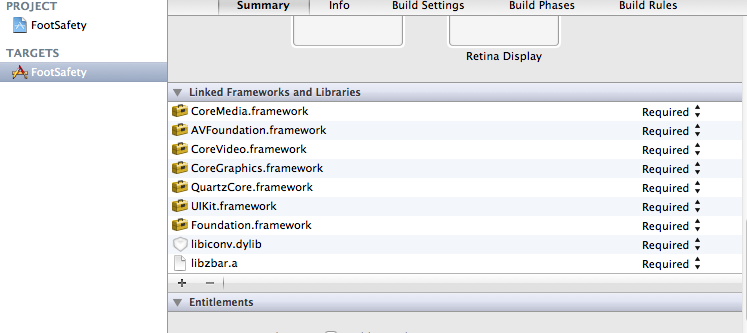
5.在appDelegate文件中加入 标记部分的代码
- - (BOOL)application:(UIApplication *)application didFinishLaunchingWithOptions:(NSDictionary *)launchOptions
- {
- self.window = [[[UIWindow alloc] initWithFrame:[[UIScreen mainScreen] bounds]] autorelease];
- // Override point for customization after application launch.
- self.viewController = [[[ViewController alloc] initWithNibName:@"ViewController" bundle:nil] autorelease];
- self.window.rootViewController = self.viewController;
- [self.window makeKeyAndVisible];
- // force view class to load so it may be referenced directly from NIB
- [ZBarReaderView class];
- return YES;
- }
注意此代码:
- // force view class to load so it may be referenced directly from NIB
- [ZBarReaderView class];
6.在.h文件中加入 ZBarReaderViewDelegate的实现,代码如下:
- //
- // ViewController.h
- // FootSafety
- //
- // Created by 泽宇 徐 on 12-6-12.
- // Copyright (c) 2012年 __MyCompanyName__. All rights reserved.
- //
- #import <UIKit/UIKit.h>
- #import "ZBarSDK.h"
- @interface ViewController : UIViewController<ZBarReaderViewDelegate>
- {
- IBOutlet UILabel * label ;
- ZBarReaderView *readerView;
- ZBarCameraSimulator *cameraSim;
- }
- @property(nonatomic,retain) UILabel * label ;
- @property (nonatomic, retain) IBOutlet ZBarReaderView *readerView;
- @end
7.在.m文件中要实现的主要方法是:
- - (void) readerView: (ZBarReaderView*) view
- didReadSymbols: (ZBarSymbolSet*) syms
- fromImage: (UIImage*) img
- {
- // do something useful with results
- for(ZBarSymbol *sym in syms) {
- self.label.text = sym.data;
- break;
- }
- }
这里是功能是读取照片信息,把条码放如label显示
- -(void) viewDidAppear:(BOOL)animated
- {
- // run the reader when the view is visible
- [readerView start];
- }
这个是在显示视图的时候,启动摄像头,开始扫描
- - (void)viewDidLoad
- {
- [super viewDidLoad];
- // Do any additional setup after loading the view, typically from a nib.
- // the delegate receives decode results
- readerView.readerDelegate = self;
- // you can use this to support the simulator
- if(TARGET_IPHONE_SIMULATOR) {
- cameraSim = [[ZBarCameraSimulator alloc]
- initWithViewController: self];
- cameraSim.readerView = readerView;
- }
- }
在初始化的时候,设置托管。
.m文件所有内容是:
- //
- // ViewController.m
- // FootSafety
- //
- // Created by 泽宇 徐 on 12-6-12.
- // Copyright (c) 2012年 __MyCompanyName__. All rights reserved.
- //
- #import "ViewController.h"
- @interface ViewController ()
- @end
- @implementation ViewController
- @synthesize label;
- @synthesize readerView;
- - (void)viewDidLoad
- {
- [super viewDidLoad];
- // Do any additional setup after loading the view, typically from a nib.
- // the delegate receives decode results
- readerView.readerDelegate = self;
- // you can use this to support the simulator
- if(TARGET_IPHONE_SIMULATOR) {
- cameraSim = [[ZBarCameraSimulator alloc]
- initWithViewController: self];
- cameraSim.readerView = readerView;
- }
- }
- -(void) viewDidAppear:(BOOL)animated
- {
- // run the reader when the view is visible
- [readerView start];
- }
- - (void) readerView: (ZBarReaderView*) view
- didReadSymbols: (ZBarSymbolSet*) syms
- fromImage: (UIImage*) img
- {
- // do something useful with results
- for(ZBarSymbol *sym in syms) {
- self.label.text = sym.data;
- break;
- }
- }
- - (void)viewDidUnload
- {
- [super viewDidUnload];
- // Release any retained subviews of the main view.
- }
- - (BOOL)shouldAutorotateToInterfaceOrientation:(UIInterfaceOrientation)interfaceOrientation
- {
- return (interfaceOrientation != UIInterfaceOrientationPortraitUpsideDown);
- }
- -(void) dealloc
- {
- [self.readerView release];
- [self.label release];
- [super dealloc];
- }
- @end
在ViewController.xib文件中 增加一个view,并且修改view的类是ZBarReaderView ,并且指向 .h文件中定义的
- ZBarReaderView *readerView;
版权声明:本文为博主原创文章,未经博主允许不得转载。

.使用ZBar项目。下载地址是: http://zbar.sourceforge.net/iphone/index.html

.新建一个项目。

.导入 ZBar的sdk。把ZBar SDK的目录拉入项目,然后选中copy选项

.在项目文件的target中加入 以下framework

.在appDelegate文件中加入 标记部分的代码

[cpp] view plain copy

- (BOOL)application:(UIApplication *)application didFinishLaunchingWithOptions:(NSDictionary *)launchOptions

{

    self.window = [[[UIWindow alloc] initWithFrame:[[UIScreen mainScreen] bounds]] autorelease];

    // Override point for customization after application launch.

    self.viewController = [[[ViewController alloc] initWithNibName:@"ViewController" bundle:nil] autorelease];

    self.window.rootViewController = self.viewController;

    [self.window makeKeyAndVisible];

    // force view class to load so it may be referenced directly from NIB

    [ZBarReaderView class];

    return YES;

}

注意此代码:

[cpp] view plain copy

// force view class to load so it may be referenced directly from NIB

 [ZBarReaderView class];

.在.h文件中加入   ZBarReaderViewDelegate的实现,代码如下:

[cpp] view plain copy

//

//  ViewController.h

//  FootSafety

//

//  Created by 泽宇 徐 on 12-6-12.

//  Copyright (c) 2012年 __MyCompanyName__. All rights reserved.

//

#import <UIKit/UIKit.h>

#import "ZBarSDK.h"

@interface ViewController : UIViewController<ZBarReaderViewDelegate>

{

    IBOutlet UILabel  * label ;

    ZBarReaderView *readerView;

    ZBarCameraSimulator *cameraSim;

}

@property(nonatomic,retain) UILabel * label ;

@property (nonatomic, retain) IBOutlet ZBarReaderView *readerView;

@end

.在.m文件中要实现的主要方法是:

[html] view plain copy

- (void) readerView: (ZBarReaderView*) view

     didReadSymbols: (ZBarSymbolSet*) syms

          fromImage: (UIImage*) img

{

    // do something useful with results

    for(ZBarSymbol *sym in syms) {

        self.label.text = sym.data;

        break;

    }

}

这里是功能是读取照片信息,把条码放如label显示

[html] view plain copy

-(void) viewDidAppear:(BOOL)animated

{

    // run the reader when the view is visible

    [readerView start];

}

这个是在显示视图的时候,启动摄像头,开始扫描

[html] view plain copy

- (void)viewDidLoad

{

    [super viewDidLoad];

    // Do any additional setup after loading the view, typically from a nib.

    // the delegate receives decode results

    readerView.readerDelegate = self;

    // you can use this to support the simulator

    if(TARGET_IPHONE_SIMULATOR) {

        cameraSim = [[ZBarCameraSimulator alloc]

                     initWithViewController: self];

        cameraSim.readerView = readerView;

    }

}

在初始化的时候,设置托管。

.m文件所有内容是:

[html] view plain copy

//

//  ViewController.m

//  FootSafety

//

//  Created by 泽宇 徐 on 12-6-12.

//  Copyright (c) 2012年 __MyCompanyName__. All rights reserved.

//

#import "ViewController.h"

@interface ViewController ()

@end

@implementation ViewController

@synthesize label;

@synthesize readerView;

- (void)viewDidLoad

{

    [super viewDidLoad];

    // Do any additional setup after loading the view, typically from a nib.

    // the delegate receives decode results

    readerView.readerDelegate = self;

    // you can use this to support the simulator

    if(TARGET_IPHONE_SIMULATOR) {

        cameraSim = [[ZBarCameraSimulator alloc]

                     initWithViewController: self];

        cameraSim.readerView = readerView;

    }

}

-(void) viewDidAppear:(BOOL)animated

{

    // run the reader when the view is visible

    [readerView start];

}

- (void) readerView: (ZBarReaderView*) view

     didReadSymbols: (ZBarSymbolSet*) syms

          fromImage: (UIImage*) img

{

    // do something useful with results

    for(ZBarSymbol *sym in syms) {

        self.label.text = sym.data;

        break;

    }

}

- (void)viewDidUnload

{

    [super viewDidUnload];

    // Release any retained subviews of the main view.

}

- (BOOL)shouldAutorotateToInterfaceOrientation:(UIInterfaceOrientation)interfaceOrientation

{

    return (interfaceOrientation != UIInterfaceOrientationPortraitUpsideDown);

}

-(void) dealloc

{

    [self.readerView release];

    [self.label release];

    [super dealloc];

}

@end

在ViewController.xib文件中 增加一个view,并且修改view的类是ZBarReaderView ,并且指向 .h文件中定义的

[cpp] view plain copy

ZBarReaderView *readerView;
使用ZBar来读取条形码和二维码的方法的更多相关文章
- Java生成读取条形码和二维码图片
原文:http://www.open-open.com/code/view/1453520722495 package zxing; import com.google.zxing.BarcodeFo ...
- zbar+opencv检测图片中的二维码或条形码
zbar本身自带检测二维码条形码功能,这里使用opencv只是做一些简单的读取图片,灰度图片以及显示条形码和二维码时用到一些绘制 // barcode-qrcodescanner.cpp: 定义控制台 ...
- [转]用C#实现的条形码和二维码编码解码器
条形码的标准: 条形码的标准有ENA条形码.UPC条形码.二五条形码.交叉二五条形码.库德巴条形码.三九条形码和128条形码等,而商品上最常使用的就是EAN商品条形码.EAN商品条形码亦称通用商品条形 ...
- 基于opencv3.0和下的条形码与二维码识别
其中对条码与二维码的识别分为以下4个步骤 1. 利用opencv和Zbar(或者Zxing)对标准的条形码图片(即没有多余背景干扰,且图片没有倾斜)进行解码,将解码信息显示出来,并与原始信息对比. 2 ...
- Android之条形码、二维码扫描框架(非原创)
文章大纲 一.条形码.二维码扫描框架介绍二.条形码.二维码的区别和组成结构介绍三.条形码.二维码扫描框架应用场景四.BGAQRCode-Android框架实战五.项目源码下载六.参考文章 一.条形码. ...
- Java 创建/识别条形码、二维码
条形码(Barcode)是将宽度不等的多个黑条和空白,按照一定的编码规则排列,用以表达一组信息的图形标识符.常用于标示物品的生产国.制造厂家.商品名称.生产日期.图书分类号.邮件起止地点.类别.日期等 ...
- (整理).net实现条形码与二维码
本文由来源网络的知识点组合而成,感谢分享的作者,文章结尾处给出查询资料连接. 条形码(barcode)是将宽度不等的多个黑条和空白,按照一定的编码规则排列,用以表达一组信息的图形标识符.常见的条形码是 ...
- 实例源码--ZXing识别条形码和二维码识别源码
下载源码 技术要点: 1.ZXing库的 使用 2.识别条形码和二 维码 3.自定义视图 4.源码带有非常详 细的中文注释 ...... 详细介绍: 1.ZXing库 ZXing是个很经典的条码/ ...
- 用C#实现的条形码和二维码编码解码器
本文主要介绍可以在C#中使用的1D/2D编码解码器.条形码的应用已经非常普遍,几乎所有超市里面的商品上面都印有条形码:二维码也开始应用到很多场合,如火车票有二维码识别.网易的首页有二维码图标,用户只需 ...
随机推荐
- Hive技术拾遗
1. SELECT语句可以使用正则表达式做列选择,下面的语句查询除了ds和h 之外的所有列:SELECT `(ds|hr)?+.+` FROM sales 2. LEFT SEMI JOIN的限制是, ...
- 人工智能有简单的算法吗?Appendix: Is there a simple algorithm for intelligence?
In this book, we've focused on the nuts and bolts of neural networks: how they work, and how they ca ...
- 【LaTeX】E喵的LaTeX新手入门教程(3)数学公式
昨天熄灯了真是坑爹.前情回顾[LaTeX]E喵的LaTeX新手入门教程(1)准备篇 [LaTeX]E喵的LaTeX新手入门教程(2)基础排版上一期测试答案1.大家一开始想到的肯定是\LaTeX{}er ...
- 内向者沟通圣经:4P法(Preparation,Presence,Push,Practice)
一.对于内向者的态度 坦白,坦白也许是个不错的方法,内向不是缺点,只是性格: 拥抱和全面衡量你自己,无论内向还是外向:(我觉得无论是内向还是外向,都应该这么做) 当你无法与自身的思想和平共处,你们开始 ...
- .net framework中重新注册IIS
要为 ASP.NET 修复 IIS 映射,请按照下列步骤执行操作:运行 Aspnet_regiis.exe 实用工具:单击“开始”,然后单击“运行”.在“打开”文本框中,键入 cmd,然后按 ENTE ...
- 云计算之路-试用Azure:如何建立虚拟机之间的内网连接
在阿里云上,同一个帐户创建的所有虚拟机(云服务器)之间的内网是直接连通的.而Azure则完全不一样,一开始使用时有点不知所措,后来摸索出来了——在Azure中只有处于同一个虚拟网络(Virtual N ...
- HDU 1253 胜利大逃亡 NYOJ 523【BFS】
胜利大逃亡 Time Limit: 4000/2000 MS (Java/Others) Memory Limit: 65536/32768 K (Java/Others) Total Subm ...
- js中字符串转换为数字
js 字符串转化成数字的三种方法主要有 转换函数.强制类型转换.利用js变量弱类型转换. 1. 转换函数: js提供了parseInt()和parseFloat()两个转换函数.前者把值转换成整数,后 ...
- canvas光晕
<!DOCTYPE html> <html> <head> <meta charset="utf-8"> <title> ...
- ZK框架笔记2、ZK框架安装、相关类库、web及zk配置
1.先去ZK官网注册一个账号 2.在MyEclipse菜单栏中Help----Eclipse Marketplace中搜索ZK Studio,点击install安装即可 3.相关类库 ...