
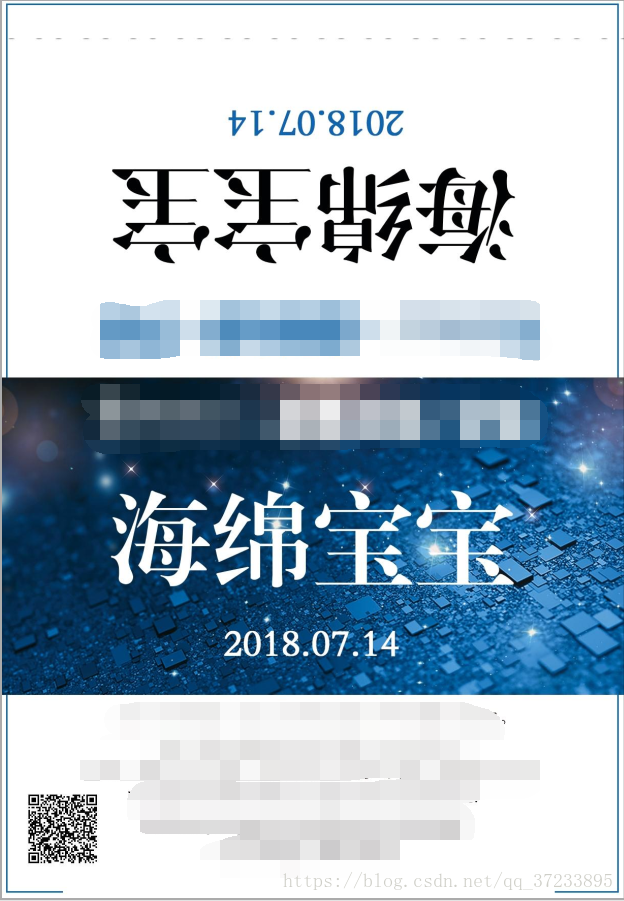
java给图片写正反字体,并将二维码写到图片上,代码实现
/**

     * @param filePath

     *            源图片路径

     * @param markContent

     *            图片中添加内容

     * @param outPath

     *            输出图片路径 字体颜色等在函数内部实现的

     *

     * @param

     */

    // 给jpg添加文字

    public  boolean createStringMark(String url , String filePath, String markContent, int R,int G,int B,String choosefont) {

        ImageIcon imgIcon = new ImageIcon(filePath);

        Image theImg = imgIcon.getImage();

        int width = theImg.getWidth(null) == -1 ? 200 : theImg.getWidth(null);

        int height = theImg.getHeight(null) == -1 ? 200 : theImg.getHeight(null);

        System.out.println(width);

        System.out.println(height);

        System.out.println(theImg);

        BufferedImage bimage = new BufferedImage(width, height, BufferedImage.TYPE_INT_RGB);

        Graphics2D g = bimage.createGraphics();

        //Color mycolor1 = Color.white;

        Color mycolor1 = new Color(255,255,255);

        g.setColor(mycolor1);

        g.setBackground(Color.red);

        g.drawImage(theImg, 0, 0, null); // 方法在画布上绘制图像、画布或视频。

        //Font font=new Font("黑体", Font.BOLD, 200);

        Font font=new Font(choosefont, Font.BOLD, 200);

        font = Font(200);

        g.setFont(font); // 字体、字型、字号  三个字350

        g.setRenderingHint(RenderingHints.KEY_ANTIALIASING, RenderingHints.VALUE_ANTIALIAS_ON);

        // 计算文字长度,计算居中的x点坐标

        FontMetrics fm = g.getFontMetrics(font);

        int textWidth = fm.stringWidth(markContent);

        int widthX = (width - textWidth) / 2;

        // 表示这段文字在图片上的位置(x,y) .第一个是你设置的内容。

        g.drawString(markContent,widthX,1130);

        Color mycolor = new Color(R,G,B);

        g.setColor(mycolor);

        g.setBackground(Color.red);

        //g.drawImage(theImg, 0, 0, null);

        Font rotatefont=new Font(choosefont, Font.BOLD, 200);

        rotatefont =  Font(200);

        g.setFont(rotatefont); // 字体、字型、字号  三个字350

        g.setRenderingHint(RenderingHints.KEY_ANTIALIASING, RenderingHints.VALUE_ANTIALIAS_ON);

        FontMetrics rotatefm = g.getFontMetrics(font);

        int rotatetextWidth = rotatefm.stringWidth(markContent);

        int rotatewidthX = (width - rotatetextWidth) / 2;

        //画倒转180度的字体

        g.translate(rotatewidthX+rotatetextWidth, 350);

        g.rotate(Math.toRadians(180));

        g.drawString(markContent, 0, 0);

        g.dispose();

        try {

            long currenttime = System.currentTimeMillis();

            String pathdate = new SimpleDateFormat("yyyy/MM/dd/HH/hh/mm/ss").format(new Date());

            String path = "F:\\pic2018\\"+pathdate;

            File file = new File(path);

            if (!file.exists()) {

                file.mkdirs();

            }

            QRCodeUtil qr = new QRCodeUtil();

            String qrCodepath = qr.Util(url, pathdate);

            String outPath = path+"\\"+currenttime+".jpg";

            FileOutputStream out = new FileOutputStream(outPath); // 先用一个特定的输出文件名

            JPEGImageEncoder encoder = JPEGCodec.createJPEGEncoder(out);

            JPEGEncodeParam param = encoder.getDefaultJPEGEncodeParam(bimage);

            param.setQuality(100, true); //

            encoder.encode(bimage, param);

            InputStream is = new FileInputStream(outPath);

            //通过JPEG图象流创建JPEG数据流解码器

            JPEGImageDecoder jpegDecoder = JPEGCodec.createJPEGDecoder(is);

            //解码当前JPEG数据流,返回BufferedImage对象

            BufferedImage buffImg = jpegDecoder.decodeAsBufferedImage();

            //得到画笔对象

            Graphics g2 = buffImg.getGraphics();

            //小图片的路径

            ImageIcon QrcodeimgIcon = new ImageIcon(qrCodepath);

            //得到Image对象。

            Image img = QrcodeimgIcon.getImage();

            //将小图片绘到大图片上,5,300 .表示你的小图片在大图片上的位置。

            g2.drawImage(img, 50, 1560, null);

            //设置颜色。

            g2.setColor(Color.WHITE);

            g2.dispose();

            OutputStream os = new FileOutputStream(path+"\\"+currenttime+"zong"+".jpg");

            //创键编码器,用于编码内存中的图象数据。

            JPEGImageEncoder en = JPEGCodec.createJPEGEncoder(os);

            en.encode(buffImg);

            is.close();

            os.close();

            out.close();

        } catch (Exception e) {

            return false;

        }

        return true;

    }

     // 第一个参数是外部字体名,第二个是字体大小

    public static Font loadFont(String fontFileName, float fontSize){

        try{

            File file = new File(fontFileName);

            FileInputStream aixing = new FileInputStream(file);

            Font dynamicFont = Font.createFont(Font.TRUETYPE_FONT, aixing);

            Font dynamicFontPt = dynamicFont.deriveFont(fontSize);

            aixing.close();

            return dynamicFontPt;

        }

        catch (Exception e)// 异常处理

        {

            e.printStackTrace();

            return new Font("宋体", Font.BOLD, 200);

        }

    }

    public  Font Font(int fontsize) {

        String root = System.getProperty("user.dir");// 项目根目录路径

        Font font = ImageEdit.loadFont(root + "/FZXBSJW.TTF", fontsize);// 调用

        return font;// 返回字体
java给图片写正反字体,并将二维码写到图片上,代码实现的更多相关文章
- js生成二维码以及插入图片
先根据qrcode官网demo,不同属性值的变化,二维码的变化效果:https://larsjung.de/jquery-qrcode/latest/demo/ 进入demo中,审查元素查看里面引用的 ...
- pbfunc外部函数扩展应用-直接在Datawindow中生成QR二维码,非图片方式
利用pbfunc外部函数在Datawindow中直接生成QR二维码,非图片方式.需要注意以下面几点: Datawindow的DataObject的单位必须为像素(Pixels). Datawindow ...
- jquery生成二维码并实现图片下载
1.引入jquery的两个js文件 <script src="../scripts/erweima/jquery-1.10.2.min.js"></script& ...
- 图片的URL上传至阿里云OSS操作(微信小程序二维码返回的二进制上传到OSS)
当我们从网络中获取一个URL的图片我们要存储到本地或者是私有的云时,我们可以这样操作 把url中的图片文件下载到本地(或者上传到私有云中) public String uploadUrlToOss ...
- 【java】google的zxing架包生成二维码和读取二维码【可带文字和logo】
承接RC4生成不重复字符串的需求之后,因为优惠码要方便用户使用的缘故,所以思来想去,觉得还是直接生成二维码给用户直接扫比较实用,也不用用户专门记录冗长的优惠码编号. ================= ...
- js将网址转为二维码并下载图片
将一个网址转为二维码, 下面可以添加文字, 还提供下载功能 利用的是 GitHub上面的qrcode.js 和canvas <!DOCTYPE html> <html> < ...
- java二维码的生成与解析代码
二维码,是一种采用黑白相间的平面几何图形通过相应的编码算法来记录文字.图片.网址等信息的条码图片.如下图 二维码的特点: 1. 高密度编码,信息容量大 可容纳多达1850个大写字母或2710个数字或 ...
- phpqrcode实现二维码(含图片)
---恢复内容开始--- 1,http://phpqrcode.sourceforge.net/ 下载 2,解压以后只需要一个文件 3,原生php测试: <?php include 'phpqr ...
- Springboot生成二维码并下载图片png支持打包成zip
pom.xml <!--二维码--> <dependency> <groupId>com.google.zxing</groupId> <arti ...
- Asp.Net 合并图片(二维码和其他图片合并)
需求:根据网址生成二维码,然后再把二维码生成到背景图片上,然后显示在网页中 pic.ashx <%@ WebHandler Language="C#" Class=" ...
随机推荐
- C# - VS2019 WinFrm应用程序调用WebService服务
WinFrm应用程序调用WebService服务 关于WebService的创建.发布与部署等相关操作不再赘述,传送门如下:C# VS2019 WebService创建与发布,并部署到Windows ...
- 8道Python基础面试练习题
1.26个字母大小写成对打印,例如:Aa,Bb...... for i in range(26): print(chr(65+i)+chr(97+i)) 2.一个list包含10个数字,然后生成一个新 ...
- jq实现回车键事件
我们写系统的时候常常因为要点击显得很麻烦,习惯了回车键完成一些东西. 接下来就直接上代码吧.jq实现回车键事件 keyDowm: () => { $("body").keyd ...
- C# List、Array、Dictionary之间相互转换
Array转换为List List转换为Array Array转Dictionary Dictionary转Array List转Dictionary Dictionary转List IQueryab ...
- sql server使用sp_executesql返回拼接字符串里面的输出参数
问题: 今天一同事请教博主,他拼接了一个语句,select表格形式数据,然后使用@@rowcount获取到行数. 但他又有这样特别的需求:想只获取行数而不返回表格数据结果,因为是while循环,不想返 ...
- vue 脚手架
Vue 脚手架的基本用法 1. 基于 3.X 版本的脚手架 创建vue项目 命令行(CLI) 的方式创建 vue 项目 vue create my-project 图形化界面(GUI) 的方式创建 v ...
- Python语法速查: 12. 文件与输入输出
返回目录 (1)文件基本操作 ● 文件常用操作 内置函数或方法 描述 open(name [,mode [,buffering]]) 内置函数.用来打开文件,返回一个文件对象(file对象).详见下述 ...
- LinuxPXE+Kickstrart无人值守安装服务
要求:关闭VMware虚拟网络编辑器中自身的DHCP服务 主机名称 操作系统 IP地址 NoneOS Centos7 192.168.72.250 Custormer 无 1.挂在本地镜像源本配置 ...
- 利用Haproxy搭建 HTTP 请求走私(Request smuggling)环境
Haproxy 介绍 HAProxy是一个使用C语言编写的自由及开放源代码软件,其提供高可用性.负载均衡,以及基于TCP和HTTP的应用程序代理. 请求走私(Request smuggling)概念证 ...
- Node接口实现HTTPS版的
最近由于自己要做一个微信小程序,接口地址只能是https的,这就很难受了 于是乎,我租了个服务器,搞了个免费的ssl认证 可是呢,我不会搞https接口怎样实现 今天特意花了一天时间来学,来学习 &q ...