
Opentracing + Uber Jaeger 全链路灰度调用链,Nepxion Discovery
当网关和服务在实施全链路分布式灰度发布和路由时候,我们需要一款追踪系统来监控网关和服务走的是哪个灰度组,哪个灰度版本,哪个灰度区域,甚至监控从Http Header头部全程传递的灰度规则和路由策略。这个功能意义在于:
- 不仅可以监控全链路中基本的调用信息,也可以监控额外的灰度信息,有助于我们判断灰度发布和路由是否执行准确,一旦有问题,也可以快速定位
- 可以监控流量何时切换到新版本,或者新的区域,或者新的机器上
- 可以监控灰度规则和路由策略是否配置准确
- 可以监控网关和服务灰度上下级树状关系
- 可以监控全链路流量拓扑图
笔者尝试调研了一系列分布式追踪系统和中间件,包括Opentracing、Uber Jaeger、Twitter Zipkin、Apache Skywalking、Pinpoint、CAT等,最后决定采用Opentracing + Uber Jaeger方式来实现,重要原因除了易用性和可扩展性外,Opentracing支持WebMvc和WebFlux两种方式,业界的追踪系统能支持WebFlux相对较少
[OpenTracing] OpenTracing已进入CNCF,正在为全球的分布式追踪系统提供统一的概念、规范、架构和数据标准。它通过提供平台无关、厂商无关的API,使得开发人员能够方便的添加(或更换)追踪系统的实现。对于存在多样化的技术栈共存的调用链中,Opentracing适配Java、C、Go和.Net等技术栈,实现全链路分布式追踪功能。迄今为止,Uber Jaeger、Twitter Zipkin和Apache Skywalking已经适配了Opentracing规范
笔者以Nepxion社区的Discovery开源框架(对该开源框架感兴趣的同学,请访问如下链接)为例子展开整合
源码主页,请访问
https://github.com/Nepxion/Discovery
指南主页,请访问
https://github.com/Nepxion/DiscoveryGuide
文档主页,请访问
https://pan.baidu.com/s/1i57rXaNKPuhGRqZ2MONZOA#list/path=%2FNepxion
整合的效果图


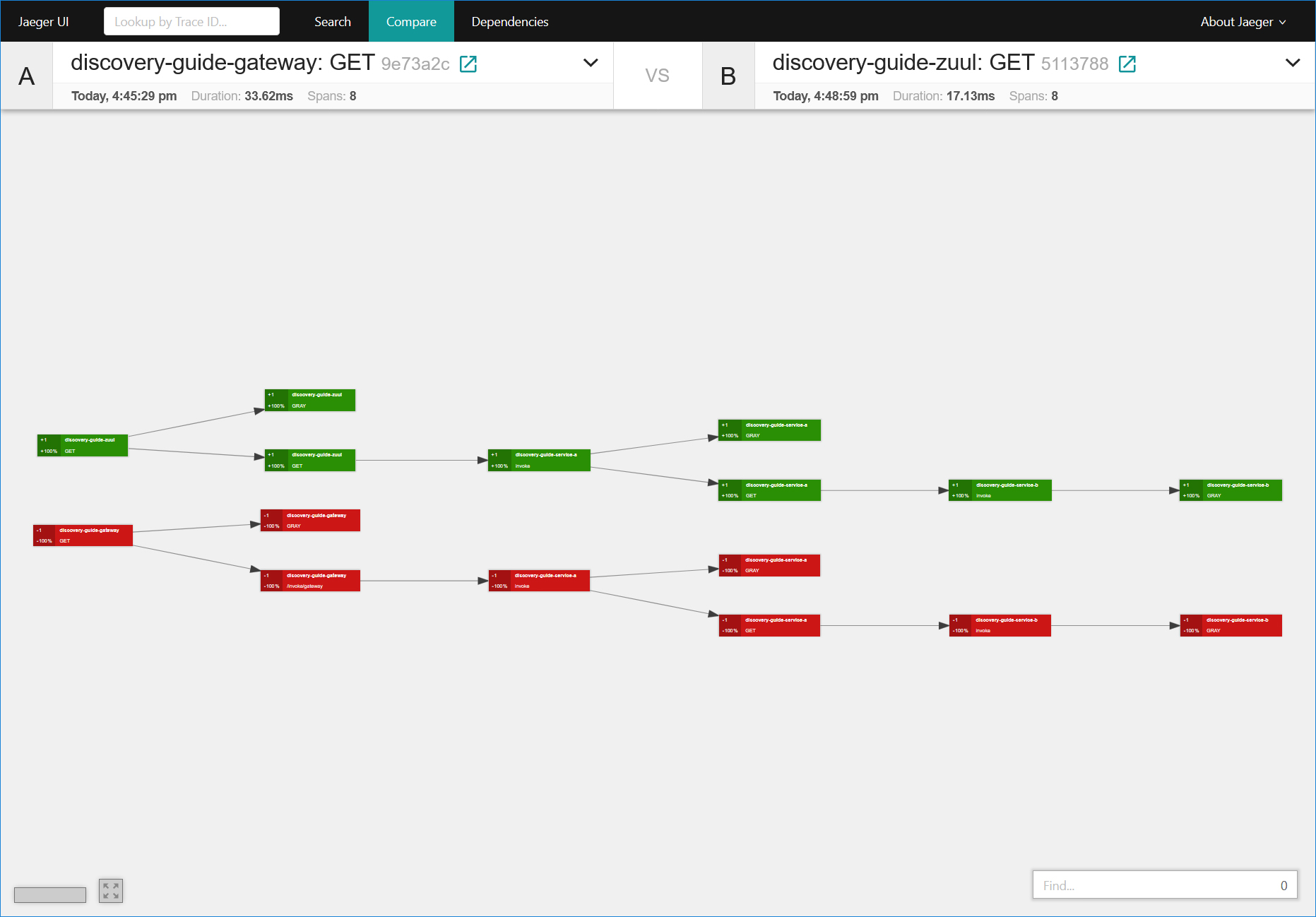
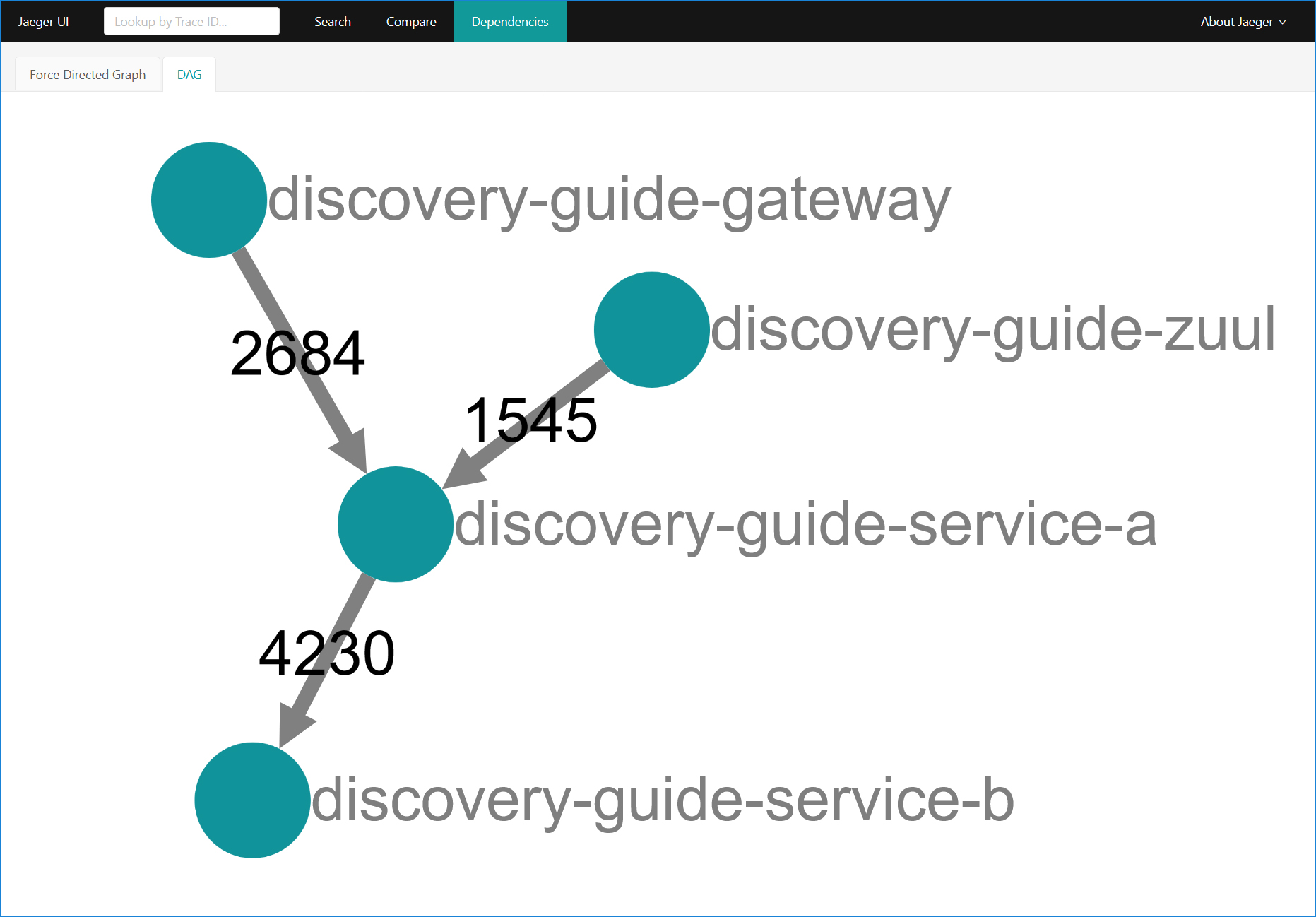
基本概念
灰度调用链主要包括如下11个参数。使用者可以自行定义要传递的调用链参数,例如:traceId, spanId等;也可以自行定义要传递的业务调用链参数,例如:mobile, user等
1. n-d-service-group - 服务所属组或者应用

2. n-d-service-type - 服务类型,分为“网关”和“服务”

3. n-d-service-id - 服务ID

4. n-d-service-address - 服务地址,包括Host和Port

5. n-d-service-version - 服务版本

6. n-d-service-region - 服务所属区域

7. n-d-version - 版本路由值

8. n-d-region - 区域路由值

9. n-d-address - 地址路由值

10. n-d-version-weight - 版本权重路由值

11. n-d-region-weight - 区域权重路由值
核心实现
Opentracing通用模块
源码参考
https://github.com/Nepxion/Discovery/tree/master/discovery-plugin-strategy-opentracing
由于OpenTracing扩展需要兼顾到Spring Cloud Gateway、Zuul和服务,它的核心逻辑存在着一定的可封装性,所以笔者抽取出一个公共模块discovery-plugin-strategy-opentracing,包含configuration、operation、context等模块,着重阐述operation模块,其它比较简单,不一一赘述了
在阐述前,笔者需要解释一个配置,该配置将决定核心实现以及终端界面的显示
- 如果开启,灰度信息输出到独立的Span节点中,意味着在界面显示中,灰度信息通过独立的GRAY Span节点来显示。优点是信息简洁明了,缺点是Span节点会增长一倍。我们可以称呼它为【模式A】
- 如果关闭,灰度信息输出到原生的Span节点中,意味着在界面显示中,灰度信息会和原生Span节点的调用信息、协议信息等混在一起,缺点是信息庞杂混合,优点是Span节点数不会增长。我们可以称呼它为【模式B】
# 启动和关闭调用链的灰度信息在Opentracing中以独立的Span节点输出,如果关闭,则灰度信息输出到原生的Span节点中。缺失则默认为true

spring.application.strategy.trace.opentracing.separate.span.enabled=true
Opentracing公共操作类 - StrategyOpentracingOperation.java
- 装配注入Opentracing的Tracer对象
- opentracingInitialize方法,提供给网关和服务的Span节点初始化
- 【模式A】下,tracer.buildSpan(...).start()实现新建一个Span,并把它放置到存储上下文的StrategyOpentracingContext的ThreadLocal里
- 【模式B】下,不需要做任何工作
- opentracingHeader方法,提供给网关的灰度调用链输出
- 【模式A】下,首先从StrategyOpentracingContext的ThreadLocal里获取Span对象,其次把customizationMap(自定义的调用链参数)的元素都放入到Tag中,最后把灰度调用链主11个参数(通过strategyContextHolder.getHeader(...)获取)和更多上下文信息放入到Tag中
- 【模式B】下,跟【模式A】类似,唯一区别的是Tags.COMPONENT的处理,由于原生的Span节点已经带有该信息,所以不需要放入到Tag中
- opentracingLocal方法,提供给服务的灰度调用链输出
- 【模式A】下,首先从StrategyOpentracingContext的ThreadLocal里获取Span对象,其次把customizationMap(自定义的调用链参数)的元素都放入到Tag中,最后把灰度调用链主11个参数(通过pluginAdapter.getXXX()获取)和更多上下文信息放入到Tag中
- 【模式B】下,跟【模式A】类似,唯一区别的是Tags.COMPONENT的处理,由于原生的Span节点已经带有该信息,所以不需要放入到Tag中
- opentracingError方法,提供给服务的灰度调用链异常输出
- 【模式A】下,首先从StrategyOpentracingContext的ThreadLocal里获取Span对象,其次span.log(...)方法实现异常输出
- 【模式B】下,不需要做任何工作
- opentracingClear方法,灰度调用链的Span上报和清除
- 【模式A】下,首先从StrategyOpentracingContext的ThreadLocal里获取Span对象,其次span.finish()方法实现Span上报,最后StrategyOpentracingContext.clearCurrentContext()方法实现Span清除
- 【模式B】下,不需要做任何工作
- getCurrentSpan方法
- 【模式A】下,返回StrategyOpentracingContext.getCurrentContext().getSpan(),即opentracingInitialize新建的Span对象
- 【模式B】下,返回tracer.activeSpan(),即原生的Span对象
public class StrategyOpentracingOperation {

    private static final Logger LOG = LoggerFactory.getLogger(StrategyOpentracingOperation.class);

    @Autowired

    protected PluginAdapter pluginAdapter;

    @Autowired

    protected StrategyContextHolder strategyContextHolder;

    @Autowired

    private Tracer tracer;

    @Value("${" + StrategyOpentracingConstant.SPRING_APPLICATION_STRATEGY_TRACE_OPENTRACING_ENABLED + ":false}")

    protected Boolean traceOpentracingEnabled;

    @Value("${" + StrategyOpentracingConstant.SPRING_APPLICATION_STRATEGY_TRACE_OPENTRACING_SEPARATE_SPAN_ENABLED + ":true}")

    protected Boolean traceOpentracingSeparateSpanEnabled;

    public void opentracingInitialize() {

        if (!traceOpentracingEnabled) {

            return;

        }

        if (!traceOpentracingSeparateSpanEnabled) {

            return;

        }

        Span span = tracer.buildSpan(DiscoveryConstant.SPAN_VALUE).start();

        StrategyOpentracingContext.getCurrentContext().setSpan(span);

        LOG.debug("Trace chain for Opentracing initialized...");

    }

    public void opentracingHeader(Map<String, String> customizationMap) {

        if (!traceOpentracingEnabled) {

            return;

        }

        Span span = getCurrentSpan();

        if (span == null) {

            LOG.error("Span not found in context to opentracing header");

            return;

        }

        if (MapUtils.isNotEmpty(customizationMap)) {

            for (Map.Entry<String, String> entry : customizationMap.entrySet()) {

                span.setTag(entry.getKey(), entry.getValue());

            }

        }

        if (traceOpentracingSeparateSpanEnabled) {

            span.setTag(Tags.COMPONENT.getKey(), DiscoveryConstant.TAG_COMPONENT_VALUE);

        }

        span.setTag(DiscoveryConstant.PLUGIN, DiscoveryConstant.PLUGIN_VALUE);

        span.setTag(DiscoveryConstant.TRACE_ID, span.context().toTraceId());

        span.setTag(DiscoveryConstant.SPAN_ID, span.context().toSpanId());

        span.setTag(DiscoveryConstant.N_D_SERVICE_GROUP, strategyContextHolder.getHeader(DiscoveryConstant.N_D_SERVICE_GROUP));

        ...

        String routeVersion = strategyContextHolder.getHeader(DiscoveryConstant.N_D_VERSION);

        if (StringUtils.isNotEmpty(routeVersion)) {

            span.setTag(DiscoveryConstant.N_D_VERSION, routeVersion);

        }

        ...

        LOG.debug("Trace chain information outputs to Opentracing...");

    }

    public void opentracingLocal(String className, String methodName, Map<String, String> customizationMap) {

        if (!traceOpentracingEnabled) {

            return;

        }

        Span span = getCurrentSpan();

        if (span == null) {

            LOG.error("Span not found in context to opentracing local");

            return;

        }

        if (MapUtils.isNotEmpty(customizationMap)) {

            for (Map.Entry<String, String> entry : customizationMap.entrySet()) {

                span.setTag(entry.getKey(), entry.getValue());

            }

        }

        if (traceOpentracingSeparateSpanEnabled) {

            span.setTag(Tags.COMPONENT.getKey(), DiscoveryConstant.TAG_COMPONENT_VALUE);

        }

        span.setTag(DiscoveryConstant.PLUGIN, DiscoveryConstant.PLUGIN_VALUE);

        span.setTag(DiscoveryConstant.CLASS, className);

        span.setTag(DiscoveryConstant.METHOD, methodName);

        span.setTag(DiscoveryConstant.TRACE_ID, span.context().toTraceId());

        span.setTag(DiscoveryConstant.SPAN_ID, span.context().toSpanId());

        span.setTag(DiscoveryConstant.N_D_SERVICE_GROUP, pluginAdapter.getGroup());

        ...

        String routeVersion = strategyContextHolder.getHeader(DiscoveryConstant.N_D_VERSION);

        if (StringUtils.isNotEmpty(routeVersion)) {

            span.setTag(DiscoveryConstant.N_D_VERSION, routeVersion);

        }

        ...

        LOG.debug("Trace chain information outputs to Opentracing...");

    }

    public void opentracingError(String className, String methodName, Throwable e) {

        if (!traceOpentracingEnabled) {

            return;

        }

        if (!traceOpentracingSeparateSpanEnabled) {

            return;

        }

        Span span = getCurrentSpan();

        if (span == null) {

            LOG.error("Span not found in context to opentracing error");

            return;

        }

        span.log(new ImmutableMap.Builder<String, Object>()

                .put(DiscoveryConstant.CLASS, className)

                .put(DiscoveryConstant.METHOD, methodName)

                .put(DiscoveryConstant.EVENT, Tags.ERROR.getKey())

                .put(DiscoveryConstant.ERROR_OBJECT, e)

                .build());

        LOG.debug("Trace chain error outputs to Opentracing...");

    }

    public void opentracingClear() {

        if (!traceOpentracingEnabled) {

            return;

        }

        if (!traceOpentracingSeparateSpanEnabled) {

            return;

        }

        Span span = getCurrentSpan();

        if (span != null) {

            span.finish();

        } else {

            LOG.error("Span not found in context to opentracing clear");

        }

        StrategyOpentracingContext.clearCurrentContext();

        LOG.debug("Trace chain context of Opentracing cleared...");

    }

    public Span getCurrentSpan() {

        return traceOpentracingSeparateSpanEnabled ? StrategyOpentracingContext.getCurrentContext().getSpan() : tracer.activeSpan();

    }

    public String getTraceId() {

        if (!traceOpentracingEnabled) {

            return null;

        }

        Span span = getCurrentSpan();

        if (span != null) {

            return span.context().toTraceId();

        }

        return null;

    }

    public String getSpanId() {

        if (!traceOpentracingEnabled) {

            return null;

        }

        Span span = getCurrentSpan();

        if (span != null) {

            return span.context().toSpanId();

        }

        return null;

    }

}
Opentracing Service模块
实现OpenTracing对服务的扩展,包含configuration、tracer等模块,着重阐述tracer模块,其它比较简单,不一一赘述了
Opentracing的服务追踪类 - DefaultServiceStrategyOpentracingTracer.java
- 继承DefaultServiceStrategyTracer,并注入StrategyOpentracingOperation
- trace方法里先执行opentracingInitialize初始化Span,这样可以让后面的逻辑都可以从Span中拿到traceId和spanId,执行opentracingLocal实现服务的灰度调用链输出
- error方法里执行opentracingError实现服务的灰度调用链异常输出
- release方法里执行opentracingClear实现灰度调用链的Span上报和清除
public class DefaultServiceStrategyOpentracingTracer extends DefaultServiceStrategyTracer {

    @Autowired

    private StrategyOpentracingOperation strategyOpentracingOperation;

    @Override

    public void trace(ServiceStrategyTracerInterceptor interceptor, MethodInvocation invocation) {

        strategyOpentracingOperation.opentracingInitialize();

        super.trace(interceptor, invocation);

        strategyOpentracingOperation.opentracingLocal(interceptor.getMethod(invocation).getDeclaringClass().getName(), interceptor.getMethodName(invocation), getCustomizationMap());

    }

    @Override

    public void error(ServiceStrategyTracerInterceptor interceptor, MethodInvocation invocation, Throwable e) {

        super.error(interceptor, invocation, e);

        strategyOpentracingOperation.opentracingError(interceptor.getMethod(invocation).getDeclaringClass().getName(), interceptor.getMethodName(invocation), e);

    }

    @Override

    public void release(ServiceStrategyTracerInterceptor interceptor, MethodInvocation invocation) {

        super.release(interceptor, invocation);

        strategyOpentracingOperation.opentracingClear();

    }

    @Override

    public String getTraceId() {

        return strategyOpentracingOperation.getTraceId();

    }

    @Override

    public String getSpanId() {

        return strategyOpentracingOperation.getSpanId();

    }

}
Opentracing Spring Cloud Gateway模块
实现OpenTracing对Spring Cloud Gateway的扩展,跟discovery-plugin-strategy-starter-service-opentracing模块类似,不一一赘述了
Opentracing Zuul模块
源码参考
https://github.com/Nepxion/Discovery/tree/master/discovery-plugin-strategy-starter-zuul-opentracing
实现OpenTracing对Zuul的扩展,跟discovery-plugin-strategy-starter-service-opentracing模块类似,不一一赘述了
使用说明
示例参考
https://github.com/Nepxion/DiscoveryGuide
使用方式
Opentracing输出方式以Uber Jaeger为例来说明,步骤非常简单
- 从https://pan.baidu.com/s/1i57rXaNKPuhGRqZ2MONZOA#list/path=%2FNepxion获取Jaeger-1.14.0.zip,Windows操作系统下解压后运行jaeger.bat,Mac和Lunix操作系统请自行研究
- 执行Postman调用后,访问http://localhost:16686查看灰度调用链
- 灰度调用链支持WebMvc和WebFlux两种方式,以GRAY字样的标记来标识
开关控制
对于Opentracing调用链功能的开启和关闭,需要通过如下开关做控制:
# 启动和关闭调用链。缺失则默认为false

spring.application.strategy.trace.enabled=true

# 启动和关闭调用链的Opentracing输出,支持F版或更高版本的配置,其它版本不需要该行配置。缺失则默认为false

spring.application.strategy.trace.opentracing.enabled=true

# 启动和关闭调用链的灰度信息在Opentracing中以独立的Span节点输出,如果关闭,则灰度信息输出到原生的Span节点中。缺失则默认为true

spring.application.strategy.trace.opentracing.separate.span.enabled=true
可选功能
自定义调用链上下文参数的创建(该类不是必须的),继承DefaultStrategyTracerAdapter
// 自定义调用链上下文参数的创建

// 对于getTraceId和getSpanId方法,在Opentracing等调用链中间件引入的情况下,由调用链中间件决定,在这里定义不会起作用;在Opentracing等调用链中间件未引入的情况下,在这里定义才有效,下面代码中表示从Http Header中获取,并全链路传递

// 对于getCustomizationMap方法,表示输出到调用链中的定制化业务参数,可以同时输出到日志和Opentracing等调用链中间件,下面代码中表示从Http Header中获取,并全链路传递

public class MyStrategyTracerAdapter extends DefaultStrategyTracerAdapter {

    @Override

    public String getTraceId() {

        return StringUtils.isNotEmpty(strategyContextHolder.getHeader(DiscoveryConstant.TRACE_ID)) ? strategyContextHolder.getHeader(DiscoveryConstant.TRACE_ID) : StringUtils.EMPTY;

    }

    @Override

    public String getSpanId() {

        return StringUtils.isNotEmpty(strategyContextHolder.getHeader(DiscoveryConstant.SPAN_ID)) ? strategyContextHolder.getHeader(DiscoveryConstant.SPAN_ID) : StringUtils.EMPTY;

    }

    @Override

    public Map<String, String> getCustomizationMap() {

        return new ImmutableMap.Builder<String, String>()

                .put("mobile", StringUtils.isNotEmpty(strategyContextHolder.getHeader("mobile")) ? strategyContextHolder.getHeader("mobile") : StringUtils.EMPTY)

                .put("user", StringUtils.isNotEmpty(strategyContextHolder.getHeader("user")) ? strategyContextHolder.getHeader("user") : StringUtils.EMPTY)

                .build();

    }

}
在配置类里@Bean方式进行调用链类创建,覆盖框架内置的调用链类
@Bean

public StrategyTracerAdapter strategyTracerAdapter() {

    return new MyStrategyTracerAdapter();

}
本文作者
任浩军, 10 多年开源经历,Github ID:@HaojunRen,Nepxion 开源社区创始人,Nacos Group Member,Spring Cloud Alibaba & Nacos & Sentinel Committer
请联系我
微信、公众号和文档



转载,请保留原文地址,谢谢 ~
Opentracing + Uber Jaeger 全链路灰度调用链,Nepxion Discovery的更多相关文章
- 基于Opentracing+Jaeger全链路灰度调用链
当网关和服务在实施全链路分布式灰度发布和路由时候,我们需要一款追踪系统来监控网关和服务走的是哪个灰度组,哪个灰度版本,哪个灰度区域,甚至监控从Http Header头部全程传递的灰度规则和路由策略.这 ...
- 基于 Istio 的全链路灰度方案探索和实践
作者|曾宇星(宇曾) 审核&校对:曾宇星(宇曾) 编辑&排版:雯燕 背景 微服务软件架构下,业务新功能上线前搭建完整的一套测试系统进行验证是相当费人费时的事,随着所拆分出微服务数量的不 ...
- Spring Cloud灰度发布之Nepxion Discovery
<蓝绿部署.红黑部署.AB测试.灰度发布.金丝雀发布.滚动发布的概念与区别> 最近公司项目在做架构升级,升级为 Spring Cloud,我们希望能够做到服务的灰度发布,根据访问量逐渐切换 ...
- 使用Skyworking 作全链路api调用监控,Integration of Skyworking, auditing the whole chain circuit.
Applicable scenario: Structure Map ~ Skywalking uses elasticsearch to store data, don't mistake elas ...
- zipkin:调用链显示分析
为什么使用了httpclient,客户端没有向zipkin server发送日志? 因为我实在main方法中调用的,完事后这个线程就没了:httpclient用的还是异步的发送日志方式:所以没发日志. ...
- 调用链系列三、基于zipkin调用链封装starter实现springmvc、dubbo、restTemplate等实现全链路跟踪
一.实现思路 1.过滤器实现思路 所有调用链数据都通过过滤器实现埋点并收集.同一条链共享一个traceId.每个节点有唯一的spanId. 2.共享传递方式 1.rpc调用:通过隐式传参.dubbo有 ...
- 分布式调用链跟踪工具Jaeger?两分钟极速体验
欢迎访问我的GitHub https://github.com/zq2599/blog_demos 内容:所有原创文章分类汇总及配套源码,涉及Java.Docker.Kubernetes.DevOPS ...
- springboot 项目添加jaeger调用链监控
1.添加maven依赖<dependency> <groupId>io.opentracing.contrib</groupId> <artifactId&g ...
- istio分布式调用链Jaeger
1.安装 kubectl apply -n istio-system -f https://raw.githubusercontent.com/jaegertracing/jaeger-kuberne ...
随机推荐
- php数据提交POSt
通常情况下用户使用浏览器网页表单向服务器post提交数据,我们使用PHP的$_POST接收用户POST到服务器的数据,并进行适当的处理.但有些情况下,如用户使用客户端软件向服务端php程序发送post ...
- JavaScript之基本概念(二)
今天主要介绍两个东西:JS标识符和数据类型 一 变量和常量 在介绍标识符之前有必要先了解一下JS中的变量和常量. 变量:程序执行期间可操作的临时存储数据的内存空间. 声明方式: var:函数作用域,变 ...
- postgresql从库搭建
1 复制类型 PostgreSQL支持物理复制(流复制)及逻辑复制2种.通过流复制技术,可以从实例级复制出一个与主库一模一样的实例级的从库.流复制同步方式有同步.异步两种. 另一种复制方式为逻辑复制, ...
- 1,eclipse导入项目jdk版本不一样解决方案 2,java报javax.servlet.jsp cannot be resolved to a type
一:eclipse导入项目jdk版本不一样解决方案 参考博文: https://www.cnblogs.com/chenmingjun/p/8472885.html 选中项目右键 --> Pro ...
- CDH高可用hadoop集群性能配置
1.HDFS的高可用配置 dfs.namenode.edits.dir (NameNode 编辑目录) : 写入 NameNode 编辑的本地文件系统上的目录.未指定将存放在namenode数据目录中 ...
- Gradle 梳理:安装、入门使用方法
Gradle 教程:第一部分,安装[翻译] 原文地址:http://rominirani.com/2014/07/28/gradle-tutorial-part-1-installation-se ...
- SpringCloudEureka入门
说明 SpringBoot版本 2.1.7.RELEASE SpringCloud版本 Greenwich.SR2 创建eureka server工程 加入pom依赖 <dependencies ...
- 动态insert mybatis与ibatis
mybatis: <insert id="insert" parameterType="hashMap"> INSERT INTO item < ...
- 离线服务器安装zabbix
因为机房内的服务器并不是所有都能上外网,所以利用zabbix官方源的安装方法就行不通了,又嫌弃编译安装麻烦,所以这里选择离线RPM包安装zabbix.(如需完整rpm包可以留言与我联系) 下载zabb ...
- Vue躬行记(1)——数据绑定
Vue.js的核心是通过基于HTML的模板语法声明式地将数据绑定到DOM结构中,即通过模板将数据显示在页面上,如下所示. <div id="container">{{c ...