
Centos 7.X 安装及常规设置
一、制作USBHDD+启动
需要工具:
UltraISO(软碟通)
U盘
centos7镜像: http://www.centos.org
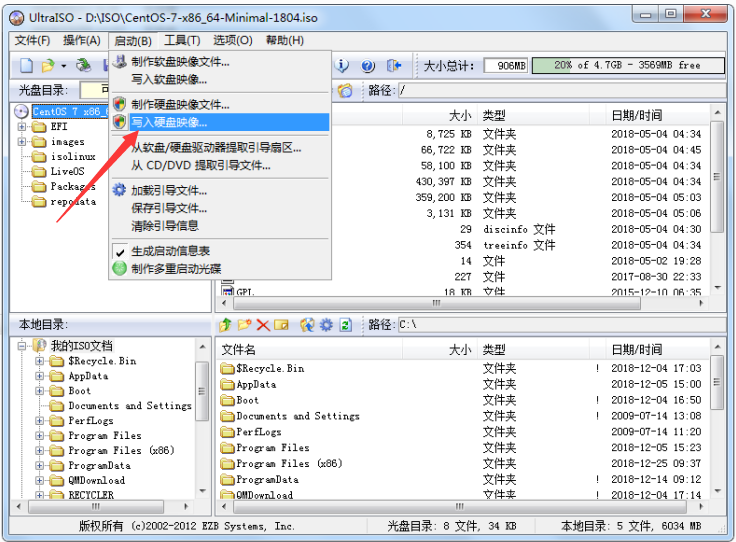
二、安装(有坑)
U盘启动电脑,进入安装界面:

选中第一项,直接安装会报错!
原因:LABEL=CentOS\x207\x20x86_64 这个卷标长度超过了windows系统允许的长度,所以你制作U盘启动的时候你卷标没有成为CentOS 7 x86_64,因而系统因找不到安装源而报错。
按下TAB后,可以看到install的参数:

vmlinuz initrd=initrd.img inst.stage2=hd:LABEL=CentOS\x207\x20x86_64 rd.live.check quiet
解决办法一:
Windows下改短卷标,并把 "LABEL=CentOS\x207\x20x86_64" 改为 "LABEL=更改后的卷标"解决办法二:
选中第一项按“TAB”(选第二项按“e”)编辑路径:
将vmlinuz initrd=initrd.img inst.stage2=hd:LABEL=CentOS\x207\x20x86_64 quiet
改成
vmlinuz initrd=initrd.img linux dd
在结果中找出你u盘盘符,一般为:sda*
然后热启动重启电脑,重复上述步骤并改为:vmlinuz initrd=initrd.img inst.stage2=hd:/dev/sda*(上一步查到的U盘盘符)
之后可继续安装!
三、安装完成后的常规设置
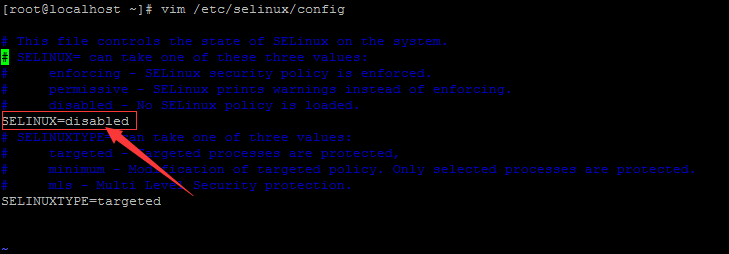
关闭selinux
[root@localhost ~]# vim /etc/selinux/config
修改yum源,base源,为阿里云的源
[root@colman ~]# curl -o /etc/yum.repos.d/CentOS-Base.repo http://mirrors.aliyun.com/repo/Centos-7.repo
repo源(需要时候再修改)
[root@colman ~]# curl -o /etc/yum.repos.d/CentOS-Base.repo http://mirrors.aliyun.com/repo/epel-7.repo
修改主机名
[root@colman ~]# hostnamectl set-hostname ***(主机名)
也可直接修改配置文件: /etc/hostname
字符集/语言
[root@colman ~]# cat /etc/locale.conf

LANG="zh_CN.UTF-8"
管理服务
[root@colman ~]# systemctl disable firewalld.service

[root@colman ~]# systemctl enable firewalld.service

Created symlink from /etc/systemd/system/dbus-org.fedoraproject.FirewallD1.service to /usr/lib/systemd/system/firewalld.service.

Created symlink from /etc/systemd/system/multi-user.target.wants/firewalld.service to /usr/lib/systemd/system/firewalld.service.

[root@colman ~]# systemctl stop firewalld.service

[root@colman ~]# systemctl status firewalld.service

● firewalld.service - firewalld - dynamic firewall daemon

   Loaded: loaded (/usr/lib/systemd/system/firewalld.service; enabled; vendor preset: enabled)

   Active: inactive (dead)

     Docs: man:firewalld(1)
Centos 7.X 安装及常规设置的更多相关文章
- centos使用docker安装redis ,并设置外网访问
拉取镜像 docker pull redis:4.0 在主机/data/redis/conf目录下新建redis.conf文件vim /data/redis/conf/redis.conf # Red ...
- centos 安装MATLAB :设置回环设备失败: 没有那个文件或目录
基本参数:centos 7 x86_64,linux 系统, 安装matlab, 已经下载R2016b_glnxa64.iso 但挂载的时候遇到问题: [root@lf mnt]# mount -o ...
- CentOS 7 安装过程中设置网络
如果在安装过程中需要使用网络,需要启动网卡,默认是DHCP 点击configure进入设置 General 常规设置 Automatically connect to this network whe ...
- CentOS 7 安装中网络设置111
如果在安装过程中需要使用网络,需要启动网卡,默认是DHCP 点击configure进入设置 General 常规设置 Automatically connect to this network whe ...
- CentOS 6.2 X64上64位Oracle11gR2 静默安装,静默设置监听,静默建库经验
1 安装前环境: 操作系统:CetnOS6.2x64 最小化安装,已配置好网络IP:172.16.2.182,物理内存8GB,硬盘100GB. 已下载: Linux.x64_11gR2_datab ...
- Cacti中文版在Centos上的安装
最近老有人问Cacti中文版在哪下载啊怎么安装啊,我在这里一遍给大家讲解了:Cacti中文版在Centos上的安装 1.基本安装 cacti是运作在apache+php+mysql+net-snmp工 ...
- c#实例化继承类,必须对被继承类的程序集做引用 .net core Redis分布式缓存客户端实现逻辑分析及示例demo 数据库笔记之索引和事务 centos 7下安装python 3.6笔记 你大波哥~ C#开源框架(转载) JSON C# Class Generator ---由json字符串生成C#实体类的工具
c#实例化继承类,必须对被继承类的程序集做引用 0x00 问题 类型“Model.NewModel”在未被引用的程序集中定义.必须添加对程序集“Model, Version=1.0.0.0, Cu ...
- MonoDevelop 4.2.2/Mono 3.4.0 in CentOS 6.5 安装笔记
MonoDevelop 4.2.2/Mono 3.4.0 in CentOS 6.5 安装笔记 说明 以root账户登录Linux操作系统,注意:本文中的所有命令行前面的 #> 表示命令行提示符 ...
- Centos 7.0 安装Mono 3.4 和 Jexus 5.6
2013-07-26 写过一篇<CentOS 6.3下 安装 Mono 3.2 和Jexus 5.4>,CentOS 7在CentOS 6的基础上有很大的调整,本文是这篇文章的更新,主要介 ...
随机推荐
- Redis之数据类型及命令
Redis(REmote DIctionary Server) 是一个遵守BSD协议.支持网络.可基于内存亦可持久化的日志型key-value存储系统. KEY 常用指令: 指令 注释 备注 exit ...
- Redis的几个核心机制底层原理
#### 1.S_DOWN和O_DOWN ###### S_DOWN和O_DOWN两种宕机状态 (1).S_DOWN是主观宕机,就一个哨兵如果自己觉得一个master宕机了,那么就是主观宕机 s ...
- .Net Core API使用ODP.NET操作Oracle数据库
.Net Core API使用ODP.NET操作Oracle数据库 1.下载Oracle.ManagerDataAccess.Core. 右键依赖项——管理NuGet程序包. 在浏览选项中查询Orac ...
- Ubuntu18.04安装NVIDIA显卡驱动
1. 查看GPU型号 lspci | grep -i nvidia 我是 GeForce GTX 960M 2. NVIDIA官网下载驱动: https://www.nvidia.com/Downlo ...
- 客户端 SOCKET 编程
建立客户端的 Socket: 客户端应用程序首先也是调用 WSAStartup() 函数来初始化 Winsock 的动态连接库,然后同样 调用 socket() 来建立一个 TCP 或 UDP Soc ...
- [Luogu2593] [ZJOI2006]超级麻将
题目地址 :https://www.luogu.org/problemnew/show/P2593. 无脑DP(虽说是抄的额) #include <iostream> #include & ...
- linux下python相关命令
若本机已安装python2,尽量不要动现有的python2,额外安装python3即可. 1.安装python3.6(centos下安装python3自带pip和setuptools) python3 ...
- C# 求Π Π/4=1-1/3+1/5-1/7+......+1/(2*n-3)-1/(2*n-1); (n=2000)
double a = 0.0;//最终Π的结果 double类型 int n; for (n = 1; n <= 2000; n++) { if (n % 2 == 1) { a += 1.0 ...
- Java匹马行天下之新手学习目录
Java匹马行天下之新手学习目录 学习路线 [Java匹马行天下——Java学习路线] [Java匹马行天下——开篇学习计划] 基础篇 [Java匹马行天下之学编程的起点——编程常识知多少] [Jav ...
- Unity Dropdown
unity DropDown控件应用很简单 代码如下 frameDpdown.options.Clear(); //Dropdown.OptionData optDataFrame = new Dro ...