
easyui 扩展 datagrid 数据网格视图
效果如图:
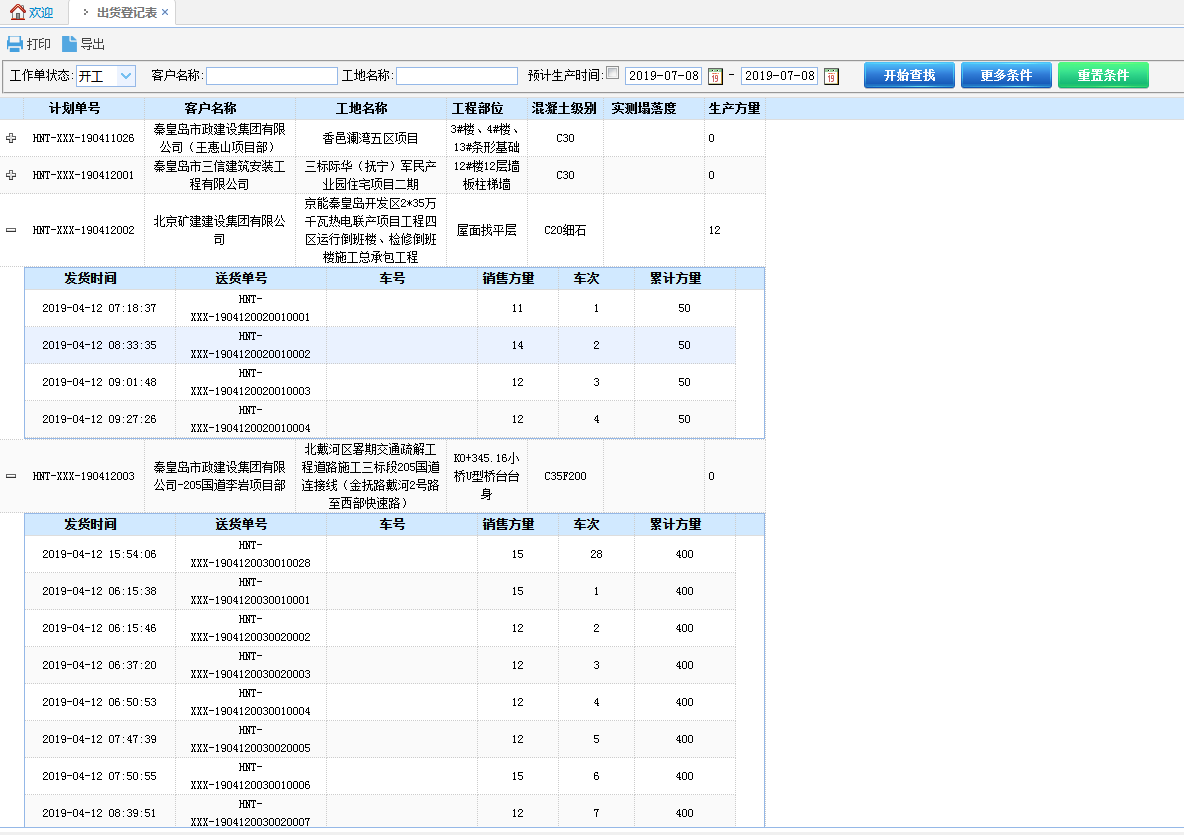
js代码:
$("#tdg").datagrid({
width: 200,
url: "/Laboratory/ShipmentRegister/LoadData",
queryParams: {
auvp: 'r',
condition: " and State='0' "
},
striped: true,
remoteSort: false,
singleSelect: true,
nowrap: false,
fitColumns: false,
columns: [[
//{ field: 'ck', checkbox: true },
{ field: 'JobNo', align: 'center', title: '计划单号', width: '120' },
{ field: 'CustomerName', align: 'center', title: '客户名称', width: '150' },
{ field: 'SiteName', align: 'center', title: '工地名称', width: '150' },
{ field: 'Project', align: 'center', title: '工程部位', width: '80' },
{ field: 'Cgrade', align: 'center', title: '混凝土级别', width: '75' },
{ field: 'ActSlumpName', align: 'center', title: '实测塌落度', width: '100' },
{ field: 'Volume', align: 'left', title: '生产方量', width: '60' },
]],
fit: true,
view: detailview,
detailFormatter: function (rowIndex, rowData) {
return '<div><table id="tt_' + rowData.Autoid + '"></table></div>';
},
onExpandRow: function (index, row) {
$("#tt_" + row.Autoid).datagrid({
width: 'auto',
height: 'auto',
url: "/Laboratory/ShipmentRegister/LoadProdData",
queryParams: {
JobNo: row.JobNo
},
striped: true,
remoteSort: false,
singleSelect: true,
nowrap: false,
fitColumns: false,
columns: [[
{ field: 'PDate', align: 'center', title: '发货时间', width: '150' },
{ field: 'DocketNo', align: 'center', title: '送货单号', width: '150' },
{ field: 'TruckName', align: 'center', title: '车号', width: '150' },
{ field: 'Volume', align: 'center', title: '销售方量', width: '80' },
{ field: 'TruckCount', align: 'center', title: '车次', width: '75' },
{ field: 'Total', align: 'center', title: '累计方量', width: '100' }
]],
//fit: true, //自适应大小,填充容器 如果fit为true,则视图显示不出来。所以此处把fit属性注释起来
onResize: function () {
$('#tdg').datagrid('fixDetailRowHeight', index);
}, onLoadSuccess: function (data) {
//此处必须有否则第一次展开时"+"号不会跟着移动
setTimeout(function () {
$('#tdg').datagrid('fixDetailRowHeight', index);
},0);
}
});
$('#tdg').datagrid('fixDetailRowHeight', index);
},
onCollapseRow: function (index, row) {
//alert(index);
}
})
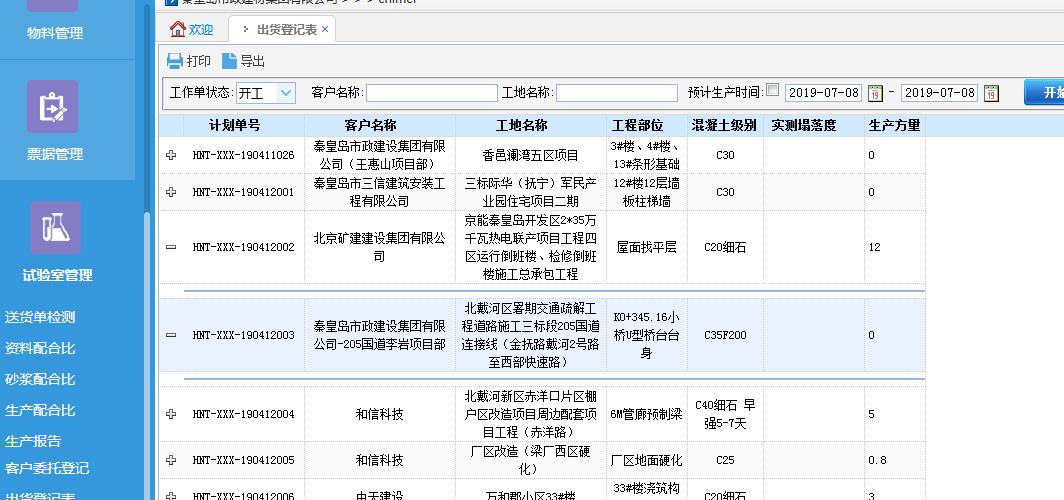
当属性fit: true时,展开视图会变成如下图所示的效果:
easyui 扩展 datagrid 数据网格视图的更多相关文章
- 数据网格和树-EasyUI Datagrid 数据网格、EasyUI Propertygrid 属性网格、EasyUI Tree 树、EasyUI Treegrid 树形网格
EasyUI Datagrid 数据网格 扩展自 $.fn.panel.defaults.通过 $.fn.datagrid.defaults 重写默认的 defaults. 数据网格(datagrid ...
- 第二百二十二节,jQuery EasyUI,DataGrid(数据表格)组件
jQuery EasyUI,DataGrid(数据表格)组件 学习要点: 1.加载方式 2.分页功能 本节课重点了解 EasyUI 中 DataGrid(数据表格)组件的使用方法,这个组件依赖于 Pa ...
- EasyUI:datagrid数据汇总
EasyUI:datagrid数据汇总 js代码: var total=0;//全局变量 $(function(){ $('#tablebudgetdata').datagrid({ title:' ...
- easyui数据网格视图(Datagrid View)的简单应用
下面介绍datagrid的数据网格详细视图和数据网格的分组视图 1.先引用的js和css文件 1)包含eauyui必备的四个文件easyui.css,icon.css, jquery-min.js.j ...
- jquery Easy UI Datagrid(数据网格)学习心德,附API
第一步,引入主要的css样式和js文件 <meta http-equiv="Content-Type" content="text/html; charset=ut ...
- 利用Aspose.Cells完成easyUI中DataGrid数据的Excel导出功能
我准备在项目中实现该功能之前,google发现大部分代码都是利用一般处理程序HttpHandler实现的服务器端数据的Excel导出,但是这样存在的问题是ashx读取的数据一般都是数据库中视图的数据, ...
- EasyUI Datagrid 数据网格
前端用easyUI开发时,官方给的文档指导太少,网上找的又很慢,因此,我总结了一个后台返回数据后,用easyUI生成表格的方法,可编辑可分页: 1 function paginationTable(i ...
- easyui datagrid数据网格
EasyUI是一组基于jQuery的UI插件集合,它的目标就是帮助web开发者更轻松的打造出功能丰富并且美观的UI界面.它的许多控件让我们不必写很复杂的javascript,从而极大地提高了开发效率. ...
- EasyUI Datagrid 数据网格 点击选中行 再次单击取消选中行
适用于jquery-easyui-1.9.15版本: 在项目中全局搜索: opts.singleSelect==true 或者在jquery.easyui.min.js中搜索: opts.single ...
随机推荐
- 有关idea与mac的好用链接
idea集成maven:https://www.cnblogs.com/daojiao/p/10270489.html idea集成tomcat:https://www.cnblogs.com/guo ...
- HTML常用标签四
表单 表单的组成 一个完整的表单通常由表单域.表单控件(也称表单元素)和提示信息3各部分组成 表单域 表单域是一个包含表单元素的区域 在HTML中,<form> 标签用去定义表单域,以实现 ...
- 表单_HTML
HTML表单_输入元素 大多数情况被用到的表单标签是输入标签 输入类型是由类型属性(type)定义的. 表单中的单选按钮可以设置以下几个属性:value.name.checked value:提交数据 ...
- Google在情报搜集中的基础技巧
Google在情报搜集中的基础技巧 作者:王宇阳 时间:2019-06-06 作者笔记 Google Hacking 是指使用特定的高级的google搜索语法,收集渗透测试目标的信息,查找目标的配 ...
- Python的包package的导入与被导入(包的类和方法的导入,__init__()怎么写)
包package的导入与被导入: 参考一下: https://blog.csdn.net/guowujun321/article/details/80764468 1.文件目录: | |-- A/ ...
- 在linux中怎么查看错误日志
cat或者tail -f命令 日 志 文 件 说 明 /var/log/message 系统启动后的信息和错误日志,是Red Hat Linux中最常用的日志之一/var/log/secure 与安全 ...
- C学习笔记(2)---各类函数
1.函数(function)声明定义: 见例子,不复述:https://www.runoob.com/cprogramming/c-functions.html 2. 函数参数(Parameters“ ...
- Python面试题分享——图迹信息科技
本帖最后由 逆风TO 于 2019-5-23 14:25 编辑 公司名称:西安图迹信息科技有限公司 公司地址:锦业路69号创业研发园瞪羚谷A座9层 主营概况:2013年成立,大数据应用工程中心,为五大 ...
- pytest-2:allure 的安装、使用
版本对应: python3.4==>allure-pytest2.7.0 python3.6==>allure0pytest2.8.6 环境安装: 1.先安装好对应的python,准备好p ...
- luoguP4719 【模板】动态 DP
题意 我理解的动态DP: 发现DP可以写成矩阵的形式,因此用数据结构维护矩阵乘积. 对于这道题,显然有DP: \(f_{x,0/1}\)表示\(x\)的子树中,x选/不选的最大点独立集. \(f_{x ...