
iOS13中presentViewController的问题
iOS13中presentViewController的问题
更新了Xcode11.0 beta之后,在iOS13中运行代码发现presentViewController和之前弹出的样式不一样。
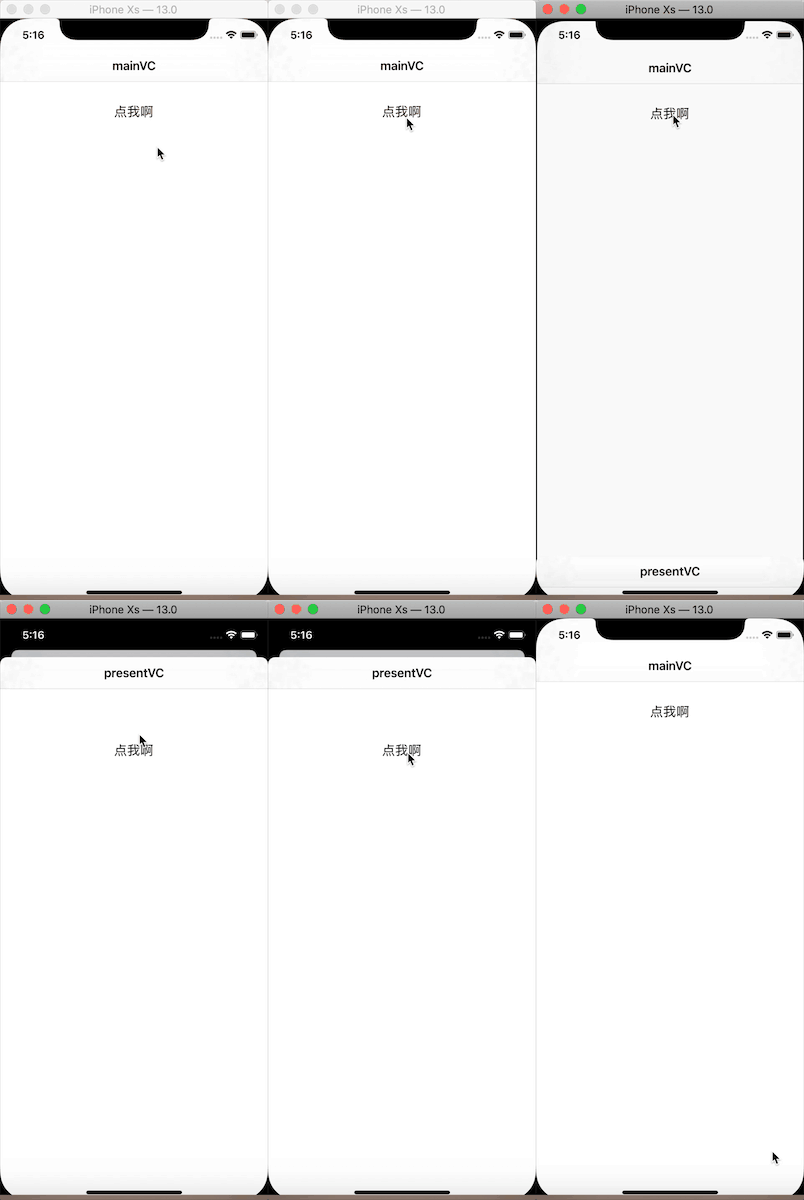
会出现这种情况是主要是因为我们之前对UIViewController里面的一个属性,即modalPresentationStyle(该属性是控制器在模态视图时将要使用的样式)没有设置需要的类型。在iOS13中modalPresentationStyle 的默认改为UIModalPresentationAutomatic,而在之前默认是UIModalPresentationFullScreen。
/*

 Defines the presentation style that will be used for this view controller when it is presented modally. Set this property on the view controller to be presented, not the presenter.

 If this property has been set to UIModalPresentationAutomatic, reading it will always return a concrete presentation style. By default UIViewController resolves UIModalPresentationAutomatic to UIModalPresentationPageSheet, but other system-provided view controllers may resolve UIModalPresentationAutomatic to other concrete presentation styles.

 Defaults to UIModalPresentationAutomatic on iOS starting in iOS 13.0, and UIModalPresentationFullScreen on previous versions. Defaults to UIModalPresentationFullScreen on all other platforms.

 */

@property(nonatomic,assign) UIModalPresentationStyle modalPresentationStyle API_AVAILABLE(ios(3.2));
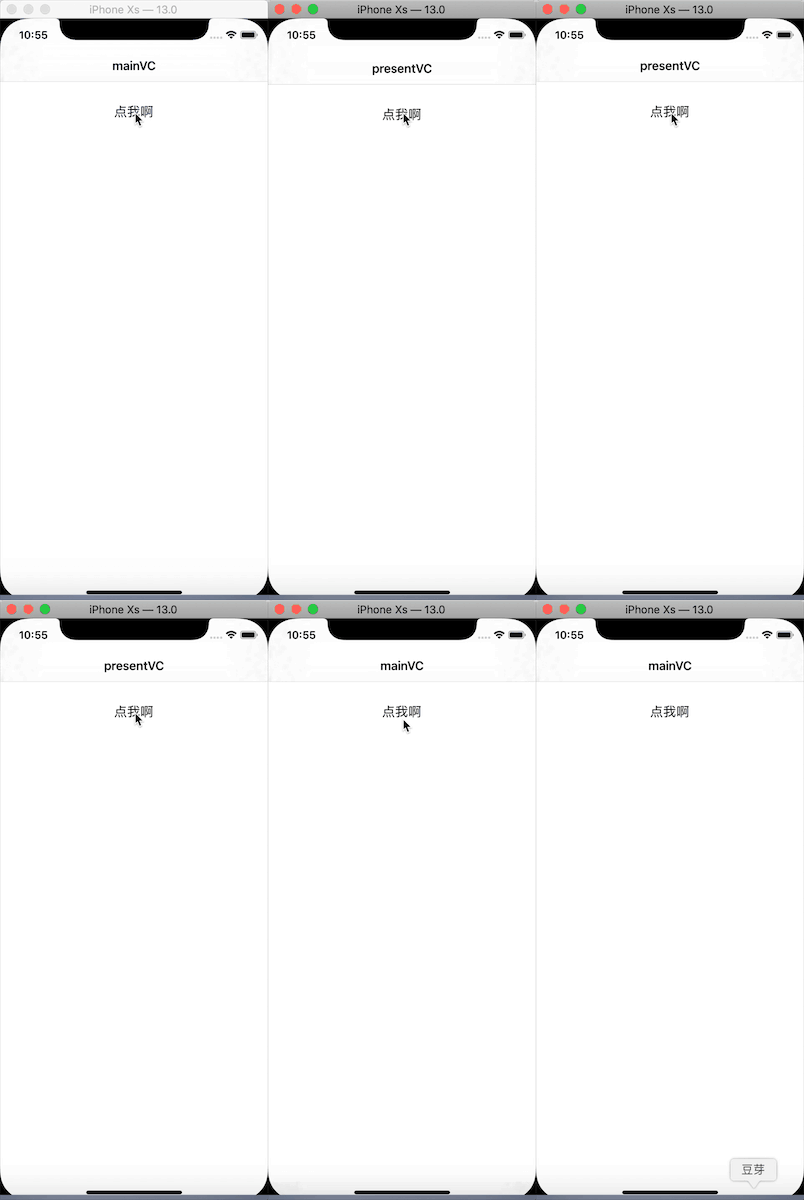
要改会原来模态视图样式,我们只需要把UIModalPresentationStyle设置为UIModalPresentationFullScreen即可。
ViewController *vc = [[ViewController alloc] init];

vc.title = @"presentVC";

UINavigationController *nav = [[UINavigationController alloc] initWithRootViewController:vc];

nav.modalPresentationStyle = UIModalPresentationFullScreen;

[self.window.rootViewController presentViewController:nav animated:YES completion:nil];
私有KVC
在使用iOS 13运行项目时突然APP就crash掉了。定位到的问题是在设置UITextField的Placeholder也就是占位文本的颜色和字体时使用了KVC的方法:
[_textField setValue:[UIColor redColor] forKeyPath:@"_placeholderLabel.textColor"];

[_textField setValue:[UIFont systemFontOfSize:14] forKeyPath:@"_placeholderLabel.font"];
可以将其替换为
_textField.attributedPlaceholder = [[NSAttributedString alloc] initWithString:@"姓名" attributes:@{NSFontAttributeName:[UIFont systemFontOfSize:14],NSForegroundColorAttributeName:[UIColor redColor]}];
并且只需要在初始化的时候设置attributedPlaceholder即富文本的占位文本,再重新赋值依然使用placeolder直接设置文本内容,样式不会改变。(想要这种效果的话需要在初始化attributedPlaceholder时的字符串不为空)
Universal Link(通用链接)
在Xcode11中配置Universal Link(通用链接)步骤:
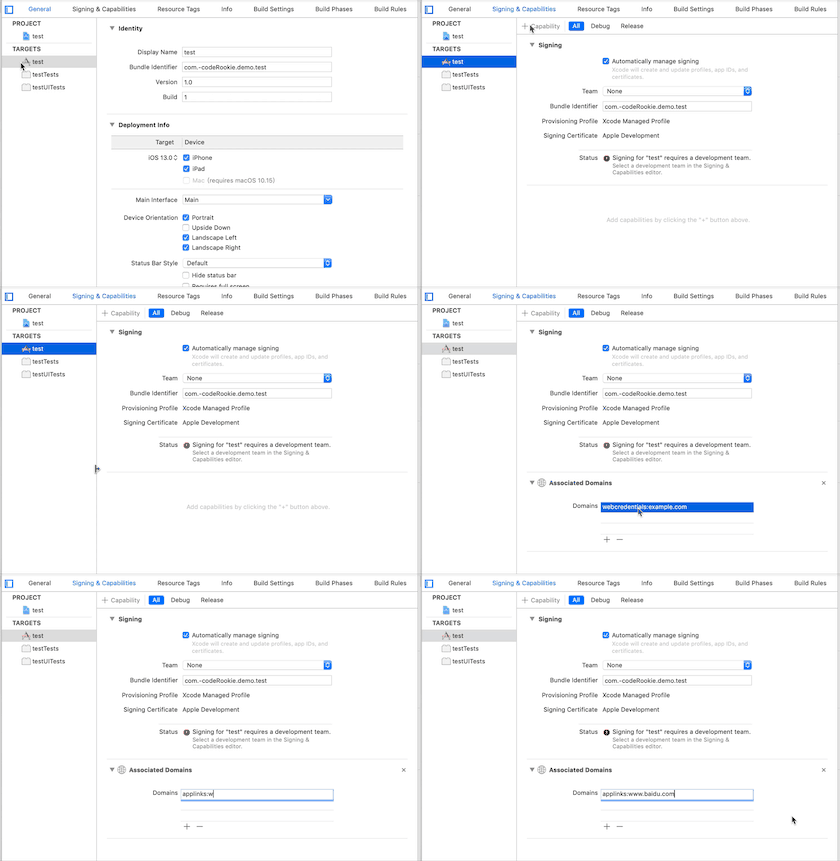
在iOS13之前在其他APP去safari中打开
Universal Link(通用链接)系统匹配域名是全匹配,而在iOS13之后规则发生了变化,猜测是包含关系。比如在iOS13之前,如果Universal Link(通用链接)为w.mydomain.com那么在微信或者其他APP访问www.mydomain.com然后点击去safari打开则不会拉起相应APP,而在iOS13则会拉起相应APP。
而在safari中输入的链接则依然和iOS之前一样,只有www.mydomain.com才会提示打开相应APP。
修改APP名称(修改DisplayName值)
- 在Xcode创建项目时默认的
project.pbxproj中的所有PRODUCT_NAME = "$(TARGET_NAME)";。 - 在Xcode11.0之前如果修改
DisplayName时只是修改info.plist中的Bundle display name值,但是在Xcode11.0中修改该值则会把project.pbxproj中的一个PRODUCT_NAME改为修改后值,如果在项目中通过[NSBundle mainBundle] infoDictionary]取kCFBundleExecutableKey的就会有影响,并且对Build Settings中的Packaing中的一些名称有影响,可能还会有其他影响有待关注。
持续更新中·····
文章若有不对地方,欢迎批评指正
iOS13中presentViewController的问题的更多相关文章
- 升级xcode11&ios13的坑
Swift Packages 目前Pod跟SPM的兼容还没做好,配置好SPM后,Pod不能进行正常更新,先配置好Pod再集成SPM则没有问题 Pod以后的更新可能会解决这个问题,也会有越来越多的库支持 ...
- Xcode11: 删除默认Main.storyBoard, 自定义UIWindow的变化 UIWindow 不能在AppDelegate中处理
Xcode自动新增了一个SceneDelegate文件,查找了一下官方文档WWDC2019:Optimizing App Launch 发现,iOS13中appdelegate的职责发现了改变: iO ...
- 在Xcode11上开发“面向低于iOS13版本的App”时的一些注意点
相关知识: https://blog.csdn.net/BUG_delete/article/details/103699563 'AppDelegate' is only available in ...
- iOS - 适配 iOS 13 之工兵连扫雷
iOS 13 支持适配的机型 目前最新 iPhone 11.iPhone 11 Pro和iPhone 11 Pro Max iPhone X.iPhone XR.iPhone XS.iPhone XS ...
- ios8调用相机报警告: Snapshotting a view that has not been rendered results in an empty snapshot. Ensure you(转)
我这也报了这个警告,但按他的方法并没有起作用,把写到这个地方看是否其他人用的到 错误代码:Snapshotting a view that has not been rendered results ...
- iOS 唤起APP之Universal Link(通用链接)
什么是Universal Link(通用链接) Universal Link(通用链接)是Apple在iOS9推出的一种能够方便的通过传统HTTPS链接来启动APP的功能,可以使用相同的网址打开网址和 ...
- [其它]iOS 13 正式版发布 iPhone 6s或更新型号均可升级
苹果今天(2019.09.20)发布了 iOS 13 正式版,可以升级的设备包括 iPhone 6s 或更新型号.第七代 iPod Touch. iOS 13 推出深色模式,为 iPhone 带来截然 ...
- xcode11新项目删除main.storyboard 两种方法
方法一 心急的童鞋按照老操作完成后再按照如下操作即可 /** 弃用storboard 1.info.plist去除 <key>UIApplicationSceneManifest</ ...
- Xcode11.1 踩坑备忘录
Xcode11.1 踩坑备忘录(mac系统10.15) 1 .环信ChatDemo2.0报错 这是环信ChatDemo2.0报错 NSInteger numberOfBeforeSection = [ ...
随机推荐
- Python 推断素数
a = raw_input() #输入数字 a = int(a) #铸造成int b=True #的标记 for i in range(2,a): #从2开始循环本身 if a%i==0: #除了自己 ...
- 设置oracle密码不过期,修改用户密码
1. 查看用户名使用的profile select username,profile from dba_usersSELECT * FROM dba_profiles WHERE profile='D ...
- linux C 内存管理方式之半动态
看到半动态申请内存,第一反应这是什么鬼? 实际上半动态内存申请很容易理解,在GNU C中使用alloca函数来实现 #include <stdlib.h> void *alloca (si ...
- Selenium-基础操作
一.测试代码 @Test public void test() { WebDriver driver = new FirefoxDriver(); // 打开当前包中的index页面 driver.g ...
- sql执行分页查询
declare @PageSize int,@PageIndex int;set @PageSize=5;set @PageIndex=2;WITH Pagination AS( SELECT * ...
- SqlServer 无法为可更新的订阅设置发布服务器登录名 sp_link_publication
原文:SqlServer 无法为可更新的订阅设置发布服务器登录名 sp_link_publication 没有截图: 创建可更新订阅,正常创建了发布,在订阅端创建订阅,最后一步提示完成,却出现了警告: ...
- ADB命令笔记本
ADB即Android Debug Bridge,作为电脑操作手机的工具,被Android开发者和众多国内xxx安全管家所使用.在此记录一些常见的命令,随时更新,方便以后查找.(万一以后我也要开发一款 ...
- oracle 使用db_link 导入导出小结
客户有一个需求,是将一个库中的某个用户迁移到一台新的oracle服务器上,因数据量较小,并且不涉及版本的升级,所以可以采用创建一个dblink,然后通过这个dblink直接从源库将用户数据导出并导入到 ...
- Delphi检测用户是否具有administrator权限(OpenThreadToken,OpenProcessToken,GetTokenInformation,AllocateAndInitializeSid和EqualSid)
检测用户是否具有administrator权限const SECURITY_NT_AUTHORITY: TSIDIdentifierAuthority = (Value: (0, 0, 0, 0, 0 ...
- RPG Maker MV游戏解包
该文章最新版本请前往:https://www.crowsong.xyz/127.html 前言 使用Petschko's RPG-Maker-MV File-Decrypter进行解包 使用Petsc ...