
CSS 笔记一(Selectors/ Backgrounds/ Borders/ Margins/ Padding/ Height and Width)
Selectors/ Backgrounds/ Borders/ Margins/ Padding/ Height and Width
CSS Introduction:
- CSS stands for Cascading Style Sheets
- CSS describes how HTML elements are to be displayed on screen, paper, or in other media
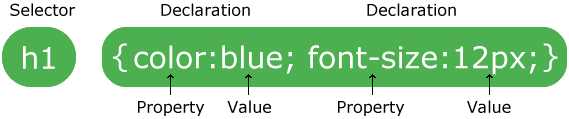
CSS Syntax
CSS Comments
- A CSS comment starts with /* and ends with */. Comments can also span multiple lines:
Example
  p {

     color: red;

     /* This is a single-line comment */

     text-align: center;

 }

 /* This is

 a multi-line

 comment */
CSS Selectors
- The element Selector
- The id Selector
- The class Selector
- Grouping Selectors
Example
 /* The element Selector */

 p {

     text-align: center;

     color: red;

 }

 /* The id Selector */

 #para1 {

     text-align: center;

     color: red;

 }

 /* The class Selector */

 .center {

     text-align: center;

     color: red;

 }

 p.center {

     text-align: center;

     color: red;

 }

 /* Grouping Selectors */

 h1, h2, p {

     text-align: center;

     color: red;

 }
Three Ways to Insert CSS
- External style sheet
- Internal style sheet
- Inline style
CSS Backgrounds
- background-color
- background-image
- background-repeat
- background-attachment
- background-position
1> Background Color
A color is most often specified by:
- a HEX value - like "#ff0000"
- an RGB value - like "rgb(255,0,0)"
- a valid color name - like "red"
2> Background Image
 body {

     background-image: url("bgdesert.jpg");

 }
3> Background Repeat
background-repeat: repeat|repeat-x|repeat-y|no-repeat|initial|inherit;
| Value | Description | Play it |
|---|---|---|
| repeat | The background image will be repeated both vertically and horizontally. This is default | Play it » |
| repeat-x | The background image will be repeated only horizontally | Play it » |
| repeat-y | The background image will be repeated only vertically | Play it » |
| no-repeat | The background-image will not be repeated | Play it » |
| initial | Sets this property to its default value. | Play it » |
| inherit | Inherits this property from its parent element. |
4> Background Attachment:
background-attachment: scroll|fixed|local|initial|inherit;
| Value | Description |
|---|---|
| scroll | The background scrolls along with the element. This is default |
| fixed | The background is fixed with regard to the viewport |
| local | The background scrolls along with the element's contents |
| initial | Sets this property to its default value. |
| inherit | Inherits this property from its parent element. |
5> Background Position:
background-position: value;
Property Values:
- [left/center/right] [top/center/bottom]
- x% y%
- xpos ypos (any CSS units)
- initial
- inherit
6> Background - Shorthand property
1 body {

     background: #ffffff url("img_tree.png") no-repeat right top;

 }
The order of the property values:
background-colorbackground-imagebackground-repeatbackground-attachmentbackground-position
CSS Borders
1> Border Style
dotted- Defines a dotted borderdashed- Defines a dashed bordersolid- Defines a solid borderdouble- Defines a double bordergroove- Defines a 3D grooved border. The effect depends on the border-color valueridge- Defines a 3D ridged border. The effect depends on the border-color valueinset- Defines a 3D inset border. The effect depends on the border-color valueoutset- Defines a 3D outset border. The effect depends on the border-color valuenone- Defines no borderhidden- Defines a hidden border
Example
 p.dotted {border-style: dotted;}

 p.dashed {border-style: dashed;}

 p.solid {border-style: solid;}

 p.double {border-style: double;}

 p.groove {border-style: groove;}

 p.ridge {border-style: ridge;}

 p.inset {border-style: inset;}

 p.outset {border-style: outset;}

 p.none {border-style: none;}

 p.hidden {border-style: hidden;}

 p.mix {border-style: dotted dashed solid double;}
Result
A dotted border.
A dashed border.
A solid border.
A double border.
A groove border. The effect depends on the border-color value.
A ridge border. The effect depends on the border-color value.
An inset border. The effect depends on the border-color value.
An outset border. The effect depends on the border-color value.
No border.
A hidden border.
A mixed border.
2> Border Width
- A specific size (in px, pt, cm, em, etc)
- Three pre-defined values: thin, medium, or thick.
3> Border Color
4> Border - Shorthand Property
The border property is a shorthand property for the following individual border properties:
border-widthborder-style(required)border-color
Example
 p {

     border: 5px solid red;

 }
CSS Margins
- The CSS margin properties are used to generate space around elements.
- The margin properties set the size of the transparent space OUTSIDE the border.
property values
- auto - the browser calculates the margin
- length - specifies a margin in px, pt, cm, etc.
- % - specifies a margin in % of the width of the containing element
- inherit - specifies that the margin should be inherited from the parent element
Note: It is also possible to use negative values for margins; to overlap content.
CSS Padding
- The CSS padding properties define the white space between the element content and the element border.
- The padding clears an area around the content (inside the border) of an element.
property values
- length - specifies a padding in px, pt, cm, etc.
- % - specifies a padding in % of the width of the containing element
- inherit - specifies that the padding should be inherited from the parent elemen
??Note: The padding is affected by the background color of the element!
CSS Height and Width Dimensions
- The
heightandwidthproperties are used to set the height and width of an element.
1> width,min-width,max-width
2> height,min-height,max-height
CSS 笔记一(Selectors/ Backgrounds/ Borders/ Margins/ Padding/ Height and Width)的更多相关文章
- 关于CSS和JS中用到的各种Height和Width的问题
自己记不住,列一下关于CSS和JS中用到的各类有关Height和Width属性的介绍对比. 所属类别 属性名 意义 其他 浏览器模型 Screen.height 浏览器窗口所在的屏幕的高度(单位像素) ...
- 【CSS】Beginner5:Margins&Padding
1.Properties for spacing-out elements 外边距:A margin is the space space outside something 内边距:padding ...
- CSS中的margin、border、padding区别
CSS padding margin border属性详解 图解CSS padding.margin.border属性W3C组织建议把所有网页上的对像都放在一个盒(box)中,设计师可以通过创建定义来 ...
- [html]CSS中的margin、border、padding区别
图解CSS padding.margin.border属性W3C组织建议把所有网页上的对像都放在一个盒(box)中,设计师可以通过创建定义来控制这个盒的属性,这些对像包括段落.列表.标题.图片以及层. ...
- CSS中的margin、border和padding的区别
aaarticlea/gif;base64,R0lGODlhuQEbAbMAAP8AM8zMzGZmYszMmZmZZkIP/5qE/8zM/wICApmZmf//zP///wAAAAAAAAAAAA
- CSS笔记
初级篇===========================选择器============================元素选择器css:h1{color: red}html:<h1> ...
- html+css笔记
文档结构 1.html文档结构 ①文档类型声明 严格型(标准模式): <!DOCTYpE HTML> HTML5 XHTML 1.0:<!DOCTYpE html pUbL ...
- CSS笔记(十五)CSS3之用户界面
参考:http://www.w3school.com.cn/css3/css3_user_interface.asp 在 CSS3 中,新的用户界面特性包括重设元素尺寸.盒尺寸以及轮廓等. 新的用户界 ...
- CSS笔记(三)背景
CSS 允许应用纯色作为背景,也允许使用背景图像创建相当复杂的效果. 参考:http://www.w3school.com.cn/css/css_background.asp 背景色 p {backg ...
随机推荐
- winfrom 无边框窗体移动和阴影
无边框窗体移动: //窗体移动API [DllImport("user32.dll")] public static extern bool ReleaseCapture(); [ ...
- mpdf部署到linux环境中遇到的问题
首先遇到的问题未:Error - mPDF requires mb_string functions. Ensure that PHP is compiled with php_mbstring.dl ...
- Chrome浏览器插件推荐大全
如何下载:http://www.cnplugins.com/devtool/ 提示:下载可能版本过旧,推荐搜索喜爱的插件之后前往官网或者github(编译的时候确保node和npm都是最新的版本).或 ...
- (转)实例分析:MySQL优化经验
[IT专家网独家]同时在线访问量继续增大,对于1G内存的服务器明显感觉到吃力,严重时甚至每天都会死机,或者时不时的服务器卡一下,这个问题曾经困扰了我半个多月.MySQL使用是很具伸缩性的算法,因此你通 ...
- Rearrange a string so that all same characters become d distance away
Given a string and a positive integer d. Some characters may be repeated in the given string. Rearra ...
- 【iCore3 双核心板】例程三十:U_DISK_IAP_FPGA实验——更新升级FPGA
实验指导书及代码包下载: http://pan.baidu.com/s/1jH1TiKY iCore3 购买链接: https://item.taobao.com/item.htm?id=524229 ...
- Characteristics of Some CISCs, RISCs, and Superscalar Processors
COMPUTER ORGANIZATION AND ARCHITECTURE DESIGNING FOR PERFORMANCE NINTH EDITION Although RISC archite ...
- JS中的混合模式
function Animation(list) { this.box = document.getElementById(list.id); this.size = list.size; this. ...
- Mongo使用脚本更新数据
SQL Server中我们经常要使用脚本来刷一些数据,在mongo中我们也可以使用mongo的脚本来刷mongo的数据 首先在命令窗口中链接到本地的mongo库 load("[脚本的地址]& ...
- JavaMail接、收邮件
我总算把这个研究出来啦.... 不要觉得 代码有点多哈. 我们先来说发送邮箱吧,首先建立一个属性文件*.properties sys.properties server=smtp.163.com ## ...