
Jquery EasyUI Tree .net实例
图片:
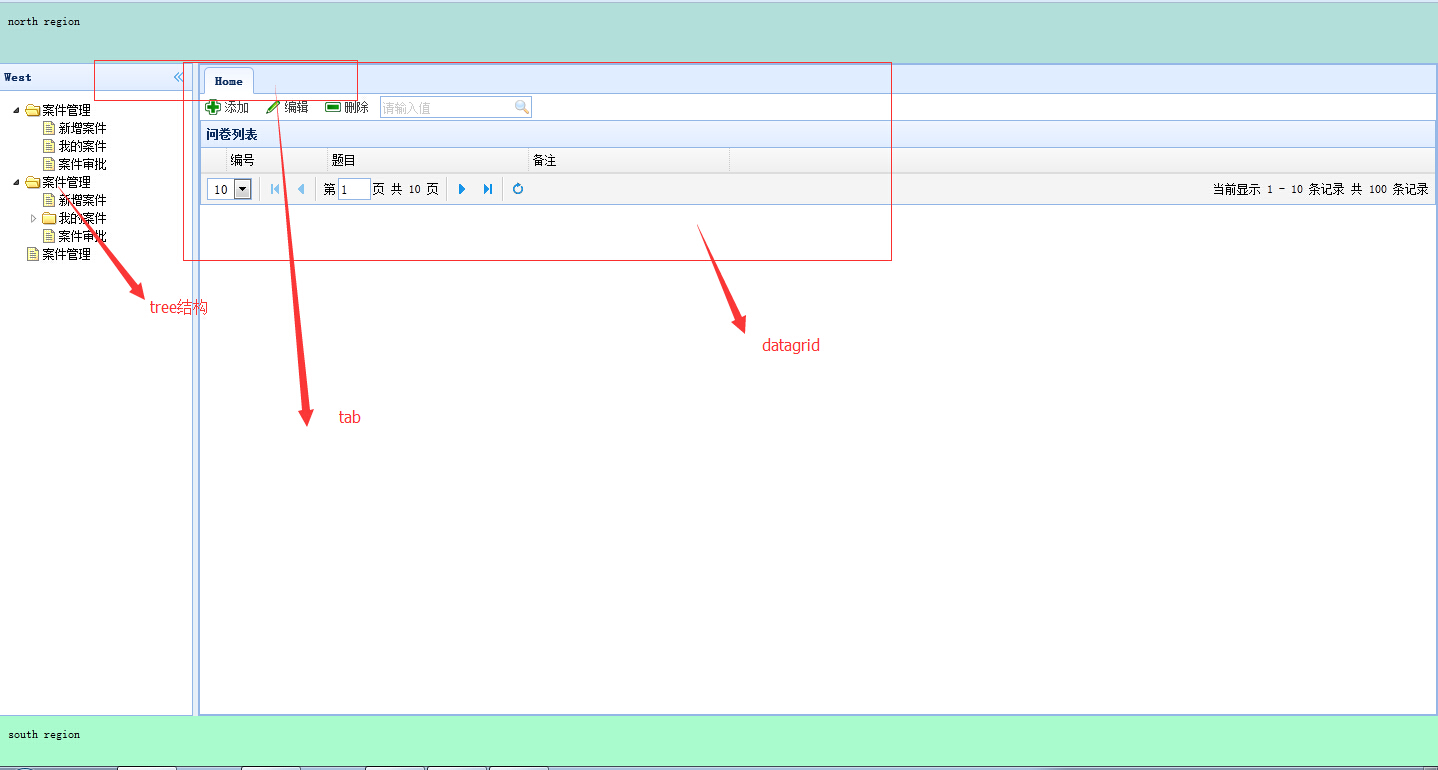
针对tree:
数据库:
CREATE TABLE [dbo].[SystemModel](

    [Id] [int] IDENTITY(,) NOT NULL,

    [Name] [nvarchar]() NULL,

    [FatherId] [int] NULL,

    [module_url] [nvarchar]() NULL,

    [module_order] [nchar]() NULL,

 CONSTRAINT [PK_SystemModel] PRIMARY KEY CLUSTERED

(

    [Id] ASC

)WITH (PAD_INDEX  = OFF, STATISTICS_NORECOMPUTE  = OFF, IGNORE_DUP_KEY = OFF, ALLOW_ROW_LOCKS  = ON, ALLOW_PAGE_LOCKS  = ON) ON [PRIMARY]

) ON [PRIMARY]
html
<!DOCTYPE html PUBLIC "-//W3C//DTD XHTML 1.0 Transitional//EN" "http://www.w3.org/TR/xhtml1/DTD/xhtml1-transitional.dtd">

<html xmlns="http://www.w3.org/1999/xhtml">

<head>

    <title>DataGrid教程</title>

    <script src="Scripts/jquery.min.js" type="text/javascript"></script>

    <script src="Scripts/easyui-lang-zh_CN.js" type="text/javascript"></script>

    <script src="Scripts/jquery.easyui.min.js" type="text/javascript"></script>

    <link rel="Stylesheet" type="text/css" href="Styles/themes/icon.css" />

    <link rel="Stylesheet" type="text/css" href="Styles/themes/default/easyui.css" />

    <script type="text/javascript">

        $(document).ready(

        function () {

            $("#QuestionList").datagrid(

            {

                title: "问卷列表",

                url: "Handler.ashx",

                columns: [[

            { field: "Id", title: "编号", width: "100" },

            { field: "Title", title: "题目", width: "200" },

            { field: "Remark", title: "备注", width: "200" }

            ]],

                rownumbers: true, //行号

                singleSelect: false, //是否单选

                pagination: true//分页控件

            }

            );

            var p = $('#QuestionList').datagrid('getPager');

            $(p).pagination({

                pageSize: 10, //每页显示的记录条数,默认为10

                pageList: [10, 20, 50], //可以设置每页记录条数的列表

                beforePageText: '第', //页数文本框前显示的汉字

                afterPageText: '页    共 {pages} 页',

                displayMsg: '当前显示 {from} - {to} 条记录   共 {total} 条记录'

            });

            //针对tree

            $(".easyui-tree").tree({

                onClick: function (node) {

                    if ($('.easyui-tree').tree('isLeaf', node.target)) {

                        alert('打开页');

                        addTab(node.text, node.attributes);

                    }

                }

            });

            //下面针对search搜索框

            $('#search').searchbox({

                searcher: function (value, name) {

                    $.post("add.ashx?type=search", { val: value }, function (result) {

                        alert(result);

                        $('#QuestionList').datagrid('loadData', result);

                    }, 'json');

                },

                prompt: '请输入值'

            });

            //下面是针对easyui-dialog

            $("#QuestionInfo").dialog(

            {

                title: "问卷信息",

                width: '900',

                height: '600',

                iconCls: 'icon-edit',

                // href: 'QueationInfo.htm',

                modal: true,

                closed: true,

                buttons: [{

                    text: '保存',

                    iconCls: 'icon-ok',

                    handler: function () {

                        $("#QInfo").form('submit', {

                            url: url,

                            onSubmit: function () {

                                return $(this).form('validate');

                            },

                            success: function (result) {

                                var result = eval('(' + result + ')');

                                if (result.errorMsg) {

                                    $.messager.show({

                                        title: '错误信息',

                                        msg: result.errorMsg

                                    });

                                } else {

                                    $('#QuestionInfo').dialog('close');

                                    $('#QuestionList').datagrid('reload');

                                }

                            }

                        });

                    }

                }, {

                    text: '取消',

                    iconCls: 'icon-cancel',

                    handler: function () {

                        $('#QuestionInfo').dialog('close');

                    }

                }]

            }

            );

        }

        );

        function Add() {

            $("#QuestionInfo").dialog("open");

            url = 'Add.ashx?type=add';

        }

        function edit() {

            var row = $('#QuestionList').datagrid('getSelected');

            if (row) {

                $('#QuestionInfo').dialog('open').dialog('setTitle', '编辑');

                $('#QInfo').form('load', row);

                url = 'Add.ashx?type=edit';

            }

            else {

                alert('请选择行');

            }

        }

        function Del() {

            $.messager.confirm('确认', '你确认要删除该记录吗?', function (r) {

                if (r) {

                    var row = $('#QuestionList').datagrid('getSelected');

                    if (row) {

                        url = 'Add.ashx?type=del&&Id=' + row.Id;

                        $.post('Add.ashx?type=del', { Id: row.Id },

                        function (result) {

                            if (result.status == 1) {

                                $('#QuestionList').datagrid('reload');

                            } else {

                                $.messager.alert('错误', result.msg, 'error');

                            }

                        }, 'json'

                        );

                    }

                    else {

                        alert('请选择行');

                    }

                }

            });

        }

        function addTab(title, url) {

            if ($('#tt').tabs('exists', title)) {

                $('#tt').tabs('select', title);

            } else {

                var content = '<iframe scrolling="auto" frameborder="0" src="' + url + '" style="width:100%;height:100%;"></iframe>';

                $('#tt').tabs('add', {

                    title: title,

                    content: content,

                    closable: true

                });

            }

        }

    </script>

</head>

<body class="easyui-layout">

    <div data-options="region:'north',border:false" style="height: 60px; background: #B3DFDA;

        padding: 10px">

        north region</div>

    <div data-options="region:'west',split:true,title:'West'" style="width: 200px; padding: 10px;">

        <ul class="easyui-tree" data-options="url:'Tree.ashx',method:'get',animate:true">

        </ul>

    </div>

    <div data-options="region:'south',border:false" style="height: 50px; background: #A9FACD;

        padding: 10px;">

        south region</div>

    <div data-options="region:'center'" id="tt" class="easyui-tabs">

        <div title="Home">

            <div id="toolbar">

                <a href="#" class="easyui-linkbutton" iconcls="icon-add" plain="true" onclick="Add()">

                    添加</a> <a href="#" class="easyui-linkbutton" iconcls="icon-edit" plain="true" onclick="edit()">

                        编辑</a> <a href="#" class="easyui-linkbutton" iconcls="icon-remove" plain="true" onclick="Del()">

                            删除</a>

                <input id="search" />

            </div>

            <table id="QuestionList">

            </table>

            <div id="QuestionInfo">

                <form id="QInfo" method="post">

                <input type="hidden" name="Id" />

                <p>

                    标题:<input id="Title" name="Title" /></p>

                <p>

                    <!--  form取值针对的是name-->

                    备注:<input id="Remark" name="Remark" /></p>

                </form>

            </div>

        </div>

    </div>

</body>

</html>
后台tree获取json
using System;

using System.Collections.Generic;

using System.Linq;

using System.Web;

using Wzh.Model;

using Wzh.BLL;

using System.Text;

namespace Web

{

    /// <summary>

    /// Tree 的摘要说明

    /// </summary>

    public class Tree : IHttpHandler

    {

        StringBuilder result = new StringBuilder();

        StringBuilder sb = new StringBuilder();

        public void ProcessRequest(HttpContext context)

        {

            context.Response.ContentType = "text/plain";

            GetTreeJsonByList(new SystemModelBLL().GetModelList("1=1"),);

            context.Response.Write(result.ToString());

            context.Response.End();

        }

        //根据List生成EasyUI Tree Json树结构

        public void GetTreeJsonByList(IList<SystemModelModel> Models, int Pid)

        {

            result.Append(sb.ToString());

            sb.Clear();

            //查询所有字节点

            IEnumerable<SystemModelModel> Infos = Models.Where(n => n.FatherId == Pid);

            if (Models.Count > )

            {

                sb.Append("[");

                if (Infos.Count() > )

                {

                    foreach (var n in Infos)

                    {

                        sb.Append("{\"id\":\"" + n.Id + "\",\"text\":\"" + n.Name + "\",\"attributes\":\"" + n.module_url + "\"");

                        IEnumerable<SystemModelModel> temp = Models.Where(p => p.FatherId == n.Id);

                        if (temp.Count() > )

                        {

                            sb.Append(",\"state\":\"closed\",\"children\":");

                            GetTreeJsonByList(Models, n.Id);

                            result.Append(sb.ToString());

                            sb.Clear();

                        }

                        result.Append(sb.ToString());

                        sb.Clear();

                        sb.Append("},");

                    }

                    sb = sb.Remove(sb.Length - , );

                }

                sb.Append("]");

                result.Append(sb.ToString());

                sb.Clear();

            }

        }

        public bool IsReusable

        {

            get

            {

                return false;

            }

        }

    }

}
Jquery EasyUI Tree .net实例的更多相关文章
- Jquery easyui Tree的简单使用
Jquery easyui Tree的简单使用 Jquery easyui 是jQuery EasyUI是一组基于jQuery的UI插件集合,而jQuery EasyUI的目标就是帮助web开发者更轻 ...
- Jquery easyui tree的使用
这个ui用的一切都是json数据.树也是如此! 后台需要返回与格式匹配的json数据才能正确加载树. 页面定义一个ui: <ul id="messageInfoAddTree" ...
- 前端基础教程-jQuery EasyUI 的EasyLoader实例
兄弟连前端分享-jQuery EasyUI 的EasyLoader实例 to move panel to other position $('#p').panel('move',{ left:100, ...
- jquery easyui tree dialog
<script type="text/javascript" src="<%=request.getContextPath()%>/include/ja ...
- Jquery easyui tree 一些常见操作
Tree: easyui tree的异步加载实现很简单,easyui的中文API文档中有实例(http://api.btboys.com/easyui/)——创建异步树形菜单,就是在tree node ...
- Jquery EasyUI DataGrid .net实例
前台界面:<!DOCTYPE html PUBLIC "-//W3C//DTD XHTML 1.0 Transitional//EN" "http://www.w3 ...
- Jquery EasyUI Tree树形结构的Java实现(实体转换VO)
前一阵做的OA项目,有一个是组织架构的树,因为是分开做的,我做的是Controller和页面,其他组做的Service和Dao,因为之前一直没有商量页面用什么框架做比较好,导致,Dao层取出来的数据都 ...
- jQuery EasyUI window窗口实例
<!DOCTYPE html><html> <head> <meta charset="UTF-8"> <title>j ...
- JQuery EasyUI Tree组件的Bug记录
记录一下使用项目中使用EasyUI遇到的bug,废话少说直接上菜 - _-(bug)..... bug :: .netcore创建一个web应用时候,会自动引入jQuery库以及一些插件,但是在 ...
随机推荐
- js与jsp
jsp :j2ee 中的一样模版技术,运行于服务器端javascript :一种运行于客户端的脚本语言,动态性.JavaScript是一种采用事件驱动的脚本语言,它不需要经过Web服务器就可以对用户的 ...
- html与jsp
1. 什么是 HTML 语言? HTML文件有什么特征? 答:HTML是超文本标记语言(Hypertext Mark-up Language)的缩写,主要用来创建与系统平台无关的网页文档.它是目前网络 ...
- zigbee学习之路(十):串口(接收)
一.前言 上次我们学习了串口的发送,今天我们要学习串口的接收,要实现的功能是接收电脑发来的数据,控制LED 灯闪烁,而且将收到的数据发回给电脑显示出来.而且要采用不占用cpu资源的中断. 二原理与分析 ...
- [问题2015S13] 复旦高等代数 II(14级)每周一题(第十四教学周)
[问题2015S13] 设 \(A=(a_{ij})\) 为 \(n\) 阶实矩阵, 定义函数 \[f(A)=\sum_{i,j=1}^na_{ij}^2.\] 设 \(P\) 为 \(n\) 阶非 ...
- [渣译文] 使用 MVC 5 的 EF6 Code First 入门 系列:为ASP.NET MVC应用程序处理并发
这是微软官方教程Getting Started with Entity Framework 6 Code First using MVC 5 系列的翻译,这里是第十篇:为ASP.NET MVC应用程序 ...
- Selenium Web 自动化 - 项目实战(三)
Selenium Web 自动化 - 项目实战(三) 2016-08-10 目录 1 关键字驱动概述2 框架更改总览3 框架更改详解 3.1 解析新增页面目录 3.2 解析新增测试用例目录 3. ...
- iOS开发数据库篇—SQLite常用的函数
iOS开发数据库篇—SQLite常用的函数 一.简单说明 1.打开数据库 int sqlite3_open( const char *filename, // 数据库的文件路径 sqlite3 * ...
- Oracle数据备份bat
@echo on setlocal rem 设置数据库和备份文件参数... set sid=testorcl set username=testname set password=testpwd se ...
- for_each使用方法详解[转]
for_each使用方法详解[转] Abstract之前在(原創) 如何使用for_each() algorithm? (C/C++) (STL)曾經討論過for_each(),不過當時功力尚淺,只談 ...
- js 原生对象排序
//对象属性排序 function compare(propertyName) { return function (object1, object2) { var value1 = object1[ ...