
Pyqt清空Win回收站
Pyqt清空回收站其实的调用Python的第三方库,通过第三方库调用windows的api删除回收站的数据
一. 准备工作
先下载第三方库winshell
下载地址: https://github.com/tjguk/winshell/tree/stable
关于winshell的文档: http://winshell.readthedocs.org/en/latest/recycle-bin.html#winshell.ShellRecycleBin.versions
该库依赖于win32con (自行下载安装)
安装winshell
python setup.py install
使用的时候 import winshell
二. 创建UI
用Py Designer 设计出UI,本部分主要用到pyqt的 QTableWidget
 <?xml version="1.0" encoding="UTF-8"?>

 <ui version="4.0">

  <class>recycleBin</class>

  <widget class="QWidget" name="recycleBin">

   <property name="geometry">

    <rect>

     <x>0</x>

     <y>0</y>

     <width>640</width>

     <height>422</height>

    </rect>

   </property>

   <property name="windowTitle">

    <string>Form</string>

   </property>

   <widget class="QGroupBox" name="groupBox">

    <property name="geometry">

     <rect>

      <x>30</x>

      <y>20</y>

      <width>561</width>

      <height>311</height>

     </rect>

    </property>

    <property name="title">

     <string>回收站列表</string>

    </property>

    <widget class="QTableWidget" name="tableWidget">

     <property name="geometry">

      <rect>

       <x>10</x>

       <y>20</y>

       <width>541</width>

       <height>271</height>

      </rect>

     </property>

     <column>

      <property name="text">

       <string>名称</string>

      </property>

      <property name="font">

       <font>

        <pointsize>12</pointsize>

        <weight>50</weight>

        <bold>false</bold>

       </font>

      </property>

     </column>

     <column>

      <property name="text">

       <string>路径</string>

      </property>

      <property name="font">

       <font>

        <pointsize>12</pointsize>

       </font>

      </property>

     </column>

    </widget>

   </widget>

   <widget class="QPushButton" name="pushButtonok">

    <property name="geometry">

     <rect>

      <x>470</x>

      <y>360</y>

      <width>75</width>

      <height>23</height>

     </rect>

    </property>

    <property name="text">

     <string>清空</string>

    </property>

   </widget>

  </widget>

  <resources/>

  <connections/>

 </ui>
预览:
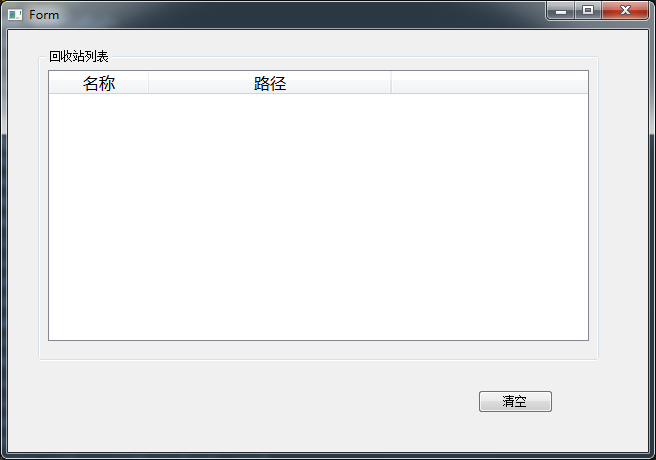
然后 将Ui转换为py文件
三. 逻辑的实现
选引入winshell
import winshell
获取 回收站里面的对象
All_files = winshell.recycle_bin()
|
- 获取对象的名称和路径
 self.dicFile = {}

         if All_files:

             for fileitem in All_files:

                 Fpath = str(fileitem.name())  # 获取文件的路径

                 FsplitName = Fpath.split('\\')

                 Fname=FsplitName[-1]  # 获取文件的名称

                 self.dicFile[Fname] = Fpath

         else:

             # self.initUi.tableWidget.hide()  # 回收站没有东西,隐藏tableWidget    不同电脑系统有的不执行该方法

             self.emptytable()
将获取的数据保存在dicFile中,循环dicFile输出在 tableWidget 中
 if self.dicFile:

             Rowcount = len(self.dicFile)  # 求出回收站项目的个数

             self.initUi.tableWidget.setColumnCount(2)  # 列数固定为2

             self.initUi.tableWidget.setRowCount(Rowcount)  # 行数为项目的个数

             self.initUi.tableWidget.setColumnWidth(1,400)  # 设置第2列宽度为400像素

             i = 0

             for datakey,datavalue in self.dicFile.items():

                 newItem = QtGui.QTableWidgetItem(unicode(datakey))

                 newItemPath = QtGui.QTableWidgetItem(unicode(datavalue))

                 self.initUi.tableWidget.setItem(i, 0, newItem)

                 self.initUi.tableWidget.setItem(i, 1, newItemPath)

                 i += 1

  else:

        self.emptytable()
判断回收站是否有数据对象
         self.initUi.tableWidget.setColumnCount(2)

         self.initUi.tableWidget.setRowCount(8)

         self.initUi.tableWidget.setColumnWidth(1,400)

         self.initUi.tableWidget.verticalHeader().setVisible(False)

         self.initUi.tableWidget.horizontalHeader().setVisible(False)

         textfont = QtGui.QFont("song",  17, QtGui.QFont.Bold)

         empinfo=QtGui.QTableWidgetItem(u'回收站内容为空,无需清理!')

         empinfo.setFont(textfont)

         self.initUi.tableWidget.setItem(0, 0, empinfo)

         self.initUi.tableWidget.setSpan(0, 0, 8, 2)

         self.initUi.pushButtonok.hide()
完整代码:
 # -*- coding: utf-8 -*-

 # Form implementation generated from reading ui file 'recycle.ui'

 #

 # Created: Thu Jan 15 19:14:32 2015

 #      by: PyQt4 UI code generator 4.10.3

 #

 # WARNING! All changes made in this file will be lost!

 from PyQt4 import QtCore, QtGui

 try:

     _fromUtf8 = QtCore.QString.fromUtf8

 except AttributeError:

     def _fromUtf8(s):

         return s

 try:

     _encoding = QtGui.QApplication.UnicodeUTF8

     def _translate(context, text, disambig):

         return QtGui.QApplication.translate(context, text, disambig, _encoding)

 except AttributeError:

     def _translate(context, text, disambig):

         return QtGui.QApplication.translate(context, text, disambig)

 class Ui_recycleBin(object):

     def setupUi(self, recycleBin):

         recycleBin.setObjectName(_fromUtf8("recycleBin"))

         recycleBin.resize(640, 422)

         self.groupBox = QtGui.QGroupBox(recycleBin)

         self.groupBox.setGeometry(QtCore.QRect(30, 20, 561, 311))

         self.groupBox.setObjectName(_fromUtf8("groupBox"))

         self.tableWidget = QtGui.QTableWidget(self.groupBox)

         self.tableWidget.setGeometry(QtCore.QRect(10, 20, 541, 271))

         self.tableWidget.setObjectName(_fromUtf8("tableWidget"))

         self.tableWidget.setColumnCount(2)

         self.tableWidget.setRowCount(0)

         item = QtGui.QTableWidgetItem()

         font = QtGui.QFont()

         font.setPointSize(12)

         font.setBold(False)

         font.setWeight(50)

         item.setFont(font)

         self.tableWidget.setHorizontalHeaderItem(0, item)

         item = QtGui.QTableWidgetItem()

         font = QtGui.QFont()

         font.setPointSize(12)

         item.setFont(font)

         self.tableWidget.setHorizontalHeaderItem(1, item)

         self.pushButtonok = QtGui.QPushButton(recycleBin)

         self.pushButtonok.setGeometry(QtCore.QRect(470, 360, 75, 23))

         self.pushButtonok.setObjectName(_fromUtf8("pushButtonok"))

         self.retranslateUi(recycleBin)

         QtCore.QMetaObject.connectSlotsByName(recycleBin)

     def retranslateUi(self, recycleBin):

         recycleBin.setWindowTitle(_translate("recycleBin", "Form", None))

         self.groupBox.setTitle(_translate("recycleBin", "回收站列表", None))

         item = self.tableWidget.horizontalHeaderItem(0)

         item.setText(_translate("recycleBin", "名称", None))

         item = self.tableWidget.horizontalHeaderItem(1)

         item.setText(_translate("recycleBin", "路径", None))

         self.pushButtonok.setText(_translate("recycleBin", "清空", None))

 import winshell

 #逻辑class

 class Logicpy(QtGui.QWidget):

     def __init__(self):

         super(Logicpy, self).__init__()

         self.initUi = Ui_recycleBin()

         self.initUi.setupUi(self)

         self.setWindowTitle(u'清空回收站')

         self.initUi.tableWidget.setEditTriggers(QtGui.QAbstractItemView.NoEditTriggers)    # 将表格变为禁止编辑

         self.initUi.tableWidget.setSelectionBehavior(QtGui.QAbstractItemView.SelectRows)  # 整行选中的方式

         self.initUi.tableWidget.setSelectionMode(QtGui.QAbstractItemView.ExtendedSelection)  #设置为可以选中多个目标

         # self.connect(self.initUi.pushButtonok, QtCore.SIGNAL('clicked()'), self.btnempty('sdf'))

         self.initUi.pushButtonok.mouseReleaseEvent=self.btnempty

         reload(sys)

         sys.setdefaultencoding("utf-8")

         All_files = winshell.recycle_bin()

         self.dicFile = {}

         if All_files:

             for fileitem in All_files:

                 Fpath = str(fileitem.name())  # 获取文件的路径

                 FsplitName = Fpath.split('\\')

                 Fname=FsplitName[-1]  # 获取文件的名称

                 self.dicFile[Fname] = Fpath

         else:

             # self.initUi.tableWidget.hide()  # 回收站没有东西,隐藏tableWidget    不同电脑系统有的不执行该方法

             self.emptytable()

         self.interData()

     # 插入recycleBin 对象

     def interData(self):

         if self.dicFile:

             Rowcount = len(self.dicFile)  # 求出回收站项目的个数

             self.initUi.tableWidget.setColumnCount(2)  # 列数固定为2

             self.initUi.tableWidget.setRowCount(Rowcount)  # 行数为项目的个数

             self.initUi.tableWidget.setColumnWidth(1,400)  # 设置第2列宽度为400像素

             i = 0

             for datakey,datavalue in self.dicFile.items():

                 newItem = QtGui.QTableWidgetItem(unicode(datakey))

                 newItemPath = QtGui.QTableWidgetItem(unicode(datavalue))

                 self.initUi.tableWidget.setItem(i, 0, newItem)

                 self.initUi.tableWidget.setItem(i, 1, newItemPath)

                 i += 1

         else:

             self.emptytable()

     # 运行程序时, 回收站为空

     def emptytable(self):

         self.initUi.tableWidget.setColumnCount(2)

         self.initUi.tableWidget.setRowCount(8)

         self.initUi.tableWidget.setColumnWidth(1,400)

         self.initUi.tableWidget.verticalHeader().setVisible(False)

         self.initUi.tableWidget.horizontalHeader().setVisible(False)

         textfont = QtGui.QFont("song",  17, QtGui.QFont.Bold)

         empinfo=QtGui.QTableWidgetItem(u'回收站内容为空,无需清理!')

         empinfo.setFont(textfont)

         self.initUi.tableWidget.setItem(0, 0, empinfo)

         self.initUi.tableWidget.setSpan(0, 0, 8, 2)

         self.initUi.pushButtonok.hide()

     # 触发btn时清空回收站

     def btnempty(self,event):

         ev=event.button()

         OK = winshell.ShellRecycleBin.empty() # 如何判断返回类型?

         self.close()

     #重载keyPressEvent ,  当按下Esc退出

     def keyPressEvent(self, event):

         if event.key() ==QtCore.Qt.Key_Escape:

             self.close()

 if __name__ == "__main__":

     import sys

     app = QtGui.QApplication(sys.argv)

     RecycleLogic = Logicpy()

     RecycleLogic.show()

     sys.exit(app.exec_())
五. 运行效果
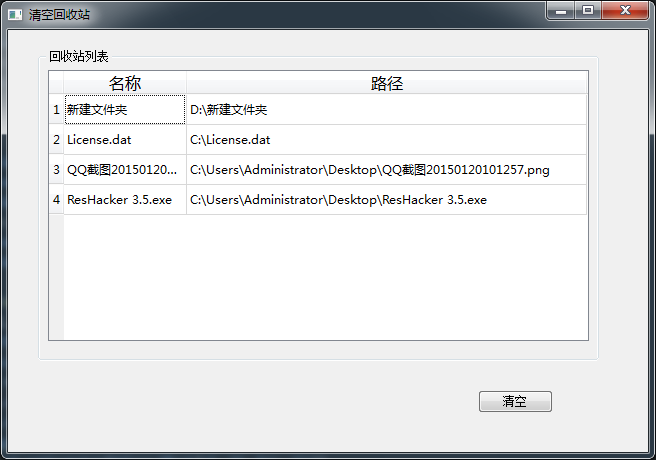
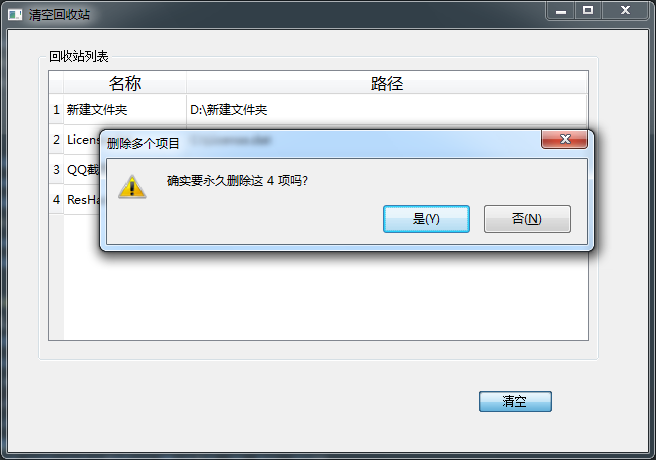
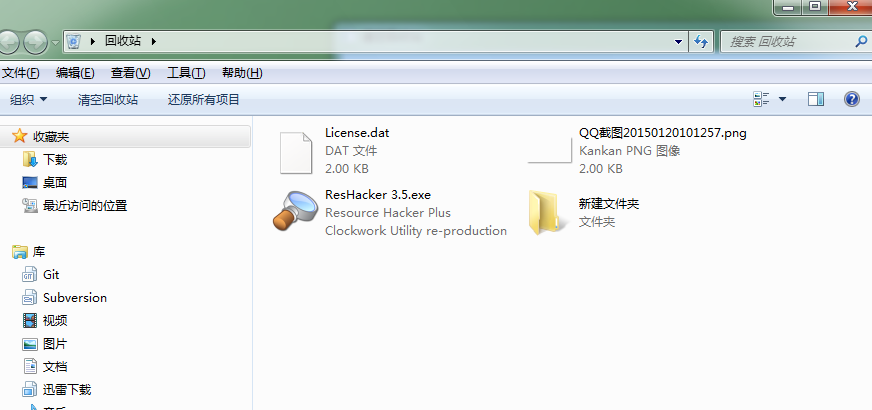
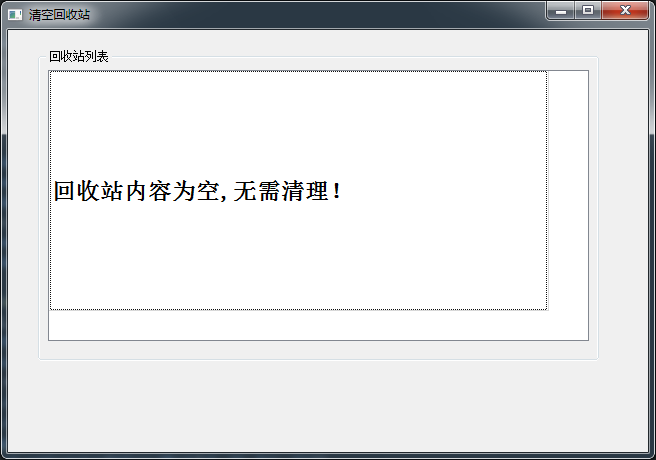
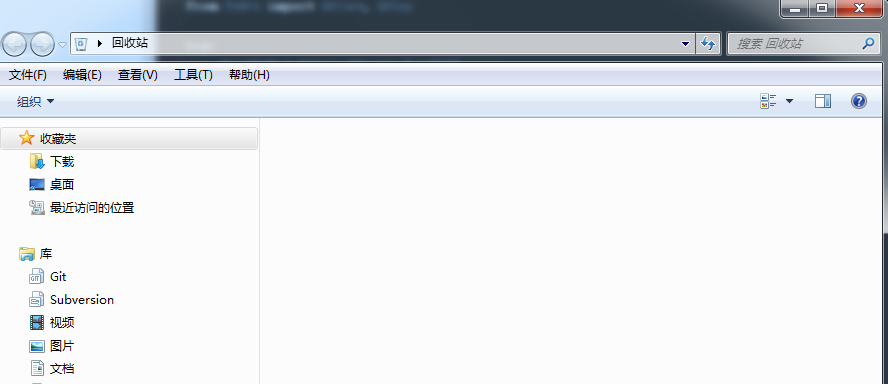
Pyqt清空Win回收站的更多相关文章
- 彻底清空SharePoint回收站(仅限IE)
1.导航到回收站页面2.F12,在控制台输入javascript:emptyItems()3.回车 4.点击确定即可 注意:这种方法可能只适用于Internet Explorer
- dedecms如何快速删除跳转的文章(记得清空内容回收站)
网站内容更新多了,有些页面修改了,这时其他相关页面也要做相应的调整,不然可能会出现404错误,那么dedecms如何快速删除跳转的文章呢?下面就随ytkah一起操作一下吧 如上图所示,在“核心”(标示 ...
- windows shell api SHEmptyRecycleBin 清空回收站
HRESULT SHEmptyRecycleBin( HWND hwnd, LPCTSTR pszRootPath, DWORD dwFlags ); hwnd 父窗口句柄 pszRootPath 将 ...
- oracle的回收站介绍
昨天做的展示oracle表空间功能剩余空间的功能,发现查询表dba_free_space时特别慢,经网上搜索,说是由于表空间碎片和回收站(Oracle 10g以后才有)引起的,后来搜到一片介绍回收站的 ...
- linux下rm命令修改,增加回收站功能【笔记】
一个脚本,linux的用户根目录下.bashrc最后加入如下代码,可以修改rm命令,让人们rm时候不再会全部删除,而是会加入到回收站里,以下是根据别人的资料参考修改的,不是原创 加入后,需要sourc ...
- Oracle的回收站和闪回查询机制(二)
上一篇中讲诉了Oracle中一些闪回查询(Flashback Query),这是利用回滚段信息来恢复一个或一些表到以前的一个时间点(一个快照).要注意的是,Flashback Query仅仅是查询以前 ...
- 转:C#清除回收站
SHEmptyRecycleBin是一个内核API方法,该方法能够清空回收站中的文件,该方法在C#中需要手动的引入方法所在的类库.该方法在C#中的声明语法如下: [DllImportAttrbute( ...
- C/S端开发问题汇总
0.先推荐几款工具,连接远程客户端DameWare Mini Remote Control,搜索本地文件Everything,以及sysinternals的系列工具: FileMon-监视所有文件修改 ...
- 整理一些Windows桌面运维常用的命令,并且整合成脚本
github地址:alittlemc/toy: 编写些脚本将运维经常所用到小玩意所集成在一起 (github.com) 持续更新! 前言 做过桌面运维的大佬们应该可以很明显感受到这份工作所需要的技能不 ...
随机推荐
- Qt5.5.1 学习笔记
添加图标(.pro): RC_ICONS = 1.ico RC_FILE = 1.rc 新建 1.rc 内容:IDI_ICON1 ICON "1.ico" 支持c++11(. ...
- 有向图寻找(一个)奇环 -- find an oddcycle in directed graph
/// the original blog is http://www.cnblogs.com/tmzbot/p/5579020.html , automatic crawling without l ...
- ubuntu 16.04 apt-get error: in the drive /media/cdrom and press
If you have an internet connection, you can safely comment out the line starting with deb cdrom: ... ...
- ios 在storyboard 和 xib中,显示自定义view的预览效果
发现FSCalendar这个控件能在xib中显示预览效果,是怎么实现的呢?其中涉及的知识又有哪些? 主要就是IBInspectable 和 IB_DESIGNABLE 先看 IBInspectable ...
- QPS计算方法
2016年3月14日 13:55:39 星期一 好久没写文章了, 神烦.....
- ZPF MYSQL数据库链接层
2015年3月31日 18:27:34 最后编辑: 2016年4月17日 00:22:00 星期日 读写分离: 根据最终的sql语句来判断是读还是写 (随后会考察并加上一致性哈希) 链式调用: 参看 ...
- Linux下编译安装Apache 2.4
Linux一般会自带httpd服务,但是版本一般不是最新,性能也不是最好,生产中建议手动安装官方源码包,安装Apache官方包之前首先要停止之前的httpd服务,停止后也可以卸载之前的版本 准备工作做 ...
- MySQL 主键范围查找问题
背景: 今天遇到一个主键范围查找的情况: id是主键,每次取10000.上面的这个查询id范围越往后面消耗的时间越久.通过id自增主键去查找数据应该不会出现这个现象的.以前都没有注意这个奇怪的现象,现 ...
- codeforces 505A. Mr. Kitayuta's Gift 解题报告
题目链接:http://codeforces.com/problemset/problem/505/A 题目意思:给出一个长度不大于10的小写英文字符串 s,问是否能通过在字符串的某个位置插入一个字母 ...
- Log4j的使用
一,Log4j简介 日志的三个目的: 1. 监视代码中变量的变化情况,周期性的记录到文件中供其他应用进行统计分析工作 2.跟踪代码运行时轨迹,作为日后审计的依 ...