
SqlServer性能优化 即席查询(十三)
执行计划,查询类别:
1.即席查询 2.预定义查询
select c.EnglishProductCategoryName,p.EnglishProductName,p.Color,p.Size

from Product as p inner join ProductCategory as c on p.ProductSubcategoryKey=

c.ProductCategoryKey where p.Size>'1'


--查询执行计划是否被缓存

 select c.usecounts,c.size_in_bytes,c.objtype,t.text from sys.dm_exec_cached_plans as c

cross apply sys.dm_exec_sql_text(c.plan_handle) as t

dbcc freeproccache--清空执行计划


--没有join 的形式会生成简单参数化

select EnglishProductName,Color,Size from Product where size>'1'--简单参数化

select EnglishProductName,Color,Size from Product where size>'2'--简单参数化

select c.EnglishProductCategoryName,p.EnglishProductName,p.Color,p.Size

from Product as p inner join ProductCategory as c on p.aProductSubcategoryKey=

c.ProductCategoryKey where p.Size>'2'
语句一样时即席查询才会重用执行计划。

优化:打开开关
exec sp_configure 'show advanced options',1

reconfigure with override
为ad hoc的查询优化:
exec sp_configure 'Optimize for ad hoc workloads',1

reconfigure with override

--使用参数化

alter database HRDB

set Parameterization forced
set Parameterization forced 强制参数化(like无法识别 )
select c.EnglishProductCategoryName,p.EnglishProductName,p.Color,p.Size

from Product as p inner join ProductCategory as c on p.ProductSubcategoryKey=

c.ProductCategoryKey where p.Size>'2'

select c.EnglishProductCategoryName,p.EnglishProductName,p.Color,p.Size

from Product as p inner join ProductCategory as c on p.ProductSubcategoryKey=

c.ProductCategoryKey where p.Size like '2%'
预定义查询:
预定义查询--参数化执行计划:
存储过程:
1.创建时延时检查
2.第一次执行时编译并生成执行计划
3.减少网络传输量
4.封装变化点
5.增强安全性,隔离访问控制
创建存储过程:
create procedure p_querycp @size varchar(500)

as

select c.EnglishProductCategoryName,p.EnglishProductName,p.Color,p.size

from Product as p inner join ProductCategory as c on p.ProductSubcategoryKey=c.ProductCategoryKey

where p.Size>@size
做跟踪(以前有对应得截图):
执行存储过程:
create procedure p_querycp @size varchar(500)

as

select c.EnglishProductCategoryName,p.EnglishProductName,p.Color,p.size

from Product as p inner join ProductCategory as c on p.ProductSubcategoryKey=c.ProductCategoryKey

where p.Size>@size

--清空执行计划

dbcc freeproccache

--执行

exec p_querycp '1'
执行重复的语句:
dbcc freeproccache

exec p_querycp @size='1'

exec p_querycp @size='2'
查看缓存计划:
select c.usecounts,c.size_in_bytes,c.objtype,t.text from sys.dm_exec_cached_plans as c

cross apply sys.dm_exec_sql_text(c.plan_handle) as t

预定义查询---参数化执行计划:
SP_ExecuteSql
避免了自己维护存储过程管理成本
可重用执行计划
Unicode字符串作为参数值与类型
大小写敏感
把存储过程定义成传递参数的:
declare @sqltext nvarchar(500)

set @sqltext=N'

select c.EnglishProductCategoryName,p.EnglishProductName,p.Color,p.size

from Product as p inner join ProductCategory as c on p.ProductSubcategoryKey=c.ProductCategoryKey

where p.Size>@size

'

declare @params	nvarchar(500)

set @params=N'@size varchar(500)'

 exec sp_executesql @sqltext,@params,@size='1'

把size 的大小换成 2

在.net中调用:(两种写法)
        public object getCp(string size)

        {

            HRUser dbcontext = new HRUser();

            var cps = from p in dbcontext.Product

                      join c in dbcontext.ProductCategory

                      on p.ProductSubcategoryKey equals c.ProductCategoryKey

                      where p.Size == size

                      //返回匿名对象

                      select new

                      {

                          CName = c.EnglishProductCategoryName,

                          PName = p.EnglishProductName,

                          Color = p.Color,

                          Size = p.Size

                      };

            return cps.ToList();

        }

        public object  getcp(string size)

        {

            HRUser dbcontext = new HRUser();

            var cps = dbcontext.Product.Join(dbcontext.ProductCategory, a => a.ProductSubcategoryKey, ar => ar.ProductCategoryKey, (a, ar) => new

            {

                CName = ar.EnglishProductCategoryName,

                PName = a.EnglishProductName,

                Color = a.Color,

                Size = a.Size

            }).Where(p => p.Size == size);

            return cps.ToList();

        }
页面:
  <asp:TextBox ID="TextBox1" runat="server"></asp:TextBox>

    <asp:Button ID="Button2" runat="server" OnClick="Button2_Click" Text="显示产品" />

    <asp:GridView ID="GridView1" runat="server">

    </asp:GridView>
点击后的事件:
  protected void Button2_Click(object sender, EventArgs e)

        {

            Product p = new Product();

            var cps = p.getCp(TextBox1.Text.Trim());

            GridView1.DataSource = cps;

            GridView1.DataBind();

        }

--动态构建语句(执行带参数的方法)

 declare @size varchar(500)

set @size='2'

execute('select c.EnglishProductCategoryName,p.EnglishProductName,p.Color,p.size

from Product as p inner join ProductCategory as c on p.ProductSubcategoryKey=c.ProductCategoryKey

where p.Size>'+''''+@size+'''')
dbcc freeproccache

--执行计划 缓存

select c.usecounts,c.size_in_bytes,c.objtype,t.text from sys.dm_exec_cached_plans as c

cross apply sys.dm_exec_sql_text(c.plan_handle) as t
形成两个缓存计划:

创建存储过程:
create  procedure p_querye @vacationhours  int

as

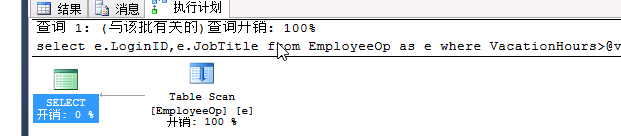
select e.LoginID,e.JobTitle from EmployeeOp as e where VacationHours>@vacationhours
exec p_querye 2--实际执行计划 表扫描

exec p_querye 99--实际执行计划 表扫描 应用用索引更好
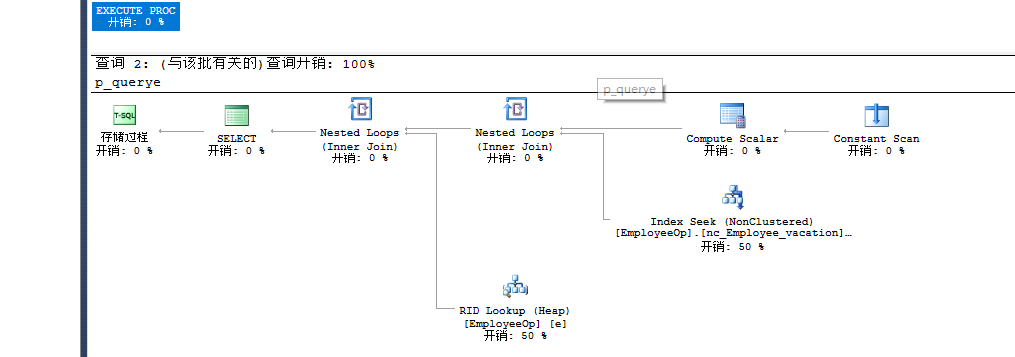
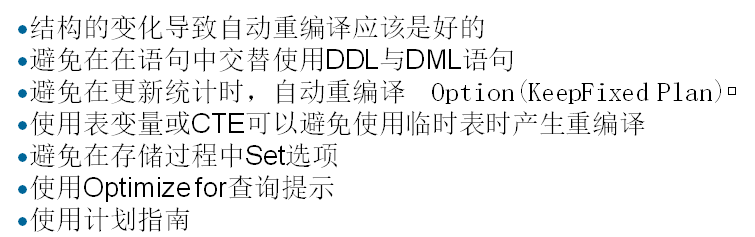
--重新编译的执行计划

exec p_querycp 99 with recompile
手工的指定执行几乎:
--手工的指定执行计划

exec  sp_create_plan_guide @name='执行任务计划指南之EmployeeOp Vacation',

--转成Unicode编码格式

@stmt=N'select e.LoginID,e.JobTitle from EmployeeOp as e where VacationHours>@vacationhours',

@type=N'Object',

--执行计划的名字

@module_or_batch ='p_querye',

@params =null,

--提示

@hints =N'OPTION(OPTIMIZE FOR(@vacationhours=''99''))'
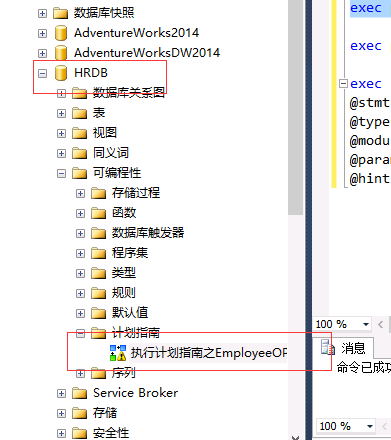
清除执行计划:执行(会参考上面指定的执行计划)
exec p_querye 2

存储过程重编译:


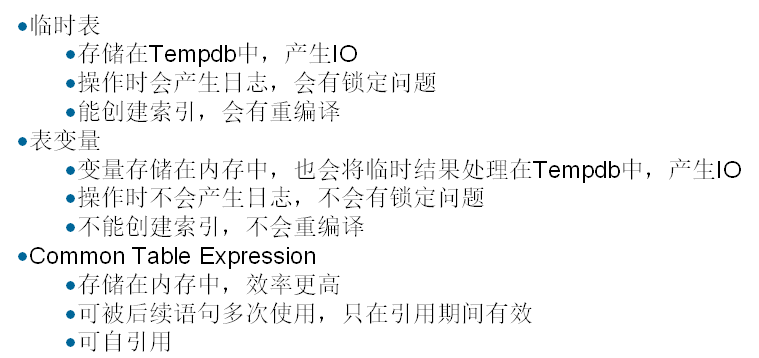
临时结果集:
定义跟踪的模板:
一:使用物理表进行临时结果集
--1.做一张物理表

create procedure p_physicaltb

as

CREATE TABLE PhysicalTB(

	[SalesOrderID] [int] NOT NULL,

	[SalesOrderDetailID] [int]  NOT NULL,

	[CarrierTrackingNumber] [nvarchar](25) NULL,

	[OrderQty] [smallint] NOT NULL,

	[ProductID] [int] NOT NULL,

	[SpecialOfferID] [int] NOT NULL,

	[UnitPrice] [money] NOT NULL,

	[UnitPriceDiscount] [money] NOT NULL,

	[LineTotal] [numeric](38, 6) NOT NULL,

	[rowguid] [uniqueidentifier] NOT NULL,

	[ModifiedDate] [datetime] NOT NULL

)

insert into PhysicalTB select * from OrderDetail

select * from PhysicalTB

set statistics time on

exec p_physicaltb   --cpu:391  total:1762

set statistics time off
跟踪的情况:

删除之后再次创建执行。
物理表每次执行都会有重编译的过程(不建议使用物理表来存储临时结果集)
第二种方式:
临时表存储临时结果集
create procedure p_temptb

as

CREATE TABLE #PhysicalTB(

	[SalesOrderID] [int] NOT NULL,

	[SalesOrderDetailID] [int]  NOT NULL,

	[CarrierTrackingNumber] [nvarchar](25) NULL,

	[OrderQty] [smallint] NOT NULL,

	[ProductID] [int] NOT NULL,

	[SpecialOfferID] [int] NOT NULL,

	[UnitPrice] [money] NOT NULL,

	[UnitPriceDiscount] [money] NOT NULL,

	[LineTotal] [numeric](38, 6) NOT NULL,

	[rowguid] [uniqueidentifier] NOT NULL,

	[ModifiedDate] [datetime] NOT NULL

)

insert into #PhysicalTB select * from OrderDetail

select * from #PhysicalTB

drop table #PhysicalTB

set statistics time on

exec p_temptb  --cpu:110  total:1494

set statistics time off

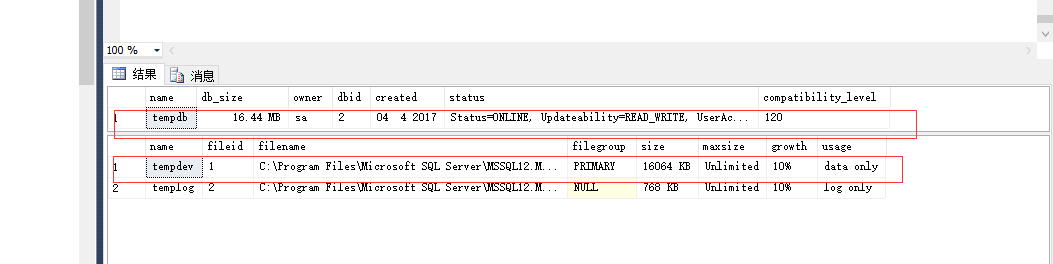
sp_helpdb 'tempdb'--16064,768
第一次执行时重新编译,第二次就不会重新编译了。
用到了tempdb临时表:
第三种方式:表变量存储临时结果集
--表变量存储临时结果集

create procedure p_tabletb

as

--申明表变量

declare @PhysicalTB table(

	[SalesOrderID] [int] NOT NULL,

	[SalesOrderDetailID] [int]  NOT NULL,

	[CarrierTrackingNumber] [nvarchar](25) NULL,

	[OrderQty] [smallint] NOT NULL,

	[ProductID] [int] NOT NULL,

	[SpecialOfferID] [int] NOT NULL,

	[UnitPrice] [money] NOT NULL,

	[UnitPriceDiscount] [money] NOT NULL,

	[LineTotal] [numeric](38, 6) NOT NULL,

	[rowguid] [uniqueidentifier] NOT NULL,

	[ModifiedDate] [datetime] NOT NULL

)

insert into @PhysicalTB select * from OrderDetail

select * from @PhysicalTB

set statistics time on

exec p_tabletb  --cpu:110  total:1494

set statistics time off

sp_helpdb 'tempdb'--17064,768
执行时不会重新编译
第四种方式:
--CTE(通用表表达式)存储临时结果集  完全放在内存中 不会操作任何数据库中的东西

create procedure p_ctetb

as

begin

--会自动推断数据类型

;with PhysicalTB(

	[SalesOrderID],

	[SalesOrderDetailID],

	[CarrierTrackingNumber],

	[OrderQty] ,

	[ProductID],

	[SpecialOfferID],

	[UnitPrice] ,

	[UnitPriceDiscount] ,

	[LineTotal] ,

	[rowguid] ,

	[ModifiedDate]

) as (select * from OrderDetail)

--访问通用表表达式

select * from PhysicalTB

end
跟踪的结果:

没有重新编译的过程,纯粹操作内存。tempdb数据库不会有任何的变化。
set statistics time on

exec p_ctetb  --cpu:100  total:1300

set statistics time off

sp_helpdb 'tempdb'--17064,768
高版本的通用表达式可以进行多次的使用:
create procedure p_ctetb1

as

begin

;with PhysicalTB(

	[SalesOrderID],

	[SalesOrderDetailID],

	[CarrierTrackingNumber],

	[OrderQty] ,

	[ProductID],

	[SpecialOfferID],

	[UnitPrice] ,

	[UnitPriceDiscount] ,

	[LineTotal] ,

	[rowguid] ,

	[ModifiedDate]

) as (select * from OrderDetail)

select * from PhysicalTB

select * from PhysicalTB

end

exec p_ctetb1
08之前的数据库,只要把表达式在创建一次就可以了
临时数据集的优化处理:
优化查询:编译指南。
--清空执行计划

dbcc freeproccache

select * from EmployeeOp where VacationHours>1 option(use plan N'

<ShowPlanXML xmlns="http://schemas.microsoft.com/sqlserver/2004/07/showplan" Version="1.2" Build="12.0.2000.8">

  <BatchSequence>

    <Batch>

      <Statements>

        <StmtSimple StatementText="select * from EmployeeOp where VacationHours>99" StatementId="1" StatementCompId="1" StatementType="SELECT" RetrievedFromCache="true" StatementSubTreeCost="0.00657038" StatementEstRows="1" StatementOptmLevel="FULL" QueryHash="0x7E06C77E90EB9FBB" QueryPlanHash="0x64478FC6152D2A83" StatementOptmEarlyAbortReason="GoodEnoughPlanFound" CardinalityEstimationModelVersion="120" ParameterizedText="(@1 tinyint)SELECT * FROM [EmployeeOp] WHERE [VacationHours]>@1">

          <StatementSetOptions QUOTED_IDENTIFIER="true" ARITHABORT="true" CONCAT_NULL_YIELDS_NULL="true" ANSI_NULLS="true" ANSI_PADDING="true" ANSI_WARNINGS="true" NUMERIC_ROUNDABORT="false" />

          <QueryPlan CachedPlanSize="40" CompileTime="6" CompileCPU="6" CompileMemory="232">

            <MemoryGrantInfo SerialRequiredMemory="0" SerialDesiredMemory="0" />

            <OptimizerHardwareDependentProperties EstimatedAvailableMemoryGrant="206857" EstimatedPagesCached="51714" EstimatedAvailableDegreeOfParallelism="2" />

            <RelOp NodeId="0" PhysicalOp="Nested Loops" LogicalOp="Inner Join" EstimateRows="1" EstimateIO="0" EstimateCPU="4.18e-006" AvgRowSize="830" EstimatedTotalSubtreeCost="0.00657038" Parallel="0" EstimateRebinds="0" EstimateRewinds="0" EstimatedExecutionMode="Row">

              <OutputList>

                <ColumnReference Database="[HRDB]" Schema="[dbo]" Table="[EmployeeOp]" Column="BusinessEntityID" />

                <ColumnReference Database="[HRDB]" Schema="[dbo]" Table="[EmployeeOp]" Column="NationalIDNumber" />

                <ColumnReference Database="[HRDB]" Schema="[dbo]" Table="[EmployeeOp]" Column="LoginID" />

                <ColumnReference Database="[HRDB]" Schema="[dbo]" Table="[EmployeeOp]" Column="OrganizationNode" />

                <ColumnReference Database="[HRDB]" Schema="[dbo]" Table="[EmployeeOp]" Column="OrganizationLevel" />

                <ColumnReference Database="[HRDB]" Schema="[dbo]" Table="[EmployeeOp]" Column="JobTitle" />

                <ColumnReference Database="[HRDB]" Schema="[dbo]" Table="[EmployeeOp]" Column="BirthDate" />

                <ColumnReference Database="[HRDB]" Schema="[dbo]" Table="[EmployeeOp]" Column="MaritalStatus" />

                <ColumnReference Database="[HRDB]" Schema="[dbo]" Table="[EmployeeOp]" Column="Gender" />

                <ColumnReference Database="[HRDB]" Schema="[dbo]" Table="[EmployeeOp]" Column="HireDate" />

                <ColumnReference Database="[HRDB]" Schema="[dbo]" Table="[EmployeeOp]" Column="SalariedFlag" />

                <ColumnReference Database="[HRDB]" Schema="[dbo]" Table="[EmployeeOp]" Column="VacationHours" />

                <ColumnReference Database="[HRDB]" Schema="[dbo]" Table="[EmployeeOp]" Column="SickLeaveHours" />

                <ColumnReference Database="[HRDB]" Schema="[dbo]" Table="[EmployeeOp]" Column="CurrentFlag" />

                <ColumnReference Database="[HRDB]" Schema="[dbo]" Table="[EmployeeOp]" Column="rowguid" />

                <ColumnReference Database="[HRDB]" Schema="[dbo]" Table="[EmployeeOp]" Column="ModifiedDate" />

              </OutputList>

              <NestedLoops Optimized="0">

                <OuterReferences>

                  <ColumnReference Column="Bmk1000" />

                </OuterReferences>

                <RelOp NodeId="1" PhysicalOp="Index Seek" LogicalOp="Index Seek" EstimateRows="1" EstimateIO="0.003125" EstimateCPU="0.0001581" AvgRowSize="19" EstimatedTotalSubtreeCost="0.0032831" TableCardinality="290" Parallel="0" EstimateRebinds="0" EstimateRewinds="0" EstimatedExecutionMode="Row">

                  <OutputList>

                    <ColumnReference Column="Bmk1000" />

                    <ColumnReference Database="[HRDB]" Schema="[dbo]" Table="[EmployeeOp]" Column="VacationHours" />

                    <ColumnReference Database="[HRDB]" Schema="[dbo]" Table="[EmployeeOp]" Column="SickLeaveHours" />

                  </OutputList>

                  <IndexScan Ordered="1" ScanDirection="FORWARD" ForcedIndex="0" ForceSeek="0" ForceScan="0" NoExpandHint="0" Storage="RowStore">

                    <DefinedValues>

                      <DefinedValue>

                        <ColumnReference Column="Bmk1000" />

                      </DefinedValue>

                      <DefinedValue>

                        <ColumnReference Database="[HRDB]" Schema="[dbo]" Table="[EmployeeOp]" Column="VacationHours" />

                      </DefinedValue>

                      <DefinedValue>

                        <ColumnReference Database="[HRDB]" Schema="[dbo]" Table="[EmployeeOp]" Column="SickLeaveHours" />

                      </DefinedValue>

                    </DefinedValues>

                    <Object Database="[HRDB]" Schema="[dbo]" Table="[EmployeeOp]" Index="[nc_Employee_vacationsickleave]" IndexKind="NonClustered" Storage="RowStore" />

                    <SeekPredicates>

                      <SeekPredicateNew>

                        <SeekKeys>

                          <StartRange ScanType="GT">

                            <RangeColumns>

                              <ColumnReference Database="[HRDB]" Schema="[dbo]" Table="[EmployeeOp]" Column="VacationHours" />

                            </RangeColumns>

                            <RangeExpressions>

                              <ScalarOperator ScalarString="(99)">

                                <Const ConstValue="(99)" />

                              </ScalarOperator>

                            </RangeExpressions>

                          </StartRange>

                        </SeekKeys>

                      </SeekPredicateNew>

                    </SeekPredicates>

                  </IndexScan>

                </RelOp>

                <RelOp NodeId="3" PhysicalOp="RID Lookup" LogicalOp="RID Lookup" EstimateRows="1" EstimateIO="0.003125" EstimateCPU="0.0001581" AvgRowSize="826" EstimatedTotalSubtreeCost="0.0032831" TableCardinality="290" Parallel="0" EstimateRebinds="0" EstimateRewinds="0" EstimatedExecutionMode="Row">

                  <OutputList>

                    <ColumnReference Database="[HRDB]" Schema="[dbo]" Table="[EmployeeOp]" Column="BusinessEntityID" />

                    <ColumnReference Database="[HRDB]" Schema="[dbo]" Table="[EmployeeOp]" Column="NationalIDNumber" />

                    <ColumnReference Database="[HRDB]" Schema="[dbo]" Table="[EmployeeOp]" Column="LoginID" />

                    <ColumnReference Database="[HRDB]" Schema="[dbo]" Table="[EmployeeOp]" Column="OrganizationNode" />

                    <ColumnReference Database="[HRDB]" Schema="[dbo]" Table="[EmployeeOp]" Column="OrganizationLevel" />

                    <ColumnReference Database="[HRDB]" Schema="[dbo]" Table="[EmployeeOp]" Column="JobTitle" />

                    <ColumnReference Database="[HRDB]" Schema="[dbo]" Table="[EmployeeOp]" Column="BirthDate" />

                    <ColumnReference Database="[HRDB]" Schema="[dbo]" Table="[EmployeeOp]" Column="MaritalStatus" />

                    <ColumnReference Database="[HRDB]" Schema="[dbo]" Table="[EmployeeOp]" Column="Gender" />

                    <ColumnReference Database="[HRDB]" Schema="[dbo]" Table="[EmployeeOp]" Column="HireDate" />

                    <ColumnReference Database="[HRDB]" Schema="[dbo]" Table="[EmployeeOp]" Column="SalariedFlag" />

                    <ColumnReference Database="[HRDB]" Schema="[dbo]" Table="[EmployeeOp]" Column="CurrentFlag" />

                    <ColumnReference Database="[HRDB]" Schema="[dbo]" Table="[EmployeeOp]" Column="rowguid" />

                    <ColumnReference Database="[HRDB]" Schema="[dbo]" Table="[EmployeeOp]" Column="ModifiedDate" />

                  </OutputList>

                  <IndexScan Lookup="1" Ordered="1" ScanDirection="FORWARD" ForcedIndex="0" ForceSeek="0" ForceScan="0" NoExpandHint="0" Storage="RowStore">

                    <DefinedValues>

                      <DefinedValue>

                        <ColumnReference Database="[HRDB]" Schema="[dbo]" Table="[EmployeeOp]" Column="BusinessEntityID" />

                      </DefinedValue>

                      <DefinedValue>

                        <ColumnReference Database="[HRDB]" Schema="[dbo]" Table="[EmployeeOp]" Column="NationalIDNumber" />

                      </DefinedValue>

                      <DefinedValue>

                        <ColumnReference Database="[HRDB]" Schema="[dbo]" Table="[EmployeeOp]" Column="LoginID" />

                      </DefinedValue>

                      <DefinedValue>

                        <ColumnReference Database="[HRDB]" Schema="[dbo]" Table="[EmployeeOp]" Column="OrganizationNode" />

                      </DefinedValue>

                      <DefinedValue>

                        <ColumnReference Database="[HRDB]" Schema="[dbo]" Table="[EmployeeOp]" Column="OrganizationLevel" />

                      </DefinedValue>

                      <DefinedValue>

                        <ColumnReference Database="[HRDB]" Schema="[dbo]" Table="[EmployeeOp]" Column="JobTitle" />

                      </DefinedValue>

                      <DefinedValue>

                        <ColumnReference Database="[HRDB]" Schema="[dbo]" Table="[EmployeeOp]" Column="BirthDate" />

                      </DefinedValue>

                      <DefinedValue>

                        <ColumnReference Database="[HRDB]" Schema="[dbo]" Table="[EmployeeOp]" Column="MaritalStatus" />

                      </DefinedValue>

                      <DefinedValue>

                        <ColumnReference Database="[HRDB]" Schema="[dbo]" Table="[EmployeeOp]" Column="Gender" />

                      </DefinedValue>

                      <DefinedValue>

                        <ColumnReference Database="[HRDB]" Schema="[dbo]" Table="[EmployeeOp]" Column="HireDate" />

                      </DefinedValue>

                      <DefinedValue>

                        <ColumnReference Database="[HRDB]" Schema="[dbo]" Table="[EmployeeOp]" Column="SalariedFlag" />

                      </DefinedValue>

                      <DefinedValue>

                        <ColumnReference Database="[HRDB]" Schema="[dbo]" Table="[EmployeeOp]" Column="CurrentFlag" />

                      </DefinedValue>

                      <DefinedValue>

                        <ColumnReference Database="[HRDB]" Schema="[dbo]" Table="[EmployeeOp]" Column="rowguid" />

                      </DefinedValue>

                      <DefinedValue>

                        <ColumnReference Database="[HRDB]" Schema="[dbo]" Table="[EmployeeOp]" Column="ModifiedDate" />

                      </DefinedValue>

                    </DefinedValues>

                    <Object Database="[HRDB]" Schema="[dbo]" Table="[EmployeeOp]" TableReferenceId="-1" IndexKind="Heap" Storage="RowStore" />

                    <SeekPredicates>

                      <SeekPredicateNew>

                        <SeekKeys>

                          <Prefix ScanType="EQ">

                            <RangeColumns>

                              <ColumnReference Column="Bmk1000" />

                            </RangeColumns>

                            <RangeExpressions>

                              <ScalarOperator ScalarString="[Bmk1000]">

                                <Identifier>

                                  <ColumnReference Column="Bmk1000" />

                                </Identifier>

                              </ScalarOperator>

                            </RangeExpressions>

                          </Prefix>

                        </SeekKeys>

                      </SeekPredicateNew>

                    </SeekPredicates>

                  </IndexScan>

                </RelOp>

              </NestedLoops>

            </RelOp>

            <ParameterList>

              <ColumnReference Column="@1" ParameterCompiledValue="(99)" />

            </ParameterList>

          </QueryPlan>

        </StmtSimple>

      </Statements>

    </Batch>

  </BatchSequence>

</ShowPlanXML>

')  --表扫描

select * from sys.dm_exec_cached_plans

select * from sys.dm_exec_sql_text

select * from  sys.dm_exec_query_plan

select * from EmployeeOp where VacationHours>99  -- 索引

select c.plan_handle,p.text from sys.dm_exec_cached_plans as c cross apply  sys.dm_exec_sql_text(c.plan_handle) as p

select * from  sys.dm_exec_query_plan(0x06000A00CD253E14207CA0290200000001000000000000000000000000000000000000000000000000000000)
SqlServer性能优化 即席查询(十三)的更多相关文章
- 03.SQLServer性能优化之---存储优化系列
汇总篇:http://www.cnblogs.com/dunitian/p/4822808.html#tsql 概 述:http://www.cnblogs.com/dunitian/p/60413 ...
- SQLServer性能优化之---数据库级日记监控
上节回顾:https://www.cnblogs.com/dotnetcrazy/p/11029323.html 4.6.6.SQLServer监控 脚本示意:https://github.com/l ...
- 01.SQLServer性能优化之----强大的文件组----分盘存储
汇总篇:http://www.cnblogs.com/dunitian/p/4822808.html#tsql 文章内容皆自己的理解,如有不足之处欢迎指正~谢谢 前天有学弟问逆天:“逆天,有没有一种方 ...
- 02.SQLServer性能优化之---牛逼的OSQL----大数据导入
汇总篇:http://www.cnblogs.com/dunitian/p/4822808.html#tsql 上一篇:01.SQLServer性能优化之----强大的文件组----分盘存储 http ...
- mysql性能优化-慢查询分析、优化索引和配置 (慢查询日志,explain,profile)
mysql性能优化-慢查询分析.优化索引和配置 (慢查询日志,explain,profile) 一.优化概述 二.查询与索引优化分析 1性能瓶颈定位 Show命令 慢查询日志 explain分析查询 ...
- SQLServer性能优化专题
SQLServer性能优化专题 01.SQLServer性能优化之----强大的文件组----分盘存储(水平分库) http://www.cnblogs.com/dunitian/p/5276431. ...
- mysql性能优化-慢查询分析、优化索引和配置
一.优化概述 二.查询与索引优化分析 1性能瓶颈定位 Show命令 慢查询日志 explain分析查询 profiling分析查询 2索引及查询优化 三.配置优化 1) max_connec ...
- [转]mysql性能优化-慢查询分析、优化索引和配置
一. 优化概述 MySQL数据库是常见的两个瓶颈是CPU和I/O的瓶颈,CPU在饱和的时候一般发生在数据装入内存或从磁盘上读取数据时候.磁盘I/O瓶颈发生在装入数据远大于内存容量的时候,如果应用分布在 ...
- mysql性能优化-慢查询分析、优化索引和配置【转】
一.优化概述 二.查询与索引优化分析 1性能瓶颈定位 Show命令 慢查询日志 explain分析查询 profiling分析查询 2索引及查询优化 三.配置优化 1) max_connec ...
随机推荐
- java 简单数组元素的增删改查
public class Test { static int[] a = new int[20]; static int n; public static void main(String[] arg ...
- Seajs教程 配置文档
seajs.config Obj alias Obj 别名配置,配置之后可在模块中使用require调用require('jQuery'); seajs.config({ alias:{ 'jquer ...
- IIS部署WCF网站服务步骤
一开始在“管理工具”下找不到IIS的快捷方式,是因为系统默认未打开IIS功能,所以首先打开IIS功能: 为避免出现未知的麻烦,建议将IIS下的所有项都勾上: 创建IIS桌面快捷方式: 添加网站托管: ...
- 转: Redis基础总结
转文:http://blog.csdn.net/basycia/article/details/52175429 1.redis是什么 2.redis的作者何许人也 3.谁在使用redis 4.学会安 ...
- 虚拟机启动linux系统报错,此主机支持 Intel VT-x,但 Intel VT-x 处于禁用状态
在使用虚拟机启动linux的时候报错,如下: 已将该虚拟机配置为使用 64 位客户机操作系统.但是,无法执行 64 位操作. 此主机支持 Intel VT-x,但 Intel VT-x 处于禁用状态. ...
- git clone带用户名和密码的方式
git clone http://username:password@127.0.0.1/res/res.git
- DevExpress--xtraTabbedMdiManager控件
因项目需要要实现类似jquery的Tab效果,所以要用到xtraTabbedMdiManager控件 使用xtraTabbedMdiManager一般配合navBarControl(上期已写过) 在工 ...
- android 取消edittext焦点
页面中如果有EditText会默认获取焦点,如果进入页面时不想让其获取到焦点可以按如下步骤: 1.在布局的最外层添加属性: android:focusable="true" and ...
- 初学3D Touch
引言 With iOS 9, new iPhone models add a third dimension to the user interface. A user can now press y ...
- java 中的SimpleDateFormat、Date函数以及字符串和Date类型互转
SimpleDateFormat是一个以与语言环境有关的方式来格式化和解析日期的具体类.它允许进行格式化(日期 -> 文本).解析(文本 -> 日期)和规范化. SimpleDateFor ...