
java查看当前项目所有线程列表界面
java查看当前项目所有线程列表界面
1.TestThread(测试类)
package com.testdemo.pcis.isc.job.king.panel;

public class TestThread {

    public static void main(String[] args) {

        new Thread(){

            public void run() {

                try {

                    Thread.currentThread().sleep(10*1000);

                } catch (InterruptedException e) {

                    e.printStackTrace();

                }

            };

        }.start();

        new Thread(){

            public void run() {

                try {

                    Thread.currentThread().sleep(20*1000);

                } catch (InterruptedException e) {

                    e.printStackTrace();

                }

            };

        }.start();

        new Thread(){

            public void run() {

                try {

                    Thread.currentThread().sleep(30*1000);

                } catch (InterruptedException e) {

                    e.printStackTrace();

                }

            };

        }.start();

        ThreadViewer.showThreads();

    }

}
2.ThreadViewer(线程视图启动类)
package com.testdemo.pcis.isc.job.king.panel;

import java.awt.*;

import java.awt.event.*;

import javax.swing.*;

import javax.swing.table.*;

public class ThreadViewer extends JPanel {

    private ThreadViewerTableModel tableModel;

    public ThreadViewer() {

        tableModel = new ThreadViewerTableModel();

        JTable table = new JTable(tableModel);

        table.setAutoResizeMode(JTable.AUTO_RESIZE_LAST_COLUMN);

        TableColumnModel colModel = table.getColumnModel();

        int numColumns = colModel.getColumnCount();

        // manually size all but the last column

        for ( int i = 0; i < numColumns - 1; i++ ) {

            TableColumn col = colModel.getColumn(i);

            col.sizeWidthToFit();

            col.setPreferredWidth(col.getWidth() + 5);

            col.setMaxWidth(col.getWidth() + 5);

        }

        JScrollPane sp = new JScrollPane(table);

        setLayout(new BorderLayout());

        add(sp, BorderLayout.CENTER);

    }

    public void dispose() {

        tableModel.stopRequest();

    }

    protected void finalize() throws Throwable {

        dispose();

    }

    public static JFrame createFramedInstance() {

        final ThreadViewer viewer = new ThreadViewer();

        final JFrame f = new JFrame("ThreadViewer");

        f.addWindowListener(new WindowAdapter() {

                public void windowClosing(WindowEvent e) {

                    f.setVisible(false);

                    f.dispose();

                    viewer.dispose();

                }

            });

        f.setContentPane(viewer);

        f.setSize(500, 300);

        f.setVisible(true);

        return f;

    }

    public static void showThreads() {

        JFrame f = ThreadViewer.createFramedInstance();

        // For this example, exit the VM when the viewer

        // frame is closed.

        f.addWindowListener(new WindowAdapter() {

                public void windowClosing(WindowEvent e) {

                    System.exit(0);

                }

            });

        // Keep the main thread from exiting by blocking

        // on wait() for a notification that never comes.

        Object lock = new Object();

        synchronized ( lock ) {

            try {

                lock.wait();

            } catch ( InterruptedException x ) {

            }

        }

    }

    public static void main(String[] args) {

        showThreads();

    }

}
3.ThreadViewerTableModel(线程视图编织类)
package com.isoftstone.pcis.isc.job.king.panel;

import java.awt.*;

import java.lang.reflect.*;

import javax.swing.*;

import javax.swing.table.*;

public class ThreadViewerTableModel extends AbstractTableModel {

    private Object dataLock;

    private int rowCount;

    private Object[][] cellData;

    private Object[][] pendingCellData;

    // the column information remains constant

    private final int columnCount;

    private final String[] columnName;

    private final Class[] columnClass;

    // self-running object control variables

    private Thread internalThread;

    private volatile boolean noStopRequested;

    public ThreadViewerTableModel() {

        rowCount = 0;

        cellData = new Object[0][0];

        // JTable uses this information for the column headers

        String[] names = {

            "Priority", "Alive",

            "Daemon", "Interrupted",

            "ThreadGroup", "Thread Name" };

        columnName = names;

        // JTable uses this information for cell rendering

        Class[] classes = {

            Integer.class, Boolean.class,

            Boolean.class, Boolean.class,

            String.class, String.class };

        columnClass = classes;

        columnCount = columnName.length;

        // used to control concurrent access

        dataLock = new Object();

        noStopRequested = true;

        Runnable r = new Runnable() {

                public void run() {

                    try {

                        runWork();

                    } catch ( Exception x ) {

                        // in case ANY exception slips through

                        x.printStackTrace();

                    }

                }

            };

        internalThread = new Thread(r, "ThreadViewer");

        internalThread.setPriority(Thread.MAX_PRIORITY - 2);

        internalThread.setDaemon(true);

        internalThread.start();

    }

    private void runWork() {

        // The run() method of transferPending is called by

        // the event handling thread for safe concurrency.

        Runnable transferPending = new Runnable() {

                public void run() {

                    transferPendingCellData();

                    // Method of AbstractTableModel that

                    // causes the table to be updated.

                    fireTableDataChanged();

                }

            };

        while ( noStopRequested ) {

            try {

                createPendingCellData();

                SwingUtilities.invokeAndWait(transferPending);

                Thread.sleep(2000);

            } catch ( InvocationTargetException tx ) {

                tx.printStackTrace();

                stopRequest();

            } catch ( InterruptedException x ) {

                Thread.currentThread().interrupt();

            }

        }

    }

    public void stopRequest() {

        noStopRequested = false;

        internalThread.interrupt();

    }

    public boolean isAlive() {

        return internalThread.isAlive();

    }

    private void createPendingCellData() {

        // this method is called by the internal thread

        Thread[] thread = findAllThreads();

        Object[][] cell = new Object[thread.length][columnCount];

        for ( int i = 0; i < thread.length; i++ ) {

            Thread t = thread[i];

            Object[] rowCell = cell[i];

            rowCell[0] = new Integer(t.getPriority());

            rowCell[1] = new Boolean(t.isAlive());

            rowCell[2] = new Boolean(t.isDaemon());

            rowCell[3] = new Boolean(t.isInterrupted());

            rowCell[4] = t.getThreadGroup().getName();

            rowCell[5] = t.getName();

        }

        synchronized ( dataLock ) {

            pendingCellData = cell;

        }

    }

    private void transferPendingCellData() {

        // this method is called by the event thread

        synchronized ( dataLock ) {

            cellData = pendingCellData;

            rowCount = cellData.length;

        }

    }

    public int getRowCount() {

        // this method is called by the event thread

        return rowCount;

    }

    public Object getValueAt(int row, int col) {

        // this method is called by the event thread

        return cellData[row][col];

    }

    public int getColumnCount() {

        return columnCount;

    }

    public Class getColumnClass(int columnIdx) {

        return columnClass[columnIdx];

    }

    public String getColumnName(int columnIdx) {

        return columnName[columnIdx];

    }

    public static Thread[] findAllThreads() {

        ThreadGroup group =

            Thread.currentThread().getThreadGroup();

        ThreadGroup topGroup = group;

        // traverse the ThreadGroup tree to the top

        while ( group != null ) {

            topGroup = group;

            group = group.getParent();

        }

        // Create a destination array that is about

        // twice as big as needed to be very confident

        // that none are clipped.

        int estimatedSize = topGroup.activeCount() * 2;

        Thread[] slackList = new Thread[estimatedSize];

        // Load the thread references into the oversized

        // array. The actual number of threads loaded

        // is returned.

        int actualSize = topGroup.enumerate(slackList);

        // copy into a list that is the exact size

        Thread[] list = new Thread[actualSize];

        System.arraycopy(slackList, 0, list, 0, actualSize);

        return list;

    }

}
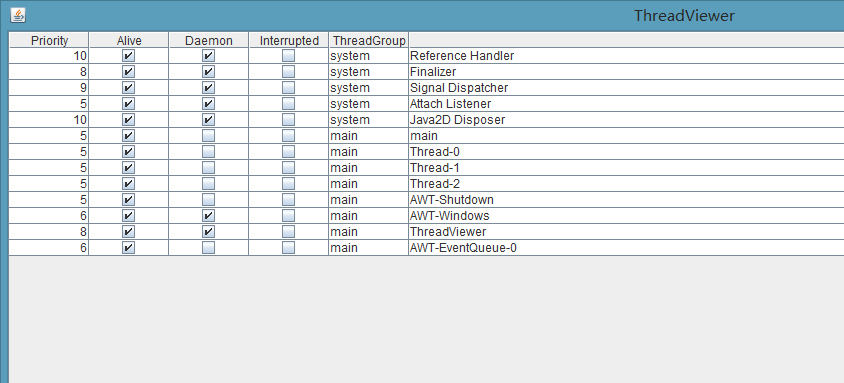
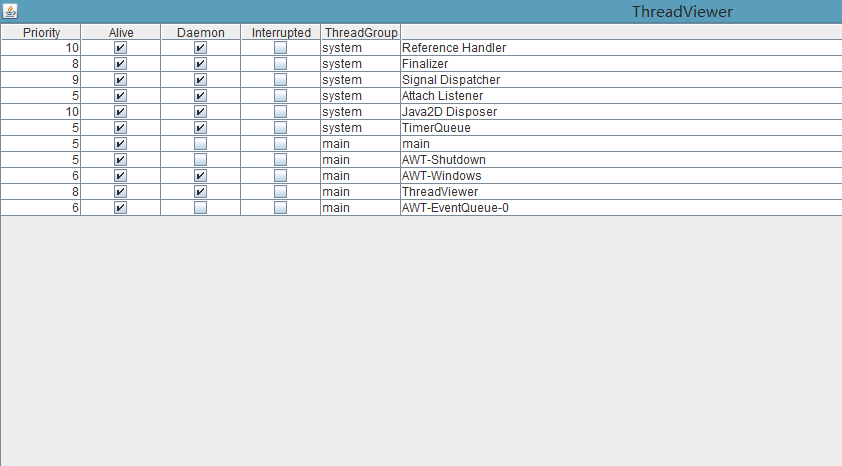
4运行前后比对
运行前界面
运行后界面
java查看当前项目所有线程列表界面的更多相关文章
- java查看当前项目所有线程列表界面【转】
java查看当前项目所有线程列表界面 1.TestThread(测试类) package com.testdemo.pcis.isc.job.king.panel; public class Test ...
- java查看本机hostName可代表的ip列表
java查看本机hostName可代表的ip列表 import java.net.InetAddress; public class ent { public static void main(Str ...
- java查看本机hostName可代表的ip列表【转】
java查看本机hostName可代表的ip列表 import java.net.InetAddress; public class ent { public static void main(Str ...
- Intellij IDEA 中如何查看maven项目中所有jar包的依赖关系图(转载)
Intellij IDEA 中如何查看maven项目中所有jar包的依赖关系图 2017年04月05日 10:53:13 李学凯 阅读数:104997更多 所属专栏: Intellij Idea ...
- Java程序设计基础项目总结报告
Java程序设计基础项目总结报告 20135313吴子怡 一.项目内容 运用所学Java知识,不调用Java类库,实现密码学相关算法的设计,并完成TDD测试,设计运行界面. 二.具体任务 1.要求实现 ...
- (转)关于java和web项目中的相对路径问题
原文:http://blog.csdn.net/yethyeth/article/details/1623283 关于java和web项目中的相对路径问题 分类: java 2007-05-23 22 ...
- Java概述和项目演示
Java概述和项目演示 1. 软件开发学习方法 多敲 多思考 解决问题 技术文档阅读(中文,英文) 项目文档 多阅读源码 2. 计算机 简称电脑,执行一系列指令的电子设备 3. 硬件组成 输入设备:键 ...
- Java知多少(88)列表和组合框
列表和组合框是又一类供用户选择的界面组件,用于在一组选择项目选择,组合框还可以输入新的选择. 列表 列表(JList)在界面中表现为列表框,是JList类或它的子类的对象.程序可以在列表框中加入多个文 ...
- Java知多少(89)列表和组合框
有两种类型的菜单:下拉式菜单和弹出式菜单.本章只讨论下拉式菜单编程方法.菜单与JComboBox和JCheckBox不同,它们在界面中是一直可见的.菜单与JComboBox的相同之处是每次只可选择一个 ...
随机推荐
- mac-android-虚机加速
mac下进行android编程不可避免会碰到android虚拟机问题,macbook pro启动虚机时报错: Starting emulator for AVD 'NEW' emulator: ERR ...
- Doxygen给C程序生成注释文档
近段时间,一直在学习华为C语言编程规范(2011版),在“注释”这一章中发现了一种“Doxygen”的注释转文档工具,查看诸多相关资料,并进行编程实践,终于可以利用Doxygen给C程序生成注释文档. ...
- angularjs上传图片
通过AngularJS实现图片上传及缩略图展示(读取文件内容) AngularJS图片上传功能的实现(读取文件内容) AngularJs实现Multipart/form-data 文件的上传(上传文件 ...
- 仿Spring读取配置文件实现方案
一.读取config和jar里的配置文件,以流的方式返回 /** * 根据路径,获取当前项目中路径(jar包和config文件)下的配置文件 * @param filePath 存放job配置信息文件 ...
- /proc/net/tcp中各项参数说明
/proc/net/tcp中的内容由tcp4_seq_show()函数打印,该函数中有三种打印形式,我们这里这只列出状态是TCP_SEQ_STATE_LISTENING或TCP_SEQ_STATE_E ...
- Android IOS WebRTC 音视频开发总结(八十五)-- 使用WebRTC广播网络摄像头视频(下)
本文主要介绍WebRTC (我们翻译和整理的,译者:weizhenwei,校验:blacker),最早发表在[编风网] 支持原创,转载必须注明出处,欢迎关注我的微信公众号blacker(微信ID:bl ...
- Hibernate温习(一)
//从学校出来几个月了,一直用maximo没有使用到Hibernate,趁着周末的空闲时间重新开始学习Hibernate. Hibernate概念: Hibernate是数据库访问层的框架,对JDBC ...
- AOP和IOC的作用
IOC:控制反转,是一种设计模式.一层含义是控制权的转移:由传统的在程序中控制依赖转移到由容器来控制:第二层是依赖注入:将相互依赖的对象分离,在spring配置文件中描述他们的依赖关系.他们的依赖关系 ...
- 内容生成器:content、计数器、多列
一,内容生成器:content 补充before和after伪类选择器: 1):将内容添加到某个选择器定义的单个或者多个元素的每一个实例之前或者之后 2)与before选择器配合使用(同理大家想下会不 ...
- Objective - C 值对象 NSNumber和NSValue
在进行数据处理的时候,因为对象类型的不同, 并不能进行相应的数据处理,所以必须要进行数据类型的转换,这也就是NSNumber,NSValue这两类值对象出现的原因. 简而言之,NSNumber就是实现 ...