
Caché数据库学习笔记(5)
目录
Cache数据库方法的RESTful封装
================================================================
因为对web service的基础理论了解不多,所以本篇笔记仅讨论在一个已有框架中添加并封装新的表方法供前端调用,工程整体框架如果以后看懂了再补吧。
首先在Ensemble里找到名为CacheNetWizard的应用程序,该程序目的是产生一个.dll文件,通过将该.dll文件添加到程序引用中,可以实现asp.net与数据库之间的通信。
如图,连接服务器,输入用户名密码并选择命名空间,选择Assembly,语言选择C#,输出文件存放到工程目录/bin/Cache.classname.dll,选择class时父子表关系的只选择父表即可。每一次改动Ensemble里的class就要重新生成一次.dll
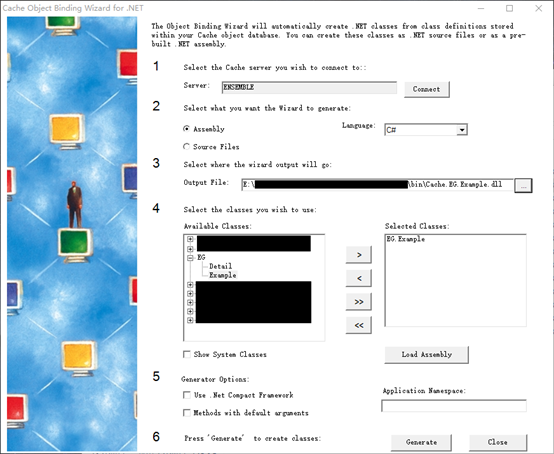
封装的目的是可以通过前端调用Ensemble中的方法,和其他web开发相似,在程序中由controller与前端通信。
 //Controllers/ExampleController.cs

 using System;

 using System.Collections.Generic;

 using System.Linq;

 using System.Net;

 using System.Net.Http;

 using System.Web.Http;

 using SpaceBed.CommonLibrary;

 using System.Web.Http.OData;

 using InterSystems.Data.CacheClient;

 using SpaceBed.DataModels;

 using SpaceBed.Models;

 namespace SpaceBed.Controllers

 {

     [WebApiTracker]

     [RESTAuthorizeAttribute]

     public class ExampleController : ApiController

     {

         static readonly IExampleRepository repository = new ExampleRepository();

         DataConnection pclsCache = new DataConnection();

         /// <summary>

         /// 插入数据 2016-10-13

         /// </summary>

         /// <param name="TestBedInfo"></param>

         /// <returns></returns>

         [Route("Api/v1/Example/SetExampleData")]

         public HttpResponseMessage SetExampleData(Example Example)

         {

             int ret = repository.SetExampleData(pclsCache, Example.PlanNo, Example.StartDate, Example.Status, Example.DoctorId);

             return new ExceptionHandler().SetData(Request, ret);

         }

         /// 根据主键获取除主键外所有信息 2016-10-13

         ///

         [Route("Api/v1/Example/GetPatientPlan")]

         public Example GetPatientPlan(string strPlanNo)

         {

             return repository.GetPatientPlan(pclsCache, strPlanNo);

         }

         /// 根据PlanNo修改Status 2016-10-14

         ///

         [Route("Api/v1/Example/ChangeStatus")]

         public HttpResponseMessage ChangeStatus(string strPlanNo, int strStatus)

         {

             int ret = repository.ChangeStatus(pclsCache, strPlanNo, strStatus);

             return new ExceptionHandler().ChangeStatus(Request, ret);

         }

         /// 根据Status和StartDate查找所有数据 2016-10-17

         ///

         [Route("Api/v1/Example/GetPlan")]

         public List<Example> GetPlan(int strStatus, int strStartDate)

         {

             return repository.GetPlan(pclsCache, strStatus, strStartDate);

         }

         ///添加Detail数据 2016-10-17

         ///

         [Route("Api/v1/Example/SetDetailData")]

         public HttpResponseMessage SetExampleDetailData(Detail Detail)

         {

             int ret = repository.SetExampleDetailData(pclsCache, Detail.Plan, Detail.Value, Detail.Instruction);

             return new ExceptionHandler().SetData(Request, ret);

         }

     }

 }
Controller调用model来实现与method的连接:
 //Models/ExampleRepository.cs

 using System;

 using System.Collections.Generic;

 using System.Linq;

 using System.Net;

 using System.Net.Http;

 using System.Web.Http;

 using System.Web;

 using SpaceBed.CommonLibrary;

 using SpaceBed.DataMethod;

 using SpaceBed.DataModels;

 namespace SpaceBed.Models

 {

     public class ExampleRepository : IExampleRepository

     {

         public int SetExampleData(DataConnection pclsCache, string PlanNo, int StartDate, int Status, string DoctorId)

         {

             return new ExampleMethod().SetExampleData(pclsCache, PlanNo, StartDate, Status, DoctorId);

         }

         public Example GetPatientPlan(DataConnection pclsCache, string strPlanNo)

         {

             return new ExampleMethod().GetPatientPlan(pclsCache, strPlanNo);

         }

         public int ChangeStatus(DataConnection pclsCache, string strPlanNo, int strStatus)

         {

             return new ExampleMethod().ChangeStatus(pclsCache, strPlanNo, strStatus);

         }

         public List<Example> GetPlan(DataConnection pclsCache, int strStatus, int strStartDate)

         {

             List<Example> Items = new List<Example>();

             Items = new ExampleMethod().GetPlan(pclsCache, strStatus, strStartDate);

             return Items;

         }

         public int SetExampleDetailData(DataConnection pclsCache, string Plan, string Value, string Instruction)

         {

             return new ExampleMethod().SetExampleDetailData(pclsCache, Plan, Value, Instruction);

         }

     }

 }
而model与controller之间需要接口,命名为IExampleRepository,也存放在model文件夹中即可:
 //Models/IExampleRepository.cs

 using System;

 using System.Collections.Generic;

 using System.Linq;

 using System.Net;

 using System.Net.Http;

 using System.Web.Http;

 using System.Text;

 using System.Threading.Tasks;

 using SpaceBed.CommonLibrary;

 using SpaceBed.DataModels;

 namespace SpaceBed.Models

 {

     public interface IExampleRepository

     {

         int SetExampleData(DataConnection pclsCache, string PlanNo, int StartDate, int Status, string DoctorId);

         Example GetPatientPlan(DataConnection pclsCache, string strPlanNo);

         int ChangeStatus(DataConnection pclsCache, string strPlanNo, int strStatus);

         List<Example> GetPlan(DataConnection pclsCache, int strStatus, int strStartDate);

         int SetExampleDetailData(DataConnection pclsCache, string Plan, string Value, string Instruction);

     }

 }
Model可以整合method,在前端调用多个method时可以在此处理,但是不在本文讨论范围内。Method对应的就是Ensemble里每个class中的方法
 //DataMethod/ExampleMethod.cs

 using System;

 using System.Collections.Generic;

 using System.Linq;

 using System.Net;

 using System.Net.Http;

 using System.Web.Http;

 using System.Web;

 using InterSystems.Data.CacheClient;

 using SpaceBed.DataModels;

 using SpaceBed.CommonLibrary;

 namespace SpaceBed.DataMethod

 {

     public class ExampleMethod

     {

         #region <EG.Example> gy 2016-10-13

         // EG.Example表 SetData

         public int SetExampleData(DataConnection pclsCache, string PlanNo, int StartDate, int Status, string DoctorId)

         {

             int ret = ;

             try

             {

                 if (!pclsCache.Connect())

                 {

                     return ret;

                 }

                 ret = (int)EG.Example.SetData(pclsCache.CacheConnectionObject, PlanNo, StartDate, Status, DoctorId);

                 return ret;

             }

             catch (Exception ex)

             {

                 HygeiaComUtility.WriteClientLog(HygeiaEnum.LogType.ErrorLog, "ExampleMethod.SetExampleData", "数据库操作异常! error information : " + ex.Message + Environment.NewLine + ex.StackTrace);

                 return ret;

             }

             finally

             {

                 pclsCache.DisConnect();

             }

         }

         // EG.Example表 GetPatientPlan

         public Example GetPatientPlan(DataConnection pclsCache, string strPlanNo)

         {

             Example PatientPlan = new Example();

             try

             {

                 if (!pclsCache.Connect())

                 {

                     return null;

                 }

                 InterSystems.Data.CacheTypes.CacheSysList list = null;

                 list = EG.Example.GetPatientPlan(pclsCache.CacheConnectionObject, strPlanNo);

                 if (list != null)

                 {

                     PatientPlan.StartDate = Convert.ToInt32(list[]);

                     PatientPlan.Status = Convert.ToInt32(list[]);

                     PatientPlan.DoctorId = list[];

                 }

                 return PatientPlan;

             }

             catch (Exception ex)

             {

                 HygeiaComUtility.WriteClientLog(HygeiaEnum.LogType.ErrorLog, "ExampleMethod.GetPatientPlan", "数据库操作异常! error information : " + ex.Message + Environment.NewLine + ex.StackTrace);

                 return null;

             }

             finally

             {

                 pclsCache.DisConnect();

             }

         }

         // EG.Example表 ChangeStatus

         public int ChangeStatus(DataConnection pclsCache, string strPlanNo, int strStatus)

         {

             int ret = ;

             try

             {

                 if (!pclsCache.Connect())

                 {

                     return ret;

                 }

                 ret = (int)EG.Example.ChangeStatus(pclsCache.CacheConnectionObject, strPlanNo, strStatus);

                 return ret;

             }

             catch (Exception ex)

             {

                 HygeiaComUtility.WriteClientLog(HygeiaEnum.LogType.ErrorLog, "ExampleMethod.ChangeStatus", "数据库操作异常! error information : " + ex.Message + Environment.NewLine + ex.StackTrace);

                 return ret;

             }

             finally

             {

                 pclsCache.DisConnect();

             }

         }

         // EG.Example表 GetPlan

         public List<Example> GetPlan(DataConnection pclsCache, int strStatus, int strStartDate)

         {

             List<Example> items = new List<Example>();

             CacheCommand cmd = null;

             CacheDataReader cdr = null;

             try

             {

                 if (!pclsCache.Connect())

                 {

                     return null;

                 }

                 cmd = EG.Example.GetPlan(pclsCache.CacheConnectionObject);

                 cmd.Parameters.Add("Status", CacheDbType.NVarChar).Value = strStatus;

                 cmd.Parameters.Add("StartDate", CacheDbType.NVarChar).Value = strStartDate;

                 cdr = cmd.ExecuteReader();

                 while (cdr.Read())

                 {

                     Example item = new Example();

                     item.PlanNo = cdr["PlanNo"].ToString();

                     item.StartDate = (int)cdr["StartDate"];

                     item.Status = (int)cdr["Status"];

                     item.DoctorId = cdr["DoctorId"].ToString();

                     items.Add(item);

                 }

                 return items;

             }

             catch (Exception ex)

             {

                 HygeiaComUtility.WriteClientLog(HygeiaEnum.LogType.ErrorLog, "ExampleMethod.GetPatientPlan", "数据库操作异常! error information : " + ex.Message + Environment.NewLine + ex.StackTrace);

                 return null;

             }

             finally

             {

                 if ((cdr != null))

                 {

                     cdr.Close();

                     cdr.Dispose(true);

                     cdr = null;

                 }

                 if ((cmd != null))

                 {

                     cmd.Parameters.Clear();

                     cmd.Dispose();

                     cmd = null;

                 }

                 pclsCache.DisConnect();

             }

         }

         #endregion

         #region <EG.Detail> gy 2016-10-17

         //EG.Detail表 SetData

         public int SetExampleDetailData(DataConnection pclsCache, string Plan, string Value, string Instruction)

         {

             int ret = ;

             try

             {

                 if (!pclsCache.Connect())

                 {

                     return ret;

                 }

                 ret = (int)EG.Detail.SetData(pclsCache.CacheConnectionObject, Plan, Value, Instruction);

                 return ret;

             }

             catch (Exception ex)

             {

                 HygeiaComUtility.WriteClientLog(HygeiaEnum.LogType.ErrorLog, "ExampleMethod.SetExampleData", "数据库操作异常! error information : " + ex.Message + Environment.NewLine + ex.StackTrace);

                 return ret;

             }

             finally

             {

                 pclsCache.DisConnect();

             }

         }

         #endregion

     }

 }
为了更加清晰地在前端将数据进行结构化显示和获取,使用datamodel将列表整合成类:
 //DataModels/Example.cs

 using System;

 using System.Collections.Generic;

 using System.Linq;

 using System.Net;

 using System.Net.Http;

 using System.Web.Http;

 using System.Web;

 namespace SpaceBed.DataModels

 {

     public class Example

     {

         private string strPlanNo = string.Empty;

         private int strStartDate = ;

         private int strStatus = ;

         private string strDoctorId = string.Empty;

         public string PlanNo

         {

             set { strPlanNo = value; }

             get { return strPlanNo; }

         }

         public int StartDate

         {

             set { strStartDate = value; }

             get { return strStartDate; }

         }

         public int Status

         {

             set { strStatus = value; }

             get { return strStatus; }

         }

         public string DoctorId

         {

             set { strDoctorId = value; }

             get { return strDoctorId; }

         }

     }

     public class Detail

     {

         private string strPlan = string.Empty;

         private string strValue = string.Empty;

         private string strInstruction = string.Empty;

         public string Plan

         {

             set { strPlan = value; }

             get { return strPlan; }

         }

         public string Value

         {

             set;

             get;

         }

         public string Instruction

         {

             set;

             get;

         }

     }

 }
以上就是将Ensemble方法进行RESTful封装的全过程(数据库连接与网络配置等不在讨论范围内),封装结果大部分为API中的GET和POST方法
补充1:web.config中可以修改网络配置,包括连接的服务器、端口、命名空间、用户名密码等,新导入时要注意修改;在引用中要添加产生的.dll文件,因为要依靠.dll才能与数据库中的方法取得通信。
补充2:父子表中父表多主键时,在数据库中处理relationship时,需要将所有父表的主键属性拼接起来,拼接符号为”||”,在RESTful里可以处理,在前端也可以处理。在RESTful里处理时,从controller到method的声明都需要使用所有父表主键属性,而在method里添加一句话,将字符串拼接到一起,于此同时,调用数据库的那句函数需要使用拼接起来的那个relationship
补充3:在Ensemble里打开子表的数据条目时需要在前面拼接父表的主键
Caché数据库学习笔记(5)的更多相关文章
- Caché数据库学习笔记(1)
目录: Caché的概念和基础知识 Caché数据库的安装 创建命名空间(namespace)和数据库(database) Documentation的使用 ===================== ...
- Caché数据库学习笔记(4)
目录 DeepSee的使用 数据.方法等的导入与导出 ======================================================== ================ ...
- Caché数据库学习笔记(2)
目录: 创建新类(表)(class文件)与创建routine(.mac .inc) 在类里面添加函数(classmethod) Terminal的使用 ======================= ...
- Caché数据库学习笔记(3)
目录 Query函数及其测试 重建索引表 Management portal简介 远程访问Ensemble ============================================== ...
- MySQL数据库学习笔记(十二)----开源工具DbUtils的使用(数据库的增删改查)
[声明] 欢迎转载,但请保留文章原始出处→_→ 生命壹号:http://www.cnblogs.com/smyhvae/ 文章来源:http://www.cnblogs.com/smyhvae/p/4 ...
- MySQL数据库学习笔记(十)----JDBC事务处理、封装JDBC工具类
[声明] 欢迎转载,但请保留文章原始出处→_→ 生命壹号:http://www.cnblogs.com/smyhvae/ 文章来源:http://www.cnblogs.com/smyhvae/p/4 ...
- MySQL数据库学习笔记(九)----JDBC的ResultSet接口(查询操作)、PreparedStatement接口重构增删改查(含SQL注入的解释)
[声明] 欢迎转载,但请保留文章原始出处→_→ 生命壹号:http://www.cnblogs.com/smyhvae/ 文章来源:http://www.cnblogs.com/smyhvae/p/4 ...
- Mysql数据库学习笔记之数据库索引(index)
什么是索引: SQL索引有两种,聚集索引和非聚集索引,索引主要目的是提高了SQL Server系统的性能,加快数据的查询速度与减少系统的响应时间. 聚集索引:该索引中键值的逻辑顺序决定了表中相应行的物 ...
- MYSQL数据库学习笔记1
MYSQL数据库学习笔记1 数据库概念 关系数据库 常见数据库软件 SQL SQL的概念 SQL语言分类 数据库操作 创建数据库 查看数据库的定义 删除数据库 修改数据库 创建表 数据类型 约束 ...
随机推荐
- yii2得到的数据对象转化成数组
yii2得到的数据对象转化成数组需要用到asArray().1.Customer::find(['id' => $id])->asArray()->one();2.$model = ...
- 快速排序算法 java 实现
快速排序算法 java 实现 快速排序算法Java实现 白话经典算法系列之六 快速排序 快速搞定 各种排序算法的分析及java实现 算法概念 快速排序是C.R.A.Hoare于1962年提出的一种划分 ...
- Unity 性能
Unity 5.0 AMD 7650k 自带核显 Unity自建立方体2000正方体 50帧 但每个立方体多达60面 多个三角形 每秒100万面绘制 可能每个都要单独计算光照? 导入3ds模型相当于 ...
- python 图片爬虫
#!/usr/bin/env python #coding:utf-8 import urllib import re def GetHtml(url): """获取HT ...
- MySQL MMM 双主在Failover时挂起
两台MySQL服务器,版本Percona 5.5.35,配置双主,装在Centos 6.4下 Master1 db1,172.21.120.160(真实IP),172.21.120.173(Writ ...
- C# Winform中DataGridView绑定后DataGridViewCheckBoxColumn无法显示的问题
在控件DataGridView绑定数据源后,发现DataGridViewCheckBoxColumn不能显示当前的check值.经过一番努力,现将完整代码奉献出来,仅供参考. 错误代码: /*禁止自动 ...
- vs2010取消显示所有文件 崩溃
这属于vs2010的bug,以下是微软官方对些问题的回应: i am still investigating the problem, but looks like the issue is caus ...
- HTML转移字符对照表
body { margin: 0; padding: 0; background: #FFF; color: #000; font-family: "宋体", arial; fon ...
- php中include()和require()的区别
1.引用文件方式 对 include()来说,在include()执行时文件每次都要进行读取和评估:而对于require()来说,文件只处理一次(实际上,文件内容替换 了require()语句.这就意 ...
- Program.cs
Program.cs using System; namespace HelloWorld { class Program { [STAThread] static void Main(string[ ...