
鸿蒙开发 - 支持导出,跨文件使用的自定义样式 AttributeModifier
我们在自定义组件的时候,无论是用 @Styles 还是 @Extend,都很难真正做到独立的封装样式,因为这两者都不支持导出,不可以跨文件调用
这篇文章主要介绍一个接口 AttributeModifier,它很好的解决了这些弊端,可以实现样式的集中管理和复用,支持跨文件调用封装好的样式类
AttributeModifier
使用介绍
AttributeModifier 是一个接口,我们需要实现其中的一个方法 apply<状态名称>Attribute,来实现不同的场景
状态名称分为:默认态(Normal)、按压态(Pressed)、焦点态(Focused)、禁用态(Disabled)、选择态(Selected)
如果想设置元素的默认样式,就是 applyNormalAttribute,如果想设置元素的按压场景下的样式,就是 applyPressedAttribute
declare interface AttributeModifier<T> {

  applyNormalAttribute?(instance: T): void;

  applyPressedAttribute?(instance: T): void;

  applyFocusedAttribute?(instance: T): void;

  applyDisabledAttribute?(instance: T): void;

  applySelectedAttribute?(instance: T): void;

}
举例
文字描述比较抽象,下面举例代码来讲解:
- 我们可以新建个目录
modifier,新建个文件index.ets,封装一个作用于Button组件的样式类,给它添加一些样式,如下:
export class ButtonModifier implements AttributeModifier<ButtonAttribute> {

  applyNormalAttribute(instance: ButtonAttribute): void {

    instance

      .width(150)

      .height(50)

      .fontSize(20)

      .backgroundColor(Color.Orange)

  }

}
- 第一步:用
AttributeModifier接口定义了一个ButtonModifier样式类 - 第二步:再实现
applyNormalAttribute设置默认态样式:包括宽度、高度、字体等
- 在组件文件中使用
import { ButtonModifier } from './modifier/index'

@Entry

@Component

struct Index {

  @State buttonModifier: ButtonModifier = new ButtonModifier()

  build() {

    Column() {

      Button('按钮')

        .attributeModifier(this.buttonModifier)

    }

    .width('100%')

  }

}
效果如下:
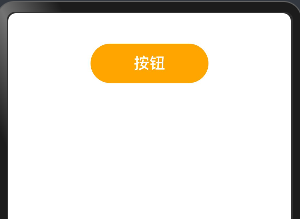
这样我们就实现了一个对 Button 组件的样式封装,并且支持导出,跨文件使用
支持同时设置多个场景的样式
上面给 Button 组件增加了“默认态”的样式,可以在这基础上继续增加“按压态”的样式,就是按钮按下时的样式,如下:
- 按钮按下的时候:增加边框,边框颜色等
export class ButtonModifier2 implements AttributeModifier<ButtonAttribute> {

  applyNormalAttribute(instance: ButtonAttribute): void {

    instance

      .width(150)

      .height(80)

      .fontSize(20)

      .backgroundColor(Color.Orange)

  }

  applyPressedAttribute(instance: ButtonAttribute): void {

    instance

      .borderWidth(5)

      .borderColor(Color.Blue)

      .borderStyle(BorderStyle.Solid)

      .backgroundColor('#17A98D')

  }

}
- 在组件中引用
import { ButtonModifier2 } from './modifier/index'

@Entry

@Component

struct Index {

  @State buttonModifier: ButtonModifier2 = new ButtonModifier2()

  build() {

    Column() {

      Button('按钮')

        .attributeModifier(this.buttonModifier)

    }

    .width('100%')

  }

}
效果如下:

接口中支持传参和业务逻辑
在 ButtonModifier3 样式类中,定义一个 isClick 变量,来区分按钮是否点击过,然后分别对点击和没有点击的情况下增加样式,如下:
export class ButtonModifier3 implements AttributeModifier<ButtonAttribute> {

  isClick: boolean = false

  constructor(flag?: boolean) {

    this.isClick = !!flag

  }

  applyNormalAttribute(instance: ButtonAttribute): void {

    if (this.isClick) {

      instance.backgroundColor('#707070')

    } else {

      instance

        .borderColor('#707070')

        .borderWidth(2)

        .backgroundColor('#17A98D')

    }

  }

}
- 在组件中调用
import { ButtonModifier3 } from './modifier/index'

@Entry

@Component

struct Index {

  @State buttonModifier: ButtonModifier3 = new ButtonModifier3()

  // @State buttonModifier: ButtonModifier3 = new ButtonModifier3(true)

  build() {

    Column() {

      Button('按钮')

        .attributeModifier(this.buttonModifier)

        .onClick(() => {

          this.buttonModifier.isClick = !this.buttonModifier.isClick

        })

    }

    .width('100%')

  }

}
效果如下:

总结
- 注意事项
我们在实现 AttributeModifier<T> 接口的实例,T 必须指定为组件对应的 Attribute类型,或者是CommonAttribute,如下:
// 作用于 Button 组件,就要传入 ButtonAttribute

export class Modifier1 implements AttributeModifier<ButtonAttribute> {

 applyNormalAttribute?(instance: ButtonAttribute): void;

}

// 作用于 TextInput 组件,就要传入 TextInputAttribute

export class Modifier2 implements AttributeModifier<TextInputAttribute> {

 applyNormalAttribute?(instance: ButtonAttribute): void;

}
- @Style 和 @Extend 和 AttributeModifier 三者对比
| 能力 | @Styles | @Extend | AttributeModifier |
|---|---|---|---|
| 跨文件导出 | 不支持 | 不支持 | 支持 |
| 通用属性设置 | 支持 | 支持 | 支持 |
| 通用事件设置 | 支持 | 支持 | 部分支持 |
| 组件特有属性设置 | 不支持 | 支持 | 部分支持 |
| 组件特有事件设置 | 不支持 | 支持 | 部分支持 |
| 参数传递 | 不支持 | 支持 | 支持 |
| 多态样式 | 支持 | 不支持 | 支持 |
| 业务逻辑 | 不支持 | 不支持 | 支持 |
最后
如果大家有不理解的地方可以留言,或自行阅读文档 文档地址
鸿蒙开发 - 支持导出,跨文件使用的自定义样式 AttributeModifier的更多相关文章
- Android开发:UI相关(一)自定义样式资源
一.自定义样式资源: 1.在drawble中新建xml资源文件: 如果新建的xml文件没有自动放置在drawable文件夹下,就手动移动到drawable下. 2.编写样式代码: < ...
- Appcan开发笔记:导出Excel文件
Appcan IDE为4.0+; appcan提供了导出文件的方法 appcan.file.write 文件会自动创建,要解决的事情是Excel用字符串输出,可以考虑 csv(逗号间隔).HTML.X ...
- java中使用poi导入导出excel文件_并自定义日期格式
Apache POI项目的使命是创造和保持java API操纵各种文件格式基于Office Open XML标准(OOXML)和微软的OLE复合文档格式(OLE2)2.总之,你可以读写Excel文件使 ...
- input type='file'文件上传自定义样式
使用场景: 在未使用UI库时免不了会用到各种上传文件,那么默认的上传文件样式无法达到项目的要求,因此重写(修改)上传文件样式是必然的,下面的效果是最近项目中自己写的一个效果,写出来做个记录方便以后使用 ...
- ReportViewer 不预览,直接导出 PDF文件
作为笔记记着,以免以后再到处找资料 1. 在不预览的情况下导出文件 先看一个方法说明,想知道ReportViewer支持导出哪些文件类型,在Render方法说明中就有描述 // // Summary: ...
- 导出Excel文件
/// <summary> /// 类说明:Assistant /// 更新网站:[url=http://www.sufeinet.com/thread-655-1-1.html]http ...
- 使用NPOI或EPPlus来导出Excel文件实例,可在Excel文件加密
使用NPOI.dll组件来导出Excel文件,并设置样式,Nuget引用即可. packages\NPOI.2.1.3.1\lib\net20\NPOI.dll #region Excel prote ...
- ios开发--一个苹果证书怎么多次使用——导出p12文件
为什么要导出.p12文件 当我们用大于三个mac设备开发应用时,想要申请新的证书,如果在我们的证书里,包含了3个发布证书,2个开发证书,可以发现再也申请不了开发证书和发布证书了(一般在我们的证书界面中 ...
- 一个苹果证书怎么多次使用(授权Mac开发)——导出p12文件
为什么要导出.p12文件 当我们用大于三个mac设备开发应用时,想要申请新的证书,如果在我们的证书里,包含了3个发布证书,2个开发证书,可以发现再也申请不了开发证书和发布证书了(一般在我们的证书界面中 ...
- 游戏开发中IIS常见支持MIME类型文件解析
游戏开发中IIS常见支持MIME类型文件解析 .apkapplication/vnd.android .ipaapplication/vnd.iphone .csbapplication/octet- ...
随机推荐
- Helm部署SkyWalking
一 . 部署ElasticSearch 1.下载安装包 helm repo add elastic https://helm.elastic.cohelm pull elastic/elasticse ...
- vue表格轮播插件
1.前言 需求:制作大屏看板时,经常要展示表格数据,通常一页时放不下的,表格需要自动滚动,并维持表头固定 为何自己封装:网上的滚动组件有2类,一种传入json数据进行滚动(DataV),优点是可以做到 ...
- CVE-2023-48409 Mali GPU 整数溢出导致堆越界写
CVE-2023-48409 Mali GPU 整数溢出导致堆越界写 https://github.com/0x36/Pixel_GPU_Exploit 漏洞原语:假设分配的大小为 0x3004, ...
- CVE-2023-3609 Linux 内核 UAF 漏洞分析与漏洞利用
漏洞分析 通过分析补丁和漏洞描述可以知道漏洞是位于 u32_set_parms 函数里面,代码如下: static int u32_set_parms(struct net *net, struct ...
- C++顺序结构(2)学习任务
在坚果云中注册免费个人云盘 一.视频下载存放在规划好的文件夹中,并观看学习 1.变量存储.注释 2.四则运算.输入 3.认识设置DEV-C++ 4.第一个C++程序 5.头文件 6.命名空间 7.co ...
- HTML 面试题
.code { background-color: rgba(246, 246, 246, 1); color: rgba(232, 62, 140, 1) } DOCTYPE的作用? DOCTYPE ...
- GraphQL Part IV: 浏览器内的 IDE
只是一个使用,这里不做介绍了.
- 【机器学习】SVM(支持向量机)算法实验
(一)实验名称:SVM(支持向量机)算法实验 (二)实验目的: 学习支持向量机SVM的基本概念 了解核函数的基本概念 掌握使用scikit-learn API函数实现SVM算法 (三)实验内容:使用s ...
- kubernetes批量删除长期处于Terminating状态的namespace
环境是k3s 1.19.1版本 有时候跑实验,实验总是卡住,而且还删不了ns,一跑又n个 强行删除有风险,强删需谨慎!! 创建脚本 delns.sh #!/bin/bash for i in &quo ...
- springboot拦截器过滤token,并返回结果及异常处理
package com.xxxx.interceptor; import org.slf4j.Logger; import org.slf4j.LoggerFactory; import org.sp ...