
鸿蒙开发 - 支持导出,跨文件使用的自定义样式 AttributeModifier
我们在自定义组件的时候,无论是用 @Styles 还是 @Extend,都很难真正做到独立的封装样式,因为这两者都不支持导出,不可以跨文件调用
这篇文章主要介绍一个接口 AttributeModifier,它很好的解决了这些弊端,可以实现样式的集中管理和复用,支持跨文件调用封装好的样式类
AttributeModifier
使用介绍
AttributeModifier 是一个接口,我们需要实现其中的一个方法 apply<状态名称>Attribute,来实现不同的场景
状态名称分为:默认态(Normal)、按压态(Pressed)、焦点态(Focused)、禁用态(Disabled)、选择态(Selected)
如果想设置元素的默认样式,就是 applyNormalAttribute,如果想设置元素的按压场景下的样式,就是 applyPressedAttribute
declare interface AttributeModifier<T> {

  applyNormalAttribute?(instance: T): void;

  applyPressedAttribute?(instance: T): void;

  applyFocusedAttribute?(instance: T): void;

  applyDisabledAttribute?(instance: T): void;

  applySelectedAttribute?(instance: T): void;

}
举例
文字描述比较抽象,下面举例代码来讲解:
- 我们可以新建个目录
modifier,新建个文件index.ets,封装一个作用于Button组件的样式类,给它添加一些样式,如下:
export class ButtonModifier implements AttributeModifier<ButtonAttribute> {

  applyNormalAttribute(instance: ButtonAttribute): void {

    instance

      .width(150)

      .height(50)

      .fontSize(20)

      .backgroundColor(Color.Orange)

  }

}
- 第一步:用
AttributeModifier接口定义了一个ButtonModifier样式类 - 第二步:再实现
applyNormalAttribute设置默认态样式:包括宽度、高度、字体等
- 在组件文件中使用
import { ButtonModifier } from './modifier/index'

@Entry

@Component

struct Index {

  @State buttonModifier: ButtonModifier = new ButtonModifier()

  build() {

    Column() {

      Button('按钮')

        .attributeModifier(this.buttonModifier)

    }

    .width('100%')

  }

}
效果如下:
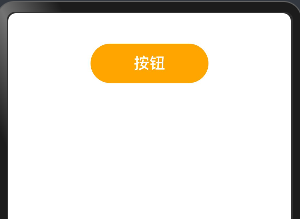
这样我们就实现了一个对 Button 组件的样式封装,并且支持导出,跨文件使用
支持同时设置多个场景的样式
上面给 Button 组件增加了“默认态”的样式,可以在这基础上继续增加“按压态”的样式,就是按钮按下时的样式,如下:
- 按钮按下的时候:增加边框,边框颜色等
export class ButtonModifier2 implements AttributeModifier<ButtonAttribute> {

  applyNormalAttribute(instance: ButtonAttribute): void {

    instance

      .width(150)

      .height(80)

      .fontSize(20)

      .backgroundColor(Color.Orange)

  }

  applyPressedAttribute(instance: ButtonAttribute): void {

    instance

      .borderWidth(5)

      .borderColor(Color.Blue)

      .borderStyle(BorderStyle.Solid)

      .backgroundColor('#17A98D')

  }

}
- 在组件中引用
import { ButtonModifier2 } from './modifier/index'

@Entry

@Component

struct Index {

  @State buttonModifier: ButtonModifier2 = new ButtonModifier2()

  build() {

    Column() {

      Button('按钮')

        .attributeModifier(this.buttonModifier)

    }

    .width('100%')

  }

}
效果如下:

接口中支持传参和业务逻辑
在 ButtonModifier3 样式类中,定义一个 isClick 变量,来区分按钮是否点击过,然后分别对点击和没有点击的情况下增加样式,如下:
export class ButtonModifier3 implements AttributeModifier<ButtonAttribute> {

  isClick: boolean = false

  constructor(flag?: boolean) {

    this.isClick = !!flag

  }

  applyNormalAttribute(instance: ButtonAttribute): void {

    if (this.isClick) {

      instance.backgroundColor('#707070')

    } else {

      instance

        .borderColor('#707070')

        .borderWidth(2)

        .backgroundColor('#17A98D')

    }

  }

}
- 在组件中调用
import { ButtonModifier3 } from './modifier/index'

@Entry

@Component

struct Index {

  @State buttonModifier: ButtonModifier3 = new ButtonModifier3()

  // @State buttonModifier: ButtonModifier3 = new ButtonModifier3(true)

  build() {

    Column() {

      Button('按钮')

        .attributeModifier(this.buttonModifier)

        .onClick(() => {

          this.buttonModifier.isClick = !this.buttonModifier.isClick

        })

    }

    .width('100%')

  }

}
效果如下:

总结
- 注意事项
我们在实现 AttributeModifier<T> 接口的实例,T 必须指定为组件对应的 Attribute类型,或者是CommonAttribute,如下:
// 作用于 Button 组件,就要传入 ButtonAttribute

export class Modifier1 implements AttributeModifier<ButtonAttribute> {

 applyNormalAttribute?(instance: ButtonAttribute): void;

}

// 作用于 TextInput 组件,就要传入 TextInputAttribute

export class Modifier2 implements AttributeModifier<TextInputAttribute> {

 applyNormalAttribute?(instance: ButtonAttribute): void;

}
- @Style 和 @Extend 和 AttributeModifier 三者对比
| 能力 | @Styles | @Extend | AttributeModifier |
|---|---|---|---|
| 跨文件导出 | 不支持 | 不支持 | 支持 |
| 通用属性设置 | 支持 | 支持 | 支持 |
| 通用事件设置 | 支持 | 支持 | 部分支持 |
| 组件特有属性设置 | 不支持 | 支持 | 部分支持 |
| 组件特有事件设置 | 不支持 | 支持 | 部分支持 |
| 参数传递 | 不支持 | 支持 | 支持 |
| 多态样式 | 支持 | 不支持 | 支持 |
| 业务逻辑 | 不支持 | 不支持 | 支持 |
最后
如果大家有不理解的地方可以留言,或自行阅读文档 文档地址
鸿蒙开发 - 支持导出,跨文件使用的自定义样式 AttributeModifier的更多相关文章
- Android开发:UI相关(一)自定义样式资源
一.自定义样式资源: 1.在drawble中新建xml资源文件: 如果新建的xml文件没有自动放置在drawable文件夹下,就手动移动到drawable下. 2.编写样式代码: < ...
- Appcan开发笔记:导出Excel文件
Appcan IDE为4.0+; appcan提供了导出文件的方法 appcan.file.write 文件会自动创建,要解决的事情是Excel用字符串输出,可以考虑 csv(逗号间隔).HTML.X ...
- java中使用poi导入导出excel文件_并自定义日期格式
Apache POI项目的使命是创造和保持java API操纵各种文件格式基于Office Open XML标准(OOXML)和微软的OLE复合文档格式(OLE2)2.总之,你可以读写Excel文件使 ...
- input type='file'文件上传自定义样式
使用场景: 在未使用UI库时免不了会用到各种上传文件,那么默认的上传文件样式无法达到项目的要求,因此重写(修改)上传文件样式是必然的,下面的效果是最近项目中自己写的一个效果,写出来做个记录方便以后使用 ...
- ReportViewer 不预览,直接导出 PDF文件
作为笔记记着,以免以后再到处找资料 1. 在不预览的情况下导出文件 先看一个方法说明,想知道ReportViewer支持导出哪些文件类型,在Render方法说明中就有描述 // // Summary: ...
- 导出Excel文件
/// <summary> /// 类说明:Assistant /// 更新网站:[url=http://www.sufeinet.com/thread-655-1-1.html]http ...
- 使用NPOI或EPPlus来导出Excel文件实例,可在Excel文件加密
使用NPOI.dll组件来导出Excel文件,并设置样式,Nuget引用即可. packages\NPOI.2.1.3.1\lib\net20\NPOI.dll #region Excel prote ...
- ios开发--一个苹果证书怎么多次使用——导出p12文件
为什么要导出.p12文件 当我们用大于三个mac设备开发应用时,想要申请新的证书,如果在我们的证书里,包含了3个发布证书,2个开发证书,可以发现再也申请不了开发证书和发布证书了(一般在我们的证书界面中 ...
- 一个苹果证书怎么多次使用(授权Mac开发)——导出p12文件
为什么要导出.p12文件 当我们用大于三个mac设备开发应用时,想要申请新的证书,如果在我们的证书里,包含了3个发布证书,2个开发证书,可以发现再也申请不了开发证书和发布证书了(一般在我们的证书界面中 ...
- 游戏开发中IIS常见支持MIME类型文件解析
游戏开发中IIS常见支持MIME类型文件解析 .apkapplication/vnd.android .ipaapplication/vnd.iphone .csbapplication/octet- ...
随机推荐
- SQL Server数据表模糊查询(like用法)详解
在SQL Server Management Studio (SSMS) 中,进行模糊查询主要是通过使用like操作符来实现的.like操作符用于在where语句中搜索列中具有指定模式的数据.我们在简 ...
- Node.js 模拟Apache服务器
1.知识必备 (1)当服务器响应不同文件类型时,需要设置响应报文头,让浏览器选择相应的编码解析数据. 常用对照表HTTP Mime-type: https://tool.oschina.net/com ...
- Java根据前端返回的字段名进行查询数据
在Java后端开发中,我们经常需要根据前端传递的参数(如字段名)来动态查询数据库中的数据.这种需求通常出现在需要实现通用查询功能或者复杂查询接口的场景中.为了实现这个功能,我们需要结合Java的反射机 ...
- Dapper.SimpleCRUD:Dapper的CRUD助手
我们在项目开发中,面对一些高并发.大数据量等业务场景,往往对SQL语句的性能要求比较高,这个时候为了方便灵活控制,我们一般就会编写原生的SQL. Dapper就是一个非常高性能的轻量级ORM框架,Da ...
- Flex 弹性布局备忘录
概述 Flex 是 Flexible Box 的缩写,意为"弹性布局",用来为盒状模型提供最大的灵活性 这也是我目前用的最多的一种布局方案,相比Grid布局此种布局方案相对较简单, ...
- Ubuntu22.04安装cuda12.1+cudnn8.9.2+TensorRT8.6.1+pytorch2.3.0+opencv_cuda4.9+onnxruntime-gpu1.18
说来话长,我想配一个一劳永逸的环境,方便以后复用.省的以后反复查教程重新装了 1. 安装miniconda+py3.10 cd /root wget -q https://repo.anaconda. ...
- MongoDB|TOMCAT定时切割日志文件的脚本
MongoDB用过一段时间后,日志较大,需要定时进行日志切割. 一.切割bash: splitlogmongo.sh #!/bin/bash log_dir="/home/mongodb/l ...
- docker创建Tomcat
安装docker 查找tomcat docker search tomcat 下载镜像 docker pull tomcat 查看下载的镜像 docker images 运行Tomcat docker ...
- NetCore2.2升级到3.1总结
最近公司要求netcore版本从2.2升级到3.1,升级需要修改的配置项和遇到的问题我这边做一个简单的总结. 可参考资料: https://docs.microsoft.com/zh-cn/aspne ...
- 【前端】【H5 API】地理定位(获取经纬度)
H5 API 地理定位 地理定位在日常生活中应用比较广泛,例如,互联网打车.在线地图等.在HTML 5的规范中,增加了获取用户地理位置信息的接口Geolocation,开发者可以通过经纬度来获取用户的 ...