
QT5笔记:13. QString 的常用功能
QString采用Unicode码,所以任何一个字符不管中英文,在size或者count时都算作一个字符,不会有宽字符区分
常用的方法
- append
- prepend
- toUpper
- toLower
- left
- right
- section
- simplified
- trimmed
- count
- size
- indexOf
- lastIndexOf
- endsWith
- startsWith
- contains
- isNull
- isEmpty
#include "widget.h"

#include "ui_widget.h"

Widget::Widget(QWidget *parent)

    : QWidget(parent)

    , ui(new Ui::Widget)

{

    ui->setupUi(this);

}

Widget::~Widget()

{

    delete ui;

}

void Widget::on_btnAppend_clicked()

{

    QString str1 ,str2;

    str1 = ui->comboBoxStr1->currentText();//G:\Qt5Book\QT5.9Study

    str2 = ui->comboBoxStr2->currentText();//一个反斜杠

    str1 = str1.append(str2);

    ui->editResult->setText(str1);

}

void Widget::on_btnPrepend_clicked()

{

    QString str1 ,str2;

    str1 = ui->comboBoxStr1->currentText();

    str2 = ui->comboBoxStr2->currentText();

    str1 = str1.prepend(str2);

    ui->editResult->setText(str1);

}

void Widget::on_btnUpper_clicked()

{

    QString str1 = ui->comboBoxStr1->currentText();

    str1 = str1.toUpper();

    ui->editResult->setText(str1);

}

void Widget::on_btnLower_clicked()

{

    QString str1 = ui->comboBoxStr1->currentText();

    str1 = str1.toLower();

    ui->editResult->setText(str1);

}

void Widget::on_btnLeft_clicked()

{

    QString str1 = ui->comboBoxStr1->currentText();

    int number = ui->spinBoxResult->value();

    str1 = str1.left(number);

    ui->editResult->setText(str1);

}

void Widget::on_btnRight_clicked()

{

    QString str1 = ui->comboBoxStr1->currentText();

    int number = ui->spinBoxResult->value();

    str1 = str1.right(number);

    ui->editResult->setText(str1);

}

/**

 * section

 * @brief Widget::on_btnSection_clicked

 * @note sep表示用来切割的字符,start表示开始切割的位置,end表示切割的结束位置,flag参数可以用来影响函数的行为的某些方面,例如是否区分大小写,是否跳过空字段和如何处理前导和尾随分隔符。

 * @result 结果返回开始切割那个字符到结束切割的那个字符之后的那个字符串。

 * @note 当start 或者 end的参数为负数时,表示起始位置为右边。

 * @note 相当于先split()进行切割,拿到各个片段(都是数组),然后取出index为start到end的数组内容,然后组装成一个字符串

 */

void Widget::on_btnSection_clicked()

{

    QString str1 ,str2;

    str1 = ui->comboBoxStr1->currentText();

    str2 = ui->comboBoxStr2->currentText();

    int number = ui->spinBoxResult->value();

    str1 = str1.section(str2.data()[0],number,number +1);

    ui->editResult->setText(str1);

}

/**

 * @brief Widget::on_btnSimplified_clicked

 * @note 将字符串的开头和结尾的空白字符(\t、\r、\n、\f、空格)去掉,然后字符串中间的若有多个空格相连,则只保留一个

 */

void Widget::on_btnSimplified_clicked()

{

    QString str1 = ui->comboBoxStr1->currentText();

    str1 = str1.simplified();

    ui->editResult->setText(str1);

}

/**

 * @brief Widget::on_btnTirm_clicked

 * @note 将字符串开头和结尾的空白字符(\t、\r、\n、\f、空格)去掉

 */

void Widget::on_btnTirm_clicked()

{

    QString str1 = ui->comboBoxStr1->currentText();

    str1 = str1.trimmed();

    ui->editResult->setText(str1);

}

/**

 * @brief Widget::on_btnCount_clicked

 * @note Returns the number of (potentially overlapping) occurrences of the string str in this string.

 */

void Widget::on_btnCount_clicked()

{

    QString str1 = ui->comboBoxStr1->currentText();

    int count = str1.count();

    ui->editResult->setText(str1.setNum(count));

}

/**

 * @brief Widget::on_btnSize_clicked

 * @note string的大小:Returns the number of characters in this string.

 */

void Widget::on_btnSize_clicked()

{

    QString str1 = ui->comboBoxStr1->currentText();

    int size = str1.size();

    ui->editResult->setText(str1.setNum(size));

}

/**

 * @brief Widget::on_binIndexOf_clicked

 * @note 第一次出现的index

 */

void Widget::on_binIndexOf_clicked()

{

    QString str1 ,str2;

    str1 = ui->comboBoxStr1->currentText();

    str2 = ui->comboBoxStr2->currentText();

    int index = str1.indexOf(str2);

    str1 = str1.setNum(index);

    ui->editResult->setText(str1);

}

/**

 * @brief Widget::on_btnLastIndex_clicked

 * @note 最后一次出现的index

 */

void Widget::on_btnLastIndex_clicked()

{

    QString str1 ,str2;

    str1 = ui->comboBoxStr1->currentText();

    str2 = ui->comboBoxStr2->currentText();

    int index = str1.lastIndexOf(str2);

    str1 = str1.setNum(index);

    ui->editResult->setText(str1);

}

/**

 * @brief Widget::on_btnEndWith_clicked

 * @note 是否是以str2结尾

 */

void Widget::on_btnEndWith_clicked()

{

    QString str1 ,str2;

    str1 = ui->comboBoxStr1->currentText();

    str2 = ui->comboBoxStr2->currentText();

    bool result = str1.endsWith(str2);

    ui->checkBoxResult->setText(qobject_cast<QPushButton *>(sender())->text());

    ui->checkBoxResult->setChecked(result);

}

/**

 * @brief Widget::on_btnStartsWith_clicked

 * @note 是否以str2开始

 */

void Widget::on_btnStartsWith_clicked()

{

    QString str1 ,str2;

    str1 = ui->comboBoxStr1->currentText();

    str2 = ui->comboBoxStr2->currentText();

    bool result = str1.startsWith(str2);

    ui->checkBoxResult->setText(qobject_cast<QPushButton *>(sender())->text());

    ui->checkBoxResult->setChecked(result);

}

/**

 * @brief Widget::on_btnContains_clicked

 * @note 是否存在str2

 */

void Widget::on_btnContains_clicked()

{

    QString str1 ,str2;

    str1 = ui->comboBoxStr1->currentText();

    str2 = ui->comboBoxStr2->currentText();

    bool result = str1.contains(str2);

    ui->checkBoxResult->setText(qobject_cast<QPushButton *>(sender())->text());

    ui->checkBoxResult->setChecked(result);

}

/**

 * @brief Widget::on_btnIsNull_clicked

 * 是否是null,区别于空字符串和空白字符串

 */

void Widget::on_btnIsNull_clicked()

{

    QString str1 = ui->comboBoxStr1->currentText();

    bool result = str1.isNull();

    ui->checkBoxResult->setText(qobject_cast<QPushButton *>(sender())->text());

    ui->checkBoxResult->setChecked(result);

}

/**

 * @brief Widget::on_btnIsEmpty_clicked

 * 是否是空字符串

 */

void Widget::on_btnIsEmpty_clicked()

{

    QString str1 ,str2;

    str1 = ui->comboBoxStr1->currentText();

    bool result = str1.isEmpty();

    ui->checkBoxResult->setText(qobject_cast<QPushButton *>(sender())->text());

    ui->checkBoxResult->setChecked(result);

}
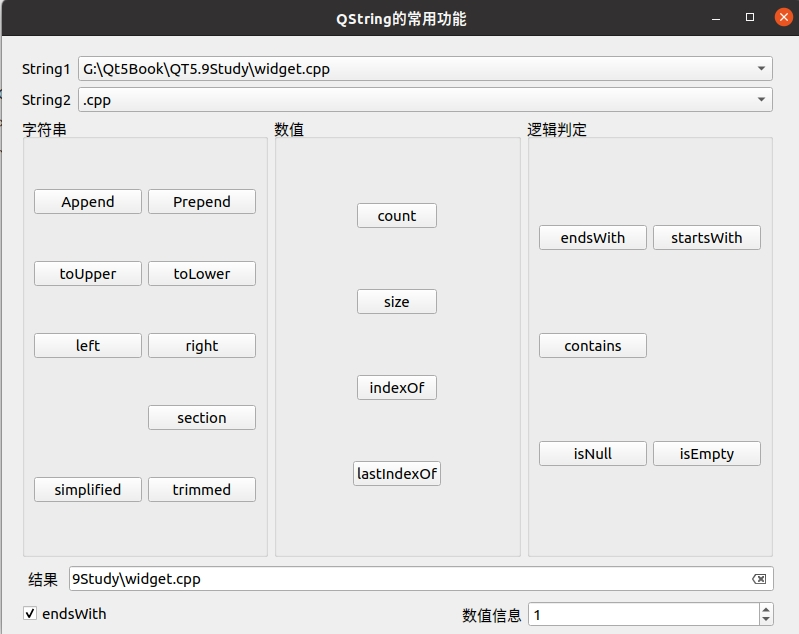
界面:
QT5笔记:13. QString 的常用功能的更多相关文章
- Wireshark学习笔记(一)常用功能案例和技巧
@ 目录 常用功能 1.统计->捕获属性 2.统计->协议分级 3.过滤包Apply as filter E1:过滤出特定序号的包 E2:过滤出某IP地址或端口 E3:导出php文件 E4 ...
- 【笔记】sublime 一些常用功能和快捷键
Ctrl+D 选词 (反复按快捷键,即可继续向下同时选中下一个相同的文本进行同时编辑)Ctrl+G 跳转到相应的行Ctrl+J 合并行(已选择需要合并的多行时)Ctrl+L 选择整行(按住-继续选择下 ...
- JAVA自学笔记13
JAVA自学笔记13 1.StringBuffer类 1)线程安全的可变字符序列 线程安全(即同步) 2)StringBuffer与String的区别:一个可变一个不可变 3)构造方法: ①publi ...
- [Java] JSP笔记 - EL、JSTL 常用标签
一. 什么是 EL 语言 表达式语言(EL)是 JSP 2.0 引入的一种计算和输出 Java 对象的简单语言. 二.EL 语言的作用 为了使JSP写起来更加简单.表达式语言的灵感来自于 ECMASc ...
- python3 字符串与列表常用功能
一.字符串常用功能 1. capitalize(),将字符串的首字母变成大写,其余全部置为小写:如果字符串中有多个单词,也只是将第一个单词的首字母置为大写:例: >>> name = ...
- Ext.Net学习笔记13:Ext.Net GridPanel Sorter用法
Ext.Net学习笔记13:Ext.Net GridPanel Sorter用法 这篇笔记将介绍如何使用Ext.Net GridPanel 中使用Sorter. 默认情况下,Ext.Net GridP ...
- JavaSE学习总结第13天_API常用对象3
13.01 StringBuffer的概述 StringBuffer类概述:线程安全的可变字符序列.一个类似于 String 的字符串缓冲区,但不能修改.虽然在任意时间点上它都包含某种特定的字符序 ...
- 前端开发掌握nginx常用功能之rewrite
上一篇博文对nginx最常用功能的server及location的匹配规则进行了讲解,这也是nginx实现控制访问和反向代理的基础.掌握请求的匹配规则算是对nginx有了入门,但是这些往往还是不能满足 ...
- Linux系统Bash的常用功能(9)
了解了基本的Linux文件文件系统的概念后,我们将更深入的了解一下Linux的其他方面的内容,那就是我们所使用的用户接口,也就是大家常听到的 『Shell』 ,『这个shell并不是黑客反弹的shel ...
- 160229-01、web页面常用功能js实现
web页面常用功能js实现 1.网页未加载时弹出新窗口 <body onunload="window.open('http://www.a68.cn');">< ...
随机推荐
- Linx操作Nginx命令
在 CentOS 上操作 Nginx 包括安装.启动.停止.重新加载配置等.以下是在 CentOS 上操作 Nginx 的常用命令: 安装 Nginx: sudo yum install nginx ...
- StarBlog博客Vue前端开发笔记:(1)准备篇
前言 之前在[基于.NetCore 开发博客项目 StarBlog - (32) 第一期完结]里说到 StarBlog 的 Vue 前端系列已经写好了 本来打算后面再发的,不过最近有点懒没去写新的文章 ...
- 零基础学习人工智能—Python—Pytorch学习(十三)
前言 最近学习了一新概念,叫科学发现和科技发明,科学发现是高于科技发明的,而这个说法我觉得还是挺有道理的,我们总说中国的科技不如欧美,但我们实际感觉上,不论建筑,硬件还是软件,理论,我们都已经高于欧美 ...
- COS 数据工作流 + Serverless云函数自定义处理能力发布!
01 背景 在工业4.0的浪潮下,智能和数据与物理世界结合越加紧密,多元化.灵活.高效的数据处理能力成为各行各业的热点需求. 虽然COS已经预置电商.文创.教育.社交.安防等行业需要的基础数据处理 ...
- 解决Vim粘贴格式乱问题
在vim粘贴代码的时候,粘贴的代码(shift+insert)会自动缩进,导致格式非常混乱. 本人深受其害,查阅网上大牛,发现以下方式均可行,与大家分享. 下面介绍两种方法: (1)在vim中,进入命 ...
- 【MyBatis】学习笔记12:通过级联属性赋值解决多对一的映射关系
[Mybatis]学习笔记01:连接数据库,实现增删改 [Mybatis]学习笔记02:实现简单的查 [MyBatis]学习笔记03:配置文件进一步解读(非常重要) [MyBatis]学习笔记04:配 ...
- mysql命令行创建数据库并设置字符集
CREATE DATABASE test1 DEFAULT CHARACTER SET utf8 COLLATE utf8_general_ci;
- Vue整合Cesium的博文
参考链接: 1.Vue 集成 Cesium 2.vue/cli3引入cesium 3.Vue2+Cesium.js展示地图 4.vue-cli3 引入 cesium 5.Vue Cli 4 引入 Ce ...
- DotNetBar115破解版下载地址
DotNetBar115破解版下载地址: 百度网盘:https://pan.baidu.com/s/187bkgB6tGyp1jUicsljfkQ 提取码:v0za
- 查询 maven 依赖 的最新版本号
如何通过maven官网查询相关依赖的具体代码和版本? 通过官网:http://mvnrepository.com/,或者:https://search.maven.org/ 在搜索栏中输入想要引入的依 ...