
利用python进行折线图,直方图和饼图的绘制
我用10个国家某年的GDP来绘图,数据如下:
labels = ['USA', 'China', 'India', 'Japan', 'Germany', 'Russia', 'Brazil', 'UK', 'France', 'Italy']
quants = [15094025.0, 11299967.0, 4457784.0, 4440376.0, 3099080.0, 2383402.0, 2293954.0, 2260803.0, 2217900.0, 1846950.0]
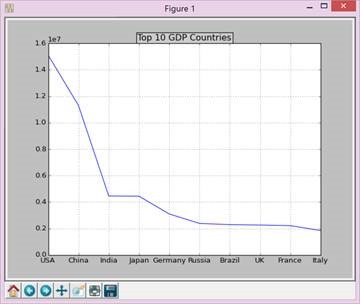
首先绘制折线图,代码如下:
def draw_line(labels,quants):
ind = np.linspace(0,9,10)
fig = plt.figure(1)
ax = fig.add_subplot(111)
ax.plot(ind,quants)
ax.set_title('Top 10 GDP Countries', bbox={'facecolor':'0.8', 'pad':5})
ax.set_xticklabels(labels)
plt.grid(True)
plt.show()
最后如下图:
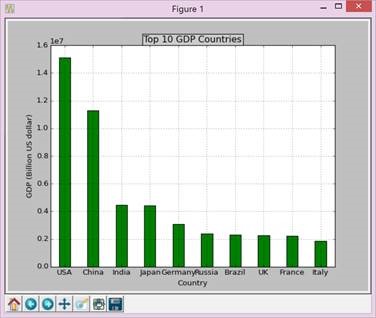
再画柱状图,代码如下:
def draw_bar(labels,quants):
width = 0.4
ind = np.linspace(0.5,9.5,10)
# make a square figure
fig = plt.figure(1)
ax = fig.add_subplot(111)
# Bar Plot
ax.bar(ind-width/2,quants,width,color='green')
# Set the ticks on x-axis
ax.set_xticks(ind)
ax.set_xticklabels(labels)
# labels
ax.set_xlabel('Country')
ax.set_ylabel('GDP (Billion US dollar)')
# title
ax.set_title('Top 10 GDP Countries', bbox={'facecolor':'0.8', 'pad':5})
plt.grid(True)
plt.show()
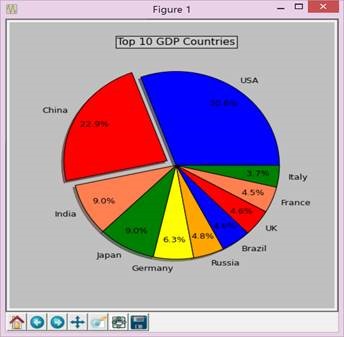
最后画饼图,代码如下:
def draw_pie(labels,quants):
plt.figure(1, figsize=(6,6))
# For China, make the piece explode a bit
expl = [0,0.1,0,0,0,0,0,0,0,0]
# Colors used. Recycle if not enough.
colors = ["blue","red","coral","green","yellow","orange"]
# autopct: format of "percent" string;
plt.pie(quants, explode=expl, colors=colors, labels=labels, autopct='%1.1f%%',pctdistance=0.8, shadow=True)
plt.title('Top 10 GDP Countries', bbox={'facecolor':'0.8', 'pad':5})
plt.show()
三、实验小结
Python的安装比较简单,但是numpy、matplotlib、scipy的安装并没有预期的简单,首先版本得对应安装的python版本,而且分32和64位,资源不容易找,安装成功后还要装其他的东西。至于matplitlib的画图感觉还是比较方便的,初学python,虽然整体简洁了很多,但是python的格式的要求过于严格,尤其是缩进等,初学者查了好久都检查不出错误但后来就又稀里糊涂运行成功了,比较抓狂。
附录:完整代码:
# -*- coding: gbk -*-
import numpy as np
import matplotlib.pyplot as plt
import matplotlib as mpl
def draw_pie(labels,quants):
# make a square figure
plt.figure(1, figsize=(6,6))
# For China, make the piece explode a bit
expl = [0,0.1,0,0,0,0,0,0,0,0]
# Colors used. Recycle if not enough.
colors = ["blue","red","coral","green","yellow","orange"]
# Pie Plot
# autopct: format of "percent" string;
plt.pie(quants, explode=expl, colors=colors, labels=labels, autopct='%1.1f%%',pctdistance=0.8, shadow=True)
plt.title('Top 10 GDP Countries', bbox={'facecolor':'0.8', 'pad':5})
plt.show()
def draw_bar(labels,quants):
width = 0.4
ind = np.linspace(0.5,9.5,10)
# make a square figure
fig = plt.figure(1)
ax = fig.add_subplot(111)
# Bar Plot
ax.bar(ind-width/2,quants,width,color='green')
# Set the ticks on x-axis
ax.set_xticks(ind)
ax.set_xticklabels(labels)
# labels
ax.set_xlabel('Country')
ax.set_ylabel('GDP (Billion US dollar)')
# title
ax.set_title('Top 10 GDP Countries', bbox={'facecolor':'0.8', 'pad':5})
plt.grid(True)
plt.show()
def draw_line(labels,quants):
ind = np.linspace(0,9,10)
fig = plt.figure(1)
ax = fig.add_subplot(111)
ax.plot(ind,quants)
ax.set_title('Top 10 GDP Countries', bbox={'facecolor':'0.8', 'pad':5})
ax.set_xticklabels(labels)
plt.grid(True)
plt.show()
# quants: GDP
# labels: country name
labels = ['USA', 'China', 'India', 'Japan', 'Germany', 'Russia', 'Brazil', 'UK', 'France', 'Italy']
quants = [15094025.0, 11299967.0, 4457784.0, 4440376.0, 3099080.0, 2383402.0, 2293954.0, 2260803.0, 2217900.0, 1846950.0]
draw_pie(labels,quants)
#draw_bar(labels,quants)
#draw_line(labels,quants)
利用python进行折线图,直方图和饼图的绘制的更多相关文章
- 利用JFreeChart生成折线图 (4) (转自 JSP开发技术大全)
利用JFreeChart生成折线图 (4) (转自 JSP开发技术大全) 14.4 利用JFreeChart生成折线图 通过JFreeChart插件,既可以生成普通效果的折线图,也可以生成3D效果的折 ...
- Python制作折线图
利用python的第三方包Pygal制作简单的折线图. 申明:本文仅供学习交流使用.源码大部分来自<python编程从入门到实践>:如有侵权,请联系我删除. 1 #!usr/bin/env ...
- python matplotlib 折线图
1.绘制折线图,去上和右边框,显示中文 import numpy as np import matplotlib.pyplot as plt #plt.style.use('default') #pl ...
- 利用Python+pyecharts+tushare图形化展示股票历史财务信息
在微信或其他平台上,经常能看到别人推荐股票,分析的头头是道,让自己懊恼于没有早点关注到这只股票,好像错失了几个亿.但是投资股票又忌讳听消息跟风,总不能看到别人推荐自己就无脑买入. 看到了一只股票,自己 ...
- 宅男福利--利用Python简单爬图
Ver beta..代码粗陋. 使用说明以Windows为例, Python版本为2.7.6 确认你电脑已经安装了Python, Windows默认安装路径为C:\Python27.如果没有安装,先下 ...
- python绘折线图
# -*- coding: utf-8 -*- import numpy as np import matplotlib.pyplot as plt #X轴,Y轴数据 y = [0.3,0.4,2,5 ...
- 06. Matplotlib 2 |折线图| 柱状图| 堆叠图| 面积图| 填图| 饼图| 直方图| 散点图| 极坐标| 图箱型图
1.基本图表绘制 plt.plot() 图表类别:线形图.柱状图.密度图,以横纵坐标两个维度为主同时可延展出多种其他图表样式 plt.plot(kind='line', ax=None, figsiz ...
- python 绘图---2D、3D散点图、折线图、曲面图
python中绘制2D曲线图需要使用到Matplotlib,Matplotlib 是一个 Python 的 2D绘图库,它以各种硬拷贝格式和跨平台的交互式环境生成出版质量级别的图形,通过 Matplo ...
- 使用python制作动图
利用python制作gif图 引言 当写文章时候,多张图片会影响排版,可以考虑制作gif图 准备 pip install imageio 代码 # This is a sample Python sc ...
随机推荐
- hibernateTemplate的load方法
hibernateTemplate的load方法采用延迟加载,所以应当注意. 如果配置不当,采用此方法获取对象,往往会出现异常: javax.servlet.ServletException: org ...
- Flex 调用webService
今天手头没事,就学习下 Flex 调用webService的方法.本地测试OK 和大家分享下. ——————————————————————————————————————————————————— ...
- 破解之寻找OEP[手动脱壳](1)
OEP:(Original Entry Point),程序的入口点,软件加壳就是隐藏了OEP(或者用了假的OEP), 只要我们找到程序真正的OEP,就可以立刻脱壳. PUSHAD (压栈) 代表程序的 ...
- 获取属性名:PropertyNameHelper
获取属性名:PropertyNameHelper namespace NCS.Infrastructure.Querying { public static class PropertyNameHel ...
- hdu 3449
有依赖的背包,转化成01背包来做: #include<iostream> #include<cstdio> #include<cstring> #include&l ...
- spoj 338
题意: 无向图 每条边有长度和费用两个属性 求从点1到点n 在花费不超过 k 的情况下的最短路径 BFS 使用优先队列 长度短的优先出列 题解上的方法没看懂 不知道怎么用链表维护 . ...
- ids & hdmi 原理
http://www.taiwanwebinar.com/zh_TW/STATIC/SITE/dwc_hdmi_tx.pdf http://blog.csdn.net/g_salamander/art ...
- windows下配置环境变量时,在cmd窗口执行配置的命令时无效的原因
一个原因肯定就是配置错误,这个就要自己仔细去检查了,如果确信配置正确,可能是你的cmd窗口在环境变量配置之前就打开的,在配置好环境变量之后,在cmd窗口执行命令是看不到效果的,可以关掉cmd窗口再重新 ...
- java事务管理(二)
数据库事务和Spring事务是一般面试都会被提到,很多朋友写惯了代码,很少花时间去整理归纳这些东西,结果本来会的东西,居然吞吞吐吐答不上来. 下面是我收集到一些关于Spring事务的问题,希望能帮助大 ...
- Vim插件列表
01.helm(Vim-Swoop) 02.ap/vim-buftabline 03.wesleyche/SrcExpl 04.vim proc 05.vim shell 06.dhruvasagar ...