
利用python进行折线图,直方图和饼图的绘制
我用10个国家某年的GDP来绘图,数据如下:
labels = ['USA', 'China', 'India', 'Japan', 'Germany', 'Russia', 'Brazil', 'UK', 'France', 'Italy']
quants = [15094025.0, 11299967.0, 4457784.0, 4440376.0, 3099080.0, 2383402.0, 2293954.0, 2260803.0, 2217900.0, 1846950.0]
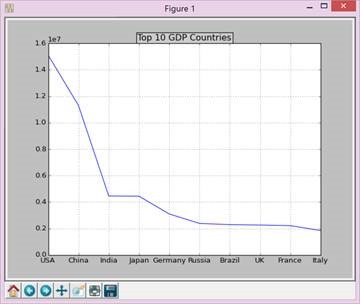
首先绘制折线图,代码如下:
def draw_line(labels,quants):
ind = np.linspace(0,9,10)
fig = plt.figure(1)
ax = fig.add_subplot(111)
ax.plot(ind,quants)
ax.set_title('Top 10 GDP Countries', bbox={'facecolor':'0.8', 'pad':5})
ax.set_xticklabels(labels)
plt.grid(True)
plt.show()
最后如下图:
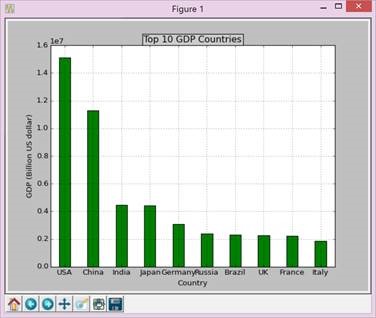
再画柱状图,代码如下:
def draw_bar(labels,quants):
width = 0.4
ind = np.linspace(0.5,9.5,10)
# make a square figure
fig = plt.figure(1)
ax = fig.add_subplot(111)
# Bar Plot
ax.bar(ind-width/2,quants,width,color='green')
# Set the ticks on x-axis
ax.set_xticks(ind)
ax.set_xticklabels(labels)
# labels
ax.set_xlabel('Country')
ax.set_ylabel('GDP (Billion US dollar)')
# title
ax.set_title('Top 10 GDP Countries', bbox={'facecolor':'0.8', 'pad':5})
plt.grid(True)
plt.show()
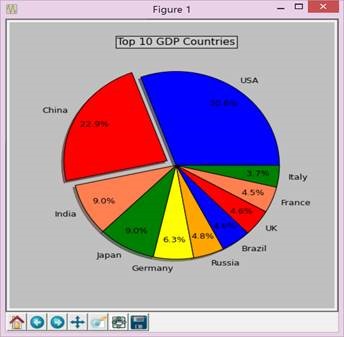
最后画饼图,代码如下:
def draw_pie(labels,quants):
plt.figure(1, figsize=(6,6))
# For China, make the piece explode a bit
expl = [0,0.1,0,0,0,0,0,0,0,0]
# Colors used. Recycle if not enough.
colors = ["blue","red","coral","green","yellow","orange"]
# autopct: format of "percent" string;
plt.pie(quants, explode=expl, colors=colors, labels=labels, autopct='%1.1f%%',pctdistance=0.8, shadow=True)
plt.title('Top 10 GDP Countries', bbox={'facecolor':'0.8', 'pad':5})
plt.show()
三、实验小结
Python的安装比较简单,但是numpy、matplotlib、scipy的安装并没有预期的简单,首先版本得对应安装的python版本,而且分32和64位,资源不容易找,安装成功后还要装其他的东西。至于matplitlib的画图感觉还是比较方便的,初学python,虽然整体简洁了很多,但是python的格式的要求过于严格,尤其是缩进等,初学者查了好久都检查不出错误但后来就又稀里糊涂运行成功了,比较抓狂。
附录:完整代码:
# -*- coding: gbk -*-
import numpy as np
import matplotlib.pyplot as plt
import matplotlib as mpl
def draw_pie(labels,quants):
# make a square figure
plt.figure(1, figsize=(6,6))
# For China, make the piece explode a bit
expl = [0,0.1,0,0,0,0,0,0,0,0]
# Colors used. Recycle if not enough.
colors = ["blue","red","coral","green","yellow","orange"]
# Pie Plot
# autopct: format of "percent" string;
plt.pie(quants, explode=expl, colors=colors, labels=labels, autopct='%1.1f%%',pctdistance=0.8, shadow=True)
plt.title('Top 10 GDP Countries', bbox={'facecolor':'0.8', 'pad':5})
plt.show()
def draw_bar(labels,quants):
width = 0.4
ind = np.linspace(0.5,9.5,10)
# make a square figure
fig = plt.figure(1)
ax = fig.add_subplot(111)
# Bar Plot
ax.bar(ind-width/2,quants,width,color='green')
# Set the ticks on x-axis
ax.set_xticks(ind)
ax.set_xticklabels(labels)
# labels
ax.set_xlabel('Country')
ax.set_ylabel('GDP (Billion US dollar)')
# title
ax.set_title('Top 10 GDP Countries', bbox={'facecolor':'0.8', 'pad':5})
plt.grid(True)
plt.show()
def draw_line(labels,quants):
ind = np.linspace(0,9,10)
fig = plt.figure(1)
ax = fig.add_subplot(111)
ax.plot(ind,quants)
ax.set_title('Top 10 GDP Countries', bbox={'facecolor':'0.8', 'pad':5})
ax.set_xticklabels(labels)
plt.grid(True)
plt.show()
# quants: GDP
# labels: country name
labels = ['USA', 'China', 'India', 'Japan', 'Germany', 'Russia', 'Brazil', 'UK', 'France', 'Italy']
quants = [15094025.0, 11299967.0, 4457784.0, 4440376.0, 3099080.0, 2383402.0, 2293954.0, 2260803.0, 2217900.0, 1846950.0]
draw_pie(labels,quants)
#draw_bar(labels,quants)
#draw_line(labels,quants)
利用python进行折线图,直方图和饼图的绘制的更多相关文章
- 利用JFreeChart生成折线图 (4) (转自 JSP开发技术大全)
利用JFreeChart生成折线图 (4) (转自 JSP开发技术大全) 14.4 利用JFreeChart生成折线图 通过JFreeChart插件,既可以生成普通效果的折线图,也可以生成3D效果的折 ...
- Python制作折线图
利用python的第三方包Pygal制作简单的折线图. 申明:本文仅供学习交流使用.源码大部分来自<python编程从入门到实践>:如有侵权,请联系我删除. 1 #!usr/bin/env ...
- python matplotlib 折线图
1.绘制折线图,去上和右边框,显示中文 import numpy as np import matplotlib.pyplot as plt #plt.style.use('default') #pl ...
- 利用Python+pyecharts+tushare图形化展示股票历史财务信息
在微信或其他平台上,经常能看到别人推荐股票,分析的头头是道,让自己懊恼于没有早点关注到这只股票,好像错失了几个亿.但是投资股票又忌讳听消息跟风,总不能看到别人推荐自己就无脑买入. 看到了一只股票,自己 ...
- 宅男福利--利用Python简单爬图
Ver beta..代码粗陋. 使用说明以Windows为例, Python版本为2.7.6 确认你电脑已经安装了Python, Windows默认安装路径为C:\Python27.如果没有安装,先下 ...
- python绘折线图
# -*- coding: utf-8 -*- import numpy as np import matplotlib.pyplot as plt #X轴,Y轴数据 y = [0.3,0.4,2,5 ...
- 06. Matplotlib 2 |折线图| 柱状图| 堆叠图| 面积图| 填图| 饼图| 直方图| 散点图| 极坐标| 图箱型图
1.基本图表绘制 plt.plot() 图表类别:线形图.柱状图.密度图,以横纵坐标两个维度为主同时可延展出多种其他图表样式 plt.plot(kind='line', ax=None, figsiz ...
- python 绘图---2D、3D散点图、折线图、曲面图
python中绘制2D曲线图需要使用到Matplotlib,Matplotlib 是一个 Python 的 2D绘图库,它以各种硬拷贝格式和跨平台的交互式环境生成出版质量级别的图形,通过 Matplo ...
- 使用python制作动图
利用python制作gif图 引言 当写文章时候,多张图片会影响排版,可以考虑制作gif图 准备 pip install imageio 代码 # This is a sample Python sc ...
随机推荐
- 如何在Ubuntu下搭建Android NDK开发环境
1 搭建Android SDK开发环境 参考在在Ubuntu下搭建Android SDK开发环境(图文)首先在Ubuntu下搭建Android SDK开发环境. 2 下载NDK开发包 打开官网: ht ...
- 你不知道的pogo pin连接器
pogo pin连接器是一种带弹簧的探针式连接器,pogo pin连接器结构看起来非常简单,但其制造工艺要求极其的精细与复杂,从车床加工,电镀,组装等每道工序,如果没有一个有良好品质控制和完善的制造水 ...
- C++对象的自销毁
记得在学校里的时候,曾经这样写过: void MyClass::KillMe() { delete this; } 老师看到这句话的时候,眼珠子都快瞪出来了.但是运行正确啊,没什么问题. 现在想起来, ...
- 对C#中的web访问mysql数据库的一些知识点进行了整理归纳总结
基本对比 使用方式 使用场合 优缺点 是否需要安装 需要的dll网址 引用方式 程序内引用 程序初期确定使用MySql,前期添加引用 大多数情况下使用在类文件内,多数使用于aspx,ashx等带有后置 ...
- CentOS7.1 安装关键步骤 记录下来
SecureCRT下载地址 https://yunpan.cn/cS9W94kuvhXPb 访问密码 08cd[这里GNOME桌面 下的 要全选,截屏有误]
- 【HDOJ】4351 Digital root
digital root = n==0 ? 0 : n%9==0 ? 9:n%9;可以简单证明一下n = a0*n^0 + a1*n^1 + ... + ak * n^kn%9 = a0+a1+..+ ...
- UVa 540 (团体队列) Team Queue
题意: 每个人都属于一个团体,在排队的时候,如果他所在的团体有人在队伍中,则他会站到这个团体的最后.否则站到整个队伍的队尾. 输出每次出队的人的编号. 分析: 容易看出,长队中,在同一个团体的人是排在 ...
- CQOI2009中位数图
原来在vijos上做过,当时根本看不懂 现在看起来这么水…… x记录从b向左连续走比k大的有多少个 y记录从b向右连续走比k大的有多少个 最后根据乘法原理乘一下 不过要加上x[0]+y[0]+1 因为 ...
- 分享10个Js的小型库,效果真的很棒
1.$fx()简介:$fx()是一个轻量级的动画库,一些复杂的动画,可以由多个简单的动画效果进行组合,但是提供的是混淆压缩过的代码,对于研究动画源码的朋友可能特别不爽API:http://fx.ine ...
- LeetCode Pascal's Triangle II (杨辉三角)
题意:给出杨辉三角的层数k,返回最后一层.k=0时就是只有一个数字1. 思路:滚动数组计算前一半出来,返回时再复制另一半.简单但是每一句都挺长的. 0ms的版本: class Solution { p ...