
Tomcat 7 Connector 精读(1)
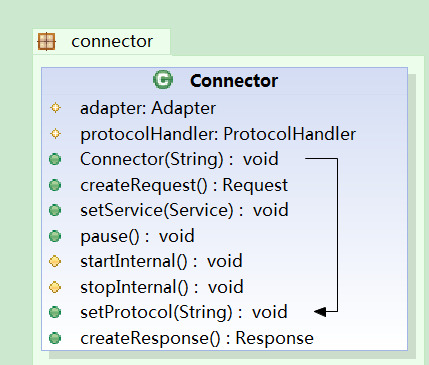
这个类图是本人截取的最重要的类的方法和属性。
其中ProtocalHandler是协议处理器,tomcat支持的协议以下方法可以看到。不同协议实现了不同的ProtocalHandler类。
public void setProtocol(String protocol) {

        if (AprLifecycleListener.isAprAvailable()) {

            if ("HTTP/1.1".equals(protocol)) {

                setProtocolHandlerClassName

                    ("org.apache.coyote.http11.Http11AprProtocol");

            } else if ("AJP/1.3".equals(protocol)) {

                setProtocolHandlerClassName

                    ("org.apache.coyote.ajp.AjpAprProtocol");

            } else if (protocol != null) {

                setProtocolHandlerClassName(protocol);

            } else {

                setProtocolHandlerClassName

                    ("org.apache.coyote.http11.Http11AprProtocol");

            }

        } else {

            if ("HTTP/1.1".equals(protocol)) {

                setProtocolHandlerClassName

                    ("org.apache.coyote.http11.Http11NioProtocol");

            } else if ("AJP/1.3".equals(protocol)) {

                setProtocolHandlerClassName

                    ("org.apache.coyote.ajp.AjpNioProtocol");

            } else if (protocol != null) {

                setProtocolHandlerClassName(protocol);

            }

        }

    }
ProtocalHandler是整个Connector类的核心。
初始化Connector的时候;根据协议名字创建处理器对象。
 public Connector(String protocol) {

        setProtocol(protocol);

        // Instantiate protocol handler

        ProtocolHandler p = null;

        try {

            Class<?> clazz = Class.forName(protocolHandlerClassName);

            p = (ProtocolHandler) clazz.newInstance();

        } catch (Exception e) {

            log.error(sm.getString(

                    "coyoteConnector.protocolHandlerInstantiationFailed"), e);

        } finally {

            this.protocolHandler = p;

        }

        if (!Globals.STRICT_SERVLET_COMPLIANCE) {

            URIEncoding = "UTF-8";

            URIEncodingLower = URIEncoding.toLowerCase(Locale.ENGLISH);

        }

    }
首先是初始化协议处理器(去除了不太重要的代码)
protected void initInternal() throws LifecycleException {

        super.initInternal();

        // 初始化Adapter

        adapter = new CoyoteAdapter(this);

        protocolHandler.setAdapter(adapter);
// 每个协议处理器都有对应的适配器,适配器干啥的呢?

         protocolHandler.init();

    }
Connector的启动,实则是启动对应的协议处理器的启动,
 protected void startInternal() throws LifecycleException {

        // Validate settings before starting

        if (getPort() < 0) {

            throw new LifecycleException(sm.getString(

                    "coyoteConnector.invalidPort", Integer.valueOf(getPort())));

        }

        setState(LifecycleState.STARTING);

        try {

            protocolHandler.start();

        } catch (Exception e) {

            String errPrefix = "";

            if(this.service != null) {

                errPrefix += "service.getName(): \"" + this.service.getName() + "\"; ";

            }

            throw new LifecycleException

                (errPrefix + " " + sm.getString

                 ("coyoteConnector.protocolHandlerStartFailed"), e);

        }

    }
终止实则是终止协议处理器
 protected void startInternal() throws LifecycleException {

        // Validate settings before starting

        if (getPort() < 0) {

            throw new LifecycleException(sm.getString(

                    "coyoteConnector.invalidPort", Integer.valueOf(getPort())));

        }

        setState(LifecycleState.STARTING);

        try {

            protocolHandler.start();

        } catch (Exception e) {

            String errPrefix = "";

            if(this.service != null) {

                errPrefix += "service.getName(): \"" + this.service.getName() + "\"; ";

            }

            throw new LifecycleException

                (errPrefix + " " + sm.getString

                 ("coyoteConnector.protocolHandlerStartFailed"), e);

        }

    }
各位看管看到这里,其实看到连接器类需要做如下工作
(1)创建请求对象
/**

     * Create (or allocate) and return a Request object suitable for

     * specifying the contents of a Request to the responsible Container.

     */

    public Request createRequest() {

        Request request = new Request();

        request.setConnector(this);

        return (request);

    }
(2)创建响应对象
  /**

     * Create (or allocate) and return a Response object suitable for

     * receiving the contents of a Response from the responsible Container.

     */

    public Response createResponse() {

        Response response = new Response();

        response.setConnector(this);

        return (response);

    }
(3)传给这两个对象给容器,简单而言,就是在创建好对象后,传递给那个适配器类就OK了。CoyoteAdapter类
Tomcat 7 Connector 精读(1)的更多相关文章
- Tomcat 7 Connector 精读(2) CoyoteAdapter
这个适配器类只讲2个方法,构造方法中我们看到一个适配器对象有自己关联的连接器类. 其中Service的重要任务就是讲客户端端请求交给容器. public void service(org.apache ...
- Tomcat 7 Connector 精读(2) 协议处理器 Http11Protocol(待续)
. Http11Protocol是阻塞式IO的实现,上图的几个方法是它的生命周期相关的方法.
- Chapter 4: Tomcat Default Connector
一.概述 第三章介绍的connector是一个很好的学习工具,但是我们还可以做的更多.这一章介绍的是Tomcat4默认的connector. 一个Tomcat的connector是一个独立的模块,能够 ...
- Tomcat 核心组件 Connector
Connector是Tomcat的连接器,其主要任务是负责处理浏览器发送过来的请求,并创建一个Request和Response的对象用于和浏览器交换数据,然后产生一个线程用于处理请求,Connecto ...
- 关于 tomcat nio connector, servlet 3.0 async, spring mvc async 的关系
tomcat 的 org.apache.coyote.http11.Http11NioProtocol Connector 是一个使用 Java NIO 实现的异步 accept 请求的 connec ...
- 内嵌Tomcat的Connector对象的静态代码块
在排查问题的过程中发现Connector对象有一个静态代码块: static { replacements.put("acceptCount", "backlog&quo ...
- [转]Loadrunner Error code 10053 & Tomcat 连接器(connector)优化
LoadRunner提示错误:Error : socket0 - Software caused connection abort. Error code : 10053. 在今天的测试过程中发现,s ...
- Tomcat HTTP connector和AJP connector
Tomcat服务器通过Connector连接器组件与客户程序建立连接,“连接器”表示接收请求并返回响应的端点.即Connector组件负责接收客户的请求,以及把Tomcat服务器的响应结果发送给客户. ...
- Tomcat connector元素常用配置(最大连接数等)
在tomcat的server.xml中有类似: <Connector port=" minSpareTHreads=" URIEncoding="gbk" ...
随机推荐
- 配置单节点伪分布式Hadoop
先写的这一篇,很多东西没再重复写. 一.所需软件 jdk和ubuntu都是32位的. 二.安装JDK 1.建jdk文件夹 cd usr sudo mkdir javajdk 2.移动mv或者复制cp安 ...
- 【Visual C++】一些开发心得与调试技巧
自己平时收集的一些技巧与心得,这里分享出来,普及一下知识. 1.如何在Release状态下进行调试 Project->Setting=>ProjectSetting对话框,选择Releas ...
- ubuntu12 开机自动转到命令行
命令: sudo gedit /etc/default/grub 找到这一行 GRUB_CMDLINE_LINUX_DEFAULT="quiet splash"改成 GRUB_CM ...
- Time.deltaTime 含义和应用
第一種:使用Time.deltaTime 一秒內從第1個Frame到最後一個Frame所花的時間,所以不管電腦是一秒跑60格或者一秒30格.24格,值都會趨近於一. 就結果而言,deltaTime是為 ...
- adobe 蛋疼的套装, 想安装一个Flash Professional CS6,标准版还没有...
产品比较 查看内容 查看各 Creative Suite 6 版本的组件. Design Standard Design & Web Premium Production Premium Ma ...
- linux xxd 命令
http://www.cnblogs.com/openix/archive/2012/04/23/2466320.html xxd -i dht.jpg dht.h
- VC++的文件格式详解
.APS:存放二进制资源的中间文件,VC把当前资源文件转换成二进制格式,并存放在APS文件中,以加快资源装载速度.资源辅助文件. .BMP:位图资源文件. .BSC:浏览信息文件,由浏览信息维护工具( ...
- SQL Server 2012 连接到数据库引擎
第 1 课:连接到数据库引擎 https://msdn.microsoft.com/zh-cn/library/ms345332(v=sql.110).aspx 本课将介绍主要的工具以及如何连接并 ...
- Android Editext监听光标位置
因为项目需要,需要实时监听光标的位置变化,网上提出的用TextWatcher和onTouchListener中调用contentText.getSelectionStart()都是获取的上一次位置. ...
- TSharding:用于蘑菇街交易平台的分库分表组件
tsharding TSharding is the simple sharding component used in mogujie trade platform. 分库分表业界方案 分库分表TS ...