
Use XSLT in wix
Following content is directly reprinted from https://installpac.wordpress.com/2012/05/07/conflict-management-in-wix/ and it is only meant for knowledge sharing, please go to the original website for more information.
Conflict Management in WiX
So if you haven’t already read my post on conflict management it might be worth reading up on this first.
https://installpac.wordpress.com/2008/04/21/wise-software-mangler-distribution
The documentation on WiX is somewhat obfuscated to the normal reader and not many people have made an attempt to clear up that documentation to well.
There is some pretty good detail here on WiX in general but it doesn’t go too deep into anything if your serious about SDLC packaging.
So here I will attempt to detail some of the more important aspects of application packaging, particularly when using WiX to generate MSI packages from a Continuous Integration (CI) build.
These days I typically use Continuous Integration (CI) and Continuous Delivery (CD) for most packaging and deployment activities. Often the CD will be delivered into a Platform As A Service (PAAS) cloud. In most instances I will deliver into a VMWare cloud architecture but that is getting a little off topic.
So back to the original post of CMDB within an SDLC packaging setup.
So as many of you will know component rules but here is an excerpt of component rules from the god father himself http://robmensching.com/blog/posts/2003/10/18/Component-Rules-101
So what Rob states is good information but rarely does he go into detail on how to achieve some of this with his uber geek toolset WiX.
So there is two parts to this puzzle.
1. Creating component guids
2. Naming components
So the first part is actually pretty easy but its probably the least documented and as such is probably the one that is done incorrectly more often than not.
So using the following command line in heat you get the following .wxs file generated.
heat dir .\<path to gac files> -gg -dr INSTALLDIR -out .\testSample.wxs -sfrag -sreg

The important part of this call to note is the -gg option. This tells heat to generate component guids immediately. This option is actually not the best choice, my preference is to use the -ag option for components.
heat dir .\<path to gac files> -ag -dr INSTALLDIR -out .\testSample.wxs -sfrag
The -ag option doesn’t appear to be all that much different but the results are actually significantly different.
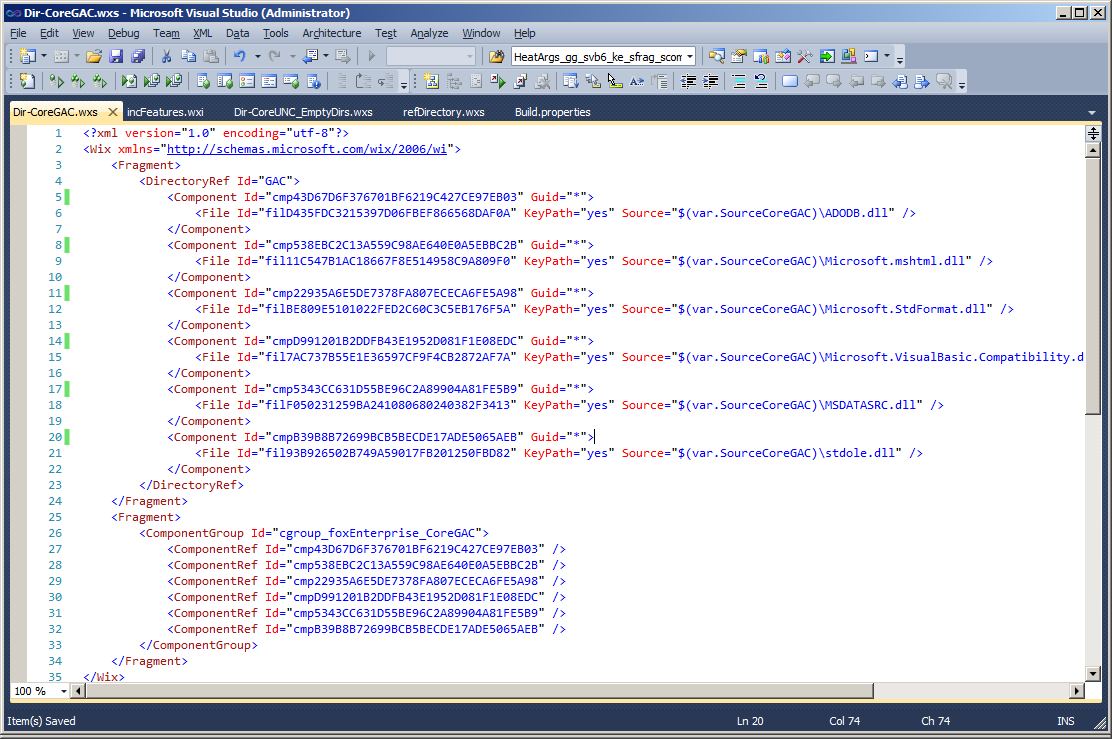
Here you can see the component guid attributes are all tagged with “*” . This is actually very good because the result of such an action tells the linker to deterministically create the component codes at link time.
What is actually happening here is very important to understand because it is based on the entire premise conflict management was built on (go figure, I love your work Rob). So what is actually happening here is that during link time the target path of the files is being resolved and then the component codes are generated based on the resolved target path.
This in effect means that a file deliver to path xxx will always generate component code xxx.
For example.
If you have a file targetted to c:\windows\system32\file_xxxx.dll then the component code will be generated exactly the same for every heat call you make that delivers a file to that same path. The end result is that if you compiled 20 different applications that all delivered the file c:\windows\system32\file_xxxx.dll then all 20 packages would have the same component code for that target path.
For those of you who are familiar with standard guid generation this would typically never ever happen. So you might think this is a strange thing to do but this is actually very very smart. Because the entire premise Windows Installer was built on is that files delivered to the same path should use the same component code to ensure reference counting is put into effect.
For those of you that don’t have a full grasp on Windows Installer Conflict Management the long and the short of this result is that if you do this you will not have issues with applications that share files in common areas. The term “Reference Count” ensure applications that share content do not break other shared applications during uninstallation of your products.
So this is a very very good thing to be doing. Unfortunately hardly anyone actually does it correctly or for that matter is even aware of the issue in the first place. Now this is actually only half of the puzzle. For those of you familiar with Wise Package Studio and Installshield this is a pretty big improvement on how these tools handle conflict management. Interestingly enough its a pretty simple mod to their code to fix as well. (so one wonders why they both fail to deliver such a simple technique into setup capture toolsets).
So the next part is somewhat more difficult and requires you have a grasp on some relatively simple XSLT and a little more heat command line action.
So we now need to call an XSLT to transform the output of heat into something a little more useful. The technique I use here is to turn off unique ID’s using the heat -suid option.
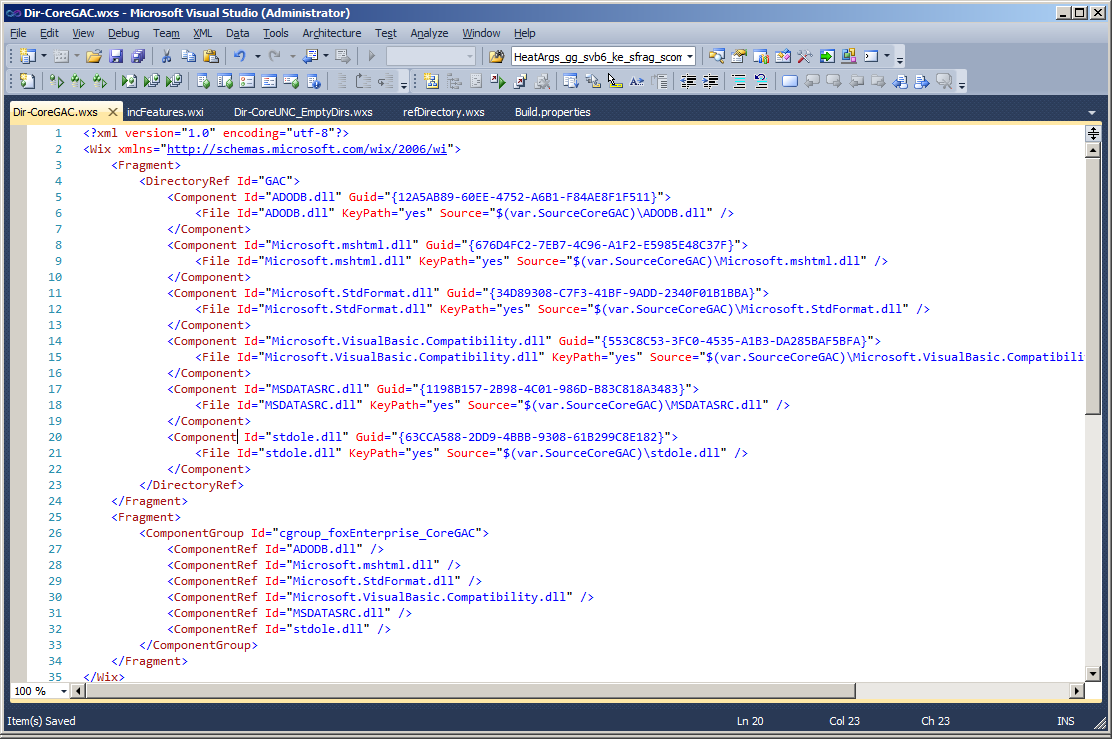
So the effect of using non-unique names causes the componentId and fileId to use the name of the file that has just been harvested (as shown above). Now in an application which is not too complicated this is actually a simple fix. The however does become an issue when you have the same filename in multiple WiX harvested fragments.
For example if you have;
DirectoryA with FileA.dll within it.
DirectoryB with FileA.dll within it.
and each harvest is called from a separate heat call the above method creates a problem of duplicate ComponentId and FileId attributes within your harvest WiX fragments. Obviously this is bad and causes the compiler to create exceptions. So this fix alone is not enough. This is where the XSLT comes into play allowing you to correct this issue.
So using an XSLT I prefix my heat call with the name of the harvested content in the case shown above the results would be as below.
DirectoryA_FileA.dll
DirectoryB_FileA.dll
So my XSLT code looks like this and I use this as a base XSLT for every heat call I make.

To call the XSLT you simply add the -t option to your heat call.
heat dir .\<path to gac files> -ag -dr INSTALLDIR -out .\testSample.wxs -sfrag -t <path to xslt file>
The result of adding the XSLT call to your heat call is each non unique filename is prefixed with the name of the heat call used.
Components will get a prefix of
Comp_CoreGAC_
Files will get a prefix of
File_CoreGAC_
This naming convention makes it very simple to identify files / components from each harvest (it looks pretty particularly when looking from referencing tables).
The end result is this.

So there you have it, this is how to conflict manage WiX installations. This is also a pre-requisite phase to patching which I might follow up sometime later.
ps, please keep commenting and I will keep up the posting.
------------------------------
here's the whole content of xslt :
<?xml version="1.0" encoding="UTF-8"?>

<xsl:stylesheet version="1.0"

            xmlns:xsl="http://www.w3.org/1999/XSL/Transform"

            xmlns:wix="http://schemas.microsoft.com/wix/2006/wi">

  <xsl:output method="xml" indent="yes" />

  <xsl:template match="@*|node()">

    <xsl:copy>

      <xsl:apply-templates select="@*|node()"/>

    </xsl:copy>

  </xsl:template>

  <xsl:template match="wix:Component">

    <xsl:copy>

      <xsl:apply-templates select="@*"/>

      <xsl:attribute name="Id">

        <xsl:text>comp_CoreGAC_</xsl:text>

        <xsl:value-of select="@Id"/>

      </xsl:attribute>

      <xsl:apply-templates select="node()" />

    </xsl:copy>

  </xsl:template>

  <xsl:template match="wix:ComponentRef">

    <xsl:copy>

      <xsl:apply-templates select="@*"/>

      <xsl:attribute name="Id">

        <xsl:text>comp_CoreGAC_</xsl:text>

        <xsl:value-of select="@Id"/>

      </xsl:attribute>

      <xsl:apply-templates select="node()"/>

    </xsl:copy>

  </xsl:template>

  <xsl:template match="wix:Directory">

    <xsl:copy>

      <xsl:apply-templates select="@*"/>

      <xsl:attribute name="Id">

        <xsl:text>dir_CoreGAC_</xsl:text>

        <xsl:value-of select="@Id"/>

      </xsl:attribute>

      <xsl:apply-templates select="node()"/>

    </xsl:copy>

  </xsl:template>

  <xsl:template match="wix:File">

    <xsl:copy>

      <xsl:apply-templates select="@*"/>

      <xsl:attribute name="Id">

        <xsl:text>file_CoreGAC_</xsl:text>

        <xsl:value-of select="@Id"/>

      </xsl:attribute>

      <xsl:apply-templates select="node()"/>

    </xsl:copy>

  </xsl:template>

</xsl:stylesheet>
Use XSLT in wix的更多相关文章
- wix xslt for adding node
Using xslt to add new node item to wix source code. Original wix code: <Fragment> <Director ...
- wix在使用heat自动生成wxs时添加windows服务组件
最近需要给安装包增加一个windows服务组件,按照我的理解,我以为只需要Product.wxs加一段如下的标签就可以了 <Componet Id="myservice"&g ...
- 初试WIX加SQL LocalDB
最近有个项目需要生成一个自动打包安装App和数据库的MSI文件,经同事推荐WIX,于是乎就试了一试.遇到了一些问题觉得有分享的价值,所以写篇博客记录一下 :) 使用感觉: WIX特点:功能很强大,用X ...
- WiX Toolset 教程索引页
注意:虽然WiX Toolset功能强大,但其学习曲线相对较高.请慎重选择: 若没有足够时间.没心思搞的请绕行至inno setup.installshield.nisi.setupfactory.. ...
- XSL学习笔记4 XSLT模式匹配的语法
模板规则通过使用模式来匹配文档树的节点.模式指定一组条件,用于选择要处理的节点. 模式匹配的语法不光可以在<xsl:template>元素的match属性中使用,还可以在<xsl ...
- XSLT简介
什么是? http://www.w3school.com.cn/xsl/xsl_intro.asp XSLT 是一种用于将 XML 文档转换为 XHTML 文档或其他 XML 文档的语言. XPath ...
- XSLT函数集合:数值函数、字符串函、节点集函数和布尔函数
任何的编程语言或者是SQL语句都有内置的函数或方法,而强大灵活的xslt技术也是如此.熟练掌握XSLT的常用函数的用法,XSLT的应用将变得如此轻松,你会发现XSLT比想象中还要牛!以下是xslt数值 ...
- Xslt 1.0中使用Array
XSLT Variable Arrays I recently answered a question on a popular programmers forum about how to stor ...
- 安装文件制作工具Wix概念快速入门
前言 Wix==Windows installer XML 顾名思议. 用于制作WINDOWS安装文件的XML格式的描述文件. 因为其实现方式为基于声明的方式,而非命令的方式. 特整理一下其相关的概念 ...
随机推荐
- innodB的隐式锁
http://blog.csdn.net/taozhi20084525/article/details/19545231 一.知识准备之隐式锁 参考:http://www.uml.org.cn/sjj ...
- QStyle 新风格的实现
摸索了很久,实际实现才发现很简单. 利用qt助手搜style可以发现style的实现和qapplication有关,在Qapplication里面搜到函数: void QApplication:: ...
- 解决vim中鼠标右键无法复制的问题
转:http://www.cnblogs.com/jianyungsun/archive/2011/03/19/1988855.html 这是我的vim配置文件:jeffy-vim-v2.4.tar ...
- Java再学习——synchronized与volatile
volatile:只保证共享资源的可见性的,任何修改都写在主存,所有线程马上就能看到,适用于新值不依赖于旧值的情形. synchronized:保证可操作的原子性一致性和可见性. volatile和s ...
- 阿里云 OCS SDK for NodeJS介绍
阿里云 OCS SDK for NodeJS介绍 阿里云技术团队:熊亮 阿里云 SDK for NodeJS 是为 NodeJS 开发者提供使用阿里云各项服务的统一入口,由阿里云UED团队负责开发维护 ...
- 【Shell脚本学习12】Shell字符串
字符串是shell编程中最常用最有用的数据类型(除了数字和字符串,也没啥其它类型好用了),字符串可以用单引号,也可以用双引号,也可以不用引号.单双引号的区别跟PHP类似. 单引号 str='this ...
- Java、Android中Math详解
java.math.Math类常用的常量和方法: Math.PI 记录的圆周率 Math.E记录e的常量 Math.abs 求绝对值 Math.sin 正弦函数 Math.asin 反正弦函数 Mat ...
- [iOS Xcode8]上传AppStore无法添加构建版本
最近升级到xcode8了,也遇到了一些问题.最近产品需要更新版本,按照以前的流程,我觉得so easy啊,万万没想到啊,这次更新版本差点让我吐血,来来回回不下七次. 首先问题是版本通过xcode上传到 ...
- Java为什么只能单继承?
就是因为C++里多重继承功能强大但是容易出错,Java才给取消掉了.如果,A和B都继承于C,再写个D继承A和B.那么C里面有个方法,A和B继承过去后都进行了覆盖,那么D到底是该继承A里面的版本呢还是B ...
- hdu 3062 2-SAT问题
思路:裸的2-SAT. #include<map> #include<set> #include<cmath> #include<queue> #inc ...