
[Java] 集合类(List、Set、Map的基本使用)
数组是一种很常见的数据结构,开始接触编程的时候多数程序都和数组相关。刚开始接触Java时也是一直使用数组写一些程序,后来越来越觉得...
数组是一种很常见的数据结构,开始接触编程的时候多数程序都和数组相关。刚开始接触Java时也是一直使用数组写一些程序,后来越来越觉得数组这东西没法满足需求了,这时一位“前辈”对我说了一句:不会用集合类就等于没学过Java。然后才知道有集合类。
想想已经是3、4年前的事了,时间如白驹过隙啊。
什么时候数组会显得力不从心,没法满足需求,需要集合类呢?
- 不知道具体数据长度
- 需要自动排序
- 存储键值对
当然,上面的情况不是绝对的,只是数组比较难满足。这时集合类(也可称为容器类)就显示了它强大的功能。
集合类的分类
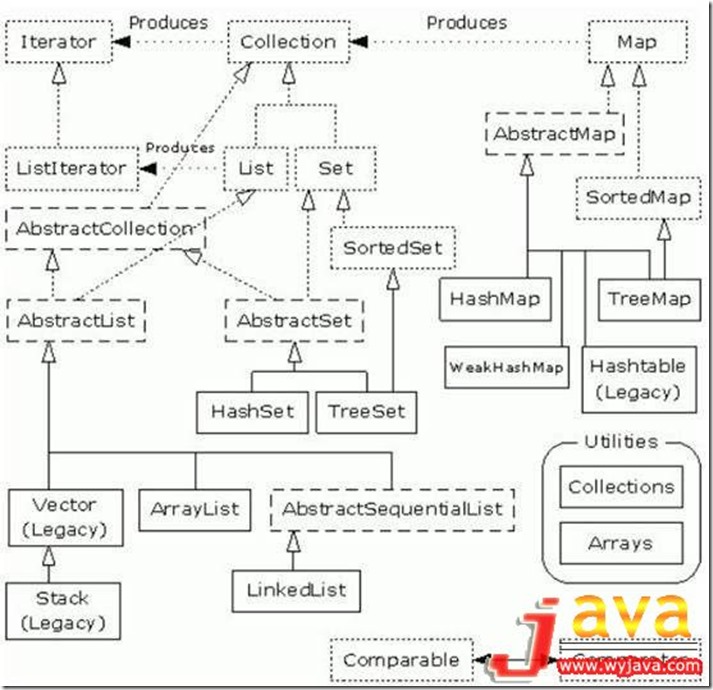
被水印遮住的单词是Comparator
上图中不包含Queue内容,部分Map的实现类未给出。
常见使用的有List、Set、Map及他们的实现类。
List、Set、Map接口及各实现类的特性
|
接口 |
特性 |
实现类 |
实现类特性 |
成员要求 |
|
List |
线性、有序的存储容器,可通过索引访问元素 |
ArrayList |
数组实现。非同步。 |
|
|
Vector |
类似ArrayList,同步。 |
|
||
|
LinkedList |
双向链表。非同步。 |
|
||
|
Map |
保存键值对成员 |
HashMap |
基于哈希表的 Map 接口的实现,满足通用需求 |
任意Object对象,如果修改了equals方法,需同时修改hashCode方法 |
|
TreeMap |
默认根据自然顺序进行排序,或者根据创建映射时提供的 Comparator进行排序 |
键成员要求实现caparable接口,或者使用Comparator构造TreeMap。键成员一般为同一类型。 |
||
|
LinkedHashMap |
类似于HashMap,但迭代遍历时取得“键值对”的顺序是其插入顺序或者最近最少使用的次序 |
与HashMap相同 |
||
|
IdentityHashMap |
使用==取代equals()对“键值”进行比较的散列映射 |
成员通过==判断是否相等 |
||
|
WeakHashMap |
弱键映射,允许释放映射所指向的对象 |
|
||
|
ConcurrentHashMap |
线性安全的Map |
|
||
|
Set |
成员不能重复 |
HashSet |
为快速查找设计的Set |
元素必须定义hashCode() |
|
TreeSet |
保持次序的Set,底层为树结构 |
元素必须实现Comparable接口 |
||
|
LinkedHashSet |
内部使用链表维护元素的顺序(插入的次序) |
元素必须定义hashCode() |
在满足要求的情况下,Map应尽量使用HashMap,Set应尽量使用HashSet。
集合类的基本使用
List
List基本操作
        ArrayList<String> arrayList = new ArrayList<String>();

        arrayList.add("Tom");

        arrayList.add("Jerry");

        arrayList.add("Micky");

        // 使用Iterator遍历元素

        Iterator<String> it = arrayList.iterator();

        while (it.hasNext()) {

            String str = it.next();

            System.out.println(str);

        }

        // 在指定位置插入元素

        arrayList.add(2, "Kate");

        // 通过索引直接访问元素

        for (int i = 0; i < arrayList.size(); i++) {

            System.out.println(arrayList.get(i));

        }

        List<String> subList = new ArrayList<String>();

        subList.add("Mike");

        // addAll(Collection<? extends String> c)添加所给集合中的所有元素

        arrayList.addAll(subList);

        // 判断是否包含某个元素

        if (arrayList.contains("Mike")) {

            System.out.println("Mike is include in the list");

        }

        LinkedList<String> linkedList = new LinkedList<String>();

        linkedList.addAll(arrayList);

        // 获取指定元素

        System.out.println(linkedList.get(4));

        // 获取第一个元素

        System.out.println(linkedList.getFirst());

        // 获取最后一个元素

        System.out.println(linkedList.getLast());

        // 获取并删除第一个元素

        System.out.println(linkedList.pollFirst());

        // 获取,但不移除第一个元素

        System.out.println(linkedList.peekFirst());
ArrayList和LinkedList的效率比较
// ArrayList添加元素的效率

         ArrayList<String> arrList = new ArrayList<String>();

                 long startTimeMillis, endTimeMillis;

                 startTimeMillis = System.currentTimeMillis();

                 for (int i = 0; i < 10000; i++) {

                     arrList.add(0, "addString");

                 }

                 endTimeMillis = System.currentTimeMillis();

                 System.out.println("ArrayList:" + (endTimeMillis - startTimeMillis)

                         + "ms");

                 arrList.clear();

                 startTimeMillis = System.currentTimeMillis();

                 for (int i = 0; i < 20000; i++) {

                     arrList.add(0, "addString");

                 }

                 endTimeMillis = System.currentTimeMillis();

                 System.out.println("ArrayList:" + (endTimeMillis - startTimeMillis)

                         + "ms");

                 arrList.clear();

                 startTimeMillis = System.currentTimeMillis();

                 for (int i = 0; i < 40000; i++) {

                     arrList.add(0, "addString");

                 }

                 endTimeMillis = System.currentTimeMillis();

                 System.out.println("ArrayList:" + (endTimeMillis - startTimeMillis)

                         + "ms");

                 arrList.clear();

                 startTimeMillis = System.currentTimeMillis();

                 for (int i = 0; i < 80000; i++) {

                     arrList.add(0, "addString");

                 }

                 endTimeMillis = System.currentTimeMillis();

                 System.out.println("ArrayList:" + (endTimeMillis - startTimeMillis)

                         + "ms");

                 arrList.clear();

                 startTimeMillis = System.currentTimeMillis();

                 for (int i = 0; i < 160000; i++) {

                     arrList.add(0, "addString");

                 }

                 endTimeMillis = System.currentTimeMillis();

                 System.out.println("ArrayList:" + (endTimeMillis - startTimeMillis)

                         + "ms");

                 arrList.clear();

                 startTimeMillis = System.currentTimeMillis();

                 for (int i = 0; i < 320000; i++) {

                     arrList.add(0, "addString");

                 }

                 endTimeMillis = System.currentTimeMillis();

                 System.out.println("ArrayList:" + (endTimeMillis - startTimeMillis)

                         + "ms");
执行时间比较
|
执行次数(在0号位置插入) |
ArrayList所用时间(ms) |
LinkedList所用时间(ms) |
|
10000 |
31 |
0 |
|
20000 |
141 |
0 |
|
40000 |
484 |
16 |
|
80000 |
1985 |
0 |
|
160000 |
7906 |
0 |
|
320000 |
31719 |
16 |
|
执行次数(在尾部插入) |
ArrayList所用时间(ms) |
LinkedList所用时间(ms) |
|
10000 |
0 |
0 |
|
20000 |
15 |
0 |
|
40000 |
0 |
0 |
|
80000 |
0 |
0 |
|
160000 |
0 |
15 |
|
320000 |
0 |
16 |
|
循环输出次数(get(index)方法) |
ArrayList所用时间(ms) |
LinkedList所用时间(ms) |
|
10000 |
93 |
204 |
|
20000 |
188 |
797 |
|
40000 |
328 |
2734 |
|
80000 |
688 |
13328 |
|
160000 |
1594 |
62313 |
|
320000 |
2765 |
太久了…… |
因为ArrayList底层由数组实现,在0号位置插入时将移动list的所有元素,在末尾插入元素时不需要移动。LinkedList是双向链表,在任意位置插入元素所需时间均相同。所以在List中有较多插入和删除操作的情况下应使用LinkedList来提高效率,而有较多索引查询的时候使用 ArrayList(使用增强型的for循环或Iterator遍历LinkedList效率将提高很多)。
Map
Map基本操作
HashMap<String, Integer> map = new HashMap<String, Integer>();

                 // 向Map中添加元素

                 map.put("Tom", 26);

                 map.put("Jack", 18);

                 map.put("Micky", 17);

                 map.put("Kate", 15);

                 // 根据Key获取Value

                 System.out.println("Jack is " + map.get("Jack") + " years old");

                 // 移除

                 map.remove("Micky");

                 // 遍历Map

                 for (Entry<String, Integer> entry : map.entrySet()) {

                     System.out.println("name:" + entry.getKey() + " age:"

                             + entry.getValue());

                 }

                 // Key相同的元素将被覆盖

                 map.put("Jack", 19);

                 // 根据Key获取Value

                 System.out.println("Jack is " + map.get("Jack") + " years old");

                 // 判断是否包含某个Key

                 if (map.containsKey("Tom")) {

                     System.out.println(map.get("Tom"));

                 }

                 // 判断是否包含某个Value

                 if (map.containsValue(26)) {

                     System.out.println("The map include the value 26");

                 }

                 // 判断map是否为空

                 if (!map.isEmpty()) {

                     // 获取map大小

                     System.out.println("The map's size=" + map.size());

                 }

                 // 获取Key的集合

                 for (String str : map.keySet()) {

                     System.out.println(str);

                 }

                 TreeMap<String, Integer> treeMap = new TreeMap<String, Integer>();

                 treeMap.putAll(map);

                 // 输出内容按照key值排序

                 for (Entry<String, Integer> entry : treeMap.entrySet()) {

                     System.out.println("name:" + entry.getKey() + " age:"

                             + entry.getValue());

                     // name:Jack age:19

                     // name:Kate age:15

                     // name:Tom age:26

                 }

                 LinkedHashMap<String, Integer> linkedHashMap = new LinkedHashMap<String, Integer>();

                 // 向Map中添加元素

                 linkedHashMap.put("Tom", 26);

                 linkedHashMap.put("Jack", 18);

                 linkedHashMap.put("Micky", 17);

                 linkedHashMap.put("Kate", 15);

                 // 保持了插入的顺序

                 for (Entry<String, Integer> entry : linkedHashMap.entrySet()) {

                     System.out.println("name:" + entry.getKey() + " age:"

                             + entry.getValue());

                     // name:Tom age:26

                     // name:Jack age:18

                     // name:Micky age:17

                     // name:Kate age:15

                 }
Set
Set基础操作
List<Integer> list = new ArrayList<Integer>();

      list.add(3);

      list.add(4);

      HashSet<Integer> hashSet = new HashSet<Integer>();

      hashSet.add(1);

      hashSet.add(3);

      hashSet.add(2);

      hashSet.add(6);

      // 重复元素将不能被添加

      hashSet.add(3);

      // 只要有元素被添加就返回true

      if (hashSet.addAll(list)) {

          System.out.println("Add success");

      }

      // 判断是否存在某个集合

      if (hashSet.containsAll(list)) {

          System.out.println("The hashSet is contain 3 and 4");

      }

      Iterator<Integer> it = hashSet.iterator();

      while (it.hasNext()) {

          System.out.print(it.next() + " ");

          // 1 2 3 4 6

          // 看结果是被排序了,HashSet按照Hash函数排序,Integer值的HashCode就是其int值

      }

      // 换转成数组

      Object[] integers = hashSet.toArray();

      for (int i = 0; i < integers.length; i++) {

          System.out.print((Integer) integers[i]);

      }

      //移除元素

      hashSet.remove(3);

      TreeSet<String> treeSet = new TreeSet<String>();

      treeSet.add("C");

      treeSet.add("A");

      treeSet.add("D");

      treeSet.add("B");

      for (Iterator<String> strIt = treeSet.iterator(); strIt.hasNext();) {

          System.out.print(strIt.next());

          // ABCD 按照字母顺序

      }

      LinkedHashSet<String> linkedHashSet = new LinkedHashSet<String>();

      linkedHashSet.add("C");

      linkedHashSet.add("A");

      linkedHashSet.add("D");

      linkedHashSet.add("B");

      for (Iterator<String> linkedIt = linkedHashSet.iterator(); linkedIt

              .hasNext();) {

          System.out.print(linkedIt.next());

          // CADB 按照插入顺序

      }
本文没有对ArrayList及HashMap进行深入的分析,这两个类是集合类中最常用的类,将另开文章进行深入剖析。
ArrayList深入分析:《ArrayList源码分析》
[Java] 集合类(List、Set、Map的基本使用)的更多相关文章
- 面试3——java集合类总结(Map)
1.概述: Java 中的map集合使用键值对(key-value)来保持数据,其中值(value)可以重复,键(key)必须唯一,但最多只能有一个key为空,它的主要实现类有HashMap.Hash ...
- 【转载】Java集合类Array、List、Map区别和联系
Java集合类主要分为以下三类: 第一类:Array.Arrays第二类:Collection :List.Set第三类:Map :HashMap.HashTable 一.Array , Arrays ...
- Java集合类: Set、List、Map、Queue使用场景梳理
本文主要关注Java编程中涉及到的各种集合类,以及它们的使用场景 相关学习资料 http://files.cnblogs.com/LittleHann/java%E9%9B%86%E5%90%88%E ...
- Java集合类: Set、List、Map、Queue使用
目录 1. Java集合类基本概念 2. Java集合类架构层次关系 3. Java集合类的应用场景代码 1. Java集合类基本概念 在编程中,常常需要集中存放多个数据.从传统意义上讲,数组是我们的 ...
- 基础知识《六》---Java集合类: Set、List、Map、Queue使用场景梳理
本文转载自LittleHann 相关学习资料 http://files.cnblogs.com/LittleHann/java%E9%9B%86%E5%90%88%E6%8E%92%E5%BA%8F% ...
- java集合类(五)About Map
接上篇“java集合类(四)About Set” 这次学完Map之后,就剩队列的知识,之后有关java集合类的学习就将告一段落,之后可能会有java连接数据库,I/O,多线程,网络编程或Android ...
- java 集合类Array、List、Map区别和优缺点
Java集合类主要分为以下三类: 第一类:Array.Arrays 第二类:Collection :List.Set第三类:Map :HashMap.HashTable 一.Array , Array ...
- Java集合排序及java集合类详解--(Collection, List, Set, Map)
1 集合框架 1.1 集合框架概述 1.1.1 容器简介 到目前为止,我们已经学习了如何创建多个不同的对象,定义了这些对象以后,我们就可以利用它们来做一 ...
- Java集合类: Set、List、Map、Queue使用场景
目录 1. Java集合类基本概念 2. Java集合类架构层次关系 3. Java集合类的应用场景代码 1. Java集合类基本概念 在编程中,常常需要集中存放多个数据.从传统意义上讲,数组是我们的 ...
- Java集合类——Set、List、Map、Queue接口
目录 Java 集合类的基本概念 Java 集合类的层次关系 Java 集合类的应用场景 一. Java集合类的基本概念 在编程中,常需要集中存放多个数据,数组是一个很好的选择,但数组的长度需提前指定 ...
随机推荐
- <Stackoverflow> 声望和节制
什么是声望(reputation)?我是怎样获得(或失去)它的? 声望是一种粗略的测量,用来表示社区对你的信任度.通过让别人相信你知道自己正在讨论什么来获得.对网站的基本使用,包括问一个问题,回答,建 ...
- 数据库防sql注入
- HDU 5773 The All-purpose Zero (变形LIS)
题目链接:http://acm.hdu.edu.cn/showproblem.php?pid=5773 0可以改变成任何数,问你严格递增的子序列最长是多少. 猜测0一定在最长上升子序列中用到,比如2 ...
- [转]freemarker中的list
转至:http://zhuyuehua.iteye.com/blog/1975251 freemarker list (长度,遍历,下标,嵌套,排序) 1. freemarker获取list的size ...
- JavaScript- 获取经度纬度
昨天获得一个小需求,需要取地理位置. 通过以下的JS能获得经度和纬 if(navigator.geolocation) { navigator.geolocation.getCurrentPositi ...
- iOS类别(Category)
iOS类别(Category)与扩展(Extension) 苹果的官方文档 Category在iOS开发中使用非常频繁.尤其是在为系统类进行拓展的时候,我们可以不用继承系统类,直接给系统类添加方法,最 ...
- 令人惊奇的gdb和pstack
pstack竟然是一个shell脚本,核心是调用gdb的thread apply all bt查看进程的所有线程的堆栈,之后用sed正则展示线程堆栈信息. /proc/pid/exe是一个指向可执行文 ...
- TinyTask Portable(录制和回放电脑操作过程)
一直想找个软件,可以回放自己或他人编码的过程.我认为,只有亲眼看到别人是怎么做的,才能更好的了解他人的思路. 虽然找到http://thecodeplayer.com/这个,但它只能回放它上面的代码, ...
- corpus academic writing
http://micusp.elicorpora.info/ http://corpus.byu.edu/coca/ http://rcpce.engl.polyu.edu.hk/RACorpus/
- uva 10152 ShellSort
//这个算法用到了"相对位置"的思想,并且就本题而言还有一个很重要的结论就是,假设 //移动了k个元素,那么这k个元素一定是最后结果的那个序列的前k个元素,而且易知, //越先移动 ...