
Windbg源码调试
Windbg提供比VS2008丰富很多的调试命令,尤其是调试多线程程序。
今天试着怎么使用源代码方式调试。为了说明调试命令,《C++标准库》一书里的例子做示范。
// testcast.cpp

#include <stdio.h>

#include <iostream>

struct A {

    virtual void test() {

        printf_s("in A\n");

   }

};

struct B : A {

    virtual void test() {

        printf_s("in B\n");

    }

    void test2() {

        printf_s("test2 in B\n");

    }

};

struct C : B {

    virtual void test() {

        printf_s("in C\n");

    }

    void test2() {

        printf_s("test2 in C\n");

    }

};

void Globaltest(A& a) {

    try {

        C &c = dynamic_cast<C&>(a);

        printf_s("in GlobalTest\n");

    }

    catch(std::bad_cast) {

        printf_s("Can't cast to C\n");

    }

}

int main() {

    A *pa = new C;

    A *pa2 = new B;

    pa->test();

    B * pb = dynamic_cast<B *>(pa);

    if (pb)

        pb->test2();

    C * pc = dynamic_cast<C *>(pa2);

    if (pc)

        pc->test2();

    C ConStack;

    Globaltest(ConStack);

   // will fail because B knows nothing about C

    B BonStack;

    Globaltest(BonStack);

}
使用命令编译并连接
cl.exe testcast.cpp /Zi
link testcast.obj /DEBUG
确保系统已经安装了windbg和symbol。
在命令行窗体,cd testcast.exe所在目录
Windbg testcast.exe
打开Windbg窗体,进入到用户模式调试
命令行交互如下(蓝色为注释):
Microsoft (R) Windows Debugger Version 6.2.9200.20512 AMD64
Copyright (c) Microsoft Corporation. All rights reserved.
CommandLine: testcast.exe
Symbol search path is: C:\Symbols;d:\Code\Exercise\C++
C:\Symbols为Windows Symbols目录,使用.symfix 可以恢复sympath为微软网站上的symbol存储位置
.sympath 查看当前symbol目录
.sympath+ D:\Code\Exercise\C++ 将“D:\Code\Exercise\C++ ”添加到symbol搜索路径中
.srcpath 查看源码搜索路径
.srcpath+ D:\Code\Exercise\C++ 将“D:\Code\Exercise\C++ ” 添加到源码搜索路径中
Executable search path is:
ModLoad: 00000000`00ac0000 00000000`00af1000 testcast.exe
ModLoad: 00000000`77b40000 00000000`77cec000 ntdll.dll
ModLoad: 00000000`77d20000 00000000`77ea0000 ntdll32.dll
ModLoad: 00000000`73e80000 00000000`73ebf000 C:\Windows\SYSTEM32\wow64.dll
ModLoad: 00000000`73e20000 00000000`73e7c000 C:\Windows\SYSTEM32\wow64win.dll
ModLoad: 00000000`73e10000 00000000`73e18000 C:\Windows\SYSTEM32\wow64cpu.dll
(1a58.b40): Break instruction exception - code 80000003 (first chance)
*** ERROR: Symbol file could not be found. Defaulted to export symbols for ntdll.dll -
ntdll!CsrSetPriorityClass+0x40:
00000000`77bf0fe0 cc int 3
0:000> bl bl用于显示断点列表
0:000> bp testcast!main 在testcast模块的main函数开头下断点
*** WARNING: Unable to verify checksum for testcast.exe
0:000> bp testcast!Globaltest 在testcast模块的Globaltest函数开头下断点
0:000> g 执行
ModLoad: 00000000`77920000 00000000`77a3f000 WOW64_IMAGE_SECTION
ModLoad: 00000000`75930000 00000000`75a40000 WOW64_IMAGE_SECTION
ModLoad: 00000000`77920000 00000000`77a3f000 NOT_AN_IMAGE
ModLoad: 00000000`77a40000 00000000`77b3a000 NOT_AN_IMAGE
ModLoad: 00000000`75930000 00000000`75a40000 C:\Windows\syswow64\kernel32.dll
ModLoad: 00000000`758e0000 00000000`75927000 C:\Windows\syswow64\KERNELBASE.dll
(1a58.b40): WOW64 breakpoint - code 4000001f (first chance)
First chance exceptions are reported before any exception handling.
This exception may be expected and handled.
*** ERROR: Symbol file could not be found. Defaulted to export symbols for ntdll32.dll -
ntdll32!LdrVerifyImageMatchesChecksum+0x6ce:
77dc0e0b cc int 3
0:000:x86> g
Breakpoint 0 hit
testcast!main:
00ac1100 55 push ebp
0:000:x86> p 单步执行
testcast!main+0x6:
00ac1106 6a04 push 4
0:000:x86> t 单步跟踪
testcast!operator new:
00ac1fd9 8bff mov edi,edi
0:000:x86> t
testcast!operator new+0x2:
00ac1fdb 55 push ebp
0:000:x86> t
testcast!operator new+0x3:
00ac1fdc 8bec mov ebp,esp
0:000:x86> p
testcast!operator new+0x5:
00ac1fde 83ec10 sub esp,10h
0:000:x86> p
testcast!operator new+0x8:
00ac1fe1 eb0d jmp testcast!operator new+0x17 (00ac1ff0)
0:000:x86> p
testcast!operator new+0x17:
00ac1ff0 ff7508 push dword ptr [ebp+8] ss:002b:003bfd20=04000000
0:000:x86> p
testcast!operator new+0x1a:
00ac1ff3 e8293a0000 call testcast!malloc (00ac5a21)
……
0:000:x86> p
testcast!Globaltest+0x4e:
00ac10be 68d84eae00 push offset testcast!std::_Iosb<int>::end+0x4 (00ae4ed8)
0:000:x86> g
Breakpoint 1 hit
testcast!Globaltest:
00ac1070 55 push ebp
0:000:x86> g
(1a58.b40): C++ EH exception - code e06d7363 (first chance)
*** ERROR: Symbol file could not be found. Defaulted to export symbols for C:\Windows\SYSTEM32\wow64.dll -
ntdll!ZwTerminateProcess+0xa: 一直执行到进程退出
00000000`77b8f97a c3 ret
0:000> g
^ No runnable debuggees error in 'g'
调试过程截图 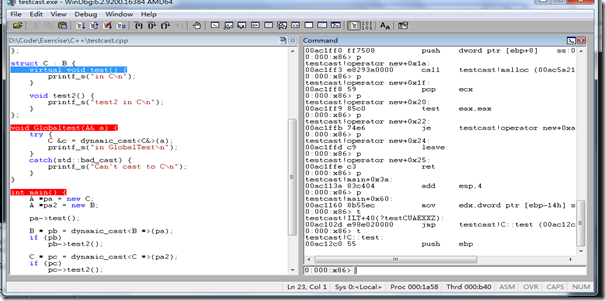
Windbg源码调试的更多相关文章
- windbg源码驱动调试 + 无源码驱动调试
windbg源码驱动调试 环境信息 虚拟机:win7 32位 windbg:6.12(版本不存在太大影响) 设置过程 windbg与虚拟机连接:链接 配置windbg 配置好双机调试后,点击win ...
- 开启Tomcat 源码调试
开启Tomcat 源码调试 因为工作的原因,需要了解Tomcat整个架构是如何设计的,正如要使用Spring MVC进行Web开发,需要了解Spring是如何设计的一样,有哪些主要的类,分别是用于干什 ...
- 在Eclipse中进行HotSpot的源码调试--转
原文地址:http://www.linuxidc.com/Linux/2015-05/117250.htm 在阅读OpenJDK源码的过程中,经常需要运行.调试程序来帮助理解.我们现在已经可以编译出一 ...
- [原创]在Windows和Linux中搭建PostgreSQL源码调试环境
张文升http://ode.cnblogs.comEmail:wensheng.zhang#foxmail.com 配图太多,完整pdf下载请点这里 本文使用Xming.Putty和VMWare几款工 ...
- SpringMVC DispatcherServlet 启动和加载过程(源码调试)
在阅读本文前,最好先阅读以下内容(当然,如果对 Servlet 已经有所了解,则可跳过): http://www.cnblogs.com/cyhbyw/p/8682078.html http://ww ...
- 《k8s-1.13版本源码分析》-源码调试
源码分析系列文章已经开源到github,地址如下: github:https://github.com/farmer-hutao/k8s-source-code-analysis gitbook:ht ...
- SpringBoot自动配置源码调试
之前对SpringBoot的自动配置原理进行了较为详细的介绍(https://www.cnblogs.com/stm32stm32/p/10560933.html),接下来就对自动配置进行源码调试,探 ...
- HashMap源码调试——认识"put"操作
前言:通常大家都知道HashMap的底层数据结构为数组加链表的形式,但其put操作具体是怎样执行的呢,本文通过调试HashMap的源码来阐述这一问题. 注:jdk版本:jdk1.7.0_51 1.pu ...
- .net源码调试 http://referencesource.microsoft.com/
其实关于.net源码调试 网上的资料已经很多了,我以前转载的文章有 VS2010下如何调试Framework源代码(即FCL) 和 如何使你的应用程序调试进.NET Framework 4.5源代码内 ...
随机推荐
- (转载)Cocos2dx-OpenGL ES2.0教程:编写自己的shader(2)
在上篇文章中,我给大家介绍了如何在cocos2d-x里面绘制一个三角形,当时我们使用的是cocos2d-x引擎自带的shader和一些辅助函数.在本文中,我将演示一下如何编写自己的shader,同时, ...
- python学习笔记16(错误、异常)
一.什么是错误,什么是异常 错误是指在执行代码过程中发生的事件,它中断或干扰代码的正常流程并创建异常对象.当错误中断流程时,该程序将尝试寻找异常处理程序(一段告诉程序如何对错误做出响应的代码),以帮助 ...
- 过长文字自动换行的技巧 Word-Break Word-Wrap
在很多时候,为了防止内容过长把表格或容器撑破, 我们都需要为容器加上自动换行的功能. 实现自动换行,用CSS来实现,通常有两种方式: word-break: 取值为 normal, break-all ...
- 增强LSH
通过LSH hash functions我们能够得到一个或多个hash table,每个桶内的数据之间是近邻的可能性很大.我们希望原本相邻的数据经过LSH hash后,都能够落入到相同的桶内,而不相邻 ...
- Spark的TorrentBroadcast:实现
依据Spark 1.4版 序列化和反序列化 前边提到,TorrentBroadcast的关键就在于特殊的序列化和反序列化设置.1.1版的TorrentBroadcast实现了自己的readObject ...
- 如果Java 失宠于Oracle,那么未来会怎么样?
[编者按]对于前不久 Oracle 裁掉了一部分 Java 布道师,近日一位 Oracle 前高管称其为该机构对Java的「计划报废」.如果这个计划是属实的,那么对于寻常的开发者.已经采用了 Java ...
- openvas
http://www.freebuf.com/articles/5474.html EPEL http://www.centoscn.com/CentOS/config/2014/0920/3793. ...
- http://jingyan.baidu.com/article/a3761b2b66fe141577f9aa51.html
http://jingyan.baidu.com/article/a3761b2b66fe141577f9aa51.html
- 网上图书商城项目学习笔记-037工具类之BaseServlet及统一中文编码
1.统一中文编码分析 tomcat默认esetISO-8859-1编码,在servlet中,可能通过request的setCharacterEncoding(charset)和response.set ...
- 201. Bitwise AND of Numbers Range
题目: Given a range [m, n] where 0 <= m <= n <= 2147483647, return the bitwise AND of all num ...