
Windbg源码调试
Windbg提供比VS2008丰富很多的调试命令,尤其是调试多线程程序。
今天试着怎么使用源代码方式调试。为了说明调试命令,《C++标准库》一书里的例子做示范。
// testcast.cpp

#include <stdio.h>

#include <iostream>

struct A {

    virtual void test() {

        printf_s("in A\n");

   }

};

struct B : A {

    virtual void test() {

        printf_s("in B\n");

    }

    void test2() {

        printf_s("test2 in B\n");

    }

};

struct C : B {

    virtual void test() {

        printf_s("in C\n");

    }

    void test2() {

        printf_s("test2 in C\n");

    }

};

void Globaltest(A& a) {

    try {

        C &c = dynamic_cast<C&>(a);

        printf_s("in GlobalTest\n");

    }

    catch(std::bad_cast) {

        printf_s("Can't cast to C\n");

    }

}

int main() {

    A *pa = new C;

    A *pa2 = new B;

    pa->test();

    B * pb = dynamic_cast<B *>(pa);

    if (pb)

        pb->test2();

    C * pc = dynamic_cast<C *>(pa2);

    if (pc)

        pc->test2();

    C ConStack;

    Globaltest(ConStack);

   // will fail because B knows nothing about C

    B BonStack;

    Globaltest(BonStack);

}
使用命令编译并连接
cl.exe testcast.cpp /Zi
link testcast.obj /DEBUG
确保系统已经安装了windbg和symbol。
在命令行窗体,cd testcast.exe所在目录
Windbg testcast.exe
打开Windbg窗体,进入到用户模式调试
命令行交互如下(蓝色为注释):
Microsoft (R) Windows Debugger Version 6.2.9200.20512 AMD64
Copyright (c) Microsoft Corporation. All rights reserved.
CommandLine: testcast.exe
Symbol search path is: C:\Symbols;d:\Code\Exercise\C++
C:\Symbols为Windows Symbols目录,使用.symfix 可以恢复sympath为微软网站上的symbol存储位置
.sympath 查看当前symbol目录
.sympath+ D:\Code\Exercise\C++ 将“D:\Code\Exercise\C++ ”添加到symbol搜索路径中
.srcpath 查看源码搜索路径
.srcpath+ D:\Code\Exercise\C++ 将“D:\Code\Exercise\C++ ” 添加到源码搜索路径中
Executable search path is:
ModLoad: 00000000`00ac0000 00000000`00af1000 testcast.exe
ModLoad: 00000000`77b40000 00000000`77cec000 ntdll.dll
ModLoad: 00000000`77d20000 00000000`77ea0000 ntdll32.dll
ModLoad: 00000000`73e80000 00000000`73ebf000 C:\Windows\SYSTEM32\wow64.dll
ModLoad: 00000000`73e20000 00000000`73e7c000 C:\Windows\SYSTEM32\wow64win.dll
ModLoad: 00000000`73e10000 00000000`73e18000 C:\Windows\SYSTEM32\wow64cpu.dll
(1a58.b40): Break instruction exception - code 80000003 (first chance)
*** ERROR: Symbol file could not be found. Defaulted to export symbols for ntdll.dll -
ntdll!CsrSetPriorityClass+0x40:
00000000`77bf0fe0 cc int 3
0:000> bl bl用于显示断点列表
0:000> bp testcast!main 在testcast模块的main函数开头下断点
*** WARNING: Unable to verify checksum for testcast.exe
0:000> bp testcast!Globaltest 在testcast模块的Globaltest函数开头下断点
0:000> g 执行
ModLoad: 00000000`77920000 00000000`77a3f000 WOW64_IMAGE_SECTION
ModLoad: 00000000`75930000 00000000`75a40000 WOW64_IMAGE_SECTION
ModLoad: 00000000`77920000 00000000`77a3f000 NOT_AN_IMAGE
ModLoad: 00000000`77a40000 00000000`77b3a000 NOT_AN_IMAGE
ModLoad: 00000000`75930000 00000000`75a40000 C:\Windows\syswow64\kernel32.dll
ModLoad: 00000000`758e0000 00000000`75927000 C:\Windows\syswow64\KERNELBASE.dll
(1a58.b40): WOW64 breakpoint - code 4000001f (first chance)
First chance exceptions are reported before any exception handling.
This exception may be expected and handled.
*** ERROR: Symbol file could not be found. Defaulted to export symbols for ntdll32.dll -
ntdll32!LdrVerifyImageMatchesChecksum+0x6ce:
77dc0e0b cc int 3
0:000:x86> g
Breakpoint 0 hit
testcast!main:
00ac1100 55 push ebp
0:000:x86> p 单步执行
testcast!main+0x6:
00ac1106 6a04 push 4
0:000:x86> t 单步跟踪
testcast!operator new:
00ac1fd9 8bff mov edi,edi
0:000:x86> t
testcast!operator new+0x2:
00ac1fdb 55 push ebp
0:000:x86> t
testcast!operator new+0x3:
00ac1fdc 8bec mov ebp,esp
0:000:x86> p
testcast!operator new+0x5:
00ac1fde 83ec10 sub esp,10h
0:000:x86> p
testcast!operator new+0x8:
00ac1fe1 eb0d jmp testcast!operator new+0x17 (00ac1ff0)
0:000:x86> p
testcast!operator new+0x17:
00ac1ff0 ff7508 push dword ptr [ebp+8] ss:002b:003bfd20=04000000
0:000:x86> p
testcast!operator new+0x1a:
00ac1ff3 e8293a0000 call testcast!malloc (00ac5a21)
……
0:000:x86> p
testcast!Globaltest+0x4e:
00ac10be 68d84eae00 push offset testcast!std::_Iosb<int>::end+0x4 (00ae4ed8)
0:000:x86> g
Breakpoint 1 hit
testcast!Globaltest:
00ac1070 55 push ebp
0:000:x86> g
(1a58.b40): C++ EH exception - code e06d7363 (first chance)
*** ERROR: Symbol file could not be found. Defaulted to export symbols for C:\Windows\SYSTEM32\wow64.dll -
ntdll!ZwTerminateProcess+0xa: 一直执行到进程退出
00000000`77b8f97a c3 ret
0:000> g
^ No runnable debuggees error in 'g'
调试过程截图 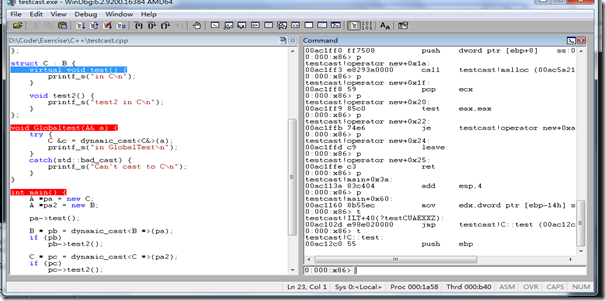
Windbg源码调试的更多相关文章
- windbg源码驱动调试 + 无源码驱动调试
windbg源码驱动调试 环境信息 虚拟机:win7 32位 windbg:6.12(版本不存在太大影响) 设置过程 windbg与虚拟机连接:链接 配置windbg 配置好双机调试后,点击win ...
- 开启Tomcat 源码调试
开启Tomcat 源码调试 因为工作的原因,需要了解Tomcat整个架构是如何设计的,正如要使用Spring MVC进行Web开发,需要了解Spring是如何设计的一样,有哪些主要的类,分别是用于干什 ...
- 在Eclipse中进行HotSpot的源码调试--转
原文地址:http://www.linuxidc.com/Linux/2015-05/117250.htm 在阅读OpenJDK源码的过程中,经常需要运行.调试程序来帮助理解.我们现在已经可以编译出一 ...
- [原创]在Windows和Linux中搭建PostgreSQL源码调试环境
张文升http://ode.cnblogs.comEmail:wensheng.zhang#foxmail.com 配图太多,完整pdf下载请点这里 本文使用Xming.Putty和VMWare几款工 ...
- SpringMVC DispatcherServlet 启动和加载过程(源码调试)
在阅读本文前,最好先阅读以下内容(当然,如果对 Servlet 已经有所了解,则可跳过): http://www.cnblogs.com/cyhbyw/p/8682078.html http://ww ...
- 《k8s-1.13版本源码分析》-源码调试
源码分析系列文章已经开源到github,地址如下: github:https://github.com/farmer-hutao/k8s-source-code-analysis gitbook:ht ...
- SpringBoot自动配置源码调试
之前对SpringBoot的自动配置原理进行了较为详细的介绍(https://www.cnblogs.com/stm32stm32/p/10560933.html),接下来就对自动配置进行源码调试,探 ...
- HashMap源码调试——认识"put"操作
前言:通常大家都知道HashMap的底层数据结构为数组加链表的形式,但其put操作具体是怎样执行的呢,本文通过调试HashMap的源码来阐述这一问题. 注:jdk版本:jdk1.7.0_51 1.pu ...
- .net源码调试 http://referencesource.microsoft.com/
其实关于.net源码调试 网上的资料已经很多了,我以前转载的文章有 VS2010下如何调试Framework源代码(即FCL) 和 如何使你的应用程序调试进.NET Framework 4.5源代码内 ...
随机推荐
- 有关hadoop分布式配置详解
linux配置ssh无密码登录 配置ssh无密码登录,先要安装openssh,如下: yum install openssh-clients 准备两台linux服务器或虚拟机,设置两台linux的ho ...
- main函数(本文较老,仅作参考)
Xcode4.2之前的main函数如下: int main(int argc, char *argv[]) { NSAutoreleasePool *pool = [[NSAutoreleasePoo ...
- office2010 office2013打开个别PPT时需要修复的解决方法
写在前面的废话(请直接查看正文部分):一次意外之后,需要重装Microsoft office,于是屁颠屁颠就重装了一次MS office 2013,装好后发现,打开个别ppt/pptx时打不开,提示修 ...
- Java调用SQLCMD遇到的问题
今天用Java调用SQLCMD命令时,一直提示找不到SQLCMD命令,但是通过CMD命令确可以使用,因为我的sqlcmd是新安装的,所以重新配置了新的path路径,而cmd可以调用是因为重新开一个cm ...
- Competing in a data science contest without reading the data
Competing in a data science contest without reading the data Machine learning competitions have beco ...
- android webview网页控件
一个WebView的简单例子 .在开发过程中应该注意几点: 1.AndroidManifest.xml中必须使用许可"android.permission.INTERNET",否则 ...
- Java的ResultSet中rs.next()含义
- [Unity菜鸟] Unity鼠标双击,鼠标函数整理(未完)
1. 鼠标双击 void OnGUI() { Event Mouse = Event.current; if (Mouse.isMouse && Mouse.type == Event ...
- Android TextView和EditText属性详解
TextView属性详解: autoLink设置 是否当文本为URL链接/email/电话号码/map时,文本显示为可点击的链接.可选值(none/web /email/phone/map/all) ...
- (从终端看linux-2)浅析terminal创建时ptmx和pts关系
我们打开一个terminal,那么将会在devpts文件系统/dev/pts下创建一个对应的pts字符文件,该pts字符文件节点直接由/dev/ptmx节点的驱动函数ptmx_open()调用devp ...