
FlappyBird Pygame
视频链接
GitHub链接:https://github.com/yanpeng1314/FlappyBird
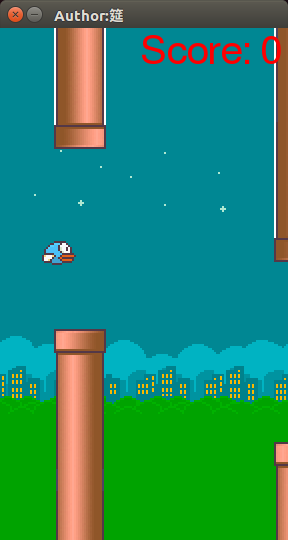
 from InitObject import *

 def startGame():
     moveDistance = -20
     isButtonPlay = False    #是否按下开始按钮
     isAlive = "birdIsAlive"      #鸟是否死亡
     initObject(screen, imageDict, bgListNight, bgListDay, pipeList, birdListAlive, birdListDeath)     #初始化对象
     buttonPlay = BaseClass(screen, 90, 300, imageDict[11], 116, 70)     #实例一个开始按钮
     gameOver = BaseClass(screen, 50, 240, imageDict[13], 204, 54)

     while True:
         ret = checkEvent()     #停止事件检测
         movingBackground(bgListNight, bgListDay)        #交替移动的背景
         movingPipe(pipeList)    #移动的管道
         screen.blit(textScore, (140, 0))
         if not isButtonPlay:    #判断开始按钮是否按下
             buttonPlay.display()
             if ret and ret[0] == "buttonDownPos" and buttonPlay.rect.collidepoint(ret[1]):
                     isButtonPlay = True
             screen.blit(getScore, (260, 0))
         else:       #已经按下开始按钮
             moveDistance += 5
             showScore(moveDistance)

             if isAlive == "birdIsAlive":    #鸟是活着的状态
                 isButtonDownK_SPACE = ret   #判断是否应该向上跳跃,如果不跳跃,则自由落体
                 isAlive = birdAnimationAlive(pipeList, birdListAlive, isButtonDownK_SPACE)

             if isAlive == "birdHasDeath":   #鸟是死了的状态
                 birdAnimationDeath(birdListDeath)   #鸟的死亡动画
                 gameOver.display()  #显示makeover按钮
                 #单击gameover按钮,退出游戏
                 if ret and ret[0] == "buttonDownPos" and gameOver.rect.collidepoint(ret[1]):
                     sys.exit()

         pygame.display.update()

 if __name__ == "__main__":
     startGame()
Main.py
 import pygame
 import time
 import sys
 import random
 from pygame.locals import *

 pygame.init()

 font = pygame.font.SysFont("arial", 40)
 goodFont = pygame.font.SysFont("arial", 80)
 textScore = font.render("Score: ", True, (255, 0, 0))
 getScore =  font.render(", True, (0, 255, 0))
 good =  goodFont.render("Good!", True, (255, 0, 0))
 frameCountPerSeconds = 10       #设置帧率
 moveDistance = 0

 imageDict = {1: "./images/bird1_0.png", 2: "./images/bird1_1.png", 3: "./images/bird1_2.png", 4: "./images/bird2_0.png", 5: "./images/bird2_1.png", 6: "./images/bird2_2.png", 7: "./images/bg_night.png", 8: "./images/bg_day.png", 9: "./images/pipe2_down.png", 10: "./images/pipe2_up.png", 11: "./images/button_play.png", 12: "./images/text_ready.png", 13: "./images/text_game_over.png"}

 screen = pygame.display.set_mode((288, 512))    #加载图片到缓冲区,还没有展示在屏幕上,返回Surface对象
 pygame.display.set_caption("Author:筵")      #设置标题

 bgListNight = []      #三张夜晚背景容器
 bgListDay = []        #三张白天背景容器
 pipeList = []
 birdListAlive = []
 birdListDeath = []
Headers.py
 from Methods import *

 def initObject(screen, imageDict, bgListNight, bgListDay, pipeList, birdListAlive, birdListDeath):
     for i in range(3):  #实例化三张夜晚背景
         bgListNight.append(Background(screen, 288*i, 0, imageDict[7]))
     for i in range(3):  #实例化三张白天背景
         bgListDay.append(Background(screen, 288*i + 864, 0, imageDict[8]))
     for i in range(6):  #实例化水管
         rand = random.randrange(-200, -50)
         pipeList.append([Pipe(screen, 304+220*i, rand, imageDict[9]), Pipe(screen, 304+220*i, 500+rand, imageDict[10])])
     for i in range(3):      #初始化活鸟
         birdListAlive.append(Bird(screen, 36, 200, imageDict[i+1]))
     for i in range(3):      #初始化死鸟
         birdListDeath.append(Bird(screen, 36, 200, imageDict[i+4]))
InitObject.py
from Headers import *

#定义基类
class BaseClass:

    def __init__(self, screen, x, y, imagePath, rectX, rectY):
        self.screen = screen
        self.x = x
        self.y = y

        self.rect = Rect(self.x, self.y, rectX, rectY)
        self.image = pygame.image.load(imagePath).convert_alpha()

    def display(self):      #渲染到屏幕上
        self.screen.blit(self.image, self.rect)

#定义背景类,继承基类
class Background(BaseClass):

    def __init__(self, screen, x, y, imagePath):
        super().__init__(screen, x, y, imagePath, 288, 512)

    def moveLeft(self):     #向左移动
        if self.rect.x < -288:
            self.rect.x = 1440
        self.rect = self.rect.move([-5, 0])

#定义水管类,继承基类
class Pipe(BaseClass):
    def __init__(self, screen, x, y, imagePath):
        super().__init__(screen, x, y, imagePath, 52, 320)

    def moveLeft(self):
        self.rect = self.rect.move([-5, 0])

#定义小鸟类,继承基类
class Bird(BaseClass):
    def __init__(self, screen, x, y, imagePath):
        super().__init__(screen, x, y, imagePath, 48, 48)

    def moveDown(self):
            self.rect = self.rect.move([0, 10])

    def deathDown(self):
        if self.rect.y <= 400:
            self.rect = self.rect.move([0, 50])

    def moveUp(self):
        self.rect = self.rect.move([0, -20])
Class.py
 from Class import *

 #检查停止事件
 def checkEvent():
     time.sleep(0.1)
     press = pygame.key.get_pressed()    #检测按下ESC键退出游戏
     if(press[K_ESCAPE]):
         sys.exit()
 #     elif press[K_SPACE]:
 #         return "buttonDownKSpace"

     for event in pygame.event.get():
         if event.type == pygame.QUIT:   #检测单击X,退出游戏
             sys.exit()

         elif event.type == MOUSEBUTTONDOWN:     #获取鼠标单击位置
             buttonDownPos = event.pos
             return ("buttonDownPos", buttonDownPos)

         elif event.type == KEYDOWN and event.key == K_SPACE:     #检测是否按下SPACE键
 #             if event.key == K_SPACE:
                 return "buttonDownK_SPACE"

 #三张夜晚背景和三张白天背景交替出现,向左移动
 def movingBackground(bgListNight, bgListDay):
     for i in range(3):
         bgListNight[i].display()
         bgListNight[i].moveLeft()

     for i in range(3):
         bgListDay[i].display()
         bgListDay[i].moveLeft()

 def movingPipe(pipeList):
     for i in pipeList:
         i[0].display()
         i[0].moveLeft()
         i[1].display()
         i[1].moveLeft()

 def birdAnimationAlive(pipeList, birdList, isButtonDownK_SPACE):   #自由下落的鸟
     deltaTime  = time.time()
     frameIndex = (int)(deltaTime/(1.0/frameCountPerSeconds))

     if isButtonDownK_SPACE == "buttonDownK_SPACE":
         for i in range(3):
             birdList[i].moveUp()
     else:
         for i in range(3):
             birdList[i].moveDown()

     if frameIndex % 3 == 0:
         birdList[0].display()
     if frameIndex % 3 == 1:
         birdList[1].display()
     if frameIndex % 3 == 2:
         birdList[2].display()

     for i in pipeList:
         if birdList[0].rect.colliderect(i[0].rect) or birdList[0].rect.colliderect(i[1].rect):
             return "birdHasDeath"
     if birdList[0].rect.y >= 512:
         return "birdHasDeath"
     else:
         return "birdIsAlive"

 def birdAnimationDeath(birdList):
     deltaTime  = time.time()
     frameIndex = (int)(deltaTime/(1.0/frameCountPerSeconds))
     if frameIndex % 3 == 0:
         birdList[0].display()
     if frameIndex % 3 == 1:
         birdList[1].display()
     if frameIndex % 3 == 2:
         birdList[2].display()
     for i in range(3):
             birdList[i].deathDown()

 def showScore(moveDistance):
     score = moveDistance // 220
     if score <= 0:
         score = 0
     if score >= 6:
         score = 6
         screen.blit(good, (30, 200))
     getScoreStart =  font.render(str(score), True, (255, 0, 0))
     screen.blit(getScoreStart, (260, 0))
Methods.py
FlappyBird Pygame的更多相关文章
- pygame学习笔记
pygame参考文档pdf版:pygame API html版 pygame API 石头剪子布的简单小游戏,待改进的地方,自适应大小.感兴趣的小伙伴可以依据get_surface()返回值(即当前窗 ...
- centos上安装pygame
安装前依赖包检查及安装 python-devel SDL_image-devel SDL_mixer-devel SDL_ttf-devel SDL-devel numpy subversion po ...
- [Canvas前端游戏开发]——FlappyBird详解
一直想自己做点小东西,直到最近看了本<HTML5游戏开发>,才了解游戏开发中的一点点入门知识. 本篇就针对学习的几个样例,自己动手实践,做了个FlappyBird,源码共享在度盘 :也可以 ...
- pygame开发PC端微信打飞机游戏
pygame开发PC端微信打飞机游戏 一.项目简介 1. 介绍 本项目类似曾经火爆的微信打飞机游戏.游戏将使用Python语言开发,主要用到pygame的API.游戏最终将会以python源文件gam ...
- win7 64位安装pygame
需要的工具包 Python安装包 Pip安装包(版本无要求) Pygame安装包(版本需要与python匹配) http://jingyan.baidu.com/article/425e69e6ed3 ...
- Python>>>使用Python和Pygame创建画板
下面是画板截图 # -*- coding: utf-8 -*- import pygame from pygame.locals import * import math class Brush: d ...
- python之GUI编程(二)win10 64位 pygame的安装
pygame的下载网址: http://www.pygame.org/download.shtml 我下载了第一个 很显然,安装的时候出现了如图中的尴尬,更改了安装目录后,在Python shell中 ...
- pygame 练习之 PIE game (以及简单图形训练)
简单的大饼游戏,掌握pygame中直线以及圆弧的画法,以及对输入的响应. import math import pygame, sys from pygame.locals import * pyga ...
- 用pygame学习初级python(二) 15.5.11
闲得无聊,对第一版的东西做了一些修改,让它更像一个游戏,也具有一些可玩性. 项目的github地址:https://github.com/lfkdsk/BrainHole_pygame 1.人物类进行 ...
随机推荐
- jquery的done和then区别
jquery的deferred对象的done方法和then方法都能实现链式调用,但是他们的作用是有区别的,then方法中如果你传递的方法有返回值,那么他会传递给下一个链式调用的方法.而done方法与此 ...
- 非阻塞式的原子性操作-CAS应用及原理
一:问题抛出 假设在出现高并发的情况下对一个整数变量做依次递增操作,下面这两段代码是否会出现问题? 1. public class IntegerTest { private static Integ ...
- 【ELK_Log4net】.net Core重写一个TcpAppender
最近再搞ELK,三个工具部署完毕,想再继承上log4net.没想到.net core版Log4net竟然没有直接Tcp发送消息的appender.醉了.log4net 1.RemotingAppend ...
- win7下IIS的安装和配置
win7下IIS的安装和配置 图文教程,需要的朋友可以参考下 http://www.jb51.net/article/29787.htm 最近工作需要IIS,自己的电脑又是Windows7系统,找了下 ...
- Contiki 源代码目录结构
最近要在烧写contiki的CC2650上做一些简单的实验,需要对contiki的目录结构有一个简单的了解.本文使用的是contiki 3.0版本,并且参考了百度文库上的一篇文档:https://we ...
- ExtJS是一种主要用于创建前端用户界面,是一个基本与后台技术无关的前端ajax框架。
ExtJS是一种主要用于创建前端用户界面,是一个基本与后台技术无关的前端ajax框架.
- HTML <select>标签
1.简单的下拉列表 <html> <body> <form> 名: <select name="firstname"> <op ...
- DALI解码模块
DALI-MOD2接口模块使用手册 一.概述(联系人:张先生,电话:13923882807,QQ:813267849) 一.概述 欢迎使用本公司的DALI解码模块,该模块支持"DALI第一套 ...
- Flexible Box布局基础知识详解
1.基本概念,借用阮一峰老师的一张图: 容器默认存在两根轴:水平的主轴(main axis)和垂直的交叉轴(cross axis).主轴的开始位置(与边框的交叉点)叫做main start,结束位置叫 ...
- Java 得到泛型中得到T.class
Class <T> entityClass = (Class <T>) ((ParameterizedType) getClass().getGenericSuperclass ...