
Struts2中五个重要的常量
一.五个常量的位置:位于xwork核心包下的Action字节码文件里
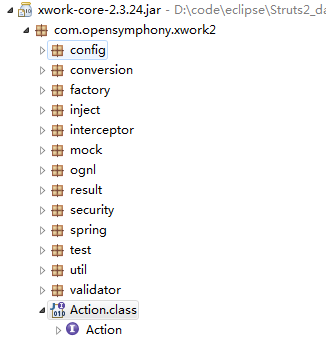
二.五个常量的介绍:
a: SUCCESS
public static final String SUCCESS = "success";
英文注释: The action execution was successful. Show result view to the end user. action执行成功,会返回一个结果视图给用户 。
具体用法:
1.action类中:
 public String execute() throws Exception {

2     return SUCCESS;

3 }
struts.xml文件:result标签默认就是success,所以可以省略,这里面默认的name="success",底层会自动帮你找寻返回值为success,并为其跳转到对应的视图界面
<result type="redirect">item.jsp</result>
b: NONE
public static final String NONE = "none";
英文解释:The action execution was successful but do not show a view. This is useful for actions that are handling the view in another fashion like redirect.
action执行是成功的,但是不会显示界面(视图),这对于以另一种重定向方式处理视图是有用的。简单说就是不让跳转到其他界面
具体用法:
public String execute() throws Exception {

     return NONE;

}
c: ERROR
public static final String ERROR = "error";
英文解释:The action execution was a failure.Show an error view, possibly asking the user to retry entering data.
action执行失败了,跳转显示一个错误视图,可能请求用户再次输入相关数据。也就是说,当anction返回结果fail或者其他失败,会帮你跳转到错误信息对于的视图
具体用法:
//action类:
public String execute() throws Exception {

  //条件代码

   return ERROR;

}

//struts.xml
<result name="error" type="redirect">item.jsp</result>
d: LOGIN
public static final String LOGIN = "login";
英文解释:The action could not execute, since the user most was not logged in. The login view should be shown.
这个anction不能执行,由于用户没有登录 ,该登录视图可能会被显示。也就是说登录出错页面跳转
//action类:

public String execute() throws Exception {

  //条件代码

   return LOGIN;

}

//struts.xml

<result name="login" type="redirect">login.jsp</result>
e: INPUT ***
public static final String LOGIN = "input";
英文:The action execution require more input in order to succeed.This result is typically used if a form handling action has been executed so as to provide defaults for a form. Theform associated with the handler should beshown to the end user.<p/>This result is also used if the given input params are invalid, meaning the user should try providing input again.
这个action为了成功需要多次输入,如果一个表单表单处理action操作被执行,便会为表单提供默认表单,通常会使用此结果。这个表单会显示给最终用户,这个结果也被用来用户输入无效,这意味着用户需要在输入一遍
上面五个变量其中除了input,其他都可以使用自定义的,只有input不能改,input视图在某些拦截器中使用,如数据校验,类型转化等等都可能出现错误,这些错误在struts2中专门放在数据存储区域的错误信息区域,struts2再走到最后一个workflow拦截器种会检查错误区域是否有错误信息,如果有,跳转到input视图。
上面就是简单的描述。
Struts2中五个重要的常量的更多相关文章
- 十五、struts2中的拦截器(框架功能核心)
十五.struts2中的拦截器(框架功能核心) 1.过滤器VS拦截器 功能是一回事. 过滤器是Servlet规范中的技术,可以对请求和响应进行过滤. 拦截器是Struts2框架中的技术,实现AOP(面 ...
- struts2中的常量
struts2中的常量: 在:struts2-core-2.1.8.1\org\apache\struts2\default.properties 文件里 <!-- 配制i18n国际化--> ...
- struts2中的constant常量配置
struts2中的constant配置详解 本文主要讲解一下struts2中的constant常量配置,内容主要来自于互联网的整理.<?xml version="1.0" e ...
- 简单理解Struts2中拦截器与过滤器的区别及执行顺序
简单理解Struts2中拦截器与过滤器的区别及执行顺序 当接收到一个httprequest , a) 当外部的httpservletrequest到来时 b) 初始到了servlet容器 传递给一个标 ...
- struts2中如何使用主题theme
一.什么是主题? 主题就是一种风格化标签,能够让所有UI标签能够产生同样的视觉效果而归集到一起的一组模板,即风格相近的模板被打包为一个主题 二.struts2提供的主题有哪些呢?struts2中如何修 ...
- struts2中struts.xml配置文件详解【未整理】
1. 深入Struts2的配置文件 本部分主要介绍struts.xml的常用配置. 1.1. 包配置: Struts2框架中核心组件就是Action.拦截器等,Struts2框架使用包来管 ...
- Struts2中基于Annotation的细粒度权限控制
Struts2中基于Annotation的细粒度权限控制 2009-10-19 14:25:53| 分类: Struts2 | 标签: |字号大中小 订阅 权限控制是保护系统安全运行很重要 ...
- 二十四、Struts2中的UI标签
二十四.Struts2中的UI标签 Struts2中UI标签的优势: 数据回显 页面布局和排版(Freemark),struts2提供了一些常用的排版(主题:xhtml默认 simple ajax) ...
- struts2中constant参数设置
序号 方法 说明 1 <constant name="struts.i18n.encoding" value="UTF-8"/> 指定web应用默认 ...
随机推荐
- 从壹开始前后端分离 42 ║支持多种数据库 & 快速数据库生成
缘起 哈喽大家周三好,休息了一段时间,打算准备找工作了
- 从壹开始微服务 [ DDD ] 之十 ║领域驱动【实战篇·中】:命令总线Bus分发(一)
烽火 哈喽大家好,老张又见面了,这两天被各个平台的“鸡汤贴”差点乱了心神,博客园如此,简书亦如此,还好群里小伙伴及时提醒,路还很长,这些小事儿就随风而去吧,这周本不打算更了,但是被群里小伙伴“催稿”了 ...
- KnockoutJS-与服务端交互
几乎所有Web应用程序都要和服务器端交换数据,交换数据时最方便的就是使用JSON格式.Knockout可以实现很复杂的客户端交互,对于前后端交互使用的技术最为基本且常用的是Ajax,本次利用Ajax和 ...
- .NET Core之微信支付之公众号、H5支付篇
前言 本篇主要记录微信支付中公众号及H5支付全过程. 准备篇 公众号或者服务号(并开通微信支付功能).商户平台中开通JSAPI支付.H5支付. 配置篇 公众号或者服务号中 -------开发----- ...
- @Controller和@RestController源码解析
2018年不知不觉已经走到了尾声,你还在为分不清@Controller和@Restcontroller而烦恼吗?这篇博文从源码层面分析这两个注解,值得一读. 首先贴一张源码的图,对比一下,左边是@Co ...
- Git 下载代码简单说明
昨天看码云上有两个项目感觉很好, 可惜竟然不会Git 找了很久看了好多文档看他写的都好复杂啊! 在这我给写出来一点点 1.下载Git https://git-scm.com/download/win ...
- 为什么HTTPS比HTTP更安全?
摘要: 理解HTTPS. 作者:浪里行舟 Fundebug经授权转载,版权归原作者所有. 前言 近几年,互联网发生着翻天覆地的变化,尤其是我们一直习以为常的HTTP协议,在逐渐的被HTTPS协议所取代 ...
- Odoo开源ERP:功能模块操作-销售功能篇
客户基础资料 1. 所有的客户基础资料,智云ERP开账启用时,期初的客户数据如果大于200条,可以批量导入: 2. 点“销售/订单/客户”菜单可以查看.编辑修改.搜索所有的客户基础资料: 3. 多层级 ...
- 解决Error:All flavors must now belong to a named flavor dimension. Learn more at...
低版本的gradle里面不会出现这个错误,高版本出现,不多说,看如何解决 在defaultConfig{}中添加:flavorDimensions "default" 保证所有的f ...
- Android6.0 源码修改之 仿IOS添加全屏可拖拽浮窗返回按钮
前言 之前写过屏蔽系统导航栏功能的文章,具体可看Android6.0 源码修改之屏蔽导航栏虚拟按键(Home和RecentAPP)/动态显示和隐藏NavigationBar 在某些特殊定制的版本中要求 ...