
testng 异常 截图
testNG里有一个异常监听类,失败时会执行类里的相关方法
DriverBase 截图类
TestngListenerScreen 异常监听类
Test1 测试类

1.DriverBase类
package com.cmall.screenshot;

import com.cmall.appium.DriverFactory;

import com.cmall.appium.Helper;

import com.cmall.jdjr.pages.Modules.Integration.HomePage;

import com.cmall.utils.LogUtil;

import com.cmall.utils.PropertyUtil;

import io.appium.java_client.MobileElement;

import io.appium.java_client.android.AndroidDriver;

import io.appium.java_client.pagefactory.AppiumFieldDecorator;

import org.apache.commons.io.FileUtils;

import org.openqa.selenium.OutputType;

import org.openqa.selenium.TakesScreenshot;

import org.openqa.selenium.support.PageFactory;

import org.testng.annotations.Test;

import java.io.File;

import java.text.SimpleDateFormat;

import java.util.Calendar;

import java.util.Date;

import java.util.concurrent.TimeUnit;

public class DriverBase

{

    private static AndroidDriver<MobileElement> driver = null;

    private Helper helper;

    private LogUtil log = new LogUtil(DriverBase.class);

    /**

     * 获取driver

     * */

    public AndroidDriver<MobileElement> getDriver() {

        return Test1.mdriver;

    }

    /**

     * 自动截图

     * */

    public void takeScreenShot(String methodName) {

        SimpleDateFormat sf = new SimpleDateFormat("yyyy_MM_dd_HH_mm_ss");

        Calendar cal = Calendar.getInstance();

        Date date = cal.getTime();

        String dateStr = sf.format(date);//上面几行代码的意思都是获取时间,并且格式化,用来作为图片的名称

        String path = this.getClass().getSimpleName() + "_" + methodName + "_" + dateStr + ".png";

        //因为我们截图是需要用到driver的,所以这里需要获取driver,这个driver是获取的当前对象的driver

        takeScreenShot((TakesScreenshot) this.getDriver(), path);

    }

    /**

     * 传入参数截图

     * */

    public void takeScreenShot(TakesScreenshot drivername, String path) {

        String currentPath = PropertyUtil.getString("screenPic_dir");

        File scrFile = drivername.getScreenshotAs(OutputType.FILE);

        try {

            FileUtils.copyFile(scrFile, new File(currentPath + "\\" + path));

        } catch (Exception e) {

            e.printStackTrace();

        } finally {

            log.error("<a href=" + currentPath + " target=_blank>Failed Screen Shot</a>");

            System.out.println("截图成功");

        }

    }

    public void setDriver(AndroidDriver<MobileElement> driver){

        this.driver = driver;

    }

}
2.TestngListenerScreen类
package com.cmall.screenshot;

import org.testng.ITestContext;

import org.testng.ITestResult;

import org.testng.TestListenerAdapter;

public class TestngListenerScreen extends TestListenerAdapter

{

    @Override

    public void onTestSuccess(ITestResult tr)

    {

        super.onTestSuccess(tr);

    }

    // 主要是用到这个方法了,当你报错时他会监听到,然后就会执行截图操作

    @Override

    public void onTestFailure(ITestResult tr)

    {

        super.onTestFailure(tr);

        System.out.println("####################################################");

        System.out.println(tr);

        System.out.println("####################################################");

        takeScreenShot(tr,tr.getMethod().getMethodName());//第二个参数表示哪个类产生的异常

    }

    @Override

    public void onTestSkipped(ITestResult tr) {

        super.onTestSkipped(tr);

    }

    @Override

    public void onTestStart(ITestResult result) {

        super.onTestStart(result);

    }

    @Override

    public void onStart(ITestContext testContext) {

        super.onStart(testContext);

    }

    @Override

    public void onFinish(ITestContext testContext) {

        super.onFinish(testContext);

    }

    private void takeScreenShot(ITestResult tr,String methodName) {

        DriverBase driverBase = (DriverBase) tr.getInstance();

        driverBase.takeScreenShot(methodName);

    }

}
3.Test1测试类
package com.cmall.screenshot;

import com.cmall.appium.DriverFactory;

import com.cmall.appium.Helper;

import com.cmall.appium.MultideviceManage;

import com.cmall.http.LogUtil;

import com.cmall.jdjr.pages.Modules.Integration.HomePage;

import io.appium.java_client.MobileElement;

import io.appium.java_client.android.AndroidDriver;

import io.appium.java_client.pagefactory.AppiumFieldDecorator;

import org.openqa.selenium.support.PageFactory;

import org.testng.annotations.Listeners;

import java.util.concurrent.TimeUnit;

import org.testng.annotations.Test;

@Listeners({ TestngListenerScreen.class })

public class Test1 extends DriverBase

{

    static AndroidDriver<MobileElement> mdriver = null;

    private LogUtil log = new LogUtil(Test.class);

    MultideviceManage m = new MultideviceManage();

    Helper helper;

    public Test1(){

        log.info("---------屏幕截图测试类---------------");

    }

    @Test

    public void test(){

        mdriver = DriverFactory.initDriver(4723,"TWGDU16B26001079");

        HomePage homePage = new HomePage();

        PageFactory.initElements(new AppiumFieldDecorator(mdriver, 20 , TimeUnit.SECONDS), homePage);

        // int a=1/0;//没预测到的--会截图

        try {

            Thread.sleep(2000);

            helper = new Helper(mdriver);

            helper.clickonElement(homePage.精选);

           // Assert.assertEquals(1,2);//会截图

            //throw new IllegalArgumentException("参数长度不是7位"); //不会截图

            int b=1/0;//能预测到被catch到的 不会截图

        } catch (Exception e) {

            e.printStackTrace();

        }

    }

}
4.配置xml文件
<!DOCTYPE suite SYSTEM "http://testng.org/testng-1.0.dtd" >

<suite name="TestngListenerScreen" verbose="1" >

<listeners>

    <listener class-name="com.cmall.screenshot.TestngListenerScreen"></listener>

</listeners>

<test name = "Test" >

    <classes>

        <class name="com.cmall.screenshot.ScreenTest"/>

    </classes>

</test>

</suite>
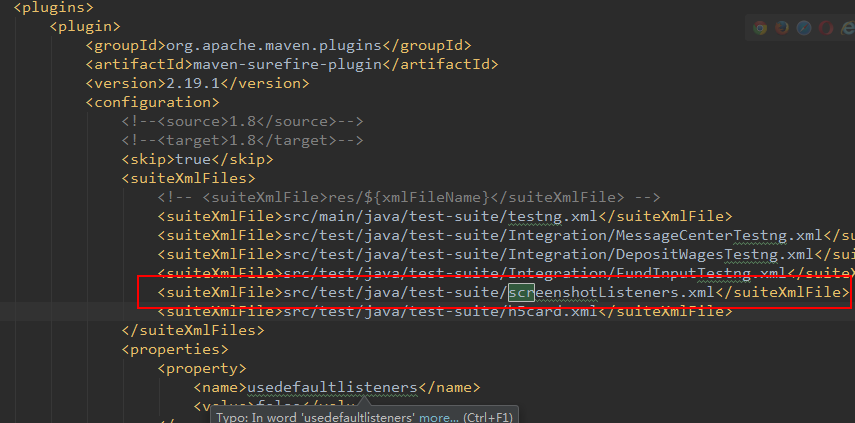
5.把xml文件配置在pom.xml里
testng 异常 截图的更多相关文章
- Python+Selenium学习--异常截图
前言 Webdriver 提供错误截图函数get_screenshot_as_file(),可以帮助我们跟踪bug,在脚本无法继续执行时候, get_screenshot_as_file()函数将截取 ...
- testng入门教程8 TestNG异常测试
TestNG跟踪异常处理代码提供了一个选项.可以测试是否需要代码抛出异常或不抛出. @Test注释expectedExceptions 参数一起使用.现在,让我们来看看@Test(expectedEx ...
- testng失败截图,注解方式调用。
今天一整天都在研究testng失败截图的方法,参考网上的前辈们的资料,加上自己的理解,终于搞出来了. package com.dengnapianhuahai; /** * 自定义注释 * */ im ...
- TestNG异常测试
用@Test(expectedExceptions = xxx) 声明 package com.janson; import org.testng.annotations.Test; public c ...
- selenium 利用testNG对异常进行自动截图
哈哈哈,很久没写博客了,懒了. 因为一些原因最近需要把监听事件重新整理一下,开始没细想,直接copy网上的,其实结果发现报错很多,或者是达不到效果,然后把之前的代码翻出来,仔细看了一下.下面给一些需要 ...
- selenium遇到异常自动截图
最近要在框架中添加case失败时,要自动截图,主要又两种方式,思想都是在抛异常的时候,捕获到异常,并作页面截图处理.今天坐下总结. 一.第一种方式,重写onException方法 只针对webdriv ...
- TestNG 入门教程
原文出处:http://www.cnblogs.com/TankXiao/p/3888070.html 阅读目录 TestNG介绍 在Eclipse中在线安装TestNG 在Eclipse中离线安装T ...
- JAVA中的异常及处理异常的方法
异常 这是我老师的喜好:就是说一上来就拿一张图给大家看看,过过瘾-_- 这是一张: 异常分类图 来,这里还有一张带中文的常见异常截图!!! 1:先来说说什么是异常吧: 其实就是"阻止当前方法 ...
- Entity Framework 6 执行Linq to Entities异常"p__linq__1 : String truncation: max=0, len=2, value='测试'"
场景再现 我需要查询公司名称包含给定字符串的公司,于是我写了下面的测试小例子: var condition = "测试"; var query = from b in db.Com ...
随机推荐
- (实用篇)使用PHP生成PDF文档
http://mp.weixin.qq.com/s?__biz=MzIxMDA0OTcxNA==&mid=2654254929&idx=1&sn=8715d008d19af70 ...
- 【编程技巧】addSubview和insertSubview的区别
addSubview 是将view加到所有层的最顶层 相当于将insertSubview的atIndex参数设置成view.subviews count 即 [view addSubview:onev ...
- Qt出现堆溢出(Error Code -1073741823)
症状 在使用Debug模式时,程序可以正常启动,但是切换到Release模式,程序报错,错误码-1073741823 原因 程序中使用了过多的new.比如: QActionGroup *mProtoc ...
- 提高PHP性能的一些小知识
自PHP面世起以其良好的跨平台性,高效的开发机制有WEB领域占有很大份额.因为它的运行机制是脚本解释运行执行后相关资源都会被回收,所以PHP开发人员很少关心他的资源占用所导致性能问题,但本人是个追求极 ...
- LINUX下文件编译
body, table{font-family: 微软雅黑} table{border-collapse: collapse; border: solid gray; border-width: 2p ...
- selenium+python自动化测试系列(一):登录
最近接手商城的项目,针对后台测试,功能比较简单,但是流程比较繁多,涉及到前后台的交叉测试.在对整个项目进行第一轮测试完成之后,考虑以后回归测试任务比较重,为了减轻回归测试的工作量,所以考虑后台 ...
- 要学的东西太多了,还想学习opencv
资料先放这里,以后好好学 http://m.blog.csdn.net/column/details?alias=opencv-tutorial eclipse加载opencv库成功! B站视频教程资 ...
- java面向对象的三大特性——封装
封装 封装从字面上来理解就是包装的意思,专业点就是信息隐藏,是指利用抽象数据类型将数据和基于数据的操作封装在一起,使其构成一个不可分割的独立实体,数据被保护在抽象数据类型的内部,尽可能地隐藏内部的细节 ...
- 更改Patrol Agent的密码
大家可以使用P3console去做,具体方法请见:http://wenku.baidu.com/link?url=HbSzxNV2SPrlpk_Bfmcg0CNZuAlyX4jgdp4vbrxmynv ...
- Navicat查询结果不能修改的原因
问题: 开发中常使用Navicat查询数据库,并修改数据库中的值.今天发现查询结果为只读,不能修改.一般连表查不能修改我是知道的,但是单表查居然不能修改. 解决方法: 查了下,有说表是只读,也有说是权 ...