
[CentOS] SSH 免密钥登录
一、环境说明:
操作系统:CentOS-7-x86_64-Minimal-1611
虚拟机:VMware® Workstation 12 Pro;12.5.5 build-5234757
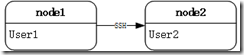
服务器:node1(User1),node2(User2)
二、实现内容:
node1 服务器用户 User1 可通过 SSH ,免密钥登录服务器 node2 的 User2 账户;
三、配置流程:
默认情况下,node1 上的用户 User1 想连接 node2,需要输入密码,如下:
 [User1@localhost ~]$ ssh User2@node2

 The authenticity of host 'node2 (192.168.126.141)' can't be established.

 ECDSA key fingerprint is 0c:f2:1d:5b:0a:ea:38:43:e7:d2:07:28:d8:05:8a:d6.

 Are you sure you want to continue connecting (yes/no)? yes

 Warning: Permanently added 'node2,192.168.126.141' (ECDSA) to the list of known hosts.

 User2@node2's password:

 Last login: Fri Feb  2 17:03:45 2018
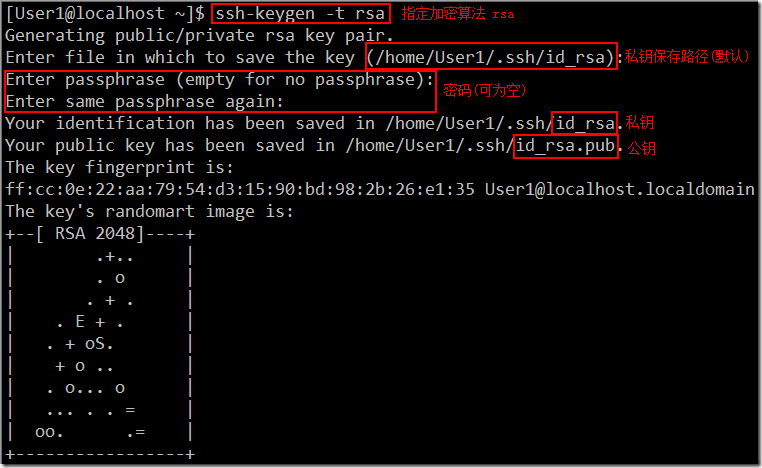
1、现在通过用户 User1 在 node1 的 /home/User1 目录下生成一对公钥和私钥:
 [User1@localhost ~]$ ssh-keygen -t rsa

 Generating public/private rsa key pair.

 Enter file in which to save the key (/home/User1/.ssh/id_rsa):

 Enter passphrase (empty for no passphrase):

 Enter same passphrase again:

 Your identification has been saved in /home/User1/.ssh/id_rsa.

 Your public key has been saved in /home/User1/.ssh/id_rsa.pub.

 The key fingerprint is:

 ff:cc:0e:22:aa:79:54:d3:15:90:bd:98:2b:26:e1:35 User1@localhost.localdomain

 The key's randomart image is:

 +--[ RSA 2048]----+

 |       .+..     |

 |       . o     |

 |       . + .     |

 |   . E + .     |

 |   . + oS.       |

 |    + o ..       |

 |   . o... o     |

 |   ... . . =     |

 |  oo.     .=   |

 +-----------------+
2、然后将公钥上传给 node2 的 User2 用户:
[User1@localhost ~]$ ssh-copy-id User2@node2
/bin/ssh-copy-id: INFO: attempting to log in with the new key(s), to filter out any that are already installed
/bin/ssh-copy-id: INFO: 1 key(s) remain to be installed -- if you are prompted now it is to install the new keys
User2@node2's password:
Number of key(s) added: 1
Now try logging into the machine, with: "ssh 'User2@node2'"
and check to make sure that only the key(s) you wanted were added.
3、登录验证成功:

说明:
1、此时 node1 上用户 User1 的私钥文件内容(id_rsa.pub)会追加到 node2 上用户 User2 的 ~/.ssh/authorized_keys 文件中:


2、还可以通过 scp 命令,将 node1 服务器上的公钥拷贝到 node2 服务器上,然后追加到 ~/.ssh/authorized_keys,
scp ~/.ssh/id_rsa.pub User2@node2:~/
3、还可以通过 cat 命令直接追加:
cat ~/.ssh/id_rsa.pub | ssh -P 22 User2@node2 'cat >> ~/.ssh/authorized_keys'
[CentOS] SSH 免密钥登录的更多相关文章
- linux系统ssh免密钥登录配置
linux主机配置ssh免密钥登录,具体配置如下: 1.执行命令ssh-keygen -t rsa,生成公钥和私钥(具体步骤详见下图) 2.会在当前用户的家目录的.ssh/生成公钥和私钥, 3.执行s ...
- Linux机器之间SSH免密钥登录设置
SSH免密钥登录 私钥:密钥留在本机 公钥:密钥发给其他机 hadoop01 生成密钥: ssh-keygen -t rsa (密钥存放路径:/root/.ssh) id_rsa:私钥 id_rsa. ...
- 014-配置SSH免密钥登录
问题:client端需要免密钥登录服务器server如何配置?1.前提:客户端已安装openssh-client;服务端已安装openssh-server;服务器端22号端口已经打开2.需要密钥登录时 ...
- centos ssh 免密码登录
最近在学习的过程中遇到这个问题: A主机和B主机: A 免密码登录B: 首先在A的 ~/.ssh 目录中 执行 ssh-keygen -t rsa 一路回车 最后生成连个文件: 将id_rsa.pub ...
- ssh免密钥登录一例问题
今天遇到一个奇怪的问题,在同一机器上创建的普通用户使用 ssh-copy-id -i .ssh/id_rsa.pub root@192.168.3.254 建立与root用户的免密钥通信,结果死活还是 ...
- ssh免密钥登录
说明:下文中说的 '客户端'指的是你所使用的本地机器; '服务端'指的是远程你要连接的机器; ----------------------------------------------------- ...
- linux配置ssh免密钥登录
https://blog.csdn.net/xiaoyi23000/article/details/80597516 1.执行命令ssh-keygen -t rsa,生成公钥和私钥 2.会在当前用户的 ...
- Centos6.5之ssh免密码登录配置
Centos6.5之ssh免密码登录配置 centos ssh 免密码登录 0.说明 这里为了方便说明问题,假设有A和B两台安装了centos6.5的主机.目标是实现A.B两台主机分别能够通过ssh免 ...
- 在CentOS/RHEL上设置SSH免密码登录
本文会告诉你怎样在 CentOS/RHEL 上设置 SSH 免密码登录.自动登录配置好以后,你可以通过它使用 SSH (Secure Shell)和安全复制 (SCP)来移动文件. SSH 是开源的, ...
随机推荐
- freemarker自定义标签报错(二)
freemarker自定义标签 1.错误描述 freemarker.core.ParseException: Unexpected end of file reached. at freemarker ...
- cfDNA基本知识
定义 Circulating free DNA or Cell free DNA (cfDNA):循环游离DNA或者细胞游离DNA,释放到血浆中的降解的DNA片段. https://en.wikipe ...
- 用VSCode开发一个基于asp.net core 2.0/sql server linux(docker)/ng5/bs4的项目(3)
第一部分: http://www.cnblogs.com/cgzl/p/8478993.html 第二部分: http://www.cnblogs.com/cgzl/p/8481825.html 由于 ...
- C#构造函数与析构函数--C#基础
1.构造函数 1)构造函数没有返回值,也不能写void,必须是public 修饰符 2)构造函数和类名相同 3)构造函数也是可以重载的 public Clerk(string name,Gender ...
- SVN的安装以及和eclipse的结合使用
SVN概述 l 通常软件开发由多人协作开发,如果对代码文件.配置文件.文档等没有进行版本控制,将会出现很多问题: l 备份多个版本,占用磁盘空间大 l 解决代码冲突困难 l 容易引发BUG l 难于追 ...
- 基于socket实现的简单的聊天程序
记得八年前第一次使用socket做的一个五子棋程序,需要序列化棋子对象,传递到对方的电脑上. 一个偶然的机会,第二次使用socket做点事情.先看聊天服务器端的实现: 服务器端要实现以下功能: ...
- myeclipse设置环境(最实用的教程)
1. General --> Workspace --> UTF-82. General --> Editors --> Associations --> JSP --& ...
- spring之事务
1.编程式事务 2.声明式事务:aop
- 机器学习之类别不平衡问题 (2) —— ROC和PR曲线
机器学习之类别不平衡问题 (1) -- 各种评估指标 机器学习之类别不平衡问题 (2) -- ROC和PR曲线 完整代码 ROC曲线和PR(Precision - Recall)曲线皆为类别不平衡问题 ...
- pxe自动化批量安装系统(Centos7)
PXE:preboot execute environment 环境实现:主服务器ip:10.0.10.1 1 tfpt trivial简单文件共享服务,基于udp协议工作: 加载系统安装程序: 69 ...