
.net remoting在wpf中的应用
我做一个remotting的通讯测试,让控制台程序和wpf窗体通讯。具体实现的功能如下:
1、wpf获取信息在控制台上显示
2、控制台启动wpf,以及在屏幕前端显示
首先,我们来看项目结构:
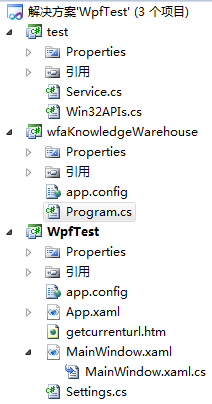
共三个项目,它们分工明确,test是控制台和wpf的公共类库,它定义了双方通讯的接口,以及接口的实现:
 using System;

 using System.Collections.Generic;

 using System.Linq;

 using System.Text;

 namespace test

 {

     public interface IOfficeService

     {

         void Insert(string stream);

     }

     [Serializable]

     public class OfficeServiceImplement : MarshalByRefObject, IOfficeService

     {

         public void Insert(string stream)

         {

             Console.WriteLine(stream);

         }

     }

     public interface IWPFService

     {

         IntPtr GetHandle();

     }

     [Serializable]

     public class WPFServiceImplement : MarshalByRefObject, IWPFService

     {

         public static Func<IntPtr> GetWPFHandle { set; get; }

         public IntPtr GetHandle()

         {

             if (GetWPFHandle != null)

             {

                 return GetWPFHandle();

             }

             return IntPtr.Zero;

         }

     }

 }
wfaKnowledgeWarehouse 是个控制台项目,用来接收从wpf传回来的消息,并打印到屏幕上:
 using System;

 using System.Collections.Generic;

 using System.Linq;

 using System.Text;

 using System.IO;

 using System.Runtime.Remoting.Channels.Http;

 using System.Runtime.Remoting;

 using System.Runtime.Remoting.Channels;

 using System.Runtime.Serialization.Formatters;

 using System.Net.Sockets;

 using System.Net;

 using test;

 using System.Diagnostics;

 using System.Threading;

 namespace wfaKnowledgeWarehouse

 {

     class Program

     {

         public const string CHANNEL_NAME = "ConsoleService";

         public const string OBJECT_URI = "ConsoleService.rem";

         /// <summary>

         /// 二进制信道处理

         /// </summary>

         public static SoapServerFormatterSinkProvider Provider = new SoapServerFormatterSinkProvider()

         {

             TypeFilterLevel = TypeFilterLevel.Full

         };

         static void Main(string[] args)

         {

             //定义一组服务

             var channel = new HttpServerChannel(CHANNEL_NAME, , Provider);

             RemotingConfiguration.RegisterWellKnownServiceType(typeof(OfficeServiceImplement), OBJECT_URI, WellKnownObjectMode.Singleton);

             var consoleInfo = Console.ReadKey();

             if (consoleInfo.Key == ConsoleKey.A)

             {

                 //如果按下A,获取wpf窗体句柄

                 var ServiceUrl = "http://" + IPAddress.Loopback.ToString() + ":{0}/WPFService.rem";

                 var WpfService = Activator.GetObject(typeof(IWPFService), string.Format(ServiceUrl, )) as IWPFService;

                 try

                 {

                     //启动客户端

                     ProcessStartInfo info = new ProcessStartInfo();

                     info.FileName = @"D:\mywork\WordAddInTest2010\WpfTest\WpfTest\bin\Debug\WpfTest.exe";

                     info.Arguments = "";

                     info.WindowStyle = ProcessWindowStyle.Minimized;

                     Process pro = Process.Start(info);

                     Thread.Sleep();

                    var window= WpfService.GetHandle();

                    Console.WriteLine(window.ToInt32());

                    if (Win32APIs.IsIconic(window) != IntPtr.Zero)

                    {

                        Win32APIs.ShowWindow(window, Win32APIs.WindowState.SW_SHOWNOACTIVATE);

                    }

                    Win32APIs.SetForegroundWindow(window);

                 }

                 catch (Exception ex)

                 {

                     Console.WriteLine(ex);

                 }

             }

             Console.Read();

         }

     }

 }
WpfTest 是wpf项目:
 using System;

 using System.Collections.Generic;

 using System.Linq;

 using System.Text;

 using System.Windows;

 using System.Windows.Controls;

 using System.Windows.Data;

 using System.Windows.Documents;

 using System.Windows.Input;

 using System.Windows.Media;

 using System.Windows.Media.Imaging;

 using System.Windows.Navigation;

 using System.Windows.Shapes;

 using System.Net;

 using test;

 using System.Windows.Interop;

 using System.Runtime.Remoting.Channels;

 using System.Runtime.Remoting.Channels.Http;

 using System.Runtime.Remoting;

 using System.Runtime.Serialization.Formatters;

 using System.Threading;

 using System.Windows.Threading;

 namespace WpfTest

 {

     /// <summary>

     /// MainWindow.xaml 的交互逻辑

     /// </summary>

     public partial class MainWindow : Window

     {

         public const string CHANNEL_NAME = "WPFService";

         public const string OBJECT_URI = "WPFService.rem";

         /// <summary>

         /// 二进制信道处理

         /// </summary>

         public static SoapServerFormatterSinkProvider Provider = new SoapServerFormatterSinkProvider()

         {

             TypeFilterLevel = TypeFilterLevel.Full

         };

         public MainWindow()

         {

             InitializeComponent();

         }

         public static IntPtr WindowPtr { set; get; }

         private void Button_Click(object sender, RoutedEventArgs e)

         {

             var ServiceUrl = "http://" + IPAddress.Loopback.ToString() + ":{0}/ConsoleService.rem";

             var WordService = Activator.GetObject(typeof(IOfficeService), string.Format(ServiceUrl, )) as IOfficeService;

             try

             {

                 WordService.Insert("wbq");

             }

             catch (Exception ex)

             {

                 MessageBox.Show(ex.Message);

             }

         }

         public IntPtr GetHandle()

         {

             return WindowPtr;

         }

         private void Window_Loaded(object sender, RoutedEventArgs e)

         {

             WindowPtr = new WindowInteropHelper(this).Handle;

             var channel = new HttpServerChannel(CHANNEL_NAME, , Provider);

             RemotingConfiguration.RegisterWellKnownServiceType(typeof(WPFServiceImplement), OBJECT_URI, WellKnownObjectMode.Singleton);

             WPFServiceImplement.GetWPFHandle = GetHandle;

         }

     }

 }
wpf项目定义了提供了WPFService服务,同时它又使用控制台提供的ConsoleService服务。
小结:想想,我们程序员为老板,为公司提供了一定的技术服务,同时得到一些报酬;老板和公司得到一些技术服务的同时,给程序员付一定的报酬。要和这个社会打交道,大抵如此吧。
.net remoting在wpf中的应用的更多相关文章
- 在WPF中使用依赖注入的方式创建视图
在WPF中使用依赖注入的方式创建视图 0x00 问题的产生 互联网时代桌面开发真是越来越少了,很多应用都转到了浏览器端和移动智能终端,相应的软件开发上的新技术应用到桌面开发的文章也很少.我之前主要做W ...
- MVVM模式解析和在WPF中的实现(六) 用依赖注入的方式配置ViewModel并注册消息
MVVM模式解析和在WPF中的实现(六) 用依赖注入的方式配置ViewModel并注册消息 系列目录: MVVM模式解析和在WPF中的实现(一)MVVM模式简介 MVVM模式解析和在WPF中的实现(二 ...
- MVVM模式解析和在WPF中的实现(五)View和ViewModel的通信
MVVM模式解析和在WPF中的实现(五) View和ViewModel的通信 系列目录: MVVM模式解析和在WPF中的实现(一)MVVM模式简介 MVVM模式解析和在WPF中的实现(二)数据绑定 M ...
- MVVM设计模式和WPF中的实现(四)事件绑定
MVVM设计模式和在WPF中的实现(四) 事件绑定 系列目录: MVVM模式解析和在WPF中的实现(一)MVVM模式简介 MVVM模式解析和在WPF中的实现(二)数据绑定 MVVM模式解析和在WPF中 ...
- MVVM模式解析和在WPF中的实现(三)命令绑定
MVVM模式解析和在WPF中的实现(三) 命令绑定 系列目录: MVVM模式解析和在WPF中的实现(一)MVVM模式简介 MVVM模式解析和在WPF中的实现(二)数据绑定 MVVM模式解析和在WPF中 ...
- MVVM模式和在WPF中的实现(二)数据绑定
MVVM模式解析和在WPF中的实现(二) 数据绑定 系列目录: MVVM模式解析和在WPF中的实现(一)MVVM模式简介 MVVM模式解析和在WPF中的实现(二)数据绑定 MVVM模式解析和在WPF中 ...
- MVVM模式和在WPF中的实现(一)MVVM模式简介
MVVM模式解析和在WPF中的实现(一) MVVM模式简介 系列目录: MVVM模式解析和在WPF中的实现(一)MVVM模式简介 MVVM模式解析和在WPF中的实现(二)数据绑定 MVVM模式解析和在 ...
- 【WPF】 Timer与 dispatcherTimer 在wpf中你应该用哪个?
源:Roboby 1.timer或重复生成timer事件,dispatchertimer是集成到队列中的一个时钟.2.dispatchertimer更适合在wpf中访问UI线程上的元素 3.Dispa ...
- 在WPF中使用WinForm控件方法
1. 首先添加对如下两个dll文件的引用:WindowsFormsIntegration.dll,System.Windows.Forms.dll. 2. 在要使用WinForm控 ...
随机推荐
- linux 下yum使用技巧
本文来自我的github pages博客http://galengao.github.io/ 即www.gaohuirong.cn 经常会遇上一些linux系统允许你上外网,而一些是不允许的,这时我们 ...
- jq实现数字增加或者减少的动画
效果图: 1.HTML: <div class="up"></div> <br> <div class="down"& ...
- Java long类型和Long类型的那些事
还记得最近做了一个项目使用的是Long类型作为主键Id坑死人了,对于我们来说Long类型一样是一个包装类型,类似String类型,使用==符号进行比较的时候有时候会出现问题,建议适应equal()方法 ...
- Hibernate学习(四)get和Load比较
package cn.lonecloud.test.crud; import org.hibernate.HibernateException; import org.hibernate.Sessio ...
- Qt 信号如何自动连接槽函数?
on_objectName_signal [static] void QMetaObject::connectSlotsByName(QObject *object) void on_<obje ...
- php留言板
这个小项目的学习,就这样结束啦.由于过程中需要使用到js,这个目前还是感觉不会.之前的分析还是不太懂的.现在心里还是有点迷茫.什么都是照着葫芦画瓢. 我的拥有自己的东西才行.
- shell脚本——mysql
很期待,学习shell脚本,减少重复工作 自动安装配置mysql脚本: #/bin/bash LOG_FILE=/home/hadoop1/log/installmysql.log function ...
- mysql打不开表问题解决方案
做开发时候某一表怎么也打不开,数据也不多,网上查了按下面这篇文章完美解决,但是要记得用root登录mysql: 记一次MySQL中Waiting for table metadata lock的解决方 ...
- MS SQL 事务日志管理小结
本文是对SQL Server事务日志的总结,文章有一些内容和知识来源于官方文档或一些技术博客,本文对引用部分的出处都有标注. 事务日志介绍 在SQL Server中,事务日志是数据库的重要组件,如 ...
- 使用wordpress搭建独立域名的个人博客或网站
最近抽空闲时间搭建了一个独立域名的个人博客站点,基本过程如下: 一.准备工作: 1.准备一个独立的域名,我是从万网中注册的cn结束的域名:tuzongxun.cn,价格29元,根据个人选择,也有更高更 ...