
mybitaPlus的使用
参考Ibase4j
1.首先在pom中引用mybatis-plus jar
</dependency>

<!-- mybatis -->

<dependency>

   <groupId>com.baomidou</groupId>

   <artifactId>mybatis-plus</artifactId>

   <version>${mybatis-plus.version}</version>

</dependency>
2.编写
Generator类编写 如下
package org;

import java.util.HashMap;

import java.util.Map;

import com.baomidou.mybatisplus.generator.AutoGenerator;

import com.baomidou.mybatisplus.generator.InjectionConfig;

import com.baomidou.mybatisplus.generator.config.DataSourceConfig;

import com.baomidou.mybatisplus.generator.config.GlobalConfig;

import com.baomidou.mybatisplus.generator.config.PackageConfig;

import com.baomidou.mybatisplus.generator.config.StrategyConfig;

import com.baomidou.mybatisplus.generator.config.TemplateConfig;

import com.baomidou.mybatisplus.generator.config.rules.DbType;

import com.baomidou.mybatisplus.generator.config.rules.NamingStrategy;

/**

 * 代码生成 注意:不生成service接口 注意:不生成service接口 注意:不生成service接口

 *

 * @author ShenHuaJie

 */

public class Generator {

    /**

     * 测试 run 执行 注意:不生成service接口 注意:不生成service接口 注意:不生成service接口

     * <p>

     * 配置方法查看 {@link ConfigGenerator}

     * </p>

     */

    public static void main(String[] args) {

        AutoGenerator mpg = new AutoGenerator();

        // 全局配置

        GlobalConfig gc = new GlobalConfig();

        gc.setOutputDir("D://");

        gc.setFileOverride(false);

        gc.setActiveRecord(false);

        gc.setEnableCache(false);// XML 二级缓存

        gc.setBaseResultMap(false);// XML ResultMap

        gc.setBaseColumnList(false);// XML columList

        gc.setOpen(false);

        gc.setAuthor("ShenHuaJie");

        // 自定义文件命名,注意 %s 会自动填充表实体属性!

        // gc.setMapperName("%sDao");

        // gc.setXmlName("%sDao");

        gc.setServiceImplName("%sService");

        // gc.setServiceImplName("%sServiceDiy");

        // gc.setControllerName("%sAction");

        mpg.setGlobalConfig(gc);

        // 数据源配置

        DataSourceConfig dsc = new DataSourceConfig();

        dsc.setDbType(DbType.MYSQL);

        dsc.setDriverName("com.mysql.jdbc.Driver");

        dsc.setUsername("root");

        dsc.setPassword("root");

        dsc.setUrl("jdbc:mysql://127.0.0.1:3306/iBase4J?characterEncoding=utf8");

        mpg.setDataSource(dsc);

        // 策略配置

        StrategyConfig strategy = new StrategyConfig();

        // strategy.setTablePrefix("sys_");// 此处可以修改为您的表前缀

        strategy.setNaming(NamingStrategy.underline_to_camel);// 表名生成策略

        strategy.setInclude(new String[] { "sys_test" }); // 需要生成的表

        // strategy.setExclude(new String[]{"test"}); // 排除生成的表

        // 字段名生成策略

        strategy.setFieldNaming(NamingStrategy.underline_to_camel);

        // 自定义实体父类

        strategy.setSuperEntityClass("org.ibase4j.core.base.BaseModel");

        // 自定义实体,公共字段

        strategy.setSuperEntityColumns(

                new String[] { "id_", "enable_", "remark_", "create_by", "create_time", "update_by", "update_time" });

        // 自定义 mapper 父类

        strategy.setSuperMapperClass("org.ibase4j.core.base.BaseMapper");

        // 自定义 service 父类

        strategy.setSuperServiceImplClass("org.ibase4j.core.base.BaseService");

        // 自定义 service 实现类父类

        // strategy.setSuperServiceImplClass("org.ibase4j.core.base.BaseService");

        // 自定义 controller 父类

        strategy.setSuperControllerClass("org.ibase4j.core.base.AbstractController");

        // 【实体】是否生成字段常量(默认 false)

        // public static final String ID = "test_id";

        // strategy.setEntityColumnConstant(true);

        // 【实体】是否为构建者模型(默认 false)

        // public User setName(String name) {this.name = name; return this;}

        // strategy.setEntityBuliderModel(true);

        mpg.setStrategy(strategy);

        // 包配置

        PackageConfig pc = new PackageConfig();

        pc.setParent("org.ibase4j");

        pc.setEntity("model");

        pc.setMapper("mapper");

        pc.setXml("mapper.xml");

        pc.setServiceImpl("service");

        pc.setService("ignore");

        pc.setController("web");

        mpg.setPackageInfo(pc);

        // 注入自定义配置,可以在 VM 中使用 cfg.abc 设置的值

        InjectionConfig cfg = new InjectionConfig() {

            public void initMap() {

                Map<String, Object> map = new HashMap<String, Object>();

                map.put("providerClass", "ISysProvider");

                this.setMap(map);

            }

        };

        mpg.setCfg(cfg);

        // 自定义模板配置,可以 copy 源码 mybatis-plus/src/main/resources/template 下面内容修改,

        // 放置自己项目的 src/main/resources/template 目录下, 默认名称一下可以不配置,也可以自定义模板名称

        TemplateConfig tc = new TemplateConfig();

        tc.setEntity("tpl/entity.java.vm");

        tc.setMapper("tpl/mapper.java.vm");

        tc.setXml("tpl/mapper.xml.vm");

        tc.setService("tpl/service.java.vm");

        tc.setController("tpl/controller.java.vm");

        mpg.setTemplate(tc);

        // 执行生成

        mpg.execute();

    }

}
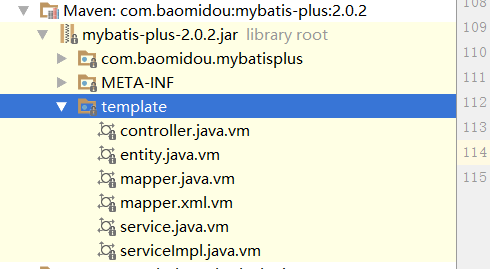
代码模板可以自己修改 也可以直接从jar中拿到 如下图
mybitaPlus的使用的更多相关文章
- My way to Python - Day012 - 消息中间件
消息中间件介绍 消息中间件的概念 消息中间件是在消息传输过程中保存消息的容器.消息中间件在将消息从它的源中继到它的目标时充当中间人的作用.队列的主要作用是提供路由并保证消息的传递:如果发生消息接收者不 ...
随机推荐
- This is very likely to create a memory leak. Stack trace of thread
1.错误描述 警告: The web application [cmp] appears to have started a thread named [Abandoned connection cl ...
- Git详解之六 Git工具
以下内容转载自:http://www.open-open.com/lib/view/open1328070367499.html Git 工具 现在,你已经学习了管理或者维护 Git 仓库,实现代码控 ...
- Android:LinearLayout布局中Layout_weight的深刻理解
首先看一下LinearLayout布局中Layout_weight属性的作用:它是用来分配属于空间的一个属性,你可以设置他的权重.很多人不知道剩余空间是个什么概念,下面我先来说说剩余空间. 看下面代码 ...
- HDU - 6521 Party (SYSU校赛K题)(线段树)
题目链接 题意:n个人排成一列,一开始他们互不认识,每次选[l,r]上的人开party,使他们互相认识,求出每次party之后新互相认识的人的对数. 思路:把“互相认识”变成单向连边,只考虑左边的人对 ...
- 【模板】FFT
FFT模板 安利一下前辈的博客,写的真的好点击这里:从多项式乘法到快速傅里叶变换 #include<bits/stdc++.h> using namespace std; const in ...
- FastJson的一些使用
前言 最近经常使用json的一些转换,使用的是fastjson,所以就对fastjson进行了一些汇总,记录下来. 正文 主要的api 首先是一些类库的说明: SerializeWriter:相当于S ...
- .NET Standard / dotnet-core / net472 —— .NET 究竟应该如何大小写?
本文将解释在 .NET 技术栈中各种不同使用方式下 N E T 三个字母何时大写何时小写:前面的 “.” 什么时候加上,什么时候去掉,什么时候又使用 “dot”. .NET 在技术文档中 如果你阅 ...
- java基础:eclipse编程不得不知道的技巧
如果你是位具有开发经丰富的工程师,在开发的过程中,你就会很强烈的要求快捷的编程.如何快捷编程,只有更加熟悉开发工具.那么eclipse是同样也有很多技巧.可以带着下面问题来阅读1.如何查找类相关信息? ...
- iOS 模态框覆盖导航栏
1.使用window 覆盖 2.试图添加到 如果有一个场景:首页三个tab,要求只覆盖Navigation ,而不影响Tab使用,那么使用window 覆盖就不满足了. 这里我们可以使用如下 ...
- python 客户端点对点通信小案例
点对点通讯分为客户端和服务器,多个客户端通过服务器进行信息的交流 服务器端代码 service端 #!/usr/bin/env python # -*- coding:utf-8 -*- impor ...