
python执行报错 configparser.NoSectionError: No section: 'section_1'
场景:请求获取验证码模块regVC.py读取配置文件config.ini时,regVC.py模块单独执行正常,但通过run_all.py模块批量执行时报错,找不到section
解决办法:配置文件路径需写绝对路径
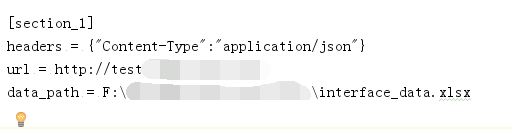
config.ini文件如下:
regVC.py模块代码如下:
 import requests

 import configparser

 import unittest

 from Case.readexcel import ExcelData

 import json

 class registerVerifyCode(unittest.TestCase):

     def setUp(self):

         self.Purl = "/api/register/getVerifyCode"

         #取配置文件内数据

         self.config = configparser.ConfigParser()

         self.text = self.config.read("F:\\Case\\config.ini")      #这里要写配置文件的绝对路径

         self.section = self.config.sections()

         self.option = self.config.options("section_1")

         self.item = self.config.items("section_1")

         self.url = self.config.items("section_1")[1][1]+self.Purl

         self.headers = self.config.items("section_1")[0][1]

         #self.headers由str类型转化为字典类型

         self.header = eval(self.headers)

         self.data_path = self.config.items("section_1")[2][1]

         self.sheetname = "注册验证码获取"

         self.data = ExcelData(self.data_path,self.sheetname).readExcel()

         print(self.url)

         print(self.data)

     def test_reVC(self):

         for a in self.data:

             for b in a:

                 print(a)

                 print(b)

                 par = {"data":{

                     b:a[b]

                 }

                 }

                 print(par)

                 par_json = json.dumps(par)

                 res = requests.post(self.url,par_json,headers=self.header)

                 print(res.text)

                 if "手机号码已注册" in res.text:

                     print("该手机号码已注册")

                 if "请求注册验证码成功" in res.text:

                     print("请求注册验证码成功")

 if __name__ == '__main__':

    unittest.main()
run_all.py代码如下:
 import unittest

 def all_case():

     case_dir = "F:\\KEJINSUO_interface\\Case\\"

     testCase = unittest.TestSuite()

     discover = unittest.defaultTestLoader.discover(case_dir, pattern = "reg*.py", top_level_dir = None)

     testCase.addTest(discover)

     return testCase

 if __name__ == '__main__':

     runner = unittest.TextTestRunner()

     runner.run(all_case())
代码需慢慢优化,先实现简单的功能
python执行报错 configparser.NoSectionError: No section: 'section_1'的更多相关文章
- python 读取配置文件总是报错 configparser.NoSectionError: No section:
本文为作者原创,禁止转载,违者必究法律责任!!! python 读取配置文件总是报错 configparser.NoSectionError: No section: 无论是 python2的版本,还 ...
- 第一次打开pycharm运行python文件报错”No Python interpreter selected“问题的解决办法
前面没有细讲,这里细述一下安装pycharm后,第一次打开pycharm运行python文件报错"No Python interpreter selected"问题的解决办法. 出 ...
- oracle创建包后执行报错:object omgmig.test_package is invalid.
今天学习了一下oracle的包的写法,然后碰到这么个问题.包声明和包主体都正确,但是就是执行报错:object omgmig.test_package is invalid. 这是会报错的sql,看起 ...
- salt执行报错一例
执行报错: 查看服务端日志: 认证有问题 重新认证吧!!! minion端: [root@super66 ~]# cd /etc/salt/[root@super66 salt]# lsminion ...
- Ubuntu下sh *.sh使用==操作符执行报错
----<鸟哥的Linux私房菜--基础篇>学习笔记 ubuntu默认的sh是连接到dash,而我们写shell脚本时使用的时bash.bash和dash在一些方面是不兼容的.因此执行同一 ...
- windows中修改catalina.sh上传到linux执行报错This file is needed to run this program解决
windows中修改catalina.sh上传到linux执行报错This file is needed to run this program解决 一.发现问题 由于tomcat内存溢出,在wind ...
- mac 上python编译报错No module named MySQLdb
mac 上python编译报错No module named MySQLdb You installed python You did brew install mysql You did expor ...
- 调用python脚本报错/usr/bin/env: python : No such file or directory
一.调用python脚本报错 /usr/bin/env: python: No such file or directory 二.解决方法 原因是在windows上编写的脚本,使用dos2unix对脚 ...
- apscheduler 执行报错No handlers could be found for logger "apscheduler.executors.default
执行报错如下: No handlers could be found for logger "apscheduler.executors.default 解决: 加入日志,查看具体报错,载根 ...
随机推荐
- 从JDK源码角度看Boolean
Java的Boolean类主要作用就是对基本类型boolean进行封装,提供了一些处理boolean类型的方法,比如String类型和boolean类型的转换. 主要实现源码如下: public fi ...
- Android Studio3.0 新特性 ~ New Features in Android Studio Preview (译文)
原文地址:https://developer.android.google.cn/studio/preview/features/index.html 最新Android Studio版本是Andro ...
- 2018秋C语言程序设计(初级)作业- 第3次作业
7-1 找出最小值 #include<stdio.h> int main() { int min,i,n,count; scanf("%d",&n); for( ...
- 搭建简单Samba服务器
本文主要实现搭建简单的Samba服务器,使得Windows能访问Linux下的共享目录,为了简单,已经关闭iptables和selinux. 1.安装samba服务器 #yum list all sa ...
- Ubuntu中apt-get安装或更新软件错误的解决办法
$su #apt-get clean #cd /var/lib/apt #mv lists lists.back #mkdir -p lists/partial #apt-get clean #apt ...
- Cookie简单实例
Cookie简单实例 1.创建CookieServlet package com.servlet.study; import java.io.IOException; import java.io.P ...
- Codeforces 25E Test 【Hash】
Codeforces 25E Test E. Test Sometimes it is hard to prepare tests for programming problems. Now Bob ...
- vmware linux nat模式设置静态ip
网上资料很多,但是都不怎么实用,这里给大家总结一下.nat模式上网.因为nat本身就能上网为什么还要设置ip.这有点自找麻烦.但是在集群这是必须的.要么你搭建伪分布,要么至少具有三台物理机器.为了节省 ...
- 《DSP using MATLAB》示例Example7.10
代码: ws1 = 0.2*pi; wp1 = 0.35*pi; wp2 = 0.65*pi; ws2 = 0.8*pi; As = 60; tr_width = min((wp1-ws1), (ws ...
- python pandas 对各种文件的读写 IO tools
The pandas I/O API is a set of top level reader functions accessed like pd.read_csv() that generally ...