
python 序列结构-列表,元组,字典,字符串,集合
列表
"""

name_list.__add__(          name_list.__getslice__(     name_list.__new__(          name_list.append(

name_list.__class__(        name_list.__gt__(           name_list.__reduce__(       name_list.count(

name_list.__contains__(     name_list.__hash__          name_list.__reduce_ex__(    name_list.extend(

name_list.__delattr__(      name_list.__iadd__(         name_list.__repr__(         name_list.index(

name_list.__delitem__(      name_list.__imul__(         name_list.__reversed__(     name_list.insert(

name_list.__delslice__(     name_list.__init__(         name_list.__rmul__(         name_list.pop(

name_list.__doc__           name_list.__iter__(         name_list.__setattr__(      name_list.remove(

name_list.__eq__(           name_list.__le__(           name_list.__setitem__(      name_list.reverse(

name_list.__format__(       name_list.__len__(          name_list.__setslice__(     name_list.sort(

name_list.__ge__(           name_list.__lt__(           name_list.__sizeof__(

name_list.__getattribute__( name_list.__mul__(          name_list.__str__(

name_list.__getitem__(      name_list.__ne__(           name_list.__subclasshook__(

"""

name_list = ["张三","刘大"]

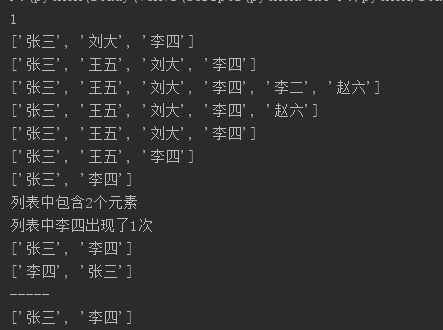
print( name_list.index("刘大"))

name_list.append("李四")

print name_list

列表的append的方法,返回值是None 意味着没有新列表产生,就地修改
In [1]: alist = [1,4,6,90,11,2,3,3,89]

In [2]: a = alist.append(10)

In [3]: print(a)

None

In [4]: type(a)

Out[4]: NoneType

In [5]: alist

Out[5]: [1, 4, 6, 90, 11, 2, 3, 3, 89, 10]
name_list.insert(1,"王五")

print name_list

a_list = ["李二","赵六"]

name_list.extend(a_list)

print name_list

name_list.remove("李二")  #会把列表中第一次出现的这个值

print name_list

name_list.pop()

print name_list

name_list.pop(2)

print name_list

del name_list[1]   #变量从内存中删除

print name_list

len_str = len(name_list)

print("列表中包含%d个元素" %len_str)

count = name_list.count("李四")

print("列表中李四出现了%d次" %count)

name_list.sort()  #按正序排列

print name_list

name_list.sort(reverse=True)  #按正序排列

print name_list

print("-----")

name_list.reverse()   #将列表反转

print name_list
元组
>>> empty_tuple = ()

>>> type(empty_tuple)

<type 'tuple'>

>>>
>>> single_tuple = (1)

>>> type(single_tuple)

<type 'int'>
>>> single_tuple1 = (1,)

>>> type(single_tuple1)

<type 'tuple'>
python 序列结构-列表,元组,字典,字符串,集合的更多相关文章
- 2.9高级变量类型操作(列表 * 元组 * 字典 * 字符串)_内置函数_切片_运算符_for循环
高级变量类型 目标 列表 元组 字典 字符串 公共方法 变量高级 知识点回顾 Python 中数据类型可以分为 数字型 和 非数字型 数字型 整型 (int) 浮点型(float) 布尔型(bool) ...
- python开发技巧---列表、字典、集合值的过滤
主要学习列表,字典,集合表达式的应用: 列表的解析式: 生成一个随机列表: In [4]: datalist = [randint(-10,10) for _ in range(10)] In [5] ...
- 跟着ALEX 学python day2 基础2 模块 数据类型 运算符 列表 元组 字典 字符串的常用操作
声明 : 文档内容学习于 http://www.cnblogs.com/xiaozhiqi/ 模块初始: Python的强大之处在于他有非常丰富和强大的标准库和第三方库,几乎你想实现的任何功能都有相 ...
- Python列表,元组,字典,字符串方法笔记
01. 列表 1.1 列表的定义 List(列表) 是 Python 中使用 最频繁 的数据类型,在其他语言中通常叫做 数组 专门用于存储 一串 信息 列表用 [] 定义,数据 之间使用 , 分隔 列 ...
- Day2 - Python基础2 列表、字典、集合
Python之路,Day2 - Python基础2 本节内容 列表.元组操作 字符串操作 字典操作 集合操作 文件操作 字符编码与转码 1. 列表.元组操作 列表是我们最以后最常用的数据类型之一, ...
- Python学习---列表/元组/字典/字符串/set集合/深浅拷贝1207【all】
1.列表 2.元组 3.字典 4.字符串 5.set集合 6.深浅拷贝
- python基础之02列表/元组/字典/set集合
python中内置的数据类型有列表(list)元组(tuple)字典(directory). 1 list list是一种可变的有序的集合.来看一个list实例: #第一种方法: >>&g ...
- python之列表/元组/字典/字符串
一.列表 格式:list = ['xxx','xxx','xxx'] 性质:可以修改列表内容 copy用法: import copy names = ['] names01 = names #直接引用 ...
- Python序列结构--列表(一)
列表 列表**包含若干元素的有序连续内存空间**,当列表增加或删除元素时,**列表对象自动进行内存的扩展或收缩**,从而**保证相邻元素之间没有缝隙**.但插入和删除非尾部元素时涉及列表元素大量的移动 ...
随机推荐
- Scala基础:定义变量和逻辑判断语句以及方法和函数
定义变量和逻辑判断语句 package com.zy.scala import scala.collection.immutable object ScalaDemo { def main(args: ...
- JAVA中Colllection的基本功能
Collection中的add方法: 代码: public static void main(String[] args) { // TODO Auto-generated method ...
- Quartz_2_简单编程式任务调度使用(CronTrigger)
第二个要介绍的任务调度器中的触发器是 CronTrigger ,相比较 SimpleTrigger 来说,CronTrigger 相对灵活,对于复杂的业务需求来说,更加的实用.要在使用 CronTri ...
- VUE+WebPack实现精美Html5游戏设计:纸牌战争
- zoj1037-Gridland
http://acm.zju.edu.cn/onlinejudge/showProblem.do?problemId=37 Gridland Time Limit: 2 Seconds Me ...
- 150. Evaluate Reverse Polish Notation (Stack)
Evaluate the value of an arithmetic expression in Reverse Polish Notation. Valid operators are +, -, ...
- 微信小程序(应用号)开发教程
本文档将带你一步步创建完成一个微信小程序,并可以在手机上体验该小程序的实际效果.这个小程序的首页将会显示欢迎语以及当前用户的微信头像,点击头像,可以在新开的页面中查看当前小程序的启动日志.下载源码 1 ...
- kalman处理realsense数据
代码来自:https://www.cnblogs.com/zjuhjm/archive/2012/12/29/2838472.html import numpy as npimport matplot ...
- 解决git无法clone地址为https的库
一.问题描述 早上在学习<Spark快速大数据分析>的时候,需要下载书本的实例代码,于是用git clone一下给出的库: https://github.com/databricks/le ...
- 系统性能信息模块之psutil模块
一.psutil模块介绍 官方网址:https://pypi.org/ psutil模块安装:https://github.com/giampaolo/psutil/blob/master/INSTA ...