
iOS之富文本(一)
NSAttributedString叫做富文本,是一种带有属性的字符串,通过它可以轻松的在一个字符串中表现出多种字体、字号、字体大小等各不相同的风格,还可以对段落进行格式化。
通过以下代码即可实现上面图示效果,十分方便,从此再也不用设置两个UILable,并且处心积虑的处理它们的长度了。
 1     UILabel * aLable = [[UILabel alloc] initWithFrame:CGRectMake(100, 500, 200, 40)];

 2     aLable.textAlignment = NSTextAlignmentCenter;

 3     [self.view addSubview:aLable];

 4

 5     NSString * aString = @"¥150 元/位";

 6

 7     //富文本对象

 8     NSMutableAttributedString * aAttributedString = [[NSMutableAttributedString alloc] initWithString:aString];

 9

10     //富文本样式

11     [aAttributedString addAttribute:NSForegroundColorAttributeName  //文字颜色

12                               value:[UIColor redColor]

13                               range:NSMakeRange(0, 4)];

14

15     [aAttributedString addAttribute:NSFontAttributeName             //文字字体

16                               value:[UIFont systemFontOfSize:25]

17                               range:NSMakeRange(0, 4)];

18

19     aLable.attributedText = aAttributedString;
常用属性:
NSFontAttributeName 文字字体
NSParagraphStyleAttributeName 段落样式(字符串通过“\n”进行分段,此设置必须在lable.numberOfLines = 0时有效,value通过NSMutableParagraphStyle设置,它有以下属性)
 [段落样式-插曲]
 1 @property(readwrite) CGFloat lineSpacing;              //行间距

 2 @property(readwrite) CGFloat paragraphSpacing;           //段间距

 3 @property(readwrite) NSTextAlignment alignment;           //对齐方式

 4 @property(readwrite) CGFloat firstLineHeadIndent;          //首行缩紧

 5 @property(readwrite) CGFloat headIndent;               //除首行之外其他行缩进

 6 @property(readwrite) CGFloat tailIndent;               //每行容纳字符的宽度

 7 @property(readwrite) NSLineBreakMode lineBreakMode;         //换行方式

 8 @property(readwrite) CGFloat minimumLineHeight;           //最小行高

 9 @property(readwrite) CGFloat maximumLineHeight;           //最大行高

10 @property(readwrite) NSWritingDirection baseWritingDirection;  //书写方式(NSWritingDirectionNatural,NSWritingDirectionLeftToRight,NSWritingDirectionRightToLeft)
11 @property(readwrite) CGFloat lineHeightMultiple;
12 @property(readwrite) CGFloat paragraphSpacingBefore;
13 @property(readwrite) float hyphenationFactor;
14 @property(readwrite,copy,NS_NONATOMIC_IOSONLY) NSArray *tabStops NS_AVAILABLE_IOS(7_0);
15 @property(readwrite,NS_NONATOMIC_IOSONLY) CGFloat defaultTabInterval NS_AVAILABLE_IOS(7_0);
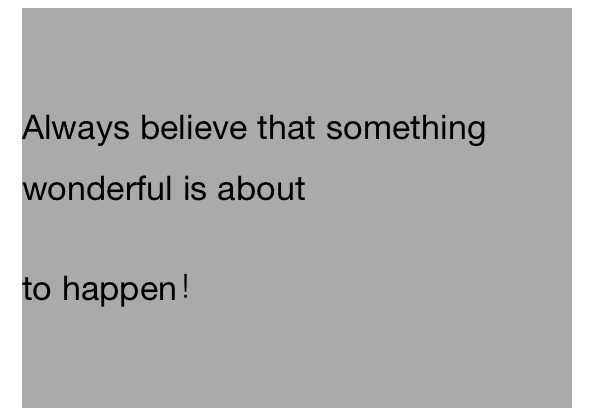
 [段落样式demo]
 1     UILabel * lable = [[UILabel alloc] initWithFrame:CGRectMake(50, 100, self.view.frame.size.width-100, 200)];

 2     lable.backgroundColor = [UIColor lightGrayColor];

 3     lable.numberOfLines = 0;

 4     [self.view addSubview:lable];

 5

 6     NSString * string = @"Always believe that something wonderful is about \nto happen!";

 7

 8     //富文本

 9     NSMutableAttributedString * attributedString = [[NSMutableAttributedString alloc] initWithString:string];

10

11     //段落样式

12     NSMutableParagraphStyle * paragraphStyle = [[NSMutableParagraphStyle alloc] init];

13

14 #warning  lable.numberOfLines必须为0,段落样式才生效

15     //行间距

16     paragraphStyle.lineSpacing = 10.0;

17     //段落间距

18     paragraphStyle.paragraphSpacing = 20.0;

19

20 //    paragraphStyle.baseWritingDirection = NSWritingDirectionLeftToRight;

21 //    paragraphStyle.firstLineHeadIndent = 10.0;

22 //    paragraphStyle.headIndent = 50.0;

23 //    paragraphStyle.tailIndent = 200.0;

24

25     [attributedString addAttribute:NSParagraphStyleAttributeName

26                              value:paragraphStyle

27                              range:NSMakeRange(0, string.length)];

28

29     lable.attributedText = attributedString;
NSForegroundColorAttributeName 文字前景色
NSBackgroundColorAttributeName 文字背景色
NSLigatureAttributeName 连体字(NSNumber @0:无连体,@1:默认连体,系统字体不包含对连体的支持)
NSUnderlineStyleAttributeName 下划线
NSStrokeColorAttributeName 只有在NSStrokeWidthAttributeName设置了值之后才有效(默认字体颜色和前景色一致,如果设置的颜色和前景色不一致则前景色无效)
NSStrokeWidthAttributeName 设置该属性之后字体变成空心字体,字体边线宽度为value设定的值
NSBaselineOffsetAttributeName 值为NSNumber类型,表明文字相对于其他文字基准线向上的偏移量
NSUnderlineColorAttributeName 值为UIColor类型,下划线颜色(只有在NSUnderlineStyleAttributeName的value为@1时有效)
NSUnderlineStyleAttributeName 值为NSNumber类型,下划线宽度(默认值为@0:下划线宽度为0——不现实下划线,@1:字符串有下划线)
属性挺多的,有其他需要的话command点进去看一下就ok,如果对他们的功能不了解三根指头点一下关键词,或者按住option点一下看看官方文档的Description相信就会有所了解了,其他的暂时就不介绍了。
如有问题,欢迎指正,小弟在此拜谢。
这里有篇讲解富文本的文章:http://www.2cto.com/kf/201409/334308.html
iOS之富文本(一)的更多相关文章
- iOS - NSMutableAttributedString富文本的实现
NSMutableAttributedString继承于NSAttributedString(带属性的字符串)能够简单快速实现富文本的效果;不多说直接上效果图和代码,通俗易懂: (一)效果图: (二) ...
- iOS之富文本
之前做项目时遇到一个问题: 使用UITextView显示一段电影的简介,由于字数比较多,所以字体设置的很小,行间距和段间距也很小,一大段文字挤在一起看起来很别扭,想要把行间距调大,结果在XCode中查 ...
- iOS之富文本(二)
之前做项目时遇到一个问题: 使用UITextView显示一段电影的简介,由于字数比较多,所以字体设置的很小,行间距和段间距也很小,一大段文字挤在一起看起来很别扭,想要把行间距调大,结 ...
- iOS swift 富文本显示 富文本在iOS中使用场景和解决方案
项目中很多地方都会用到富文本的内容:比如一般的商品详情,视频详情,资讯详情等,运营人员通过后台的富文本编辑器编辑的内容,前端拿到的就是一段富文本的字符串,这富文本大多都是图片和文字的组合.我们今天介绍 ...
- IOS Html富文本渲染方式:DTCoreText、WKWebView、UIWebView的内存占用对比
在app的内容页(详情页)中,富文本的显示一直是经常需要处理的问题,而通常在后端的富文本编辑中,Html应用比较普遍,所以其实需要处理的Html富文本显示的问题,以下这三种方式肯定不是最优的显示Htm ...
- iOS开发富文本制作 图片和文字/NSMutableParagraphStyle/NSMutableAttributedString
/NSMutableParagraphStyle/NSMutableAttributedString 组合使 NSString * titlestr=@"日产GT-R"; NSMu ...
- iOS计算富文本(NSMutableAttributedString)高度
有时候开发中我们为了样式好看, 需要对文本设置富文本属性, 设置完后那么怎样计算其高度呢, 很简单, 方法如下: - (NSInteger)hideLabelLayoutHeight:(NSStrin ...
- iOS -- YYText富文本
NSMutableAttributedString *text = [[NSMutableAttributedString alloc] initWithString: [NSString strin ...
- iOS 开发富文本之TTTAttributedLabel 在某个特定位置的文字添加跳转,下划线,修改字体大小,颜色
@property(nonatomic , strong) TTTAttributedLabel * ttLabel; @property(nonatomic , strong) NSRange li ...
随机推荐
- 3星|《十大全球CEO亲授企业高速成长的关键战略》:作为CEO,我也非常坦率地表明过家庭优先于工作
十大全球CEO亲授 企业高速成长的关键战略(<哈佛商业评论>增刊) <哈佛商业评论>上的10来篇文章合集.大部分都看过,除了一篇中信的访谈,其他大部分是美国的有点旧的案例. 总 ...
- 使用Firebug或chrome-devToolBar深入学习javascript语言核心
使用Firebug和chrome-devToolBar调试页面样式或脚本是前端开发每天必做之事.这个开发神器到底能给我们带来哪些更神奇的帮助呢?这几天看的一些资料中给了我启发,能不通过Firebug和 ...
- Python Tkinter-Event
1.点击 from tkinter import * root=Tk() def printCoords(event): print(event.x,event.y) bt1=Button(root, ...
- JVM监控及堆栈内存
jconsole 堆内存:存放new出来的对象 栈内存:存放基本数据结构和对象的引用,但对象本身放在堆中
- 微软职位内部推荐-SW Engineer II for Windows System
微软近期Open的职位: Microsoft's Operating Systems Group delivers the operating system and core user experie ...
- Spark SQL、DataFrame和Dataset——转载
转载自: Spark SQL.DataFrame和Datase
- react native组件的创建
react native组件的创建 react文件加载顺序: react项目启动后,先加载index.js.在index.js中可以指向首页. import { AppRegistry } from ...
- Beta阶段中间产物
空天猎功能说明书:https://git.coding.net/liusx0303/Plane.git 空天猎代码控制:https://coding.net/u/MR__Chen/p/SkyHunte ...
- VMware提示无法打开内核设备 \\.\Global\vmx86: 系统找不到指定的文件解决方案
1.右键单击[我的电脑],选择[管理] 2.在[服务]中找到VMware Workstation Server服务右键启动
- <浪潮之巅>读书笔记
<浪潮之巅>这本书通过介绍AT&T.IBM.微软.苹果.google等IT公司的发展历史,揭示科技工业的胜败规律,说明这些公司是如何在每一次科技革命浪潮到来时站在浪尖,实现跨越式发 ...