
UIBezierPath的使用(持续更新)
UIBezierPath的使用

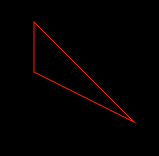
1. 使用UIBezierPath绘制多边形
    // 获取path

    UIBezierPath *aPath = [UIBezierPath bezierPath];

    // 设定起始点

    [aPath moveToPoint:CGPointMake(0.0f, 0.0f)];

    // 添加点

    [aPath addLineToPoint:CGPointMake(100.0f, 100.0f)];

    [aPath addLineToPoint:CGPointMake(.f, .f)];

    // 闭合path

    [aPath closePath];
2. 使用UIBezierPath绘制圆形
    // 将常数转换为度数

    #define   DEGREES(degrees)  ((3.14159265359f * degrees)/ 180.f)

    // 获取path

    UIBezierPath *aPath = \

    [UIBezierPath bezierPathWithArcCenter:CGPointMake(, ) // 圆的中心

                                   radius:.f                // 圆的半径

                               startAngle:DEGREES()          // 起始点

                                 endAngle:DEGREES()        // 结束点

                                clockwise:YES];               // 顺时针

3. 使用UIBezierPath绘制矩形
    // 获取path

    UIBezierPath *aPath = [UIBezierPath bezierPathWithRect:CGRectMake(, , , )];

4. 使用UIBezierPath绘制椭圆
    // 获取path

    UIBezierPath *aPath = [UIBezierPath bezierPathWithOvalInRect:CGRectMake(, , , )];

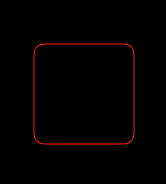
5. 使用UIBezierPath绘制圆角矩形
    // 获取path

    UIBezierPath *aPath = [UIBezierPath bezierPathWithRoundedRect:CGRectMake(, , , )

                                                     cornerRadius:.f];
6. 使用UIBezierPath绘制带部分圆角的矩形
    // 获取path

    UIBezierPath *aPath = [UIBezierPath bezierPathWithRoundedRect:CGRectMake(, , , )

                                                byRoundingCorners:UIRectCornerTopLeft

                                                      cornerRadii:CGSizeMake(, )];

7. 使用UIBezierPath绘制不规则曲线1
    // 获取path
    UIBezierPath *aPath = [UIBezierPath bezierPath];

    // 设定起始点
    [aPath moveToPoint:CGPointMake(0.0f, 0.0f)];

    // 添加一个不规则点
    [aPath addCurveToPoint:CGPointMake(100.f, 100.f)
             controlPoint1:CGPointMake(50.f, 0.f)     // 开始点
             controlPoint2:CGPointMake(0.f, 50.f)];   // 结束点

    // 添加一个点
    [aPath addLineToPoint:CGPointMake(0.0f, 100.f)];

    // 闭合path
    [aPath closePath];


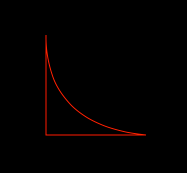
8. 使用UIBezierPath绘制不规则曲线2
    // 获取path

    UIBezierPath *aPath = [UIBezierPath bezierPath];

    // 设定起始点

    [aPath moveToPoint:CGPointMake(0.0f, 0.0f)];

    // 添加一个不规则点

    [aPath addQuadCurveToPoint:CGPointMake(.f, .f)

                  controlPoint:CGPointMake(.f, .f)];   // 控制点

    // 添加一个点

    [aPath addLineToPoint:CGPointMake(0.0f, .f)];

    // 闭合path

    [aPath closePath];

9. 使用path与CAShapeLayer配合制作mask遮罩效果(path闭环里面的填充区域就是作为遮罩使用的)
    // 创建一个view

    UIView *showView = [[UIView alloc] initWithFrame:CGRectMake(, , , )];

    showView.backgroundColor = [UIColor greenColor];

    showView.layer.contents = (__bridge id)([UIImage imageNamed:@""].CGImage);

    // 创建一个椭圆的path

    UIBezierPath *aPath = [UIBezierPath bezierPathWithOvalInRect:CGRectMake(, , , )];

    // 创建一个CAShapeLayer并获取椭圆的path

    CAShapeLayer *layer = [CAShapeLayer layer];

    layer.path = aPath.CGPath;

    // 把这个CAShapeLayer添加为mask

    showView.layer.mask = layer;


UIBezierPath calls
UIBezierPath的使用(持续更新)的更多相关文章
- 神技!微信小程序(应用号)抢先入门教程(附最新案例DEMO-豆瓣电影)持续更新
微信小程序 Demo(豆瓣电影) 由于时间的关系,没有办法写一个完整的说明,后续配合一些视频资料,请持续关注 官方文档:https://mp.weixin.qq.com/debug/wxadoc/de ...
- iOS系列教程 目录 (持续更新...)
前言: 听说搞iOS的都是高富帅,身边妹子无数.咱也来玩玩.哈哈. 本篇所有内容使用的是XCode工具.Swift语言进行开发. 我现在也是学习阶段,每一篇内容都是经过自己实际编写完一遍之后,发现 ...
- ASP.NET MVC 5 系列 学习笔记 目录 (持续更新...)
前言: 记得当初培训的时候,学习的还是ASP.NET,现在回想一下,图片水印.统计人数.过滤器....HttpHandler是多么的经典! 不过后来接触到了MVC,便立马爱上了它.Model-View ...
- git常用命令(持续更新中)
git常用命令(持续更新中) 本地仓库操作git int 初始化本地仓库git add . ...
- iOS开发系列文章(持续更新……)
iOS开发系列的文章,内容循序渐进,包含C语言.ObjC.iOS开发以及日后要写的游戏开发和Swift编程几部分内容.文章会持续更新,希望大家多多关注,如果文章对你有帮助请点赞支持,多谢! 为了方便大 ...
- 基于android studio的快捷开发(将持续更新)
对于Android studio作为谷歌公司的亲儿子,自然有它的好用的地方,特别是gradle方式和快捷提示方式真的很棒.下面是我在实际开发中一些比较喜欢用的快速开发快捷键,对于基本的那些就不多说了. ...
- 总结js常用函数和常用技巧(持续更新)
学习和工作的过程中总结的干货,包括常用函数.常用js技巧.常用正则表达式.git笔记等.为刚接触前端的童鞋们提供一个简单的查询的途径,也以此来缅怀我的前端学习之路. PS:此文档,我会持续更新. Aj ...
- 我的敏捷、需求分析、UML、软件设计电子书 - 下载(持续更新中)
我将所有我的电子书汇总在一起,方便大家下载!(持续更新) 文档保存在我的网站——软件知识原创基地上(www.umlonline.org),请放心下载. 1)软件设计是怎样炼成的?(2014-4-1 发 ...
- React Native之坑总结(持续更新)
React Native之坑总结(持续更新) Genymotion安装与启动 之前我用的是蓝叠(BlueStack)模拟器,跑RN程序也遇到了一些问题,都通过搜索引擎解决了,不过没有记录. 但是Blu ...
随机推荐
- [Ext JS 4]后台自动产生图档
前言 [Ext JS 4] 实战之将chart导出为png, jpg 格式的文件 承接上一篇, 我们可以做到在Browser端打开一个Chart,并导出为png或是jpg 等格式的图档. 但实际的需求 ...
- java-list-分组
Map<String, List<Hb12Domain>> groupBy = hb18DomainList.stream().collect(Collectors.group ...
- WPF 获取指定文件的Icon
C# var icon = System.Drawing.Icon.ExtractAssociatedIcon(@"filepath"); var m = new MemorySt ...
- loadruner关联web_reg_save_param
语法int web_reg_save_param(const char *ParamName, <list of Attributes>, LAST); 参数说明: • ParamName ...
- spring boot 笔记
1.不能访问非启动类中的@RequestMapping 路径: 启动类注解 1.@Controller @EnableAutoConfiguration @ComponentScan 或 2.@Spr ...
- 【U3D】播放器设置(PlayerSettings)
播放器设置 (Player Settings) 播放器设置 (Player Settings) 用于为您要在 Unity 中编译的最终游戏定义各项(特定于平台的)参数.例如,参数中的一些值用于您打开单 ...
- codeforces-727A
题目连接:http://codeforces.com/contest/727/problem/A A. Transformation: from A to B time limit per test ...
- [Codeforces166B]Polygons 凸包
大致题意: 给你一个凸多边形A,和一个任意多边形B,判断B是否在A的内部 先对A的点集建凸包,然后枚举B中的点,二分判断是否在A的内部. 二分时可用叉积判断,详细见代码 #include<cst ...
- 洛谷P3052 [USACO12MAR]摩天大楼里的奶牛 [迭代加深搜索]
题目传送门 摩天大楼里的奶牛 题目描述 A little known fact about Bessie and friends is that they love stair climbing ra ...
- 使用抽象bean
定义抽象类Abstract=“true”抽象bean不能实例化,一个类可以创建多个bean. 抽象bean的配置和一般bean的配置基本一样只是在增加了Abstract=“true”抽象bean是一个 ...