
OpenCV使用二维特征点(Features2D)和单映射(Homography)寻找已知物体
使用二维特征点(Features2D)和单映射(Homography)寻找已知物体
理论
代码
这个教程的源代码如下所示。你还可以从 以下链接下载到源代码
#include <stdio.h>

#include <iostream>

#include "opencv2/core/core.hpp"

#include "opencv2/features2d/features2d.hpp"

#include "opencv2/highgui/highgui.hpp"

#include "opencv2/calib3d/calib3d.hpp"

using namespace cv;

void readme();

/** @function main */

int main( int argc, char** argv )

{

  if( argc != 3 )

  { readme(); return -1; }

  Mat img_object = imread( argv[1], CV_LOAD_IMAGE_GRAYSCALE );

  Mat img_scene = imread( argv[2], CV_LOAD_IMAGE_GRAYSCALE );

  if( !img_object.data || !img_scene.data )

  { std::cout<< " --(!) Error reading images " << std::endl; return -1; }

  //-- Step 1: Detect the keypoints using SURF Detector

  int minHessian = 400;

  SurfFeatureDetector detector( minHessian );

  std::vector<KeyPoint> keypoints_object, keypoints_scene;

  detector.detect( img_object, keypoints_object );

  detector.detect( img_scene, keypoints_scene );

  //-- Step 2: Calculate descriptors (feature vectors)

  SurfDescriptorExtractor extractor;

  Mat descriptors_object, descriptors_scene;

  extractor.compute( img_object, keypoints_object, descriptors_object );

  extractor.compute( img_scene, keypoints_scene, descriptors_scene );

  //-- Step 3: Matching descriptor vectors using FLANN matcher

  FlannBasedMatcher matcher;

  std::vector< DMatch > matches;

  matcher.match( descriptors_object, descriptors_scene, matches );

  double max_dist = 0; double min_dist = 100;

  //-- Quick calculation of max and min distances between keypoints

  for( int i = 0; i < descriptors_object.rows; i++ )

  { double dist = matches[i].distance;

    if( dist < min_dist ) min_dist = dist;

    if( dist > max_dist ) max_dist = dist;

  }

  printf("-- Max dist : %f \n", max_dist );

  printf("-- Min dist : %f \n", min_dist );

  //-- Draw only "good" matches (i.e. whose distance is less than 3*min_dist )

  std::vector< DMatch > good_matches;

  for( int i = 0; i < descriptors_object.rows; i++ )

  { if( matches[i].distance < 3*min_dist )

     { good_matches.push_back( matches[i]); }

  }

  Mat img_matches;

  drawMatches( img_object, keypoints_object, img_scene, keypoints_scene,

               good_matches, img_matches, Scalar::all(-1), Scalar::all(-1),

               vector<char>(), DrawMatchesFlags::NOT_DRAW_SINGLE_POINTS );

  //-- Localize the object

  std::vector<Point2f> obj;

  std::vector<Point2f> scene;

  for( int i = 0; i < good_matches.size(); i++ )

  {

    //-- Get the keypoints from the good matches

    obj.push_back( keypoints_object[ good_matches[i].queryIdx ].pt );

    scene.push_back( keypoints_scene[ good_matches[i].trainIdx ].pt );

  }

  Mat H = findHomography( obj, scene, CV_RANSAC );

  //-- Get the corners from the image_1 ( the object to be "detected" )

  std::vector<Point2f> obj_corners(4);

  obj_corners[0] = cvPoint(0,0); obj_corners[1] = cvPoint( img_object.cols, 0 );

  obj_corners[2] = cvPoint( img_object.cols, img_object.rows ); obj_corners[3] = cvPoint( 0, img_object.rows );

  std::vector<Point2f> scene_corners(4);

  perspectiveTransform( obj_corners, scene_corners, H);

  //-- Draw lines between the corners (the mapped object in the scene - image_2 )

  line( img_matches, scene_corners[0] + Point2f( img_object.cols, 0), scene_corners[1] + Point2f( img_object.cols, 0), Scalar(0, 255, 0), 4 );

  line( img_matches, scene_corners[1] + Point2f( img_object.cols, 0), scene_corners[2] + Point2f( img_object.cols, 0), Scalar( 0, 255, 0), 4 );

  line( img_matches, scene_corners[2] + Point2f( img_object.cols, 0), scene_corners[3] + Point2f( img_object.cols, 0), Scalar( 0, 255, 0), 4 );

  line( img_matches, scene_corners[3] + Point2f( img_object.cols, 0), scene_corners[0] + Point2f( img_object.cols, 0), Scalar( 0, 255, 0), 4 );

  //-- Show detected matches

  imshow( "Good Matches & Object detection", img_matches );

  waitKey(0);

  return 0;

  }

  /** @function readme */

  void readme()

  { std::cout << " Usage: ./SURF_descriptor <img1> <img2>" << std::endl; }
解释
结果
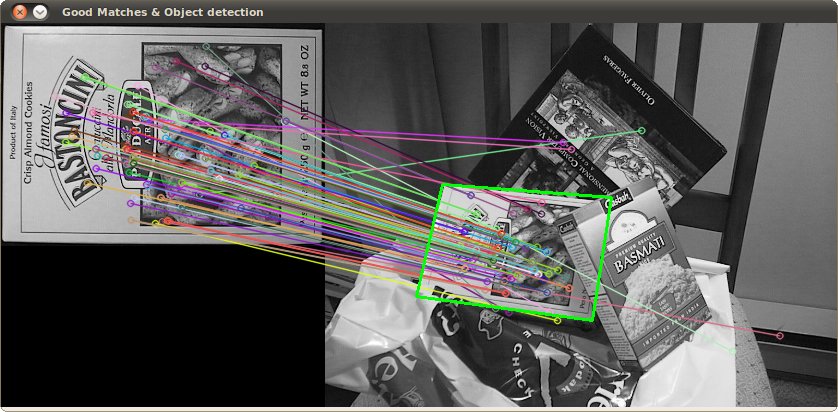
检测到的目标结果 (用绿色标记出来的部分)
翻译者
Shuai Zheng, <kylezheng04@gmail.com>, http://www.cbsr.ia.ac.cn/users/szheng/
from: http://www.opencv.org.cn/opencvdoc/2.3.2/html/doc/tutorials/features2d/feature_homography/feature_homography.html#feature-homography
OpenCV使用二维特征点(Features2D)和单映射(Homography)寻找已知物体的更多相关文章
- OpenCV 使用二维特征点(Features2D)和单映射(Homography)寻找已知物体
#include <stdio.h> #include <iostream> #include "opencv2/core/core.hpp" #inclu ...
- OpenCV开发笔记(六十九):红胖子8分钟带你使用传统方法识别已知物体(图文并茂+浅显易懂+程序源码)
若该文为原创文章,未经允许不得转载原博主博客地址:https://blog.csdn.net/qq21497936原博主博客导航:https://blog.csdn.net/qq21497936/ar ...
- 开发环境配置--Ubuntu+Qt4+OpenCV(二)
同系列文章 1. 开发环境配置--Ubuntu+Qt4+OpenCV(一) 2. 开发环境配置--Ubuntu+Qt4+OpenCV(二) 3. 开发环境配置--Ubuntu+Qt4+OpenCV(三 ...
- 使用OpenCV查找二值图中最大连通区域
http://blog.csdn.net/shaoxiaohu1/article/details/40272875 使用OpenCV查找二值图中最大连通区域 标签: OpenCVfindCoutour ...
- OpenCV图像变换二 投影变换与极坐标变换实现圆形图像修正
投影变换 在放射变换中,物体是在二维空间中变换的.如果物体在三维空间中发生了旋转,那么这种变换就成为投影变换,在投影变换中就会出现阴影或者遮挡,我们可以运用二维投影对三维投影变换进行模块化,来处理阴影 ...
- PyTorch深度学习实践——处理多维特征的输入
处理多维特征的输入 课程来源:PyTorch深度学习实践--河北工业大学 <PyTorch深度学习实践>完结合集_哔哩哔哩_bilibili 这一讲介绍输入为多维数据时的分类. 一个数据集 ...
- VS2010/MFC编程入门之二(利用MFC向导生成单文档应用程序框架)
VS2010/MFC编程入门之二(利用MFC向导生成单文档应用程序框架)-软件开发-鸡啄米 http://www.jizhuomi.com/software/141.html 上一讲中讲了VS20 ...
- 第二十二章 Django会话与表单验证
第二十二章 Django会话与表单验证 第一课 模板回顾 1.基本操作 def func(req): return render(req,'index.html',{'val':[1,2,3...]} ...
- opencv统计二值图黑白像素个数
#include "iostream" #include "queue" #include "Windows.h" #include < ...
随机推荐
- LeetCode 136. Single Number(只出现一次的数字)
LeetCode 136. Single Number(只出现一次的数字)
- 洛谷P1726 上白泽慧音 [Tarjan]
题目传送门 上白泽慧音 题目描述 在幻想乡,上白泽慧音是以知识渊博闻名的老师.春雪异变导致人间之里的很多道路都被大雪堵塞,使有的学生不能顺利地到达慧音所在的村庄.因此慧音决定换一个能够聚集最多人数的村 ...
- java自定义类
引用数据类型(类) 引用数据类型分类 提到引用数据类型(类),其实我们对它并不陌生,之前使用过的Scanner类.Random类. 我们可以把类的类型为两种: 第一种,Java为我们提供好的类,如Sc ...
- MySQL之varchar
MySQL之varchar 0.前言 探究关于MySQL中varchar长度的定义 1.研究MySQL的varchar列类型的背景 1.MySQL5.x 2.InnoDB 2.varchar 对于va ...
- Java 接口和抽象类--缺省模式
一个软件设计的好坏,我想很大程度上取决于它的整体架构,而这个整体架构其实就是你对整个宏观商业业务的抽象框架,当代表业务逻辑的高层抽象层结构 合理时,你底层的具体实现需要考虑的就仅仅是一些算法和一些具体 ...
- Unity 2D游戏开发教程之游戏精灵的开火状态
Unity 2D游戏开发教程之游戏精灵的开火状态 精灵的开火状态 “开火”就是发射子弹的意思,在战争类型的电影或者电视剧中,主角们就爱这么说!本节打算为精灵添加发射子弹的能力.因为本游戏在后面会引入敌 ...
- java8新特性——简介
java8问世已经有好长时间了,但是之前项目中都没有使用到,所以一直都只是了解一些,近期刚刚换了家新公司,在开发中需要使用到java8来开发,所以也是马上赶来学习一下java8得新特性. 一.新特性 ...
- 2018/3/18 noip模拟赛 20分
T1 dp,特别裸特别简单,我放弃了写了个dfs. T2 树归,特别裸特别简单,我不会写. T3 贪心二分不知道什么玩意儿反正不会写就对了. 我是个智障
- java--由一道选择题研究数值越界
原题来自牛客网的java专项练习: 以下是代码. public class Test2 { public static void add(Byte b) { b=b++; } public stati ...
- [SimpleOJ236]暴风雨
题目大意: 给你一棵n个点的树,以及m+q条信息. m条描述点a到b有边直接相连. q条描述点a和点b的LCA为c. 问有多少符合条件的以1为根的树. 思路: 状压DP. e[i]记录需要与点i直接相 ...