
Android-自定义RadioButton
1.控件RadioButton需要用RadioGroup包裹起来,才能使用
2.RadioButton必须设置ID才能实现单选功能
3.RadioGroup有方向(垂直方向 和 水平方向)默认是垂直方向

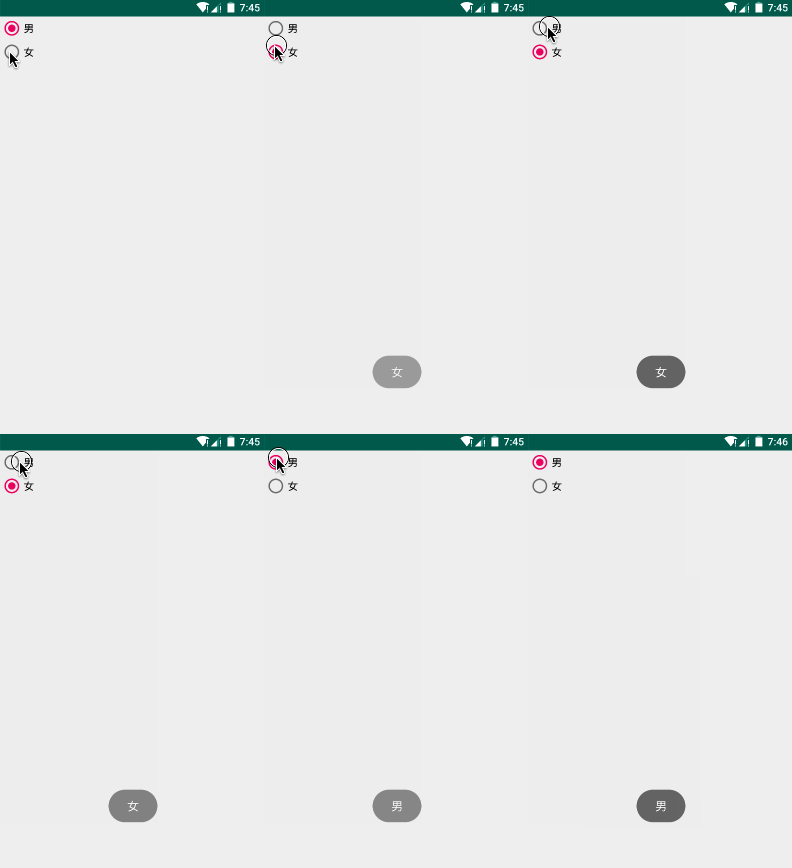
先介绍原生的RadioButton,然后再介绍自定义效果RadioButton

Layout:
<?xml version="1.0" encoding="utf-8"?>

<LinearLayout

    xmlns:android="http://schemas.android.com/apk/res/android"

    android:orientation="vertical"

    android:layout_width="match_parent"

    android:layout_height="match_parent">

    <!-- RadioGroup RadioButton -->

    <RadioGroup

        android:id="@+id/rg_sex"

        android:layout_width="wrap_content"

        android:layout_height="wrap_content">

        <RadioButton

            android:id="@+id/rb_man"

            android:layout_width="wrap_content"

            android:layout_height="wrap_content"

            android:text="男"

            />

        <RadioButton

            android:id="@+id/rb_woman"

            android:layout_width="wrap_content"

            android:layout_height="wrap_content"

            android:text="女"

            />

    </RadioGroup>

</LinearLayout>
监听事件:
package liudeli.ui.all;

import android.app.Activity;

import android.os.Bundle;

import android.widget.RadioButton;

import android.widget.RadioGroup;

import android.widget.Toast;

public class WidgetActivity extends Activity {

    @Override

    protected void onCreate(Bundle savedInstanceState) {

        super.onCreate(savedInstanceState);

        setContentView(R.layout.activity_widget);

        // RadioButton

        RadioGroup rgSex = findViewById(R.id.rg_sex);

        RadioButton rb_man = findViewById(R.id.rb_man);

        RadioButton rb_woman = findViewById(R.id.rb_woman);

        // 默认设置为男选中状态

        rb_man.setChecked(true);

        rgSex.setOnCheckedChangeListener(new RadioGroup.OnCheckedChangeListener() {

            @Override

            public void onCheckedChanged(RadioGroup group, int checkedId) {

                switch (checkedId) {

                    case R.id.rb_man:

                        alertToast("男");

                        break;

                    case R.id.rb_woman:

                        alertToast("女");

                        break;

                }

            }

        });

    }

    private void alertToast(String text) {

        Toast.makeText(this, text, Toast.LENGTH_LONG).show();

    }

    @Override

    protected void onDestroy() {

        super.onDestroy();

    }

}
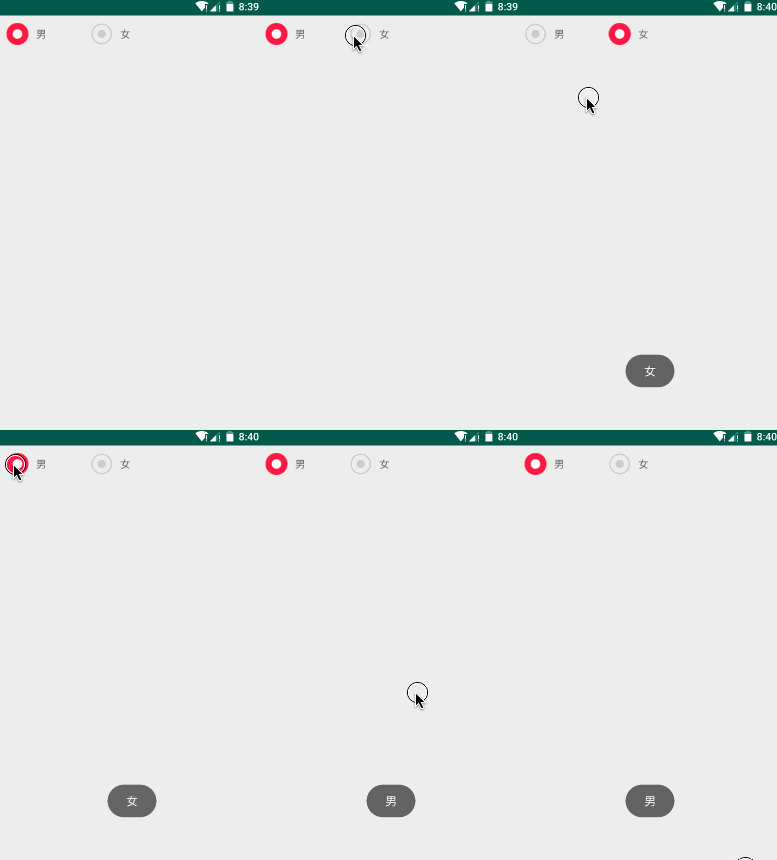
自定义RadioButton效果:
RadioButton使用的选择器:
<?xml version="1.0" encoding="utf-8"?>

<selector xmlns:android="http://schemas.android.com/apk/res/android">

    <item android:drawable="@drawable/radio_false" android:state_checked="false" />

    <item android:drawable="@drawable/radio_true" android:state_checked="true" />

    <!-- 注意⚠:选择器如果的默认一定要放在最后一行,否则会出现莫名其妙的问题 -->

    <!--<item android:drawable="@drawable/radio_false" />-->

</selector>
RadioButton 设置:
android:button="@null" 去除RadioButton圆点
android:background="@drawable/radio_button_selector" 设置选择器效果
<?xml version="1.0" encoding="utf-8"?>

<LinearLayout

    xmlns:android="http://schemas.android.com/apk/res/android"

    android:orientation="vertical"

    android:layout_width="match_parent"

    android:layout_height="match_parent">

    <!--

         RadioGroup RadioButton

    -->

    <RadioGroup

        android:id="@+id/rg_sex"

        android:layout_width="fill_parent"

        android:layout_height="wrap_content"

        android:orientation="horizontal"

        android:layout_margin="10dp">

        <!--

             android:button="@null" 去除RadioButton圆点

             android:background="@drawable/radio_button_selector" 设置选择器效果

         -->

        <RadioButton

            android:id="@+id/rb_man"

            android:layout_width="30dp"

            android:layout_height="30dp"

            android:button="@null"

            android:background="@drawable/radio_button_selector"

            />

        <TextView

            android:layout_width="wrap_content"

            android:layout_height="wrap_content"

            android:text="男"

            android:layout_marginLeft="10dp"

            />

        <RadioButton

            android:id="@+id/rb_woman"

            android:layout_width="30dp"

            android:layout_height="30dp"

            android:layout_marginLeft="60dp"

            android:button="@null"

            android:background="@drawable/radio_button_selector"

            />

        <TextView

            android:layout_width="wrap_content"

            android:layout_height="wrap_content"

            android:text="女"

            android:layout_marginLeft="10dp"

            />

    </RadioGroup>

</LinearLayout>
Android-自定义RadioButton的更多相关文章
- Android 自定义RadioButton的样式
Android 自定义RadioButton的样式 我们知道Android控件里的button,listview可以用xml的样式自定义成自己希望的漂亮样式. 最近用到RadioButton,利用xm ...
- Android 自定义RadioButton实现
由于使用小米系统MIUI运行是RadioButton样式跟google Android API自定义的不一样,则我们可以定义任何想要的东东.没有做不到,只有想不到 Android 自定义RadioBu ...
- android自定义radiobutton样式文字颜色随选中状态而改变
主要是写一个 color selector 在res/建一个文件夹取名color res/color/color_radiobutton.xml <selector xmlns:android= ...
- android 自定义 radiobutton 文字颜色随选中状态而改变
主要是写一个 color selector 在res/建一个文件夹取名color res/color/color_radiobutton.xml <?xml version="1.0& ...
- Android自定义radiobutton(文字靠左,选框靠右)
<RadioButton android:id="@+id/rb_never" android:layout_width="fill_parent" an ...
- 转:android 自定义RadioButton样式
http://gundumw100.iteye.com/blog/1146527 上面这种3选1的效果如何做呢?用代码写? 其实有更简单的办法,忘了RadioButton有什么特性了吗? 我就用Ra ...
- Android 自定义 radiobutton
<RadioButton android:id="@+id/radiobutton_pay_method" android:layout_width="30dp&q ...
- Android 自定义RadioButton样式
上面这种3选1的效果如何做呢?用代码写? 其实有更简单的办法,忘了RadioButton有什么特性了吗? 我就用RadioButton实现了如上效果,其实很简单的. 首先定义一张background ...
- React Native之(支持iOS与Android)自定义单选按钮(RadioGroup,RadioButton)
React Native之(支持iOS与Android)自定义单选按钮(RadioGroup,RadioButton) 一,需求与简单介绍 在开发项目时发现RN没有给提供RadioButton和Rad ...
- android自定义RadioGroup实现可以添加多种布局
android自带的RadioGroup是继承自LinearLayout,如果布局的时候不是直接写radiobutton,即radiobutton外面还包了一层容器,这时分组是不成功的,因为查找不到r ...
随机推荐
- OpenLayers 3 之 地图视图(View)
OpenLayers 3 之 地图视图(View) 初始化一幅地图,必备的三要素之一视图(view),这个对象主要是控制地图与人的交互,如进行缩放,调节分辨率.地图的旋转等控制.也就是说每个 map对 ...
- python 获取当前运行的类名函数名
import inspect def get_current_function_name(): return inspect.stack()[1][3] class MyClass: def func ...
- linux服务器中Apache隐藏index.php失败
可以通过URL重写隐藏应用的入口文件index.php,下面是相关服务器的配置参考: [Apache] httpd.conf配置文件中加载了mod_rewrite.so模块 AllowOverride ...
- NHibernate注意事项
1.检查映射文件是否正确 2.检查配置文件的“嵌入的资源”选项 3.检查Configuration是否加载了程序集
- Java如何快速修改Jar包里的文件内容
需求背景:写了一个实时读取日志文件以及监控的小程序,打包成了Jar包可执行文件,通过我们的web主系统上传到各个服务器,然后调用ssh命令执行.每次上传前都要通过解压缩软件修改或者替换里面的配置文件, ...
- 解决OpenFeign默认无法上传文件的问题
前言 最近在项目中使用OpenFeign时,发现其不支持文件上传功能.网上找了很多资料,最后找到feign-form和feign-form-spring的解决方案.但其默认只支持单文件上传,不支持多文 ...
- Action的三种编写方式
-------------------siwuxie095 Action 的三种编写方式 在 Struts2 的应用开发中,Action 作为框架的核心类,实现 对用户请求的处理,Action 类被称 ...
- rman恢复增加ADG(级联ADG)
当前已经有一套ADG库,分别是prod1和prod1s计划从pord的ADG备库(prod1s)拷贝一个0级rman全备到新的服务器,恢复后,搭建成新增的ADG,SID叫prod2s,后面激活当做测试 ...
- shiro 集成spring 使用 redis作为缓存 学习记录(六)
1.在applicationContext-redis.xml配置文件中增加如下: 申明一个cacheManager对象 用来注入到 shiro的 securityManager 属性 cac ...
- Python正则表达式的七个使用范例-乾颐堂
作为一个概念而言,正则表达式对于Python来说并不是独有的.但是,Python中的正则表达式在实际使用过程中还是有一些细小的差别. 本文是一系列关于Python正则表达式文章的其中一部分.在这个系列 ...