
OpsManager管理MongoDB
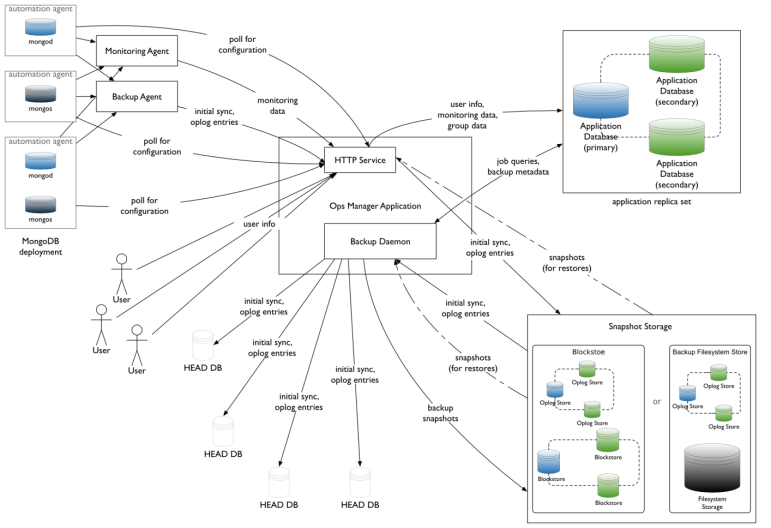
|
mydb1 |
Ops Manager,mongodb,agent |
|
mydb2 |
mongodb,agent |
|
mydb3 |
mongodb,agent |
NUMA Settings
sysctl -w vm.zone_reclaim_mode=0
NTP Settings
yum install -y ntp/etc/init.d/ntpd start
Turn off Atime
vim /etc/fstab/dev/mapper/VolGroup-lv_data /data ext4 defaults,noatime,nodiratime 1 1
ulimt settings
ulimit -a
修改/etc/security/limits.conf
mongod soft nproc 65535
mongod hard nproc 65535
Disable Transparent Huge Pages
通过启动脚本可以在每次启动时关闭THP
vim /etc/init.d/disable-transparent-hugepages
#以下为脚本内容
#!/bin/bash
### BEGIN INIT INFO
# Provides: disable-transparent-hugepages
# Required-Start: $local_fs
# Required-Stop:
# X-Start-Before: mongod mongodb-mms-automation-agent
# Default-Start: 2 3 4 5
# Default-Stop: 0 1 6
# Short-Description: Disable Linux transparent huge pages
# Description: Disable Linux transparent huge pages, to improve
# database performance.
### END INIT INFO
case $1 in
start)
if [ -d /sys/kernel/mm/transparent_hugepage ]; then
thp_path=/sys/kernel/mm/transparent_hugepage
elif [ -d /sys/kernel/mm/redhat_transparent_hugepage ]; then
thp_path=/sys/kernel/mm/redhat_transparent_hugepage
else
return 0
fi
echo 'never' > ${thp_path}/enabled
echo 'never' > ${thp_path}/defrag
re='^[0-1]+$'
if [[ $(cat ${thp_path}/khugepaged/defrag) =~ $re ]]
then
# RHEL 7
echo 0 > ${thp_path}/khugepaged/defrag
else
# RHEL 6
echo 'no' > ${thp_path}/khugepaged/defrag
fi
unset re
unset thp_path
;;esac
检查是否生效
cat /sys/kernel/mm/transparent_hugepage/enabledcat /sys/kernel/mm/transparent_hugepage/defrag
#有以下输出表示正确
always madvise [never]
1、Install the Ops Manager Application Database
Ops Manager需要先安装mongodb,创建其数据库副本集后才能部署安装。
官方的yum源比较慢,推荐使用阿里云yum源
# 阿里云repo
cat > /etc/yum.repos.d/mongodb-org-3.4.repo << EOF
[mongodb-org-3.4]
name=MongoDB Repository
#baseurl=https://repo.mongodb.org/yum/redhat/$releasever/mongodb-org/3.4/x86_64/
baseurl=https://mirrors.aliyun.com/mongodb/yum/redhat/\$releasever/mongodb-org/3.4/x86_64/
gpgcheck=0
enabled=1
gpgkey=https://www.mongodb.org/static/pgp/server-3.4.asc
EOF
安装mongod
在每台节点上执行以下步骤
yum install -y mongodb-org
修改配置
vim /etc/mongod.conf
#修改为数据分区,需创建该目录,并确保mongod用户可读写
# Where and how to store data.
storage:
dbPath: /data/mongo
journal:
enabled: true
#默认监听本地lo,注释掉
# network interfaces
net:
port: 27017
# bindIp: 127.0.0.1 # Listen to local interface only, comment to listen on all interfaces.
启动服务
mkdir -p /data/mongo
chown -R mongod:mongod /data
systemctl start mongod.service
部署Ops Manager副本集
通过修改配置文件的方式创建Ops Manager所需副本集。
注:也可以通过命令行方式指定副本集启动。修改配置文件的方式便于通过init script管理。
在所有节点上修改配置
vim mongod.conf
#添加以下内容
replication:
replSetName: rs_ops_manager
#重启生效
systemctl start mongod.service
在任一节点上执行mongo shell,添加副本集节点,此处使用node1节点
mongo --host localhost --port 27017
#Initiate the replica set
rs.initiate()
#display the replica set configuration object
rs.conf()
#Add the remaining members to the replica set
rs.add("mydb2")
rs.add("mydb3")
#Check the status of the replica set
rs.status()
2、Install Ops Manager
#下载安装wget -c https://downloads.mongodb.com/on-prem-mms/rpm/mongodb-mms-3.4.15.646-1.x86_64.rpm
rpm -ivh mongodb-mms-<version>.x86_64.rpm
Configure the Ops Manager connection to the Ops Manager Application Database
vim /opt/mongodb/mms/conf/conf-mms.properties
#设置mongo.mongoUri
mongo.mongoUri=mongodb://mydb1:27017,mydb2:27017,mydb3:27017/?replicaSet=rs_ops_manager
/etc/init.d/mongodb-mms start
Generating new Ops Manager private key...
Starting pre-flight checks
Successfully finished pre-flight checks
Migrate Ops Manager data
Running migrations...[ OK ]
Start Ops Manager server
Instance 0 starting...................[ OK ]
Starting pre-flight checks
Successfully finished pre-flight checks
Start Backup Daemon...[ OK ]
Open the Ops Manager home page and register the first user.
- http://<host>:8080
- Click the Register link and follow the prompts to register the first user and create the first group. The first user is automatically assigned the Global Owner role.
3、配置MongoDB Ops Manager
3.1 打开Ops管理界面
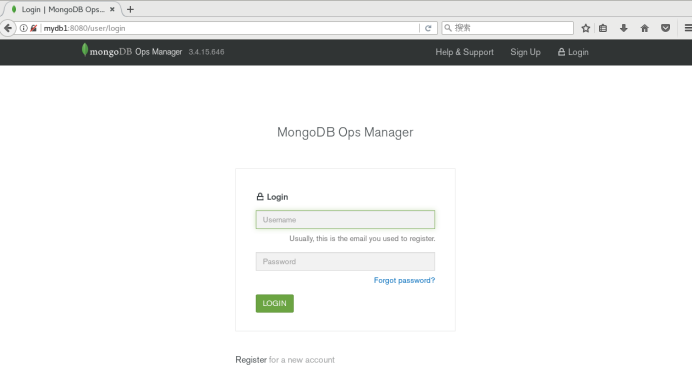
通过服务ops的8080端口,即可打开web管理界面,如下图所示:
3.2 注册管理员账号

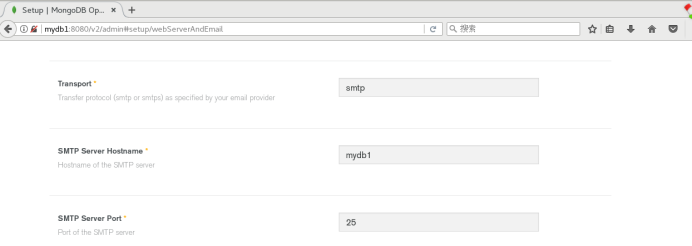
3.3 设置Web Server和Email
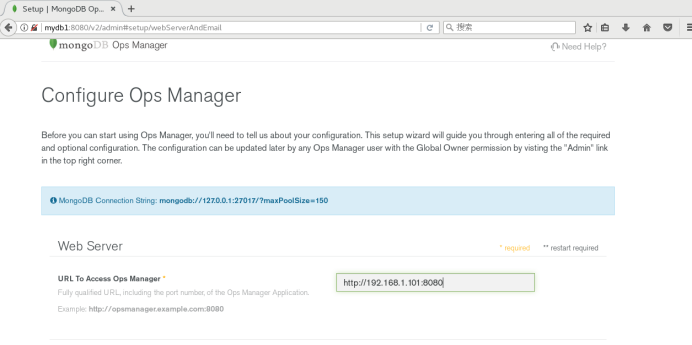
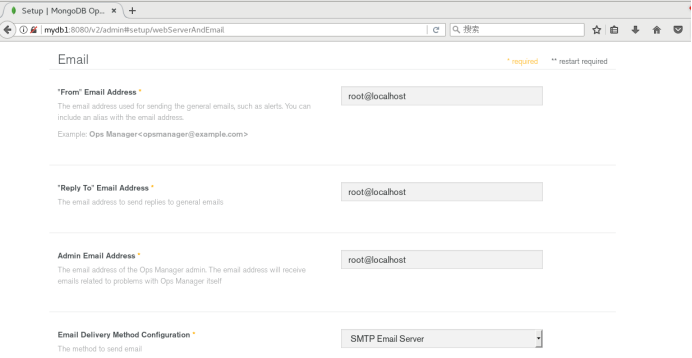
设置Web Server和Email,其他的默认即可,如下图所示:
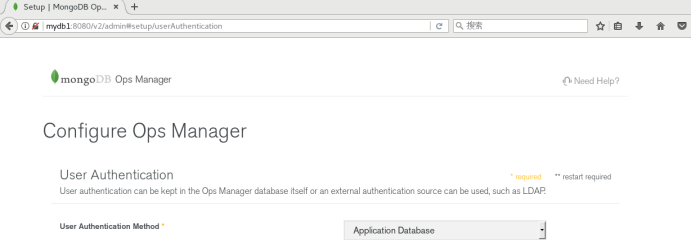
3.4 设置用户认证方式
这里使用默认的application database,如下图:
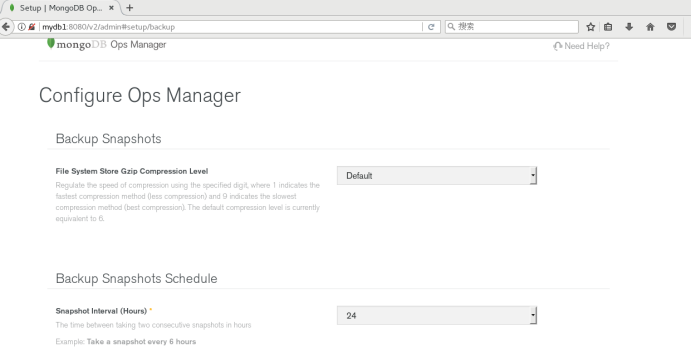
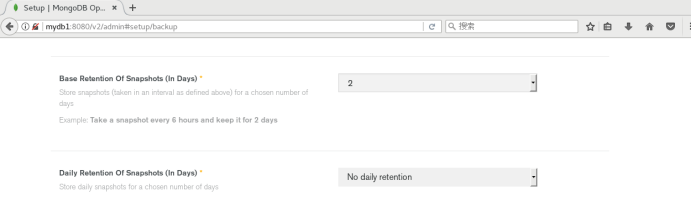
3.5 备份快照设置
使用默认的设置即可,如下图:
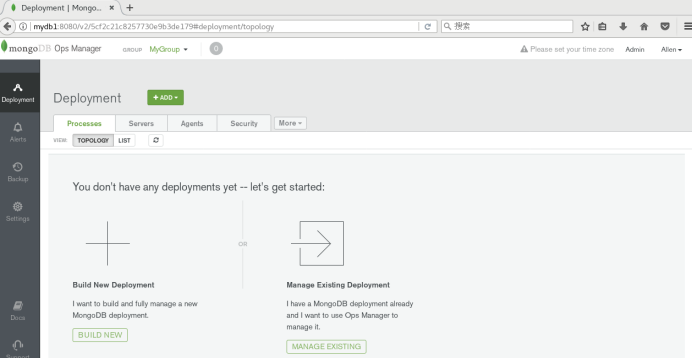
4、配置MongoDB Ops Manager Agent
依次点击Agents->Download & Settings, 会出现所有的代理信息,如图所示:
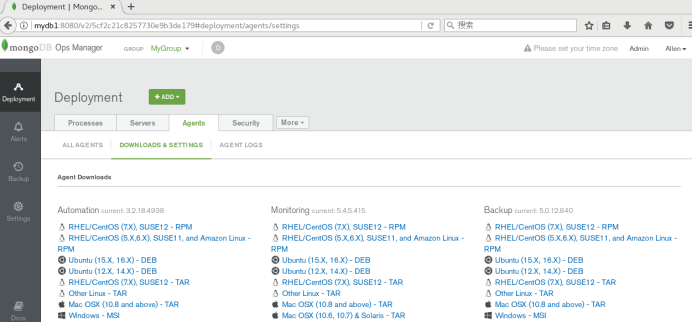
安装Automation,Monitoring,Backup。环境的操作系统是Oracle Linux 7,所以点击Centos 7对应的rpm连接,弹出安装操作步骤:
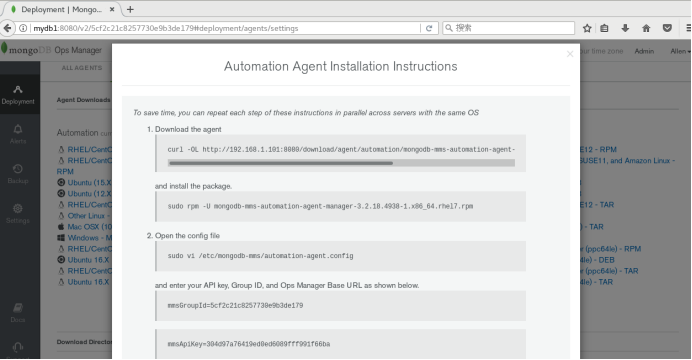

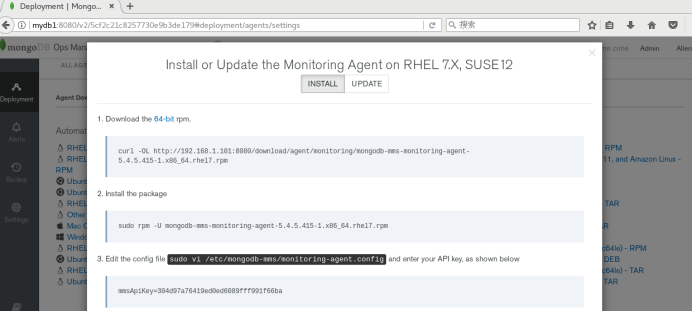
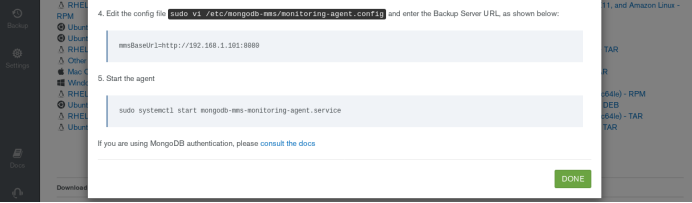
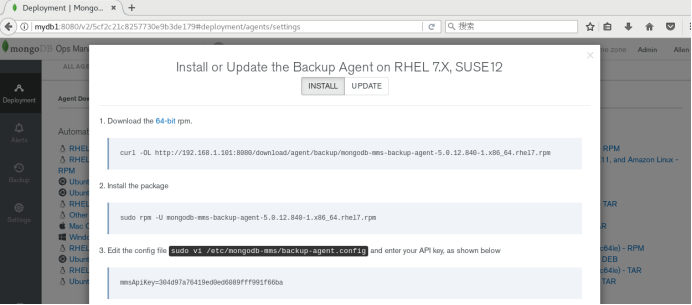
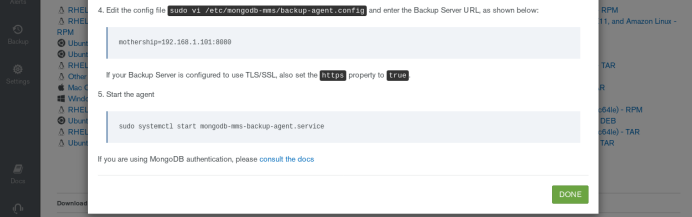
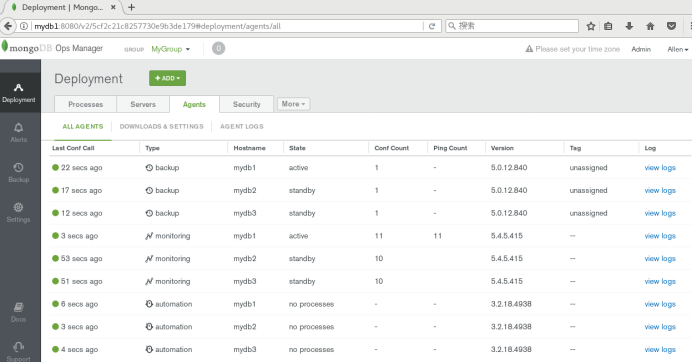
待所有的代理安装配置完成后,会在web管理界面看到,如下图所示:
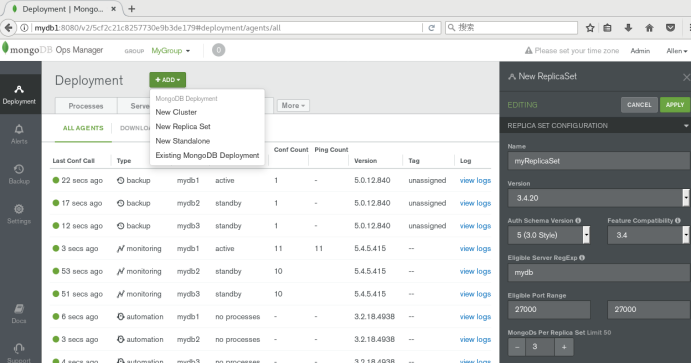
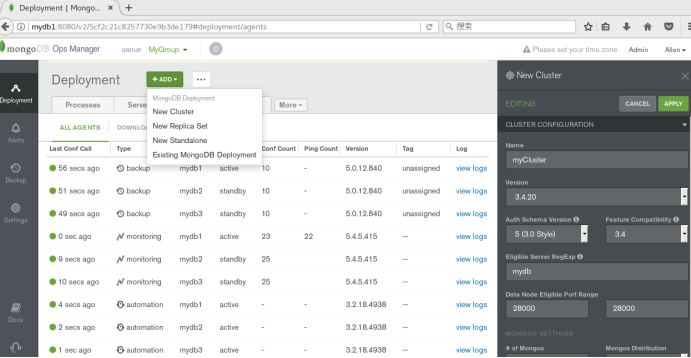
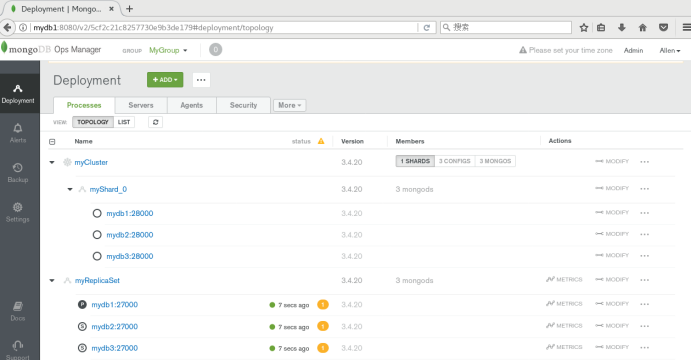
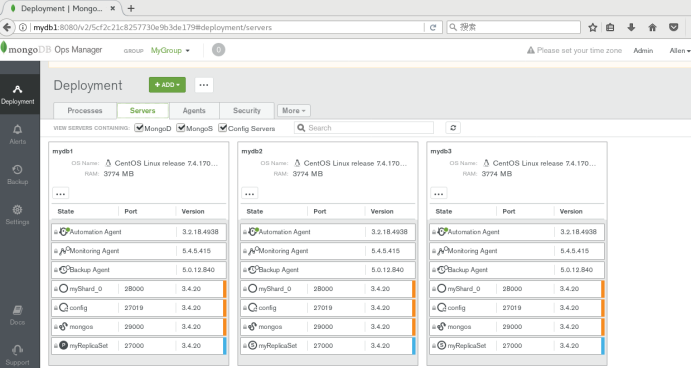
5、通过Ops Manager自动化部署repl和shard集群
Create or Import a MongoDB Deployment
Manage Deployments
Alerts and Monitoring
Back Up and Restore Deployments
https://www.cnblogs.com/wsl222000/p/6742504.html
https://www.iyunv.com/thread-385560-1-1.html
https://blog.51cto.com/candon123/2162461
http://www.mamicode.com/info-detail-2420298.html
OpsManager管理MongoDB的更多相关文章
- docker之安装和管理mongodb
前言 折腾一些使用docker来配置和管理mongodb和mongodb集群. 安装mongodb 从docker网站拉取mongodb镜像 docker search mongo # 选择一个版本 ...
- MongoDB用户,角色管理 --- MongoDB基础用法(三)
用户管理 用户创建 MongoDB采用基于角色的访问控制(RBAC)来确定用户的访问. 授予用户一个或多个角色,确定用户对MongoDB资源的访问权限和用户可以执行哪些操作. 用户应该只有最小权限集才 ...
- 如何管理MongoDB的用户和权限
管理用户的创建及使用 创建用户的函数是db.createUser({...}),创建用户时通常需要为该用户添加权限,如read.readWrite权限. 可添加的权限以及说明: 权限 作用 read ...
- 管理 MongoDB 用户和权限
创建用户 创建用户的函数是:db.createUser(). 创建用户时,需要为该用户添加权限.可添加的权限以及说明: 权限 作用 read 允许用户读取指定数据库. readWrite 允许用户读写 ...
- 使用mongo-express管理mongodb数据库
前面的话 本文将详细介绍一款用nodejs开发的基于Web的mongodb数据库管理工具mongo-express 安装 首先,全局安装 mongo-express 包 npm install -g ...
- 使用RockMongo管理MongoDB
http://blog.csdn.net/mydeman/article/details/7082730
- 【技术课堂】如何管理MongoDB数据库?
- 技术课堂】如何管理MongoDB数据库?
- 使用Robo 3T 软件管理MongoDB数据库如何执行命令行shell
比如使用命令行的方式查看数据库runoobdb中的sites集合(数据表)中的所有数据 1.在连接名的地方鼠标右键选择“open shell” 2.在出现的shell窗口中输入一下命令行,然后按ctr ...
随机推荐
- Geos判断点是否在多边形内
使用的geo版本是3.5.1 #include <iostream> #include "geos.h" using namespace std; GeometryFa ...
- 检测ip代理有效性
转载及总结 转载:https://xw.qq.com/amphtml/20190428A05ZS200 1.telnet 方法 经过测试,会看到存在以下问题: 即使一些代理商能够用telnet测试过关 ...
- java学习之路(1)
java中的main()方法: 一.java主类中的主方法形式: public static void main(String[] args){ //TODO } 二.个部分解释: (1).publi ...
- Ryu控制器安装部署和入门
Ryu官网简介,原滋原味 Ryu is a component-based software defined networking framework. Ryu provides software c ...
- js面向对象入门
通常我们写js以及调用: function init(){ console.log("init") } function load(){ console.log("loa ...
- 去除IntelliJ IDEA对重复代码的检测
方法1: 方法2:(比较简便)
- Ubuntu18.04 桌面系统的个人吐槽(主要是终端)
装了Ubuntu18.04,桌面换风格了,使用中最大的感觉是终端切换非常反人类,可能是我还没有摸清门路.原先习惯用Alt+Tab快捷键切不同终端以及不同窗口的,现在Alt+Tab时多个终端会归成一个图 ...
- 查看memcache版本
window: cmd中用telnet 127.0.0.1 11211这样的命令连接上memcache,然后直接输入stats就可以得到memcache服务器的版本. 注意:memcache的默认端口 ...
- rc.local 注意事項,call python script, file position
如果要在 rc.local 呼叫 python script python script 的位置需使用絕對路徑 其 python script 裡的有關 file 的位置也需使用 絕對路徑 如果要在 ...
- Linux命令之date
date [选项] [格式] date [-u|--utc|--universal] [MMDDhhmm[[CC]yy][.ss]] date命令根据指定格式显示当前时间或设置系统时间.很多shell ...