
springboot加载application.yml文件null
- 话不多说,直接上代码
- 本人项目为maven项目
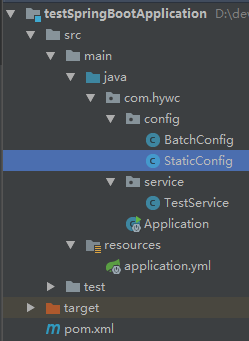
- 以下是项目结构
- pom.xml文件
<?xml version="1.0" encoding="UTF-8"?>

<project xmlns="http://maven.apache.org/POM/4.0.0"

         xmlns:xsi="http://www.w3.org/2001/XMLSchema-instance"

         xsi:schemaLocation="http://maven.apache.org/POM/4.0.0 http://maven.apache.org/xsd/maven-4.0.0.xsd">

    <modelVersion>4.0.</modelVersion>

    <parent>

        <groupId>org.springframework.boot</groupId>

        <artifactId>spring-boot-starter-parent</artifactId>

        <version>2.1..RELEASE</version>

        <relativePath/> <!-- lookup parent from repository -->

    </parent>

    <groupId>testSpringBootApplication</groupId>

    <artifactId>testSpringBootApplication</artifactId>

    <version>1.0-SNAPSHOT</version>

    <properties>

        <java.version>1.8</java.version>

    </properties>

    <dependencies>

        <dependency>

            <groupId>org.springframework.boot</groupId>

            <artifactId>spring-boot-starter</artifactId>

        </dependency>

        <dependency>

            <groupId>org.springframework.boot</groupId>

            <artifactId>spring-boot-starter-test</artifactId>

            <scope>test</scope>

        </dependency>

        <dependency>

            <groupId>org.springframework.boot</groupId>

            <artifactId>spring-boot-starter-web</artifactId>

        </dependency>

        <!--导入配置文件处理器,配置文件进行绑定就会有提示-->

        <dependency>

            <groupId>org.springframework.boot</groupId>

            <artifactId>spring-boot-configuration-processor</artifactId>

            <optional>true</optional>

        </dependency>

    </dependencies>

    <build>

        <plugins>

            <plugin>

                <groupId>org.springframework.boot</groupId>

                <artifactId>spring-boot-maven-plugin</artifactId>

            </plugin>

        </plugins>

    </build>

</project>- 配置文件:application.yml
batch:

  buffer:

     size:

     max:

     sleep:

  excute:

pool: - 写一个对应次配置文件的类
@Component

public class BatchConfig {

    @Value("${batch.buffer.size}")

    public String buffer_size;

    @Value("${batch.excute.pool}")

    public String excute_pool;

    @Value("${batch.buffer.max}")

    public String buffer_max;

    @Value("${batch.buffer.sleep}")

    public String buffer_sleep;

}- 因为使用注解autowired一直创建对象失败,所以只能写一个静态类来自动加载BatchConfig
@Component

public class StaticConfig {

    public static BatchConfig batchConfigstatic;

    @Autowired

    private BatchConfig batchConfig;

    @PostConstruct

    public void initStaticDao() {

        batchConfigstatic = this.batchConfig;

    }

}
service层调用配置文件
@Service

public class TestService {

    private String buffermax;

    public TestService() {

        buffermax = StaticConfig.batchConfigstatic.buffer_max;

        System.out.println("size="+buffermax);

    }

}
启动类
@SpringBootApplication

@EnableConfigurationProperties

@EnableAutoConfiguration

@ComponentScan("com.hywc")

public class Application {

    public static void main(String[] args) {

        // 启动springboot

        //ApplicationContext applicationContext =

        SpringApplication.run(Application.class, args);

    }

}- 运行结果
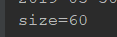
- 因之前@Value以及@ConfigurationProperties形式均为null,所以中间加了一层,亲测可用,哈哈!!!
springboot加载application.yml文件null的更多相关文章
- SpringBoot加载自定义yml文件
自定义配置文件(跟SpringBoot的application.yml同一目录下): nlu-parse-rule: title: "NLU响应结果解析规则" desc: &quo ...
- Springboot默认加载application.yml原理以及扩展
Springboot默认加载application.yml原理以及扩展 SpringApplication.run(...)默认会加载classpath下的application.yml或applic ...
- Eclipse下SpringBoot没有自动加载application.properties文件
Eclipse内创建SpringBoot项目,在java/main/resources文件夹下面创建application.properties配置文件,SpringApplication.run后发 ...
- SpringBoot启动如何加载application.yml配置文件
一.前言 在spring时代配置文件的加载都是通过web.xml配置加载的(Servlet3.0之前),可能配置方式有所不同,但是大多数都是通过指定路径的文件名的形式去告诉spring该加载哪个文件: ...
- springboot:读取application.yml文件
现在开发主要使用微服务框架springboot,在springboot中经常遇到读取application.yml文件的情形. 一.概述 开发过程中经常遇到要读取application.yml文件中的 ...
- 使用IDEA开发SpringBoot不加载application.yml配置文件的解决方案
1.如果启动项目不加载application.yml配置文件,那么请确认下是否应用了Resources为项目资源文件夹 2.如果项目起初是可以正常使用的,突然不知道改了什么,然后进行启动项目的时候不加 ...
- (转)spring boot实战(第六篇)加载application资源文件源码分析
原文:http://blog.csdn.net/liaokailin/article/details/48878447
- Spring Boot加载application.properties配置文件顺序规则
SpringApplication会从以下路径加载所有的application.properties文件: 1.file:./config/(当前目录下的config文件夹) 2.file:./(当前 ...
- Springboot 加载配置文件源码分析
Springboot 加载配置文件源码分析 本文的分析是基于springboot 2.2.0.RELEASE. 本篇文章的相关源码位置:https://github.com/wbo112/blogde ...
随机推荐
- Elasticsearch的Search详解
介绍 ES不是新技术,是将全文检索和数据分析.分布式整合到一起. 基于lucene开发,提供简单的restful api接口.java api接口.其他语言开发接口等. 实现了分布式的搜索引擎和分析引 ...
- ORM SQLAlchemy 表于表的关系
1表与表之间三种关系 1.1 一对一关系 举例: 一个丈夫对应一个妻子,一个妻子对应一个丈夫 1.2 一对多关系 举例:一个人可以拥有多辆汽车,要求查询某个人拥有的所有车辆 分析:这种情况其实也可以采 ...
- spring-boot学习 (Groovy与Spring Boot Cli)
一.使用idea创建一个spring-boot项目,选择groovy语言 二.编写相应代码 1.创建实例类 package com.zhi.example class Man { Long id St ...
- linux设置脚本开机自启
由于在centos7中/etc/rc.d/rc.local的权限被降低了,所以需要赋予其可执行权 chmod +x /etc/rc.d/rc.local 赋予脚本可执行权限假设/opt/script/ ...
- SQL-W3School-基础:SQL INSERT INTO 语句
ylbtech-SQL-W3School-基础:SQL INSERT INTO 语句 1.返回顶部 1. INSERT INTO 语句 INSERT INTO 语句用于向表格中插入新的行. 语法 IN ...
- kotlin 之单表达式函数
fun d(x:Int):Int=x* 如果函数体只有一条语句,而且是return语句,那么可以省略大括号以及return关键字,
- 思科常见的防病毒ACL
SW(config-ext-nacl)# 10 deny tcp any any eq 27665 SW(config-ext-nacl)# 20 deny tcp any any eq 16660 ...
- 加载selenium库
一.maven的下载.解压以及环境变量配置 1.下载maven: 官网下载地址:http://maven.apache.org/download.cgi 在Files下面下载对应的maven版本(官网 ...
- vps虚拟机df -h根分区100%
前言:今天上午接到一个网友的求助,说是服务器的根分区满了.但是,找不到具体的大文件在哪里.由于故障确实很古怪,我就要来了故障服务器的相关账户密码. 故障服务器相关环境: 系统:Centos 6.5 s ...
- maven编译正常,运行报错:中没有主清单属性
在pom.xml添加插件 <plugin> <groupId>org.apache.maven.plugins</groupId> <artifactId&g ...