
Arc Engine二次开发——弹窗进行属性查询
在Arcmap中使用Sapefile格式的矢量数据时,经常会用到其属性查询的功能,弹出窗体然后用户鼠标点击或手动输入查询条件,进而查询到感兴趣的要素。在AE二次开发中也经常需要这个功能,于是在此记录整个开发过程。
首先当然是需要构建一个Visual C# Windows窗体应用程序,然后添加axMapControl等控件,这些过程不再赘述。
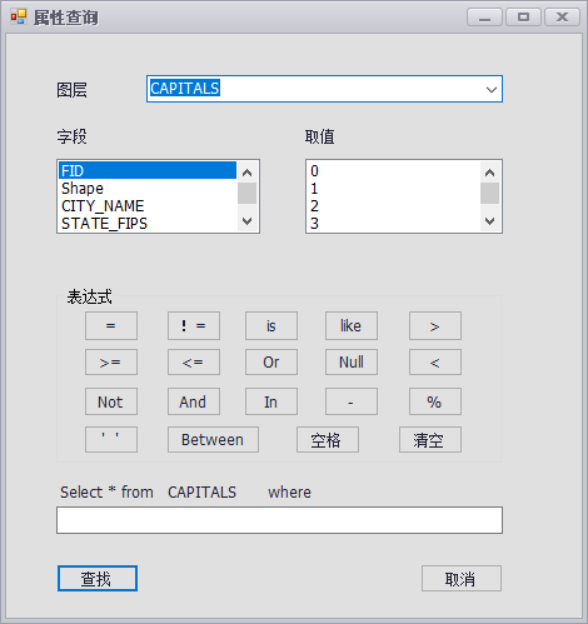
然后新建一个名为FormQueryAttr.cs的窗体,用于属性查询时弹出,其界面设置为如下:

其中要素为:一个ComboBox(cboLayer);两个ListBox(listBoxField和listBoxValue);一个GroupBox;一个TextBox(textBoxSql)
21个Button,表达式所需的19个button的名称如下:
btnequal、btnunequal、btnis、btnlike、btnmore、btnless、btnmoe、btnloe、btnor、btnnull、btnnot、btnand、btnin、btnunderline、btnpercent、btncharacter、btnbetween、btnspace、btnempty
点击查看代码,添加以下变量并在构造函数中添加以下语句:
         //地图数据

         private AxMapControl mMapControl;

         //选中的图层

         private IFeatureLayer mFeatureLayer;

         //根据所选择的图层查询得到的特征类

         private IFeatureClass pFeatureClass = null;

         public FormQueryAttr(AxMapControl mapControl)

         {

             InitializeComponent();

             this.mMapControl = mapControl;

         }
接着回到程序主界面,添加属性查询的Button按钮,在其点击响应函数中添加如下代码:
         //属性查询

         private void barButtonItem13_ItemClick(object sender, DevExpress.XtraBars.ItemClickEventArgs e)

         {

             FormQueryAttr formqueryattr = new FormQueryAttr(this.axMapControl1);

             formqueryattr.Show();

         }
至此,程序运行且用户点击“属性查询”按钮时,会初始化FormQueryAttr.cs窗体,将整个axMapControl作为参数传入,并显示窗体。
然后再回到FormQueryAttr.cs窗体的代码中,做以下更改:
在其Load函数中为cboLayer添加所有图层名称,代码如下:
         private void FormQueryAttr_Load(object sender, EventArgs e)

         {

             //MapControl中没有图层时返回

             if (this.mMapControl.LayerCount <= )

                 return;

             //获取MapControl中的全部图层名称,并加入ComboBox

             ILayer pLayer;

             //图层名称

             string strLayerName;

             for (int i = ; i < this.mMapControl.LayerCount; i++)

             {

                 pLayer = this.mMapControl.get_Layer(i);

                 strLayerName = pLayer.Name;

                 //图层名称加入cboLayer

                 this.cboLayer.Items.Add(strLayerName);

             }

             //默认显示第一个选项

             this.cboLayer.SelectedIndex = ;

         }
为cboLayer添加SelectedIndexChanged响应事件,其中代码如下:
         private void cboLayer_SelectedIndexChanged(object sender, EventArgs e)

         {

             this.listBoxField.Items.Clear();

             //获取cboLayer中选中的图层

             mFeatureLayer = mMapControl.get_Layer(cboLayer.SelectedIndex) as IFeatureLayer;

             pFeatureClass = mFeatureLayer.FeatureClass;

             string strFldName;

             for (int i = ; i < pFeatureClass.Fields.FieldCount; i++)

             {

                 strFldName = pFeatureClass.Fields.get_Field(i).Name;

                 this.listBoxField.Items.Add(strFldName);

             }

             this.listBoxField.SelectedIndex = ;

             this.label8.Text = mFeatureLayer.Name;

         }
为listBoxField添加SelectedIndexChanged和DoubleClick响应事件,其中代码如下:
         private void listBoxField_SelectedIndexChanged(object sender, EventArgs e)

         {

             string sFieldName = listBoxField.Text;

             listBoxValue.Items.Clear();

             int iFieldIndex = ;

             IField pField = null;

             IFeatureCursor pFeatCursor = pFeatureClass.Search(null, true);

             IFeature pFeat = pFeatCursor.NextFeature();

             iFieldIndex = pFeatureClass.FindField(sFieldName);

             pField = pFeatureClass.Fields.get_Field(iFieldIndex);

             while (pFeat != null)

             {

                 listBoxValue.Items.Add(pFeat.get_Value(iFieldIndex));

                 pFeat = pFeatCursor.NextFeature();

             }

         }

         private void listBoxField_DoubleClick(object sender, EventArgs e)

         {

             textBoxSql.SelectedText = listBoxField.SelectedItem.ToString() + " ";

         }
为listBoxValue添加DoubleClick响应事件,其中代码如下:
         private void listBoxValue_DoubleClick(object sender, EventArgs e)

         {

             textBoxSql.SelectedText = listBoxValue.SelectedItem.ToString() + " ";

         }
然后对“表达式”中的按钮添加对应的点击响应函数,具体代码如下:
         private void btnequal_Click(object sender, EventArgs e)

         {

             textBoxSql.SelectedText = "= ";

         }

         private void btnis_Click(object sender, EventArgs e)

         {

             textBoxSql.SelectedText = "is ";

         }

         private void btncharacter_Click(object sender, EventArgs e)

         {

             textBoxSql.SelectedText = "'' ";

         }

         private void btnempty_Click(object sender, EventArgs e)

         {

             this.textBoxSql.Text = "";

         }

         private void btnunequal_Click(object sender, EventArgs e)

         {

             textBoxSql.SelectedText = "!= ";

         }

         private void btnlike_Click(object sender, EventArgs e)

         {

             textBoxSql.SelectedText = "like ";

         }

         private void btnmore_Click(object sender, EventArgs e)

         {

             textBoxSql.SelectedText = "> ";

         }

         private void btnmoe_Click(object sender, EventArgs e)

         {

             textBoxSql.SelectedText = ">= ";

         }

         private void btnloe_Click(object sender, EventArgs e)

         {

             textBoxSql.SelectedText = "<= ";

         }

         private void btnor_Click(object sender, EventArgs e)

         {

             textBoxSql.SelectedText = " or ";

         }

         private void btnnull_Click(object sender, EventArgs e)

         {

             textBoxSql.SelectedText = "Null ";

         }

         private void btnless_Click(object sender, EventArgs e)

         {

             textBoxSql.SelectedText = "< ";

         }

         private void btnnot_Click(object sender, EventArgs e)

         {

             textBoxSql.SelectedText = " Not ";

         }

         private void btnand_Click(object sender, EventArgs e)

         {

             textBoxSql.SelectedText = " And ";

         }

         private void btnin_Click(object sender, EventArgs e)

         {

             textBoxSql.SelectedText = " In ";

         }

         private void btnunderline_Click(object sender, EventArgs e)

         {

             textBoxSql.SelectedText = "_";

         }

         private void btnpercent_Click(object sender, EventArgs e)

         {

             textBoxSql.SelectedText = "% ";

         }

         private void btnbetween_Click(object sender, EventArgs e)

         {

             textBoxSql.SelectedText = " Between ";

         }

         private void btnspace_Click(object sender, EventArgs e)

         {

             textBoxSql.SelectedText = " ";

         }
最后对按钮“查找”和“取消”添加点击响应函数,代码如下:
         private void button1_Click(object sender, EventArgs e)

         {

             try

             {

                 mMapControl.Map.ClearSelection(); //清除上次查询结果

                 IActiveView pActiveView = mMapControl.Map as IActiveView;

                 //pQueryFilter的实例化

                 IQueryFilter pQueryFilter = new QueryFilterClass();

                 //设置查询过滤条件

                 pQueryFilter.WhereClause = textBoxSql.Text;

                 //search的参数第一个为过滤条件,第二个为是否重复执行

                 IFeatureCursor pFeatureCursor = mFeatureLayer.Search(pQueryFilter, false);

                 //获取查询到的要素

                 IFeature pFeature = pFeatureCursor.NextFeature();

                 //判断是否获取到要素

                 while (pFeature != null)

                 {

                     mMapControl.Map.SelectFeature(mFeatureLayer, pFeature); //选择要素

                     pFeature = pFeatureCursor.NextFeature();

                 }

                 pActiveView.PartialRefresh(esriViewDrawPhase.esriViewGeoSelection, null, null);

                 pActiveView.Refresh();//刷新图层

             }

             catch (Exception ex)

             {

                 MessageBox.Show(ex.Message);

             }

         }

         private void button2_Click(object sender, EventArgs e)

         {

             this.Hide();

         }
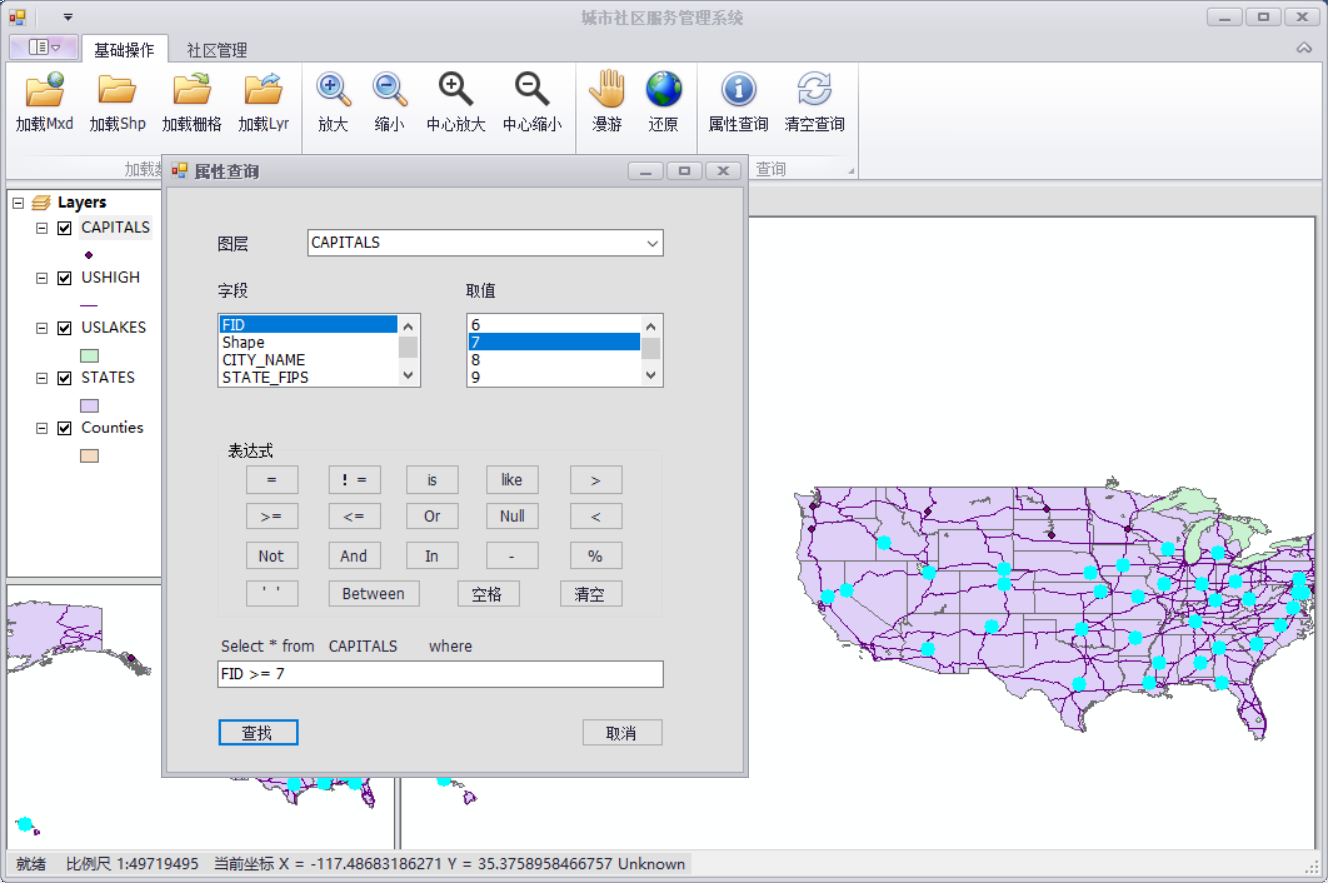
到此为止,所有属性查询的工作已经完成,使用效果如下图所示:
如果需要清除所选要素,则添加按钮,并在其点击响应函数中添加如下代码即可:
         //清空查询

         private void barButtonItem14_ItemClick(object sender, DevExpress.XtraBars.ItemClickEventArgs e)

         {

             axMapControl1.Map.ClearSelection();

             axMapControl1.Refresh();

         }
Arc Engine二次开发——弹窗进行属性查询的更多相关文章
- 基于Java的Arc Engine二次开发的环境的配置
1.软件准备 ArcGIS for Desktop 10.2, Arc engine, jdk-7u60-windows-i586,Eclipse Mar2 2.软件的安装 2.1 ArcGIS fo ...
- 【UG二次开发】创建、查询、编辑成型特征的函数
创建成型特征函数UF_MODL_create_boss 通过设置凸台的参数建立凸台特征UF_MODL_create_rect_pad 通过设置矩形凸垫的参数建立矩形凸垫特征UF_MODL_create ...
- 【读书笔记】《基于UG NX系统的二次开发》笔记
我有几本二次开发的书,但是从头到尾读下来的却没有几本.有时候遇到困难发帖求助,好不容易得到答案.后来却发现在书上的前几章就有详细介绍.读书笔记不仅是一种记录,更是一种督促自己读书的方法.还有一个原因是 ...
- SVN二次开发——让SVN、TSVN(TortoiseSVN)支持windows的访问控制模型、NTFS ADS(可选数据流、NTFS的安全属性)
SVN二次开发 ——让SVN.TSVN(TortoiseSVN)支持windows的访问控制模型.NTFS ADS (可选数据流.NTFS的安全属性) SVN secondary developmen ...
- AE二次开发中几个功能速成归纳(符号设计器、创建要素、图形编辑、属性表编辑、缓冲区分析)
/* * 实习课上讲进阶功能所用文档,因为赶时间从网上抄抄改改,凑合能用,记录一下以备个人后用. * * ----------------------------------------------- ...
- Qt+QGIS二次开发:自定义类实现查询矢量数据的属性字段值(图查属性)
在GIS领域,有两种重要的查询操作,图查属性和属性查图. 本文主要介绍如何在QGIS中通过从QgsMapToolIdentify中派生自定义类实现查询矢量数据的属性字段值(图查属性). 重点参考资料: ...
- ArcGIS Engine开发之属性查询
属性查询即基于空间数据的属性数据的查询,通过用户提交SQL语言中的where语句定义的查询条件,对属性数据进行搜索,从而得到查询结果的操作. 相关的类与接口 与属性查询功能相关的类主要有QureyFi ...
- [ArcEngine二次开发]为Feature的属性赋值
在创建FeatureClass之后,需要为FeatureClass添加Features,在为Feature的字段赋值时,代码大致如下: 在这里赋值的时候,出现了一个错误: The operation ...
- WeCenter二次开发教程(一):熟悉模板结构
<1>程序文件目录介绍: app – 应用目录 models – 模型目录 plugins – 插件目录 static – 静态文件 system – 系统目录 views – 模板目录 ...
随机推荐
- 为什么在MySQL数据库中无法创建外键?(MyISAM和InnoDB详解)
问题描述:为什么在MySQL数据库中不能创建外键,尝试了很多次,既没有报错,也没有显示创建成功,真实奇了怪,这是为什么呢? 问题解决:通过查找资料,每次在MySQL数据库中创建表时默认的情况是这样的: ...
- 转 zabbix 优化方法 以及 后台数据库查询方法 两则
############sample 1 https://blog.51cto.com/sfzhang88/1558254 如何从Zabbix数据库中获取监控数据 sfzhang关注6人评论40627 ...
- DDos攻击解决办法
(1).DDos概念 分布式拒绝服务攻击(英文意思是Distributed Denial of Service,简称DDoS)是指处于不同位置的多个攻击者同时向一个或数个目标发动攻击,或者一个攻击者控 ...
- 【helm & Tiller】报错Error: incompatible versions client[v2.14.1] server[v2.13.0] │
helm是helm的客户端部分 tiller是helm的服务器端部分 报错 报错Error: incompatible versions client[v2.14.1] server[v2.13.0] ...
- line-height超出隐藏显示的行数和垂直居中
line-height是css样式里设置行高的方法,在div中有overflow:hidden,可以隐藏超出div的内容,配合行高和div的高,可以设置该div里可以显示几行内容,div可以容纳几个行 ...
- skynet sproto 问题
刚碰到一个小细节,纠结了半个小时 sproto的协议,request 和{ 必须有空格
- Flutter 一些常用第三方库、插件
网络请求 http ^0.12.0+2 https://pub.dev/packages/http https://github.com/dart-lang/http 该软件包包含一组高级函数和类,可 ...
- 仔细看参数--NGINX之tcp_nodelay
一.知识准备 ● 在nginx优化中有个经常需要设置的参数,tcp_nodelay ● 该参数最核心的功能,就是把小包组成成大包,提高带宽利用率也就是著名的nagle算法 ● tcp协议中,有一个现象 ...
- Centos7.5 添加环境变量并生效
配置环境变量用户 jiangshan为例(base) [jiangshan@localhost ~]$ export PATH=$PATH:/usr/local/MATLAB/R2014a/bin/( ...
- mogodb数据库简单的权限分配
mongdb数据库默认不需要权限认证,但为了安全起见,最好设置下需要权限认证,启动的时候设置auth=true即可. 推荐通过mongodb.conf配置文件的形式启动mongodb 进入mong ...