
ASP.MVC当URL跳转时候参数的安全性
一个页面跳转到另外一个页面直接将参数写在URL上面并不安全比如 http://XXXXXXXXXXX/meeting/shakeGroup?id=5381&uid=o0En_sj1J0bFgIBMPG37WjWMXpqY
参数id和uid需要进行加密,写个简单的例子来实现:
加密类:
using System;

using System.Collections.Generic;

using System.IO;

using System.Linq;

using System.Security.Cryptography;

using System.Text;

using System.Web;

namespace CnbLogsProject.Util

{

    public class EnCodeHelper

    {

        // url传输参数加密密钥

        public static string strKeys = "abdfajrtrgjfg";

        #region 加密字符串

        /// <summary>

        /// 加密

        /// </summary>

        /// <param name="strValue"></param>

        /// <returns></returns>

        public static string GetEncryption(string strValue)

        {

            //加密标准算法的对象

            DESCryptoServiceProvider provider = new DESCryptoServiceProvider();

            //建立加密对象的密钥和偏移量

            provider.Key = Encoding.ASCII.GetBytes(strKeys.Substring(, ));

            //原文使用Encoding.ASCII方法的GetBytes方法

            provider.IV = Encoding.ASCII.GetBytes(strKeys.Substring(, ));

            //将要加密的字符放到byte数组中

            byte[] bytes = Encoding.UTF8.GetBytes(strValue);

            //输入的文本必须是英文文本

            MemoryStream stream = new MemoryStream();

            //定义将数据连接到加密转换的流

            CryptoStream stream2 = new CryptoStream(stream, provider.CreateEncryptor(), CryptoStreamMode.Write);

            stream2.Write(bytes, , bytes.Length);//将当前字节写入到流中

            stream2.FlushFinalBlock();//清除缓存区

            StringBuilder builder = new StringBuilder();

            //循环遍历每个字节

            foreach (byte num in stream.ToArray())

            {

                builder.AppendFormat("{0:X2}", num);

            }

            stream.Close();//关闭释放资源

            return builder.ToString();

        }

        #endregion

        #region 解密字符串

        /// <summary>

        /// 解密

        /// </summary>

        /// <param name="strValue"></param>

        /// <returns></returns>

        public static string GetDecryption(string strValue)

        {

            //解密标准算法的对象

            DESCryptoServiceProvider provider = new DESCryptoServiceProvider();

            //建立解密密对象的密钥和偏移量

            provider.Key = Encoding.ASCII.GetBytes(strKeys.Substring(, ));

            //原文使用Encoding.ASCII方法的GetBytes方法

            provider.IV = Encoding.ASCII.GetBytes(strKeys.Substring(, ));

            //将要解密的字符放到byte数组中

            byte[] buffer = new byte[strValue.Length / ];

            //循环遍历遍历

            for (int i = ; i < (strValue.Length / ); i++)

            {

                int num2 = Convert.ToInt32(strValue.Substring(i * , ), 0x10);

                buffer[i] = (byte)num2;

            }

            //输入的文本必须是英文文本

            MemoryStream stream = new MemoryStream();

            //定义将数据连接到解密转换的流

            CryptoStream stream2 = new CryptoStream(stream, provider.CreateDecryptor(), CryptoStreamMode.Write);

            //将当前字节写入到流中

            stream2.Write(buffer, , buffer.Length);

            stream2.FlushFinalBlock();//清除缓存区

            stream.Close();//关闭释放资源

            return Encoding.GetEncoding("GB2312").GetString(stream.ToArray());

        }

        #endregion

    }

}
strKeys 为秘钥可以写在配置文件里面

控制器(将A页面的参数加密后暴露给客户端跳转到B页面时候解密):
     /// <summary>

        /// A页面

        /// </summary>

        /// <returns></returns>

        public ActionResult Index()

        {

            string id = "";

            string uid = "o0En_sj1J0bFgIBMPG37WjWMXpqY";

            id = EnCodeHelper.GetEncryption(id);

            uid = EnCodeHelper.GetEncryption(uid);

            ViewBag.id = id;

            ViewBag.uid = uid;

            return View();

        }

        /// <summary>

        /// B页面

        /// </summary>

        /// <param name="id"></param>

        /// <param name="uid"></param>

        /// <returns></returns>

        public ActionResult Home(string id="",string uid="")

        {

            ViewBag.id =EnCodeHelper.GetDecryption(id);

            ViewBag.uid =EnCodeHelper.GetDecryption(uid);

            return View();

        }
视图:
@{

    ViewBag.Title = "Index";

}

<script src="~/Scripts/jquery-1.8.2.min.js"></script>

<button id="re">跳转</button>

<script>

    $(function () {

        $("#re").click(function () {

            location.href = "Home?id="+"@ViewBag.id"+"&uid="+"@ViewBag.uid";

        });

    });

</script>
@{

    ViewBag.Title = "Home";

}

<input value="@ViewBag.id" />

<input value="@ViewBag.uid"/>

<h2>Home</h2>
效果:
原来的URL:http://localhost:63792/Home/Home?id=282D147B1B12BAE3&uid=29732D957DD4EF753BC3E94797D1018D230457174ABD43EF1ED2FEA651E8351E
跳转到B页面后成功解密:
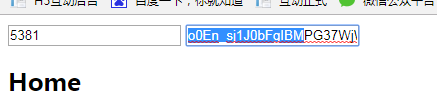
对应上我们开头的
http://XXXXXXXXXXX/meeting/shakeGroup?id=5381&uid=o0En_sj1J0bFgIBMPG37WjWMXpqY
参数id和uid需要进行加密,写个简单的例子来实现:
当然还有其他很多方法
ASP.MVC当URL跳转时候参数的安全性的更多相关文章
- JS分页 + 获取MVC地址栏URL路径的最后参数
@{ Layout = null; } <!DOCTYPE html> <html> <head> <meta name="viewport&quo ...
- MVC中URL传多个参数
1.mvc中url传递多个参数不能直接使用&,会报错(从客户端(&)中检测到有潜在危险的 Request.Path 值) 方法①:使用?---/Home/Index/?id=xxx&a ...
- url跳转路径参数获取
function getUrlParam1(name){ //正则表达式过滤 var reg = new RegExp("(^|&)" + name + "=([ ...
- 在ASP.NET非MVC环境中(WebForm中)构造MVC的URL参数
目前项目中有个需求,需要在WebForm中去构造MVC的URL信息,这里写了一个帮助类可以在ASP.NET非MVC环境中(WebForm中)构造MVC的URL信息,主要就是借助当前Http上下文去构造 ...
- 在ASP.NET非MVC环境中(WebForm中)构造MVC的URL参数,以及如何根据URL解析出匹配到MVC路由的Controller和Action
目前项目中有个需求,需要在WebForm中去构造MVC的URL信息,这里写了一个帮助类可以在ASP.NET非MVC环境中(WebForm中)构造MVC的URL信息,主要就是借助当前Http上下文去构造 ...
- C# MVC 用户登录状态判断 【C#】list 去重(转载) js 日期格式转换(转载) C#日期转换(转载) Nullable<System.DateTime>日期格式转换 (转载) Asp.Net MVC中Action跳转(转载)
C# MVC 用户登录状态判断 来源:https://www.cnblogs.com/cherryzhou/p/4978342.html 在Filters文件夹下添加一个类Authenticati ...
- ASP.NET MVC制作404跳转(非302和200)
前言:距离上次发文已经有几个月了! 这段时间李,制作了一个博客网站,现将博客文章选一些发表到博客园,顺便为自己网站打一下广告! 产生404的原因主要有以下: 1.浏览器和爬虫:某些浏览器会请求网站的f ...
- 【转载】ASP.NET MVC重写URL制作伪静态网页,URL地址以.html结尾
在搜索引擎优化领域,静态网页对于SEO的优化有着很大的好处,因此很多人就想把自己的网站的一些网页做成伪静态.我们现在在网络上发现很多博客网站.论坛网站.CMS内容管理系统等都有使用伪静态这一种情况,伪 ...
- ASP.NET Core MVC中URL和数据模型的匹配
Http GET方法 首先我们来看看GET方法的Http请求,URL参数和ASP.NET Core MVC中Controller的Action方法参数匹配情况. 我定义一个UserController ...
随机推荐
- ldap数据库--ODSEE--ACI
查看跟DN下的aci ldapsearch -h hostname -p port -D "cn=Directory Manager" -w - -b "BASE_DN& ...
- Android 工程师
转发:https://zhuanlan.zhihu.com/p/30429725 这句话我真的憋了好久.Android 工程师只要关注我,我就能让你达到大师级水平,不是面试时的吹牛逼水平,不是自我欺骗 ...
- windows下配置php + mysql环境
一.php服务器环境:apache + php安装与配置 1.下载apache.(httpd.apache.com) apache官网只提供源码,编译文件会有跳转到别的网站的下载地址. 如需VC9或V ...
- 使用flex
Flex如何处理二义性模式: 1.词法分析器匹配输入时匹配尽可能多的字符串 2.如果两个模式都可以匹配的话,匹配在程序中更早出现的模式 上下文相关的记号 flex提供起始状态(start state) ...
- 使用Python操作excel文件
使用的类库 pip install openpyxl 操作实现 工作簿操作 # coding: utf-8 from openpyxl import Workbook # 创建一个excel工作簿 w ...
- FreeMarker 快速入门
FreeMarker 快速入门 FreeMarker是一个很值得去学习的模版引擎.它是基于模板文件生成其他文本的通用工具.本章内容通过如何使用FreeMarker生成Html web 页面 和 代码自 ...
- C++雾中风景3:const用法的小结
const作为C与C++共有的关键字,很多使用的方式大同小异.但由于C++是一门面向对象的语言,在类和对象中有更多的使用规则.之前学习C语言的时候就被const这个关键字搅得焦头烂额,正巧也借这篇文章 ...
- jQuery操作input改变value属性值
今天写了一个表单元素,在用户点击的时候会清空input中的内容,当鼠标点击其他地方的时候会把输入的值保存为input的value值 类似于这样的效果 当用户点击的时候文字消失. html代码 < ...
- Cesium基础使用介绍
前言 最近折腾了一下三维地球,本文简单为大家介绍一款开源的三维地球软件--Cesium,以及如何快速上手Cesium.当然三维地球重要的肯定不是数据显示,这只是数据可视化的一小部分,重要的应该是背后的 ...
- Linux驱动调试-根据oops的栈信息,确定函数调用过程
上章链接入口: http://www.cnblogs.com/lifexy/p/8006748.html 在上章里,我们分析了oops的PC值在哪个函数出错的,那如何通过栈信息来查看出错函数的整个调用 ...