
【方法】Oracle用户密码含特殊字符时的登陆问题
【方法】Oracle用户密码含特殊字符时的登陆问题
1.1 BLOG文档结构图
1.2 前言部分
1.2.1 导读和注意事项
各位技术爱好者,看完本文后,你可以掌握如下的技能,也可以学到一些其它你所不知道的知识,~O(∩_∩)O~:
① 用户密码含有特殊字符,如@、%、&、¥、#等字符,如何修改密码及登录数据库(重点)
② exp或expdp的时候使用sys用户导出
Tips:
① 本文在itpub(http://blog.itpub.net/26736162)、博客园(http://www.cnblogs.com/lhrbest)和微信公众号(xiaomaimiaolhr)上有同步更新。
② 文章中用到的所有代码、相关软件、相关资料及本文的pdf版本都请前往小麦苗的云盘下载,小麦苗的云盘地址见:http://blog.itpub.net/26736162/viewspace-1624453/。
③ 若网页文章代码格式有错乱,请下载pdf格式的文档来阅读。
④ 在本篇BLOG中,代码输出部分一般放在一行一列的表格中。
本文若有错误或不完善的地方请大家多多指正,您的批评指正是我写作的最大动力。
1.2.2 相关文章链接
【密码】Oracle用户密码系列:http://blog.itpub.net/26736162/viewspace-2129595/
-------------------------------------------------------------------------
第二章 实验部分
2.1 实验环境介绍
|
项目 |
source db |
|
db 类型 |
RAC |
|
db version |
11.2.0.3.0 |
|
db 存储 |
ASM |
|
OS版本及kernel版本 |
RHEL 6.5 |
2.2 实验目标
当用户密码含有特殊字符的时候,测试sqlplus和exp、imp及expdp、impdp的登陆及修改密码问题。
2.3 实验过程
2.3.1 sqlplus连接
普通用户连接:
|
[oracle@orcltest admin]$ sqlplus / as sysdba SQL*Plus: Release 11.2.0.3.0 Production on Fri Feb 24 09:25:35 2017 Copyright (c) 1982, 2011, Oracle. All rights reserved. Connected to: Oracle Database 11g Enterprise Edition Release 11.2.0.3.0 - 64bit Production With the Partitioning, Automatic Storage Management, OLAP, Data Mining and Real Application Testing options SYS@lhrdb> alter user lhr identified by "l@hr"; User altered. SYS@lhrdb> exit Disconnected from Oracle Database 11g Enterprise Edition Release 11.2.0.3.0 - 64bit Production With the Partitioning, Automatic Storage Management, OLAP, Data Mining and Real Application Testing options [oracle@orcltest ~]$ sqlplus 'lhr/"l@hr"'@LHRDB SQL*Plus: Release 11.2.0.3.0 Production on Fri Feb 24 09:27:05 2017 Copyright (c) 1982, 2011, Oracle. All rights reserved. Connected to: Oracle Database 11g Enterprise Edition Release 11.2.0.3.0 - 64bit Production With the Partitioning, Automatic Storage Management, OLAP, Data Mining and Real Application Testing options LHR@LHRDB> EXIT Disconnected from Oracle Database 11g Enterprise Edition Release 11.2.0.3.0 - 64bit Production With the Partitioning, Automatic Storage Management, OLAP, Data Mining and Real Application Testing options [oracle@orcltest ~]$ |
sys用户连接:
|
[oracle@orcltest admin]$ sqlplus / as sysdba SQL*Plus: Release 11.2.0.3.0 Production on Fri Feb 24 09:29:09 2017 Copyright (c) 1982, 2011, Oracle. All rights reserved. Connected to: Oracle Database 11g Enterprise Edition Release 11.2.0.3.0 - 64bit Production With the Partitioning, Automatic Storage Management, OLAP, Data Mining and Real Application Testing options SYS@lhrdb> alter user sys identified by "l@hr"; User altered. SYS@lhrdb> exit [oracle@orcltest ~]$ sqlplus 'sys/"l@hr"'@LHRDB as sysdba SQL*Plus: Release 11.2.0.3.0 Production on Fri Feb 24 09:29:35 2017 Copyright (c) 1982, 2011, Oracle. All rights reserved. Connected to: Oracle Database 11g Enterprise Edition Release 11.2.0.3.0 - 64bit Production With the Partitioning, Automatic Storage Management, OLAP, Data Mining and Real Application Testing options SYS@LHRDB> exit Disconnected from Oracle Database 11g Enterprise Edition Release 11.2.0.3.0 - 64bit Production With the Partitioning, Automatic Storage Management, OLAP, Data Mining and Real Application Testing options [oracle@orcltest ~]$ |
2.3.2 expdp连接
密码用双引号,用户名和密码用单引号括起来,然后【用户名】+【密码】+【tn】+【as sysdba】用单引号括起来,最后的这个单引号用\进行转义
|
expdp \''sys/"l@hr"'@LHRDB as sysdba\' DIRECTORY=DATA_PUMP_DIR DUMPFILE=SCOTT%U.dmp SCHEMAS=SCOTT COMPRESSION=all metrics=y |
|
[oracle@orcltest admin]$ expdp \''sys/"l@hr"'@LHRDB as sysdba\' DIRECTORY=DATA_PUMP_DIR DUMPFILE=SCOTT%U.dmp SCHEMAS=SCOTT COMPRESSION=all metrics=y Export: Release 11.2.0.3.0 - Production on Fri Feb 24 09:32:22 2017 Copyright (c) 1982, 2011, Oracle and/or its affiliates. All rights reserved. Connected to: Oracle Database 11g Enterprise Edition Release 11.2.0.3.0 - 64bit Production With the Partitioning, Automatic Storage Management, OLAP, Data Mining and Real Application Testing options FLASHBACK automatically enabled to preserve database integrity. Starting "SYS"."SYS_EXPORT_SCHEMA_01": "sys/********@LHRDB AS SYSDBA" DIRECTORY=DATA_PUMP_DIR DUMPFILE=SCOTT%U.dmp SCHEMAS=SCOTT COMPRESSION=all metrics=y Estimate in progress using BLOCKS method... Processing object type SCHEMA_EXPORT/TABLE/TABLE_DATA Total estimation using BLOCKS method: 192 KB Processing object type SCHEMA_EXPORT/USER Completed 1 USER objects in 0 seconds Processing object type SCHEMA_EXPORT/SYSTEM_GRANT Completed 1 SYSTEM_GRANT objects in 0 seconds Processing object type SCHEMA_EXPORT/ROLE_GRANT Completed 2 ROLE_GRANT objects in 1 seconds Processing object type SCHEMA_EXPORT/DEFAULT_ROLE Completed 1 DEFAULT_ROLE objects in 1 seconds Processing object type SCHEMA_EXPORT/PRE_SCHEMA/PROCACT_SCHEMA Completed 1 PROCACT_SCHEMA objects in 10 seconds Processing object type SCHEMA_EXPORT/TABLE/TABLE Completed 4 TABLE objects in 2 seconds Processing object type SCHEMA_EXPORT/TABLE/GRANT/OWNER_GRANT/OBJECT_GRANT Completed 3 OBJECT_GRANT objects in 3 seconds Processing object type SCHEMA_EXPORT/TABLE/INDEX/INDEX Completed 2 INDEX objects in 1 seconds Processing object type SCHEMA_EXPORT/TABLE/CONSTRAINT/CONSTRAINT Completed 2 CONSTRAINT objects in 0 seconds Processing object type SCHEMA_EXPORT/TABLE/INDEX/STATISTICS/INDEX_STATISTICS Completed 2 INDEX_STATISTICS objects in 1 seconds Processing object type SCHEMA_EXPORT/TABLE/CONSTRAINT/REF_CONSTRAINT Completed 1 REF_CONSTRAINT objects in 2 seconds Processing object type SCHEMA_EXPORT/TABLE/STATISTICS/TABLE_STATISTICS Completed 4 TABLE_STATISTICS objects in 14 seconds . . exported "SCOTT"."DEPT" 4.976 KB 4 rows . . exported "SCOTT"."EMP" 5.617 KB 14 rows . . exported "SCOTT"."SALGRADE" 4.890 KB 5 rows . . exported "SCOTT"."BONUS" 0 KB 0 rows Master table "SYS"."SYS_EXPORT_SCHEMA_01" successfully loaded/unloaded ****************************************************************************** Dump file set for SYS.SYS_EXPORT_SCHEMA_01 is: /u02/app/oracle/admin/lhrdb/dpdump/SCOTT01.dmp Job "SYS"."SYS_EXPORT_SCHEMA_01" successfully completed at 09:33:19 |
2.3.3 修改密码中含有“@”符号
|
[oracle@orcltest ~]$ sqlplus / as sysdba SQL*Plus: Release 11.2.0.3.0 Production on Thu Mar 16 17:10:26 2017 Copyright (c) 1982, 2011, Oracle. All rights reserved. Connected to: Oracle Database 11g Enterprise Edition Release 11.2.0.3.0 - 64bit Production With the Partitioning, Automatic Storage Management, OLAP, Data Mining and Real Application Testing options SYS@lhrdb> alter user scott identified by "tiger&123"; Enter value for 123: old 1: alter user scott identified by "tiger&123" new 1: alter user scott identified by "tiger" User altered. SYS@lhrdb> SYS@lhrdb> set define off SYS@lhrdb> alter user scott identified by "tiger&123"; User altered. SYS@lhrdb> exit Disconnected from Oracle Database 11g Enterprise Edition Release 11.2.0.3.0 - 64bit Production With the Partitioning, Automatic Storage Management, OLAP, Data Mining and Real Application Testing options [oracle@orcltest ~]$ sqlplus 'scott/"tiger&123"'@LHRDB SQL*Plus: Release 11.2.0.3.0 Production on Thu Mar 16 17:14:00 2017 Copyright (c) 1982, 2011, Oracle. All rights reserved. Connected to: Oracle Database 11g Enterprise Edition Release 11.2.0.3.0 - 64bit Production With the Partitioning, Automatic Storage Management, OLAP, Data Mining and Real Application Testing options SCOTT@LHRDB> SCOTT@LHRDB> set define off SCOTT@LHRDB> alter user scott identified by "$tiger&123l@h\r/0%s,d$"; User altered. SCOTT@LHRDB> exit Disconnected from Oracle Database 11g Enterprise Edition Release 11.2.0.3.0 - 64bit Production With the Partitioning, Automatic Storage Management, OLAP, Data Mining and Real Application Testing options [oracle@orcltest ~]$ sqlplus 'scott/"$tiger&123l@h\r/0%s,d$"'@LHRDB SQL*Plus: Release 11.2.0.3.0 Production on Thu Mar 16 17:20:12 2017 Copyright (c) 1982, 2011, Oracle. All rights reserved. Connected to: Oracle Database 11g Enterprise Edition Release 11.2.0.3.0 - 64bit Production With the Partitioning, Automatic Storage Management, OLAP, Data Mining and Real Application Testing options SCOTT@LHRDB> |
2.3.4 修改密码中含有双引号符号
修改scott用户的密码为:a"b
|
[oracle@orcltest ~]$ sqlplus / as sysdba SQL*Plus: Release 11.2.0.3.0 Production on Thu Mar 16 17:39:18 2017 Copyright (c) 1982, 2011, Oracle. All rights reserved. Connected to: Oracle Database 11g Enterprise Edition Release 11.2.0.3.0 - 64bit Production With the Partitioning, Automatic Storage Management, OLAP, Data Mining and Real Application Testing options SYS@lhrdb> password scott Changing password for scott New password: Retype new password: Password changed SYS@lhrdb> conn scott/a"b Connected. SCOTT@lhrdb> [oracle@orcltest ~]$ sqlplus scott/a\"b SQL*Plus: Release 11.2.0.3.0 Production on Thu Mar 16 17:42:34 2017 Copyright (c) 1982, 2011, Oracle. All rights reserved. Connected to: Oracle Database 11g Enterprise Edition Release 11.2.0.3.0 - 64bit Production With the Partitioning, Automatic Storage Management, OLAP, Data Mining and Real Application Testing options SCOTT@lhrdb> |
注:因为一般特殊字符可以使用双引号处理,但是如果密码中含有双引号,就不能用双引号处理,可以直接使用password修改密码。
2.4 本文结论
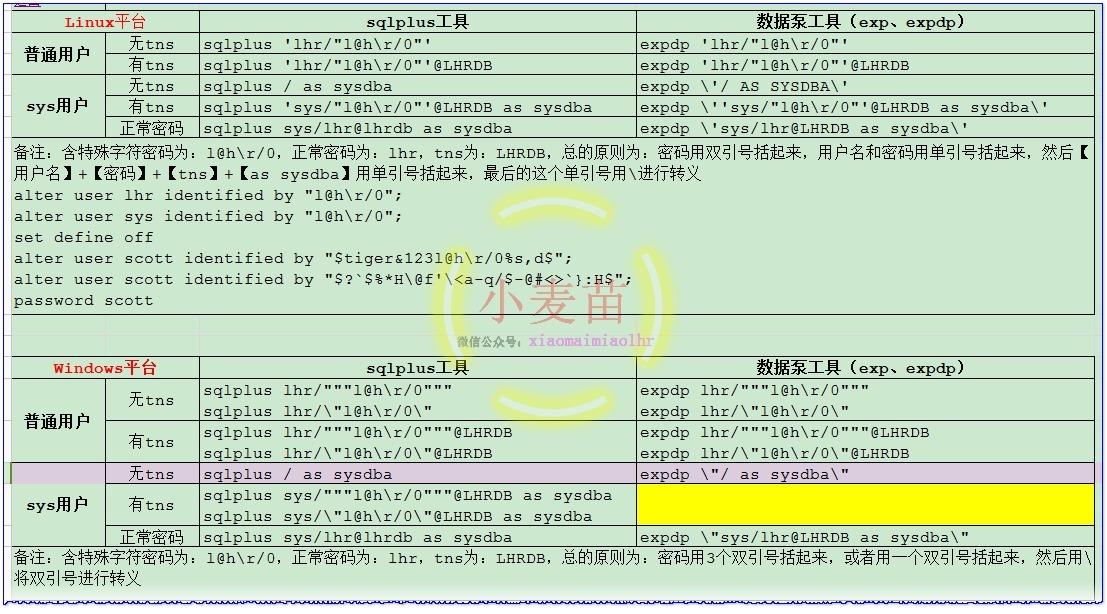
参考下表:
|
Linux平台 |
sqlplus工具 |
数据泵工具(exp、expdp) |
|
|
普通用户 |
无tns |
sqlplus 'lhr/"l@h\r/0"' |
expdp 'lhr/"l@h\r/0"' |
|
有tns |
sqlplus 'lhr/"l@h\r/0"'@LHRDB |
expdp 'lhr/"l@h\r/0"'@LHRDB |
|
|
sys用户 |
无tns |
sqlplus / as sysdba |
expdp \'/ AS SYSDBA\' |
|
有tns |
sqlplus 'sys/"l@h\r/0"'@LHRDB as sysdba |
expdp \''sys/"l@h\r/0"'@LHRDB as sysdba\' |
|
|
正常密码 |
sqlplus sys/lhr@lhrdb as sysdba |
expdp \'sys/lhr@LHRDB as sysdba\' |
|
|
备注:含特殊字符密码为:l@h\r/0,正常密码为:lhr,tns为:LHRDB,总的原则为:密码用双引号括起来,用户名和密码用单引号括起来,然后【用户名】+【密码】+【tns】+【as sysdba】用单引号括起来,最后的这个单引号用\进行转义 alter user lhr identified by "l@h\r/0"; alter user sys identified by "l@h\r/0"; set define off alter user scott identified by "$tiger&123l@h\r/0%s,d$"; alter user scott identified by "$?`$%*H\@f'\`}:H$"; password scott |
|||
|
Windows平台 |
sqlplus工具 |
数据泵工具(exp、expdp) |
|
|
普通用户 |
无tns |
sqlplus lhr/"""l@h\r/0""" sqlplus lhr/\"l@h\r/0\" |
expdp lhr/"""l@h\r/0""" expdp lhr/\"l@h\r/0\" |
|
有tns |
sqlplus lhr/"""l@h\r/0"""@LHRDB sqlplus lhr/\"l@h\r/0\"@LHRDB |
expdp lhr/"""l@h\r/0"""@LHRDB expdp lhr/\"l@h\r/0\"@LHRDB |
|
|
sys用户 |
无tns |
sqlplus / as sysdba |
expdp \"/ as sysdba\" |
|
有tns |
sqlplus sys/"""l@h\r/0"""@LHRDB as sysdba sqlplus sys/\"l@h\r/0\"@LHRDB as sysdba |
||
|
正常密码 |
sqlplus sys/lhr@lhrdb as sysdba |
expdp \"sys/lhr@LHRDB as sysdba\" |
|
|
备注:含特殊字符密码为:l@h\r/0,正常密码为:lhr,tns为:LHRDB,总的原则为:密码用3个双引号括起来,或者用一个双引号括起来,然后用\将双引号进行转义 DIRECTORY=DATA_PUMP_DIR DUMPFILE=dmp_SCOTT.dmp SCHEMAS=SCOTT reuse_dumpfiles=y |
|||
About Me
...............................................................................................................................
● 本文作者:小麦苗,只专注于数据库的技术,更注重技术的运用
● 本文在itpub(http://blog.itpub.net/26736162)、博客园(http://www.cnblogs.com/lhrbest)和个人微信公众号(xiaomaimiaolhr)上有同步更新
● 本文itpub地址:http://blog.itpub.net/26736162/viewspace-2135493/
● 本文博客园地址:http://www.cnblogs.com/lhrbest/p/6560906.html
● 本文pdf版及小麦苗云盘地址:http://blog.itpub.net/26736162/viewspace-1624453/
微信群:私聊
● 联系我请加QQ好友(642808185),注明添加缘由
● 于 2017-03-16 10:00 ~ 2017-03-16 22:00 在泰兴公寓完成
● 文章内容来源于小麦苗的学习笔记,部分整理自网络,若有侵权或不当之处还请谅解
● 版权所有,欢迎分享本文,转载请保留出处
...............................................................................................................................
拿起手机使用微信客户端扫描下边的左边图片来关注小麦苗的微信公众号:xiaomaimiaolhr,扫描右边的二维码加入小麦苗的QQ群,学习最实用的数据库技术。


【方法】Oracle用户密码含特殊字符时的登陆问题的更多相关文章
- Oracle用户密码过期和用户被锁解决方法【转】
[原因/触发因素] 确定是由于Oracle11g中默认在default概要文件中设置了“PASSWORD_LIFE_TIME=180天”所导致. [影响和风险] 影响 密码过期后,业务进程连接数据库异 ...
- Oracle 用户密码中包括了“@”字符串的错误提示解决方法
Oracle 用户密码设置了带有"@"符号,正常登陆总是无法登陆,提示无法解析的连接字符串错误 解决办法:1:修改密码:修改密码使密码中不包括@符号:2:增加转义即可,在密码前后增 ...
- Oracle用户密码过期问题解决
一.用户密码即将过期,导致autotrace无法打开 如果用户密码即将过期,在登录数据库时会收到如下提示: ERROR: ORA-2800 ...
- 【密码】Oracle用户密码系列
[密码]Oracle用户密码系列 1.1 BLOG文档结构图 1.2 前言部分 1.2.1 导读和注意事项 各位技术爱好者,看完本文后,你可以掌握如下的技能,也可以学到一些其它你所不知道的知识, ...
- oracle用户密码过期!the password has expired
Oracle提示错误消息ORA-28001: the password has expired,是由于Oracle11G的新特性所致, Oracle11G创建用户时缺省密码过期限制是180天(即6个月 ...
- 如何修改Oracle用户密码
大家如果不知道oracle数据库的密码的话,我们可以通过简单的命令行把密码进行修改. 1.打开cmd 2 在弹出的命令提示窗口输入 set oracle_sid=数据库名称(实例),回车.例如数据库名 ...
- 技巧:如何提升Oracle用户密码的安全性
环境:Oracle 11.2.0.4 客户需求:主要背景是数据库中有很多业务用户名,且由于部分用户缺乏安全意识,甚至直接将自己的密码设置为和用户名一样,目前客户期望密码设置不要过于简单,最起码别和用户 ...
- Oracle用户密码认证方式
oracle用户有两种认证方式: 操作系统认证(要求该用户属于本地DBA组,然后通过操作系统认证登录oracle,从而启动数据库) 密码文件认证 oracle使用哪种认证方式决定在于两个参数: 1.r ...
- 修改oracle用户密码为永不过期
错误提示:ORA-28001: the password has expired (DBD ERROR: OCISessionBegin) 解决方法:修改密码为永不过期 (1)查看用户的proifle ...
随机推荐
- leetcode刷题总结
题外话 今年大三,现正值寒假时间,开学就开始大三下学期的生活了. 在大三临近结束的时间,也就是复习考试的时间里,我每天都会用早上的时间来刷codewars.刚开始玩的时候,一到8kyu的题目如果稍微难 ...
- [html5] 学习笔记-响应式布局
1.响应式布局介绍 响应式布局是2010年5月份提出的一个概念,简而言之,就是一个网站能够兼容多个终端——而不是每一个终端做一个特定的版本.这个概念是为了兼容移动互联网浏览而诞生的,其目的是为用户提供 ...
- 苹果手机上开发微信公众号(wap)遇到的问题解决方法
1.样式 苹果 手机会自行强制css样式,比如input会变得面目全非,你可以加上input{-webkit-appearance: none;}恢复原貌! 2.jquery的live错误,苹果手机上 ...
- Spark RDD算子介绍
Spark学习笔记总结 01. Spark基础 1. 介绍 Spark可以用于批处理.交互式查询(Spark SQL).实时流处理(Spark Streaming).机器学习(Spark MLlib) ...
- 深入浅出ThreadLocal
前言 ThreadLocal为变量在每个线程中都创建了一个副本,所以每个线程可以访问自己内部的副本变量,不同线程之间不会互相干扰.本文会基于实际场景介绍ThreadLocal如何使用以及内部实现机制. ...
- 税号输入框 将input框中的输入自动转化成半角大写
这两天出了这么一个需求,输入税号的时候,需要自动将其转化为半角大写,并且阻止标点符号中文汉字的输入.(下面会有:全半角转换.文本框选中.光标位置判断.设置光标位置 这些内容) 然后我就开始了慢慢查找资 ...
- Maven入门,Maven项目的创建,nexus 2.x搭建私服以及Maven多模块项目创建
maven的了解做一个总结,以便日后查阅, 若有不足之处,还望指出,学无止境 当然也能起到入门效果. 一,搭建maven私服 1.工具 a. Nexus 2.5.1-01 b. Maven 3.3.9 ...
- C# XmlSerializer将对象序列化以及反序列化(Sqlite数据库)
获取不同数据库表信息将筛选出来的信息序列化以及反序列化 相应类结构: Class Tables: [Serializable] [XmlRoot("Table")] public ...
- c#访问存储过程
// 2015/07/04 // 访问存储过程 using System; using System.Collections.Generic; using System.Linq; using Sys ...
- jxls2.3-简明教程
jxls是一个简单的.轻量级的excel导出库,使用特定的标记在excel模板文件中来定义输出格式和布局.java中成熟的excel导出工具有pol.jxl,但他们都是使用java代码的方式来导出ex ...