
Selenium webdriver定位iframe里面元素两种方法
以东方财富网登录页面为例:
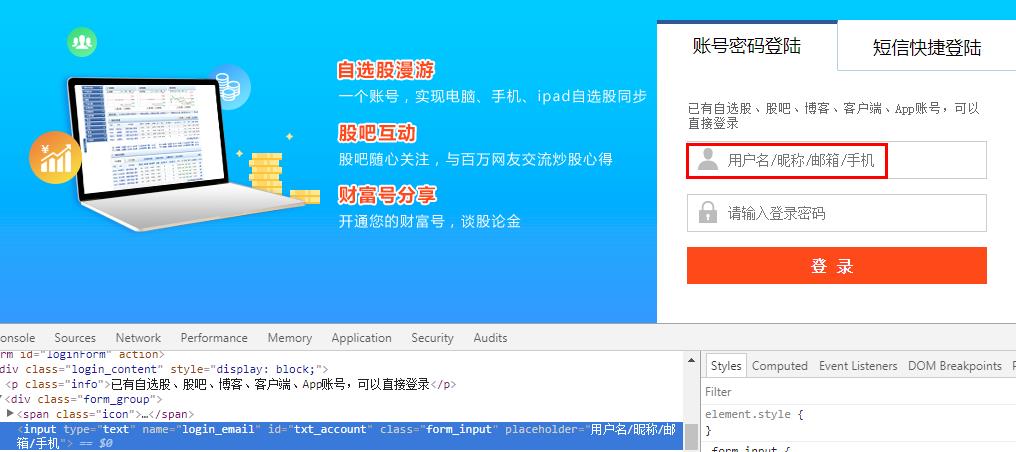
在查找元素过程中,直接通过id或者xpath等找不到元素,查看页面源代码发现元素是属于iframe里,例如:
<div class="wrap_login">

        <iframe class="frame_login" src="https://exaccount.eastmoney.com/home/login?request=%7b%22agentPageUrl%22%3a%22https%3a%2f%2fpassport.eastmoney.com%2fpub%2fLoginAgent%22%2c%22redirectUrl%22%3a%22http%3a%2f%2fwww.eastmoney.com%2f%22%2c%22callBack%22%3a%22LoginCallBack%22%2c%22redirectFunc%22%3a%22PageRedirect%22%2c%22data%22%3a%7b%22domainName%22%3a%22passport.eastmoney.com%22%2c%22deviceType%22%3a%22Web%22%2c%22productType%22%3a%22UserPassport%22%2c%22versionId%22%3a%220.0.1%22%7d%7d"></iframe>

    </div>
以下为了定位到iframe里面元素,有2种方法:
方法一:单独打开iframe网址,直接定位。

    @Test

    public void loginTest() throws InterruptedException {

        System.setProperty("webdriver.firefox.bin", "D:\\Program Files\\Mozilla Firefox\\firefox.exe");

        WebDriver driver = new FirefoxDriver();

        driver.get("https://exaccount.eastmoney.com/home/login?request=%7b%22agentPageUrl%22%3a%22https%3a%2f%2fpassport.eastmoney.com%2fpub%2fLoginAgent%22%2c%22redirectUrl%22%3a%22http%3a%2f%2fwww.eastmoney.com%2f%22%2c%22callBack%22%3a%22LoginCallBack%22%2c%22redirectFunc%22%3a%22PageRedirect%22%2c%22data%22%3a%7b%22domainName%22%3a%22passport.eastmoney.com%22%2c%22deviceType%22%3a%22Web%22%2c%22productType%22%3a%22UserPassport%22%2c%22versionId%22%3a%220.0.1%22%7d%7d");

        driver.manage().window().maximize();

        Thread.sleep(3000);

        driver.findElement(By.id("txt_account")).sendKeys("ycyzharry");

        driver.findElement(By.id("txt_pwd")).sendKeys("password");

        driver.findElement(By.id("btn_login")).click();

    }

}
方法二:先切换到iframe,再进行定位。
    @Test

    public void clickButtonTest() throws InterruptedException {

        System.setProperty("webdriver.firefox.bin", "D:\\Program Files\\Mozilla Firefox\\firefox.exe");

        WebDriver driver = new FirefoxDriver();

        driver.get("https://passport.eastmoney.com/pub/login?backurl=http%3A//www.eastmoney.com/");

        driver.manage().window().maximize();

        Thread.sleep(3000);

        WebElement iframe = driver.findElement(By.className("frame_login"));

        driver.switchTo().frame(iframe);

        driver.findElement(By.id("txt_account")).sendKeys("ycyzharry");

        driver.findElement(By.id("txt_pwd")).sendKeys("password");

        driver.findElement(By.id("btn_login")).click();
   }

}
值得注意的是,如果iframe有id时,切换iframe时把id作为参数直接传入
driver.switchTo().frame("id");
以上示例中,iframe没有id,只有class="frame_login",所以我们需要先通过classname定位到iframe元素,再把该元素作为参数传入。
例如,如果要跳出iframe,可以使用以下方法:
driver.switchTo().defaultContent();
Selenium webdriver定位iframe里面元素两种方法的更多相关文章
- Selenium webdriver定位iframe里面元素
在查找元素过程中,直接通过id或者xpath等找不到元素,查看页面源代码发现元素是属于iframe里,例如: <div class="wrap_login"> < ...
- Java中通过Selenium WebDriver定位iframe中的元素
转载请注明出自天外归云的博客园:http://www.cnblogs.com/LanTianYou/ 问题:有一些元素,无论是通过id或是xpath等等,怎么都定位不到. 分析:这很可能是因为你要定位 ...
- 转载:selenium webdriver定位不到元素的五种原因及解决办法
1.动态id定位不到元素for example: //WebElement xiexin_element = driver.findElement(By.id("_mail_c ...
- selenium webdriver定位不到元素的五种原因及解决办法
1.动态id定位不到元素 for example: //WebElement xiexin_element = driver.findElement(By.id("_mail_ ...
- [Python爬虫] 之七:selenium webdriver定位不到元素的五种原因及解决办法(转载)
转载:http://www.51testing.com/html/87/300987-831171.html 1.动态id定位不到元素for example: //WebElement ...
- web页面中快速找到html对应元素两种方法
一.第一种方法(通过先进入开发模式然后再去选择网页元素) 1.打开IE.Chrome.FireFox等,按 F12 键进入开发模式 2.在打开的控制窗口左上角有个 箭头 按钮,点击它之后,此时将鼠标 ...
- selenium webdriver学习--------iframe的处理
有时候我们在定位一个页面元素的时候发现一直定位不了,反复检查自己写的定位器没有任何问题,代 码也没有任何问题.这时你就要看一下这个页面元素是否在一个iframe中,这可能就是找不到的原因之一.如果你在 ...
- jquery阻止元素冒泡的两种方法
通常情况下,如果给父元素添加事件之后,子元素也会继承同样的事件,这个时候就要阻止子元素的这种行为,成为阻止冒泡,总结两种解决方法: html代码: <div id="parent&qu ...
- JS动态创建元素(两种方法)
前言 创建元素有两种方法 1)将需要创建的元素,以字符串的形式拼接:找到父级元素,直接对父级元素的innnerHTML进行赋值. 2)使用Document.Element对象自带的一些函数,来实现动态 ...
随机推荐
- 跟着刚哥深入学maven
前言:目前所有的项目都在使用maven,可是一直没有时间去整理学习,这两天正好有时间,好好的整理一下. 一.为什么使用Maven这样的构建工具[why] ① 一个项目就是一个工程 如果项目非常庞大,就 ...
- Java将头像图片保存到MySQL数据库
在做头像上传的过程中通常是将图片保存到数据库中,这里简单介绍一中将图片保存到数据库的方法: jsp代码: <div> <input class="avatar-input& ...
- VMware 创建多台Linux机器并配置IP
1.查看并分配虚拟网络 我们首先要知道 VMware 三种网络模式的区别. ①.Bridged(桥接模式):就是将主机网卡与虚拟机虚拟的网卡利用虚拟网桥进行通信.在桥接的作用下,类似于把物理主机虚拟为 ...
- github pages部署静态网页
如果你的项目只是一个静态网站,就没有必要再去整什么服务器,github pages 提供了搭建静态网站的功能: 为什么使用Github Pages 1. 搭建简单而且免费: 2. 支持静态脚本: 3. ...
- Vue的报错:Uncaught TypeError: Cannot assign to read only property 'exports' of object '#<Object>'
Vue的报错:Uncaught TypeError: Cannot assign to read only property 'exports' of object '#<Object>' ...
- 非滤波单目视觉slam笔记1
非滤波单目视觉slam 主要分为以下8部分 数据类型 数据关联 初始化 位姿估计 地图维护 地图生成 失效恢复 回环检测 数据类型 直接法(稠密,半稠密) 基本原理是亮度一致性约束,\(J(x,y) ...
- spring + springmvc+ mybatis 事务管理及控制
<?xml version="1.0" encoding="UTF-8"?> <beans xmlns="http://www.sp ...
- Babel 入门指南
Babel 入门指南 ⚠️ 注意: Babel 可以与很多构建工具(如 Browserify.Grunt.Gulp 等)进行集成.由于本教程选择 Webpack ,所以只讲解与 Webpack 的集 ...
- Behavior的使用(一):页面跳转NavigateToPageAction
Behavior的使用,让UI设计师能够更加方便的进行UI设计,更高效地和开发进行合作.Behavior有三种触发方式:EventTriggerBehavior事件触发,DataTriggerBeha ...
- PHP中递归最详解释.
说到递归函数想必会有很多同学感到晕晕的,很难绕,容易绕错,那下面就让我来为大家详解一下. 首先,什么是递归函数呢? 1.所谓递归:指的是在函数内部,调用函数自身的操作.2.递归分两布:递(从最外层函数 ...