
Selenium webdriver定位iframe里面元素两种方法
以东方财富网登录页面为例:
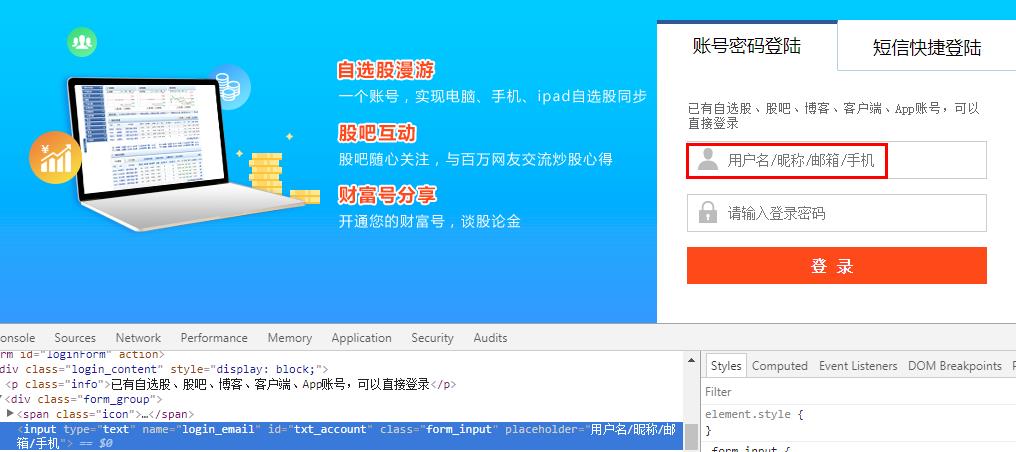
在查找元素过程中,直接通过id或者xpath等找不到元素,查看页面源代码发现元素是属于iframe里,例如:
<div class="wrap_login">

        <iframe class="frame_login" src="https://exaccount.eastmoney.com/home/login?request=%7b%22agentPageUrl%22%3a%22https%3a%2f%2fpassport.eastmoney.com%2fpub%2fLoginAgent%22%2c%22redirectUrl%22%3a%22http%3a%2f%2fwww.eastmoney.com%2f%22%2c%22callBack%22%3a%22LoginCallBack%22%2c%22redirectFunc%22%3a%22PageRedirect%22%2c%22data%22%3a%7b%22domainName%22%3a%22passport.eastmoney.com%22%2c%22deviceType%22%3a%22Web%22%2c%22productType%22%3a%22UserPassport%22%2c%22versionId%22%3a%220.0.1%22%7d%7d"></iframe>

    </div>
以下为了定位到iframe里面元素,有2种方法:
方法一:单独打开iframe网址,直接定位。

    @Test

    public void loginTest() throws InterruptedException {

        System.setProperty("webdriver.firefox.bin", "D:\\Program Files\\Mozilla Firefox\\firefox.exe");

        WebDriver driver = new FirefoxDriver();

        driver.get("https://exaccount.eastmoney.com/home/login?request=%7b%22agentPageUrl%22%3a%22https%3a%2f%2fpassport.eastmoney.com%2fpub%2fLoginAgent%22%2c%22redirectUrl%22%3a%22http%3a%2f%2fwww.eastmoney.com%2f%22%2c%22callBack%22%3a%22LoginCallBack%22%2c%22redirectFunc%22%3a%22PageRedirect%22%2c%22data%22%3a%7b%22domainName%22%3a%22passport.eastmoney.com%22%2c%22deviceType%22%3a%22Web%22%2c%22productType%22%3a%22UserPassport%22%2c%22versionId%22%3a%220.0.1%22%7d%7d");

        driver.manage().window().maximize();

        Thread.sleep(3000);

        driver.findElement(By.id("txt_account")).sendKeys("ycyzharry");

        driver.findElement(By.id("txt_pwd")).sendKeys("password");

        driver.findElement(By.id("btn_login")).click();

    }

}
方法二:先切换到iframe,再进行定位。
    @Test

    public void clickButtonTest() throws InterruptedException {

        System.setProperty("webdriver.firefox.bin", "D:\\Program Files\\Mozilla Firefox\\firefox.exe");

        WebDriver driver = new FirefoxDriver();

        driver.get("https://passport.eastmoney.com/pub/login?backurl=http%3A//www.eastmoney.com/");

        driver.manage().window().maximize();

        Thread.sleep(3000);

        WebElement iframe = driver.findElement(By.className("frame_login"));

        driver.switchTo().frame(iframe);

        driver.findElement(By.id("txt_account")).sendKeys("ycyzharry");

        driver.findElement(By.id("txt_pwd")).sendKeys("password");

        driver.findElement(By.id("btn_login")).click();
   }

}
值得注意的是,如果iframe有id时,切换iframe时把id作为参数直接传入
driver.switchTo().frame("id");
以上示例中,iframe没有id,只有class="frame_login",所以我们需要先通过classname定位到iframe元素,再把该元素作为参数传入。
例如,如果要跳出iframe,可以使用以下方法:
driver.switchTo().defaultContent();
Selenium webdriver定位iframe里面元素两种方法的更多相关文章
- Selenium webdriver定位iframe里面元素
在查找元素过程中,直接通过id或者xpath等找不到元素,查看页面源代码发现元素是属于iframe里,例如: <div class="wrap_login"> < ...
- Java中通过Selenium WebDriver定位iframe中的元素
转载请注明出自天外归云的博客园:http://www.cnblogs.com/LanTianYou/ 问题:有一些元素,无论是通过id或是xpath等等,怎么都定位不到. 分析:这很可能是因为你要定位 ...
- 转载:selenium webdriver定位不到元素的五种原因及解决办法
1.动态id定位不到元素for example: //WebElement xiexin_element = driver.findElement(By.id("_mail_c ...
- selenium webdriver定位不到元素的五种原因及解决办法
1.动态id定位不到元素 for example: //WebElement xiexin_element = driver.findElement(By.id("_mail_ ...
- [Python爬虫] 之七:selenium webdriver定位不到元素的五种原因及解决办法(转载)
转载:http://www.51testing.com/html/87/300987-831171.html 1.动态id定位不到元素for example: //WebElement ...
- web页面中快速找到html对应元素两种方法
一.第一种方法(通过先进入开发模式然后再去选择网页元素) 1.打开IE.Chrome.FireFox等,按 F12 键进入开发模式 2.在打开的控制窗口左上角有个 箭头 按钮,点击它之后,此时将鼠标 ...
- selenium webdriver学习--------iframe的处理
有时候我们在定位一个页面元素的时候发现一直定位不了,反复检查自己写的定位器没有任何问题,代 码也没有任何问题.这时你就要看一下这个页面元素是否在一个iframe中,这可能就是找不到的原因之一.如果你在 ...
- jquery阻止元素冒泡的两种方法
通常情况下,如果给父元素添加事件之后,子元素也会继承同样的事件,这个时候就要阻止子元素的这种行为,成为阻止冒泡,总结两种解决方法: html代码: <div id="parent&qu ...
- JS动态创建元素(两种方法)
前言 创建元素有两种方法 1)将需要创建的元素,以字符串的形式拼接:找到父级元素,直接对父级元素的innnerHTML进行赋值. 2)使用Document.Element对象自带的一些函数,来实现动态 ...
随机推荐
- 一天搞定CSS(扩展):CSS Hack
做前端多年,虽然不是经常需要hack,但是我们经常会遇到各浏览器表现不一致的情况.基于此,某些情况我们会极不情愿的使用这个不太友好的方式来达到大家要求的页面表现.我个人是不太推荐使用hack的,要知道 ...
- 在linux下利用信号量实现一个写者线程多个读者线程
#include<pthread.h> #include<string.h> #include<stdlib.h> #include<stdio.h> ...
- javaCV开发详解之7:让音频转换更加简单,实现通用音频编码格式转换、重采样等音频参数的转换功能(以pcm16le编码的wav转mp3为例)
javaCV系列文章: javacv开发详解之1:调用本机摄像头视频 javaCV开发详解之2:推流器实现,推本地摄像头视频到流媒体服务器以及摄像头录制视频功能实现(基于javaCV-FFMPEG.j ...
- Spring学习(7)--- @Required注解
@Required注解是用于bean属性的setter方法 这个注解仅仅表示,受影响的bean属性必须在配置时被填充,通过在bean定义胡通过自动装配一个明确的属性值 package com.mypa ...
- LANMP一键安装包 版本服务任你选 可安装单一服务
介绍与使用 更多内容请到 乌龟运维 wuguiyunwei.com 请保证在系统原有yum源文件存在的情况下运行此脚本 以下以centos7.3为例: 下面以安装LNMP为例: ? 1 wget ht ...
- 学习总结------用JDBC连接MySQL
1.下载MySQL的JDBC驱动 地址:https://dev.mysql.com/downloads/connector/ 为了方便,直接就选择合适自己的压缩包 跳过登录,选择直接下载 下载完成后, ...
- banner自动生成工具,ascii文字展示
前言 post@ Ryan-Miao@github.io Spring-Boot里有个banner的功能,刚开始觉得很鸡肋.然而,现在觉得蛮有意思的.无聊的程序员. 生成文字 大部分工具只支持英文的库 ...
- Apache和PHP环境配置
最近闲来想学习一下PHP. 工欲善其事,必先利其器.我的PHP环境配置了三遍,才安装成功. 下面就分享一下我的安装经验. 1.Apache2.4,PHP5.6,MySql5.6这些都是从官网下载的. ...
- 2.配置Spring+SpringMvc+Mybatis(分库or读写分离)--Intellij IDAE 2016.3.5
建立好maven多模块项目后,开始使用ssm传统的框架: 1.打开总工程下的pom.xml文件:添加如下代码: <!--全局的所有版本号定义--> <properties> & ...
- PHP中递归最详解释.
说到递归函数想必会有很多同学感到晕晕的,很难绕,容易绕错,那下面就让我来为大家详解一下. 首先,什么是递归函数呢? 1.所谓递归:指的是在函数内部,调用函数自身的操作.2.递归分两布:递(从最外层函数 ...