
ScrollView嵌套ListView,GridView数据加载不全问题的解决
我们大家都知道ListView,GridView加载数据项,如果数据项过多时,就会显示滚动条。ScrollView组件里面只能包含一个组件,当ScrollView里面嵌套listView,GridView时,由于ScrollView,ListView,GridView都有滚动条,系统默认ScrollView的滚动条,ListView,GridView的滚动条会被忽略,就会出现数据加载不全的问题。解决这种问题,要利用自定义布局的知识解决,具体实现如下所示:
一.ListView数据加载不全问题的解决的解决
1.MyListViewActivity.class
public class MyListViewActivity extends AppCompatActivity {

    @Override

    protected void onCreate(Bundle savedInstanceState) {

        super.onCreate(savedInstanceState);

        setContentView(R.layout.activity_my_list_view);

    }

}
2.MyListView.class
/**

 * 自定义listView,解决scrowView嵌套listView,

 * listView里面的滚动条不显示导致数据显示不全的问题

 */

public class MyListView extends ListView {

    public MyListView(Context context) {

        super(context);

    }

    public MyListView(Context context, AttributeSet attrs) {

        super(context, attrs);

    }

    public MyListView(Context context, AttributeSet attrs, int defStyleAttr) {

        super(context, attrs, defStyleAttr);

    }

    @Override

    protected void onMeasure(int widthMeasureSpec, int heightMeasureSpec) {

        int exeSpec = MeasureSpec.makeMeasureSpec(Integer.MAX_VALUE>>2,MeasureSpec.AT_MOST);

        super.onMeasure(widthMeasureSpec, exeSpec);

    }

}
3.strings.xml
<resources>

    <string name="app_name">泰洋</string>

    <string-array name="userName">

        <item>马里山</item>

        <item>陈渠珍</item>

        <item>金日成</item>

        <item>金成日</item>

        <item>姜涛</item>

        <item>李想</item>

        <item>牛奔</item>

        <item>金鑫</item>

        <item>乐嘉</item>

        <item>刘梅</item>

        <item>樊城</item>

        <item>卢决</item>

        <item>邓乐</item>

        <item>陈吉</item>

    </string-array>

</resources>
4.activity_my_list_view.xml
<?xml version="1.0" encoding="utf-8"?>

<LinearLayout xmlns:android="http://schemas.android.com/apk/res/android"

    xmlns:tools="http://schemas.android.com/tools"

    android:id="@+id/activity_my_list_view"

    android:layout_width="match_parent"

    android:layout_height="match_parent"

    android:orientation="vertical"

    tools:context="com.langdon.taiyang.androidtest.autoView.MyListViewActivity">

    <!--方式一

    <ListView

        android:entries="@array/userName"

        android:layout_width="match_parent"

        android:layout_height="wrap_content" />

    <Button

        android:text="button 1"

        android:layout_width="match_parent"

        android:layout_height="wrap_content" />

    <Button

        android:text="button 2"

        android:layout_width="match_parent"

        android:layout_height="wrap_content" />

    <Button

        android:text="button 3"

        android:layout_width="match_parent"

        android:layout_height="wrap_content" />

    <Button

        android:text="button 4"

        android:layout_width="match_parent"

        android:layout_height="wrap_content" />

    <Button

        android:text="button 5"

        android:layout_width="match_parent"

        android:layout_height="wrap_content" />

    <Button

        android:text="button 6"

        android:layout_width="match_parent"

        android:layout_height="wrap_content" />-->

    <!--方式二

    <ScrollView

        android:layout_width="match_parent"

        android:layout_height="match_parent">

        <LinearLayout

            android:orientation="vertical"

            android:layout_width="match_parent"

            android:layout_height="wrap_content">

            <ListView

                android:entries="@array/userName"

                android:layout_width="match_parent"

                android:layout_height="wrap_content" />

            <Button

                android:text="button 1"

                android:layout_width="match_parent"

                android:layout_height="wrap_content" />

            <Button

                android:text="button 2"

                android:layout_width="match_parent"

                android:layout_height="wrap_content" />

            <Button

                android:text="button 3"

                android:layout_width="match_parent"

                android:layout_height="wrap_content" />

            <Button

                android:text="button 4"

                android:layout_width="match_parent"

                android:layout_height="wrap_content" />

            <Button

                android:text="button 5"

                android:layout_width="match_parent"

                android:layout_height="wrap_content" />

            <Button

                android:text="button 6"

                android:layout_width="match_parent"

                android:layout_height="wrap_content" />

        </LinearLayout>

    </ScrollView>-->

    <!--方式三-->

    <ScrollView

        android:layout_width="match_parent"

        android:layout_height="match_parent">

        <LinearLayout

            android:orientation="vertical"

            android:layout_width="match_parent"

            android:layout_height="wrap_content">

            <com.langdon.taiyang.androidtest.autoView.MyListView

                android:entries="@array/userName"

                android:layout_width="match_parent"

                android:layout_height="wrap_content" />

            <Button

                android:text="button 1"

                android:layout_width="match_parent"

                android:layout_height="wrap_content" />

            <Button

                android:text="button 2"

                android:layout_width="match_parent"

                android:layout_height="wrap_content" />

            <Button

                android:text="button 3"

                android:layout_width="match_parent"

                android:layout_height="wrap_content" />

            <Button

                android:text="button 4"

                android:layout_width="match_parent"

                android:layout_height="wrap_content" />

            <Button

                android:text="button 5"

                android:layout_width="match_parent"

                android:layout_height="wrap_content" />

            <Button

                android:text="button 6"

                android:layout_width="match_parent"

                android:layout_height="wrap_content" />

        </LinearLayout>

    </ScrollView>

</LinearLayout>
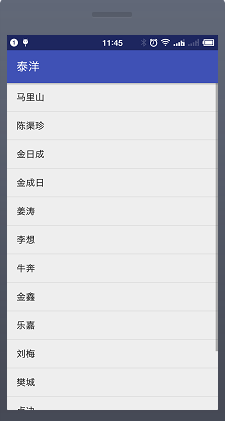
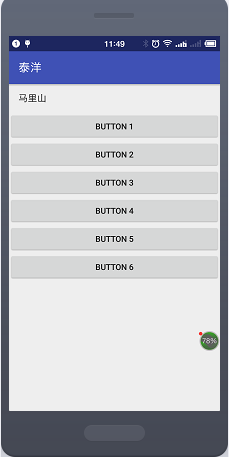
效果图如下:
 |
 |
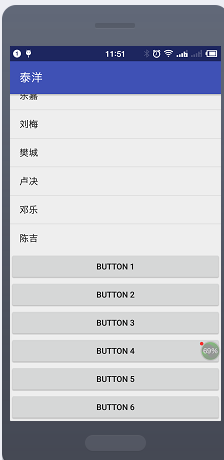 |
总结:从左往右是:方法一,方法二,方法三的图片;方法二显示的就是ListView加载数据不全的情况
二.GridView数据加载不全问题的解决的解决
1.MyGridViewActivity.class
public class MyGridViewActivity extends AppCompatActivity {

    private GridView gv;

    @Override

    protected void onCreate(Bundle savedInstanceState) {

        super.onCreate(savedInstanceState);

        setContentView(R.layout.activity_my_grid);

        gv = (GridView) findViewById(R.id.gv_my_gridView);

        gv.setAdapter(new MyAdapter(this));

        gv.setOnItemClickListener(new AdapterView.OnItemClickListener() {

            @Override

            public void onItemClick(AdapterView<?> parent, View view, int position, long id) {

                Toast.makeText(MyGridViewActivity.this,"gridview"+position,Toast.LENGTH_LONG).show();

            }

        });

    }

    //自定义适配器

    static class MyAdapter extends BaseAdapter {

        private Context context;

        public MyAdapter(Context context){

            this.context = context;

        }

        private int[] imges = {R.mipmap.gradview_dog_one,R.mipmap.gradview_dog_two,R.mipmap.gradview_dog_three,

                R.mipmap.gradview_dog_one,R.mipmap.gradview_dog_two,R.mipmap.gradview_dog_three,

                R.mipmap.gradview_dog_one,R.mipmap.gradview_dog_two,R.mipmap.gradview_dog_three,

                R.mipmap.gradview_dog_one,R.mipmap.gradview_dog_two,R.mipmap.gradview_dog_three,};

        private String[] names = {"拉布拉多","泰迪","柴犬","牧羊犬",

                "拉布拉多","泰迪","柴犬","牧羊犬",

                "拉布拉多","泰迪","柴犬","牧羊犬"};

        @Override

        public int getCount() {

            return names.length;

        }

        @Override

        public Object getItem(int position) {

            return names[position];

        }

        @Override

        public long getItemId(int position) {

            return position;

        }

        @Override

        public View getView(int position, View convertView, ViewGroup parent) {

            LayoutInflater layoutInflater = LayoutInflater.from(context);

            View view = layoutInflater.inflate(R.layout.gridview_item,null);

            ImageView iv = (ImageView) view.findViewById(R.id.iv_gridview_img);

            TextView tv = (TextView) view.findViewById(R.id.tv_gridview_name);

            iv.setImageResource(imges[position]);

            tv.setText(names[position]);

            return view;

        }

    }

}
2.MyGridView.class
/**

 * 自定义gridView,解决scrowView嵌套gridView,

 * gridView里面的滚动条不显示导致数据显示不全的问题

 */

public class MyGridView extends GridView {

    public MyGridView(Context context) {

        super(context);

    }

    public MyGridView(Context context, AttributeSet attrs) {

        super(context, attrs);

    }

    public MyGridView(Context context, AttributeSet attrs, int defStyleAttr) {

        super(context, attrs, defStyleAttr);

    }

    @Override

    protected void onMeasure(int widthMeasureSpec, int heightMeasureSpec) {

        int exeSpec = MeasureSpec.makeMeasureSpec(Integer.MAX_VALUE>>2,MeasureSpec.AT_MOST);

        super.onMeasure(widthMeasureSpec, exeSpec);

    }

}
3.activity_my_grid.xml
<?xml version="1.0" encoding="utf-8"?>

<LinearLayout xmlns:android="http://schemas.android.com/apk/res/android"

    xmlns:tools="http://schemas.android.com/tools"

    android:layout_width="match_parent"

    android:layout_height="match_parent"

    android:orientation="vertical"

    tools:context="com.langdon.taiyang.androidtest.autoView.MyGridViewActivity">

    <!--方式一

    <GridView

        android:id="@+id/gv_my_gridView"

        android:layout_width="match_parent"

        android:layout_height="match_parent"

        android:numColumns="4"

        android:horizontalSpacing="10dp"

        android:verticalSpacing="10dp" />

    <Button

        android:text="button 1"

        android:layout_width="match_parent"

        android:layout_height="wrap_content" />

    <Button

        android:text="button 2"

        android:layout_width="match_parent"

        android:layout_height="wrap_content" />

    <Button

        android:text="button 3"

        android:layout_width="match_parent"

        android:layout_height="wrap_content" />

    <Button

        android:text="button 4"

        android:layout_width="match_parent"

        android:layout_height="wrap_content" />

    <Button

        android:text="button 5"

        android:layout_width="match_parent"

        android:layout_height="wrap_content" />

    <Button

        android:text="button 6"

        android:layout_width="match_parent"

        android:layout_height="wrap_content" />-->

    <!--方式二:scrollView中只能有一个组件

    <ScrollView

        android:layout_width="match_parent"

        android:layout_height="match_parent">

        <LinearLayout

            android:orientation="vertical"

            android:layout_width="match_parent"

            android:layout_height="wrap_content">

            <GridView

                android:id="@+id/gv_my_gridView"

                android:layout_width="match_parent"

                android:layout_height="match_parent"

                android:numColumns="4"

                android:horizontalSpacing="10dp"

                android:verticalSpacing="10dp" />

            <Button

                android:text="button 1"

                android:layout_width="match_parent"

                android:layout_height="wrap_content" />

            <Button

                android:text="button 2"

                android:layout_width="match_parent"

                android:layout_height="wrap_content" />

            <Button

                android:text="button 3"

                android:layout_width="match_parent"

                android:layout_height="wrap_content" />

            <Button

                android:text="button 4"

                android:layout_width="match_parent"

                android:layout_height="wrap_content" />

            <Button

                android:text="button 5"

                android:layout_width="match_parent"

                android:layout_height="wrap_content" />

            <Button

                android:text="button 6"

                android:layout_width="match_parent"

                android:layout_height="wrap_content" />

        </LinearLayout>

    </ScrollView>-->

    <!--方式三-->

    <ScrollView

        android:layout_width="match_parent"

        android:layout_height="match_parent">

        <LinearLayout

            android:orientation="vertical"

            android:layout_width="match_parent"

            android:layout_height="wrap_content">

            <com.langdon.taiyang.androidtest.autoView.MyGridView

                android:id="@+id/gv_my_gridView"

                android:layout_width="match_parent"

                android:layout_height="match_parent"

                android:numColumns="4"

                android:horizontalSpacing="10dp"

                android:verticalSpacing="10dp" />

            <Button

                android:text="button 1"

                android:layout_width="match_parent"

                android:layout_height="wrap_content" />

            <Button

                android:text="button 2"

                android:layout_width="match_parent"

                android:layout_height="wrap_content" />

            <Button

                android:text="button 3"

                android:layout_width="match_parent"

                android:layout_height="wrap_content" />

            <Button

                android:text="button 4"

                android:layout_width="match_parent"

                android:layout_height="wrap_content" />

            <Button

                android:text="button 5"

                android:layout_width="match_parent"

                android:layout_height="wrap_content" />

            <Button

                android:text="button 6"

                android:layout_width="match_parent"

                android:layout_height="wrap_content" />

        </LinearLayout>

    </ScrollView>

</LinearLayout>
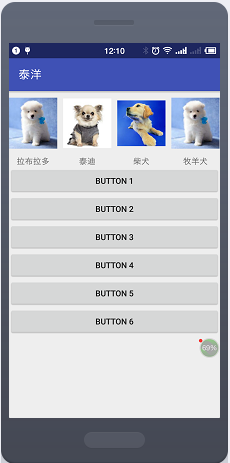
效果图如下:
 |
 |
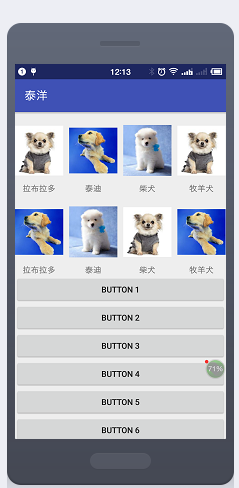 |
总结:从左往右依次是:方法一,方法二,方法三的图片;方法二显示的就是GridView加载数据不全的情况
ScrollView嵌套ListView,GridView数据加载不全问题的解决的更多相关文章
- Android之ListView分页数据加载
1.效果如下: 实例如下: 上图的添加数据按钮可以换成一个进度条 因为没有数据所以我加了一个按钮添加到数据库用于测试:一般在服务器拉去数据需要一定的时间,所以可以弄个进度条来提示用户: 点击加载按 ...
- 关于ligerui 中 grid 表格的扩展搜索功能在远程数据加载时无法使用的解决办法
要想使用grid里的扩展搜索功能,除了要引用ligerui主要的js文件外,还必须引入下面的JS文件: 1.Source\demos\filter\ligerGrid.showFilter.js 2. ...
- ScrollView嵌套ListView嵌套GridView的上下拉以及加载更多
ScrollView 效果 ScrollView 说明 一个ScrollView 嵌套ListView 嵌套GridView的上拉加载更多,下拉刷新的demo. 主要是重写了GridView和Lsit ...
- android中ScrollView嵌套ListView或GridView显示位置问题
Android中ScrollView中嵌套ListView或GridView时在开始进入界面时总是显示中间位置,开头的位置显示不出来.这种情况下只需要在ScrollView的父控件中添加以下两行代码即 ...
- Android: 阻止ScrollView随着数据加载自动滚动
当ScrollView中有类似GridView的控件时,当数据加载后ScrollView会自动滚动.要阻止这种事情发生,我们需要做的是在ScrollView的下层容器中添加android:descen ...
- ListView用法及加载数据时的闪烁问题和加载数据过慢问题
ListView介绍及添加数据时的闪烁问题 1. ListView类 1.1 ListView常用的基本属性: (1)FullRowSelect:设置是否行选择模式.(默认为false) 提示 ...
- ScrollView嵌套ListView、GridView,进入页面显示的位置并不是在最顶部,而是在中间部分问题
在Android项目的开发中,经常会遇到一些布局,可能需要在ScrollView中嵌套ListView或.GridView来实现, 是在使用的过程总又遇到了一个新的问题,就是如果在ScrollView ...
- XE7 & FMX 那些年我们一起上过的控件:ListView 之 (3) 加载数据时如何显示自定义样式
本文介绍一下ListView下如何加载数据.及使用进度条反馈当前进度给用户. 注意: 原创作品,请尊重作者劳动成果,转载请注明出处!!!原文永久固定地址:http://www.cnblogs.com/ ...
- Android——MeasureSpec学习 - 解决ScrollView嵌套ListView和GridView冲突的方法
原文地址:http://blog.csdn.net/yuhailong626/article/details/20639217 在自定义View和ViewGroup的时候,我们经常会遇到int ...
随机推荐
- Akka.net路径里的user
因为经常买双色球,嫌每次对彩票号麻烦,于是休息的时候做了个双色球兑奖的小程序,做完了发现业务还挺复杂的,于是改DDD重做设计,拆分服务,各种折腾...,不过这和本随笔没多大关系,等差不多了再总结一下, ...
- 使用 Nodejs 搭建简单的Web服务器
使用Nodejs搭建Web服务器是学习Node.js比较全面的入门教程,因为要完成一个简单的Web服务器,你需要学习Nodejs中几个比较重要的模块,比如:http协议模块.文件系统.url解析模块. ...
- setTimeout 的黑魔法
setTimeout,前端工程师必定会打交道的一个函数.它看上去非常的简单,朴实.有着一个很不平凡的名字--定时器.让年少的我天真的以为自己可以操纵未来.却不知朴实之中隐含着惊天大密.我还记得我第一次 ...
- 谈一下关于CQRS架构如何实现高性能
CQRS架构简介 前不久,看到博客园一位园友写了一篇文章,其中的观点是,要想高性能,需要尽量:避开网络开销(IO),避开海量数据,避开资源争夺.对于这3点,我觉得很有道理.所以也想谈一下,CQRS架构 ...
- iPhone Anywehre虚拟定位提示“后台服务未启动,请重新安装应用后使用”的解决方法
问题描述: iPhone越狱了,之后在Cydia中安装Anywhere虚拟定位,但是打开app提示:后台服务未启动,请重新安装应用后使用. 程序无法正常使用... 解决方法: 打开Cydia-已安装, ...
- Java数据库连接技术——JDBC
大家好,今天我们学习了Java如何连接数据库.之前学过.net语言的数据库操作,感觉就是一通百通,大同小异. JDBC是Java数据库连接技术的简称,提供连接各种常用数据库的能力. JDBC API ...
- Hyper-V3:虚拟机的配置
在Hyper-V成功新建一台虚拟机,在正式使用之前,必须配置VM使用的硬件资源,并授予用户访问VM的权限等,本文罗列出一些常见的配置,供读者参阅. 一,为虚拟机分配使用的内存 在Hyper-V Man ...
- Android性能优化之利用Rxlifecycle解决RxJava内存泄漏
前言: 其实RxJava引起的内存泄漏是我无意中发现了,本来是想了解Retrofit与RxJava相结合中是如何通过适配器模式解决的,结果却发现了RxJava是会引起内存泄漏的,所有想着查找一下资料学 ...
- JavaScript动画-拖拽改变元素大小
▓▓▓▓▓▓ 大致介绍 拖拽改变元素大小是在模拟拖拽上增加了一些功能 效果:拖拽改变元素大小 ▓▓▓▓▓▓ 拖拽改变元素大小原理 首先这个方块得知道我们想要改变这个它的大小,所以我给它设定一个范围,当 ...
- duang~免费的学习视频来啦:学霸君之全栈测试
学霸君向童鞋们推荐一款 同名学霸学习 视频教程 重点是完全免费收看学习噢!!! 今天 学霸君推荐腾讯课堂的学霸君之全栈测试 复制下方链接至腾讯课堂中报名学习 https://ke.qq.com/cou ...